
Kirjanmerkit
| Kehittäjä: | Dina amelia (3) | ||
| Hinta: | Ilmainen Uusi | ||
| Arvio: | 640 Hopea | ||
| Sijoitukset: | 0 | ||
| Kommentit: | 0 Lähetä kommentti | ||
| Listat: | 0 0 | ||
| Pisteet: | 0 | ||
| +1 Piste | |||
Lyhyesti
Tutustu: DraftKinz, kehittäjän Dina amelia sovellus kategoriassa ”Kehittäjien työkalut”.
Se toimii jopa HoloLensillä: Windows sekoitetussa todellisuudessa.
Siitä on jopa Windows Mobile -versio. Terveisiä menneisyydestä.
Ilmainen: ei mainoksia, ei sovelluksen sisäisiä ostoksia. Vain sinä ja sovellus.
Uutuus: ilmestyi , joten olet ensimmäisten joukossa.
Toimii jopa Surface Hubilla, isoihin neuvotteluhuoneisiin.
AppAgg-arvio on 640. Taso Hopea, eikä se ole yhtään hullumpi.
Ikäraja ”EVERYONE”, joten sopii lapsillekin.
Puhuu vain yhtä kieltä, eikä se ole suomi.
Käytitkö sitä? Arvostelusi olisi täällä ensimmäinen.
Kehittäjällä on AppAggissa vielä 2 muuta sovellusta. Kannattaa vilkaista.
Haluatko kuulla päivityksistä ja uusista sovelluksista ensimmäisenä? Seuraa kehittäjää tai tilaa RSS-syöte. Push-ilmoitukset saat AppAgg Alerts -sovelluksella, joka toimii Android- ja iOS-laitteissa.
Näyttökuvat 5
Muut alustat 0
Hintahistoria 0
- Nykyinen hinta: Ilmainen
- Vähintään: Ilmainen
- Enintään: Ilmainen
Oma syöte etusivulla
Kuvaus

DraftKinz is not a circuit simulator and not a PCB drawing editor. It does not draw boards or route nets. DraftKinz is a calculation and validation workbench that concentrates on engineering numbers, design constraints, dimensional checks and the comparison of alternative copper configurations. It tells you what the numbers mean and shows the arithmetic with your own values filled in.
WHAT DRAFTKINZ EVALUATES
DraftKinz works with required copper trace width, current capacity, copper thickness, temperature rise, voltage drop, trace resistance, trace length, electrical power dissipation, design margin and alternative trace configurations. Every calculation names its assumptions and the formula behind it, so you always know what you are looking at.
TRACE WIDTH CALCULATOR
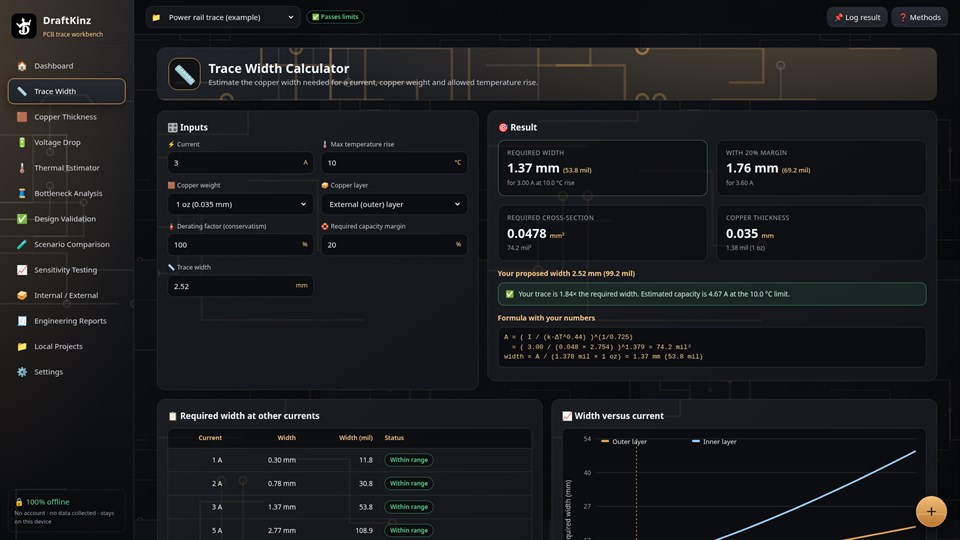
The Trace Width Calculator estimates the copper width needed for a current, a copper weight and an allowed temperature rise. DraftKinz uses an IPC-2221 style relationship, I = k × ΔT^0.44 × A^0.725, with the cross-section A in square mils. The constant k is 0.048 for outer layers and 0.024 for inner layers. You see the required width in millimetres and in mils, the width including your chosen safety margin, the required cross-section, a table of widths for other currents, and a chart of width against current for outer and inner layers. A derating factor lets you make the estimate more conservative.
COPPER THICKNESS EVALUATOR
Choose from 0.5, 1, 2 and 3 oz copper, where one ounce is 0.035 millimetres thick. The Copper Thickness Evaluator applies your proposed width to every weight and shows capacity, temperature rise, resistance, voltage drop, power and the width each weight would need. DraftKinz tells you the thinnest copper that meets every limit, which is often the quickest way to resolve a tight design.
VOLTAGE DROP ANALYZER
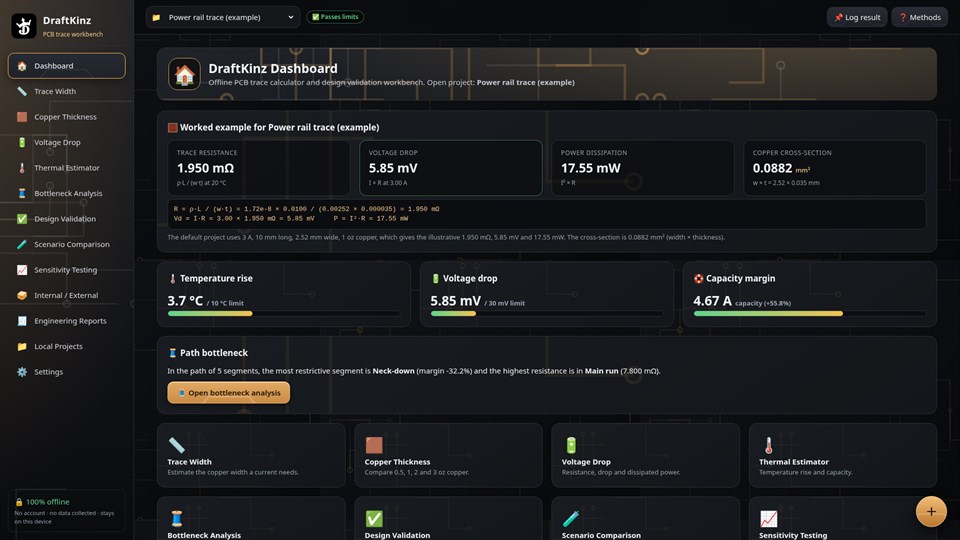
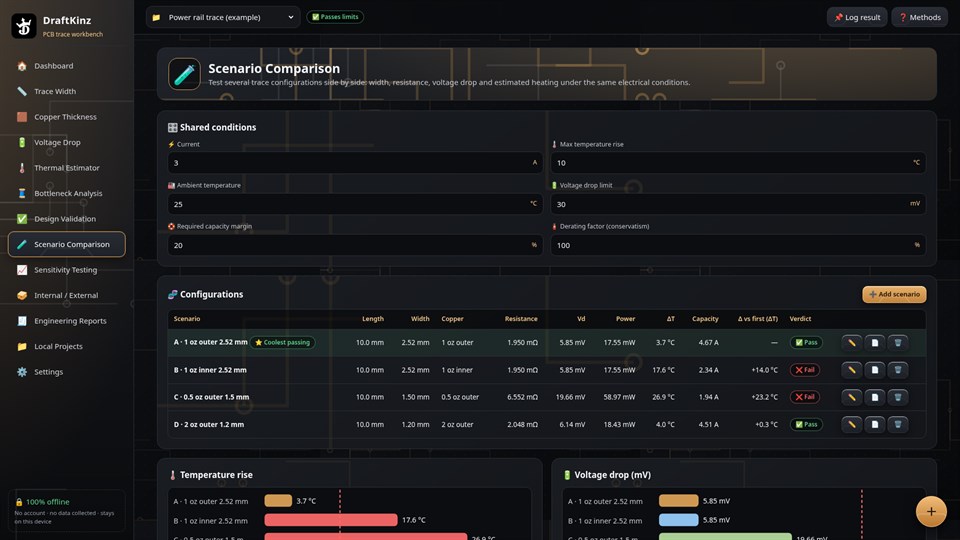
The Voltage Drop Analyzer calculates trace resistance from R = ρ × L / (w × t), with copper resistivity of about 1.72 × 10⁻⁸ ohm metres at 20 degrees Celsius. It then gives the voltage drop I × R, the power dissipated I² × R, the copper cross-section and the percentage of your supply voltage. A worked example in DraftKinz uses 3 amperes through a trace 10 millimetres long and 2.52 millimetres wide in 1 oz copper: the resistance is 1.950 milliohms, the voltage drop 5.85 millivolts, the power 17.55 milliwatts and the copper cross-section 0.0882 square millimetres. You can switch from nominal resistance at 20 degrees to resistance at operating temperature, and a chart shows how voltage drop grows with length.
TEMPERATURE RISE ESTIMATOR
The Temperature Rise Estimator turns current and geometry into an estimated temperature rise, a trace temperature on top of your ambient value, the current capacity at your limit and the extra dissipation caused by hot copper. A chart plots rise against current with your limit and your operating point marked, and DraftKinz warns you when the estimated trace temperature is high enough to worry about laminate and component ratings.
TRACE BOTTLENECK ANALYSIS
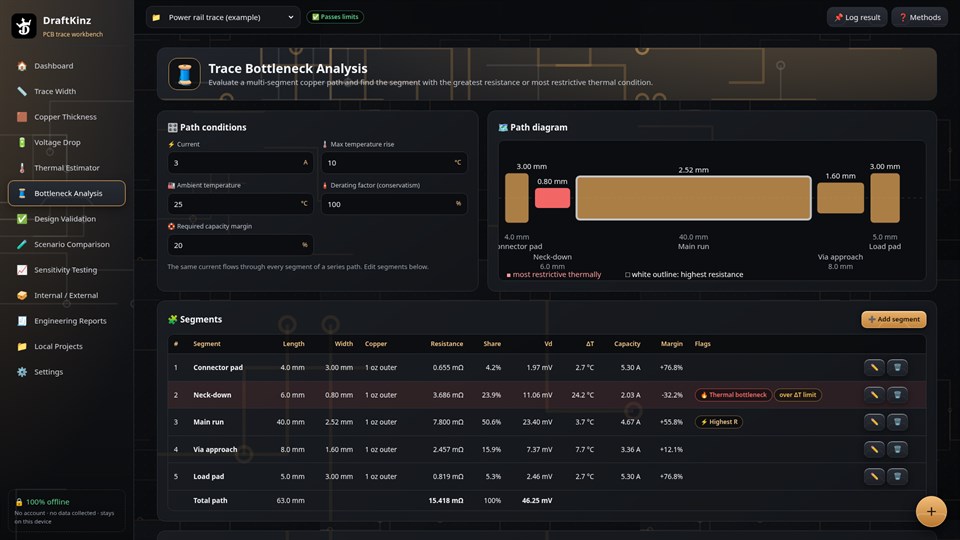
Trace Bottleneck Analysis is the feature that makes DraftKinz different from a simple online trace calculator. Instead of judging a single uniform trace, DraftKinz evaluates a path made of several copper segments, each with its own length, width, copper weight and layer. It adds up the resistance, finds the segment with the greatest resistance and the segment with the most restrictive thermal condition, and draws the path so the weak point is easy to see. A narrow neck-down, a thin via approach or a long run can each limit the design, and DraftKinz tells you which one it is and how wide it should be.
DESIGN VALIDATION
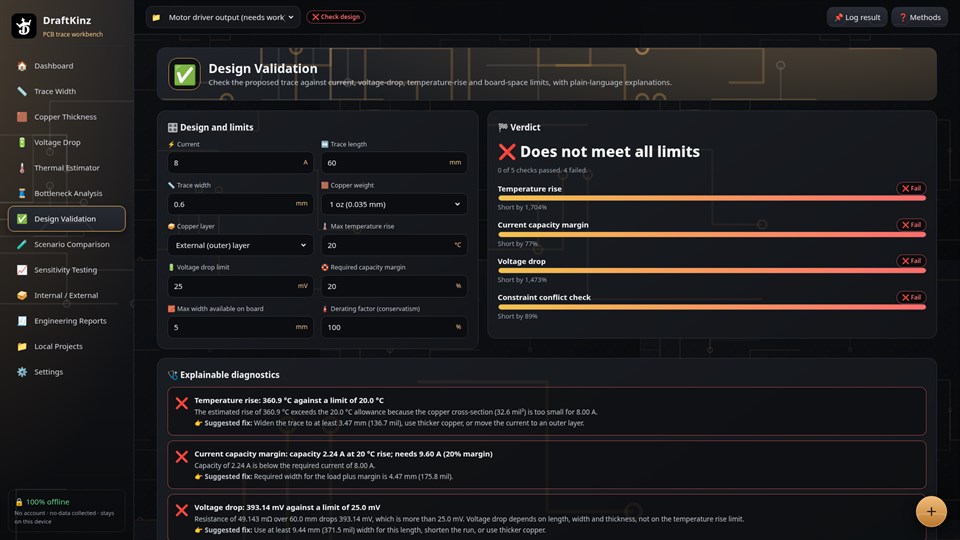
Design Validation checks the proposed trace against limits that you set for current margin, voltage drop, temperature rise and the width available on the board. For every check you see the remaining margin, a pass, caution or fail result, and an explanation in plain language of why the configuration passes or fails. DraftKinz detects conflicting requirements, for example when no width inside your available space can satisfy both the heating limit and the voltage-drop limit, and tells you whether a heavier copper weight would solve it. A table lists the minimum width that satisfies every limit for each copper weight.
SCENARIO COMPARISON
Scenario Comparison tests up to eight trace configurations side by side under the same electrical conditions. Each scenario has its own length, width, copper weight and layer. DraftKinz shows resistance, voltage drop, power, temperature rise and capacity, the difference from the first scenario, a pass or fail verdict, and it marks the coolest passing option. Bar charts make the differences clear at a glance. You can duplicate, edit and remove scenarios in a few taps.
SENSITIVITY TESTING
Sensitivity Testing shows how changing width or thickness affects the result. DraftKinz plots temperature rise and voltage drop against width, shows what happens when current, width, thickness or length rises by ten percent, and ranks the inputs that matter most. It helps you decide where to spend board space and where a change makes no real difference.
INTERNAL AND EXTERNAL LAYERS
Outer layers lose heat to the air, while inner layers are surrounded by laminate. DraftKinz uses different thermal assumptions for each and compares the same trace on both, showing the temperature rise, the capacity and the width an inner layer needs. The comparison makes it plain how much extra copper an inner-layer power trace needs.
ENGINEERING REPORTS
The Engineering Reports section assembles a complete report for the open project: inputs, assumptions, results, validation findings, path bottleneck, scenarios and the notice about estimates. Copy it, download it as a text, CSV or JSON file, or print it from the Windows print dialog. Reports are created locally on your device and nothing is uploaded. A local calculation history keeps a record of the results you choose to log.
LOCAL PROJECTS AND SETTINGS
Projects keep your design values, path segments, scenarios, notes and history together. Create, rename, duplicate, import and delete projects, and move them from one computer to another as JSON files. In Settings you can adjust the copper resistivity and temperature coefficient, the number of decimal places, and the default limits used for new projects. Two sample projects are included, one of which has deliberate problems so you can see the diagnostics in action.
WHO USES DRAFTKINZ
DraftKinz is built for PCB designers, electronics engineers, electrical engineering students, hardware developers, electronics technicians, engineering educators, PCB prototyping workshops and electronics research laboratories. Students can follow the formulas with real numbers. Professionals can compare options quickly before running a more detailed analysis.
FULLY OFFLINE AND PRIVATE
DraftKinz works fully offline after installation. There is no registration, no sign-in, no cloud synchronization, no analytics, no tracking and no advertising. Projects and history are saved only in local storage on your device. DraftKinz does not use the camera, the microphone or any media and needs no unusual permissions. DraftKinz does not gather or access any information from the user. DraftKinz needs no sign-in. DraftKinz keeps every calculation on your device. DraftKinz shows its assumptions. DraftKinz makes copper trace checks fast.
WORKS THE WAY ENGINEERS THINK
DraftKinz keeps units visible, shows widths in millimetres and in mils, and prints each formula with your own numbers so you can check it by hand. Fields accept decimals, results update as you type, and every limit has a sensible default that you can change.
A DESKTOP APP THAT FEELS AT HOME
DraftKinz opens straight on the dashboard, with a side navigation for every tool, a project picker at the top, a quick-actions button, centred notifications and modal dialogs for editing. It adapts from wide desktop windows to narrow ones, so you can keep it beside your layout software.
EXAMPLES TO START FROM
The first sample project is a power-rail trace of 3 amperes that passes every check with margin. The second is a motor-driver output of 8 amperes through a narrow, long trace that fails, so you can read how DraftKinz explains each failure and what it suggests. Use them as a guide for your own projects.
GET STARTED WITH DRAFTKINZ
Open DraftKinz, pick a project, and visit the Trace Width Calculator to see what your current needs. Move to Design Validation to set your limits, to Trace Bottleneck Analysis to check a whole path, and to Engineering Reports when you are ready to export. DraftKinz is quick to learn and exact in use.
WHY CHOOSE DRAFTKINZ
DraftKinz gives you a clear yes or no, the reason behind it, and the change that fixes it, all offline and in one workbench.
IMPORTANT LIMITATION
DraftKinz results are engineering estimates, not certification of PCB safety and not a guarantee of safe operating limits. The published curves behind trace-width estimates were fitted over a limited range of current, temperature rise, copper weight and width, and they do not model planes, vias, board thickness, airflow or neighbouring heat sources. For a production release, use a documented methodology such as IPC-2152 where it applies, separate internal and external layers, and check your thermal assumptions against real board conditions.
Kehittäjältä
Listat 0
-
 DraftKinz
Pisteet 0
-

- +1 Piste

Sijoitukset 0
-
- Arviosi
Kehittäjä 3
- Dina amelia
- Seuraajat: 0
- Alustat: Windows Sovellukset (3)
- Tarjoukset: 0
- Listat: 0 0
- Pisteet: 0
- Sijoitukset: 0
- Kommentit: 0
- Videot: 0
- RSS: Tilaa
Uutta
- Versio: PC
- Viimeksi päivitetty:
- Welcome to DraftKinz 1.0, the first release of the offline PCB trace engineering calculator and design validation workbench.
• Dashboard with a worked example, margin gauges, a path bottleneck summary and your local calculation history.
• Trace Width Calculator with width in millimetres and mils, a margin option and a width-versus-current chart.
• Copper Thickness Evaluator comparing 0.5, 1, 2 and 3 oz copper in one table with a required-width chart.
• Voltage Drop Analyzer with resistance, drop, power and a nominal or operating-temperature option.
• Temperature Rise Estimator with trace temperature, capacity and a rise-versus-current curve.
• Trace Bottleneck Analysis, the signature feature, with a path diagram and a diagnosis of the weakest and highest-resistance segments.
• Design Validation with limits for current margin, voltage drop, temperature rise and board width, plus suggested fixes.
• Scenario Comparison, Sensitivity Testing and an Internal and External Layer Comparison.
• Engineering Reports with preview, copy, TXT, CSV and JSON export, and printing.
• Local Projects with notes, plus Settings for constants and defaults.
• A quick-actions button, centred notifications and a layout that adapts from wide desktop windows to narrow ones.
• Two sample projects, one with deliberate problems so you can see how DraftKinz explains them.
Thank you for choosing DraftKinz. It works fully offline and does not gather or access any information from the user.
Lisätietoja
- Julkaisupäivämäärä:
- Luokka:
Windows-sovellukset›Kehittäjien työkalut - Käyttöjärjestelmä:
HoloLensMobilePCSurface Hub - Koko:
702 Kb - Tuetut kielet:
Englanti - Sisällön ikärajoitus:
EVERYONE - Windows Store Arvio: ¡
0
AppAgg-arvio
Laskennallinen AppAgg-arvio:
DraftKinz
Kehittäjä: Dina amelia
Korkeampi arvio kertoo yleensä paremmista tuloksista AppAggin seuraamissa mittareissa.
Perustuu: suosioon · käyttäjäarvioihin · tuoreuteen · tarjouksiin · kauppadataan · yhteisön aktiivisuuteen
Lasketaan uudelleen päivittäin tuoreiden AppAgg-tietojen perusteella.
Kommentit 0 ¡
Jaa
DraftKinz Lyhennetty URL: Kopioitu!- Windows Store

