
已保存
选择将在你的已保存菜单中显示的名称。
完成!
| 开发人员: | Candy Bear Workstation (1) | ||
| 价格: | $5.33 | ||
| 评价: | 500 青铜 | ||
| 排名: | 0 | ||
| 评论: | 0 发表评论 | ||
| 列表: | 0 + 0 | ||
| 积分: | 0 + 0 ¡ | ||
| +1 积分 | |||
说明

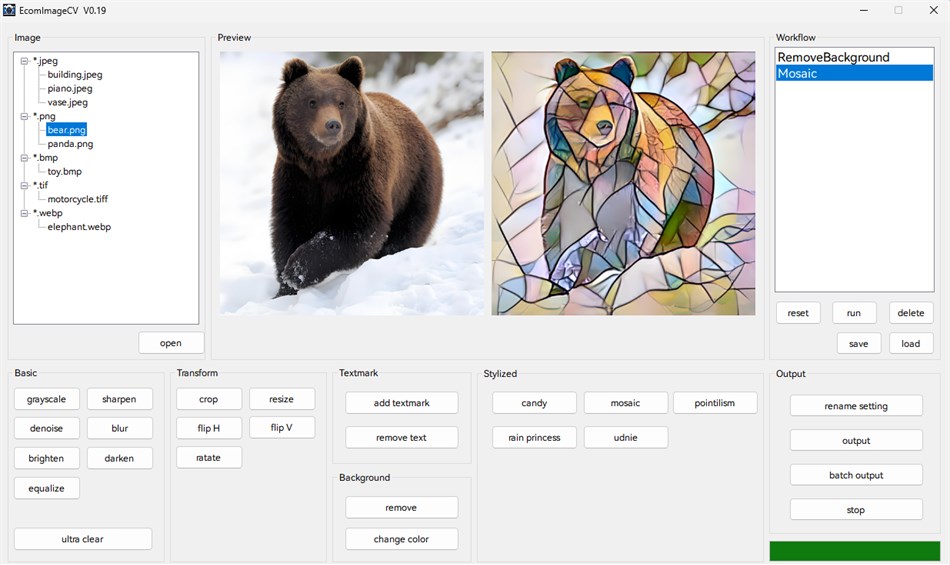
EcomImageCV is a powerful image processing software designed specifically for
e-commerce image processing. The software integrates multiple image processing
functions, including basic image processing, background removal, text removal,
image stylization, super resolution enhancement, and more. It supports batch
processing and workflow automation to help users efficiently complete image
processing tasks.
Key Features:
- Support for multiple image formats: JPEG, PNG, BMP, GIF, TIFF, WebP, TGA
- Intuitive graphical user interface
- Real-time preview functionality
- Batch processing support
- Workflow save and load
- AI-driven processing features such as super-resolution, text or object removal, background removal, Image style transformation.
2. Quick Start
2.1 Opening an Image
--------------------
- Click the "open" button to open an image file
- Supports drag-and-drop operation - drag image files directly into the software window
- Click a filename in the file list on the left to quickly switch images
2.2 Processing an Image
-----------------------
- Select the desired processing function from the function panel on the bottom, such as remove background, add textmark and so on.
- The processing result will be displayed in the preview area on the top
2.3 Saving an Processed Image
-------------------
- Click the "output" button to save a single processed image
- Select the output format (JPEG/PNG/BMP/TIFF/WebP)
- Output files will be saved in the "output" subfolder within the source file directory
2.4 Batch Image Processing
-------------------
- Click the "batch output" button to process all the image files in the source file directory, the processing will be based on the workflow on the right.
- Output files will be saved in the "output" subfolder within the source file directory
2.5 Example: Process images in batch: remove the background, add text watermarks, resize to 256x256, and change their format to png.
-------------------
- Click the "open" button to open an image file, all images that need to be processed should be placed in the same folder as this file.
- Click the "remove background" button to remove the image background.
- Click the "add textmark" button to add text watermark on image.
- Click the "resize" button to resize the image.
- Click the "batch output", choose the output format (PNG). Then all image files within the folder will be processed.
- Output files will be saved in the "output" subfolder within the source file directory.
For questions or suggestions, please contact the development team ( candybearws@163.com).
Thank you for using EcomImageCV!
屏幕截图
Ad
价格历史
- 目前价格: $5.33
- 最小值: $5.33
- 最大值: $5.33
可选
AppAgg 评价
500
AppAgg 预估评价:
EcomImageCV
500 青铜
评价越高,通常表示在 AppAgg 上的信号越强。
基于: 热度 · 用户评分 · 新鲜度 · 优惠 · 商店数据 · 社区活跃度
根据最新 AppAgg 数据每日重新计算。
短网址: 已复制!
新版变化
- 版本: PC
- 最后更新:
其他信息
开发人员
- Candy Bear Workstation
- 平台: Windows 应用 (1)
- 列表: 0 + 0
- 积分: 0 + 0 ¡
- 排名: 0
- 评论: 0
- 折扣: 0
- 视频: 0
- RSS: 订阅
列表 (0)
0
- EcomImageCV
积分 (0)
0
排名 (0)
0
评论 (0)
成为第一个发表评论的人
简要
EcomImageCV 短网址: 已复制!- 分享
- Windows Store
«EcomImageCV». 平台: Windows. 类别: 开发人员工具. 开发商: «Candy Bear Workstation». 首次发布: . 最后更新: . 目前价格: $5.33. 最低记录价格: $5.33. 最高记录价格: $5.33. 该条目尚未在 AppAgg 上获得评分或评论。 可用语言: English. AppAgg 会跟踪 «EcomImageCV»的价格历史、评分和用户反馈。 AppAgg 不托管应用程序或分发软件。 所有商标、徽标和屏幕截图均属于其各自所有者。 关注未来折扣和更新: RSS
类似
-
- Windows Terminal
- Windows 应用: 开发人员工具 来自: Microsoft Corporation
- 免费
- 列表: 7 + 3 0 0
- 积分: 5 + 9,450 10K 版本: PC The Windows Terminal is a modern, fast, efficient, powerful, and productive terminal application for users of command-line tools and shells like Command Prompt, PowerShell, and WSL. ... ⥯
-
- App Installer (Mobile) - WinUI 3
- Windows 应用: 开发人员工具 来自: wherewhere
- 免费
- 列表: 3 + 2 0 0
- 积分: 20 + 3,246 8K 版本: PC Android™ App Installer for Windows 10/11 makes sideloading Android applications easy for WSA, Anbox, etc.: Just double-click the app package, and you won't have to run Android Debug ... ⥯
-
- Arduino IDE
- Windows 应用: 开发人员工具 来自: Arduino LLC
- 免费
- 列表: 0 + 2 0 0
- 积分: 2 + 926 4K 版本: PC Arduino is an open-source electronics platform based on easy-to-use hardware and software. It's intended for anyone making interactive projects. IMPORTANT: This app performs with core ... ⥯
-
- Ubuntu on Windows
- Windows 应用: 开发人员工具 来自: Canonical Group Limited
- 免费
- 列表: 2 0 0
- 积分: 11 + 912 5K 版本: PC Ubuntu on Windows allows you to use Ubuntu Terminal and run Ubuntu command line utilities including bash, ssh, git, apt and many more. Please note that Windows 10 S does not support ... ⥯
-
- DevToys
- Windows 应用: 开发人员工具 来自: etiennebaudoux
- 免费
- 列表: 3 + 1 0 0
- 积分: 5 + 677 7K 版本: PC An Open-Source Swiss Army knife for developers. DevToys helps in everyday tasks like formatting JSON, comparing text, testing RegExp. No need to use many untruthful websites to do ... ⥯
-
- Termius - Modern SSH Client
- Windows 应用: 开发人员工具 来自: Termius Corporation
- * 免费
- 列表: 0 + 4 0 0
- 积分: 8 + 540 38K 版本: PC Termius is a modern SSH client designed for productivity and collaboration. Connect with one click from desktop and mobile no re-entering IP addresses, ports, and passwords. With a ... ⥯
-
- TurboWarp
- Windows 应用: 开发人员工具 来自: Thomas Weber
- 免费
- 列表: 0 0 0
- 积分: 1 + 539 6K 版本: PC TurboWarp is a mod of the Scratch programming language with a compiler to run projects faster, dark mode, new extensions, a bunch of addons, and more. - Runs projects up to 100x faster ⥯
-
- Python 3.12
- Windows 应用: 开发人员工具 来自: Python Software Foundation
- 免费
- 列表: 0 0 0
- 积分: 1 + 412 4K 版本: PC Python is an easy to learn, powerful programming language. It has efficient high-level data structures and a simple but effective approach to object-oriented programming. Python s ... ⥯