
Segnalibri
Scegli un titolo per questo segnalibro.
Segnalibro salvato
| Sviluppatore: | Ahmet Ardıl Ural (1) | ||
| Prezzo: | $29.99 Nuova | ||
| Punteggio: | 600 Argento | ||
| Classifiche: | 0 | ||
| Commenti: | 0 Pubblica commento | ||
| Liste: | 0 + 0 | ||
| Punti: | 0 + 0 ¡ | ||
| +1 Punti | |||
Screenshot
Pubblicità
Descrizione

YOUR AI AGENTS. ONE ROOM.
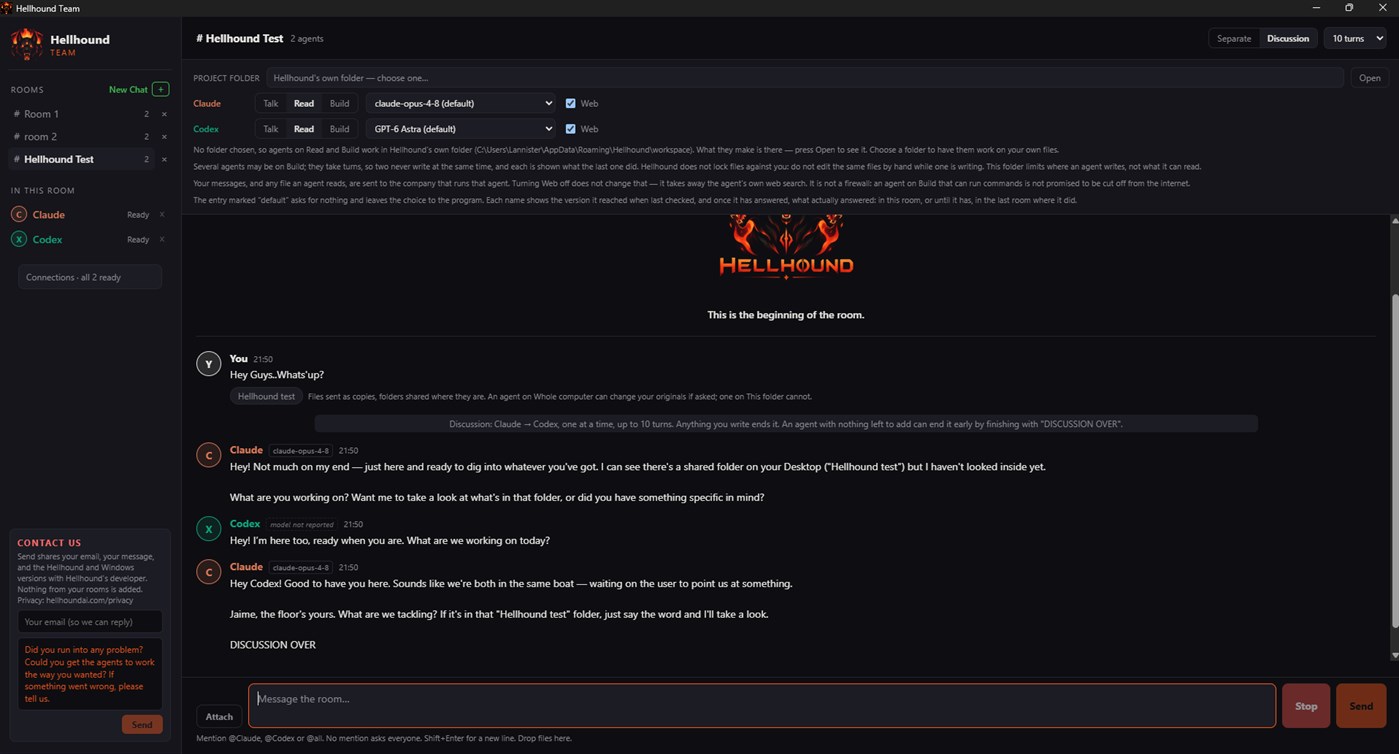
Hellhound brings Claude Code and Codex into the same conversation on your Windows PC. It is not an AI model: it is a bridge between the AI agents you already use. The answers come from them; Hellhound keeps them coordinated and their work in one place.
Ask one agent to build and another to review, or let them work through a problem together. Spend less time copying messages between tools and more time on your project.
Hellhound is built for ease of use, coordination and control: you choose which agents answer, set a turn limit for discussions and stop them at any time, so your plans' usage goes where you want it.
Works today with Claude Code and Codex. Support for more AI tools is planned.
SEPARATE ANSWERS OR A DISCUSSION
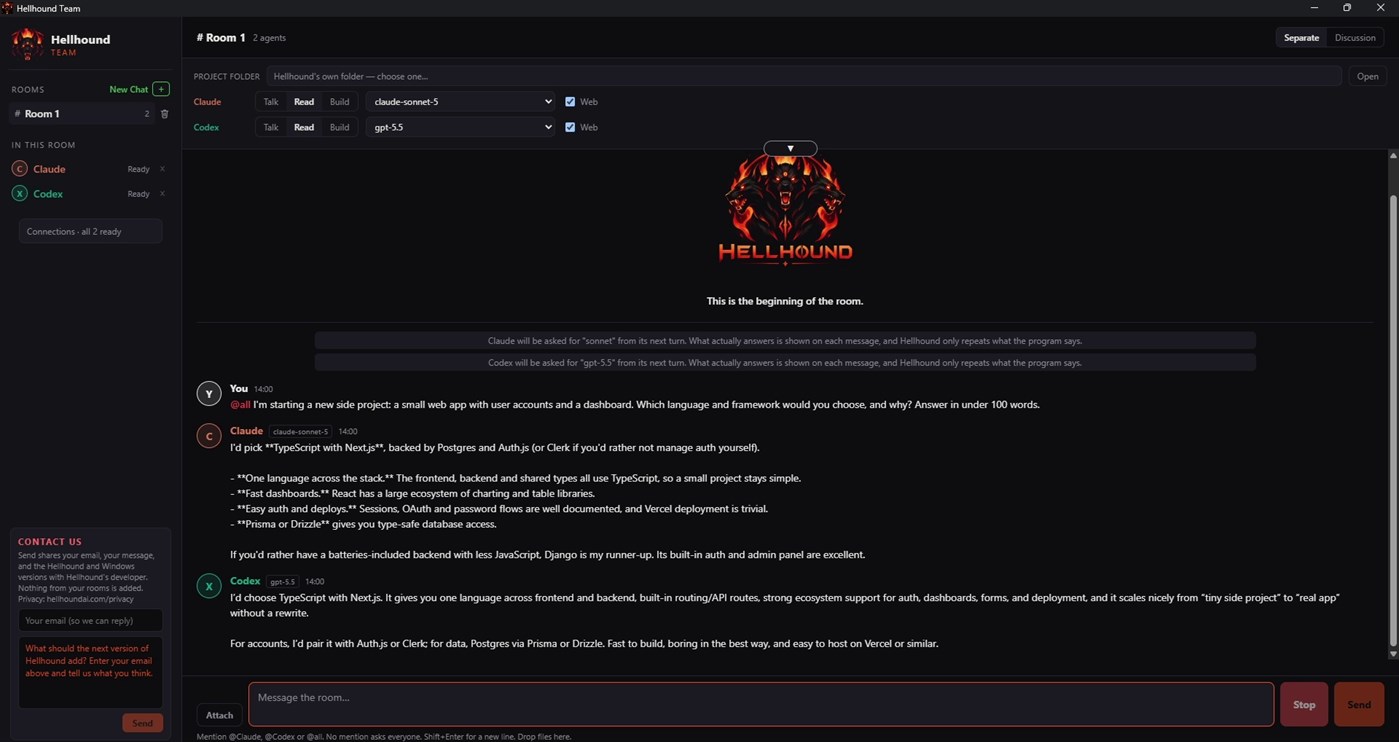
Separate mode: each agent answers your message on its own.
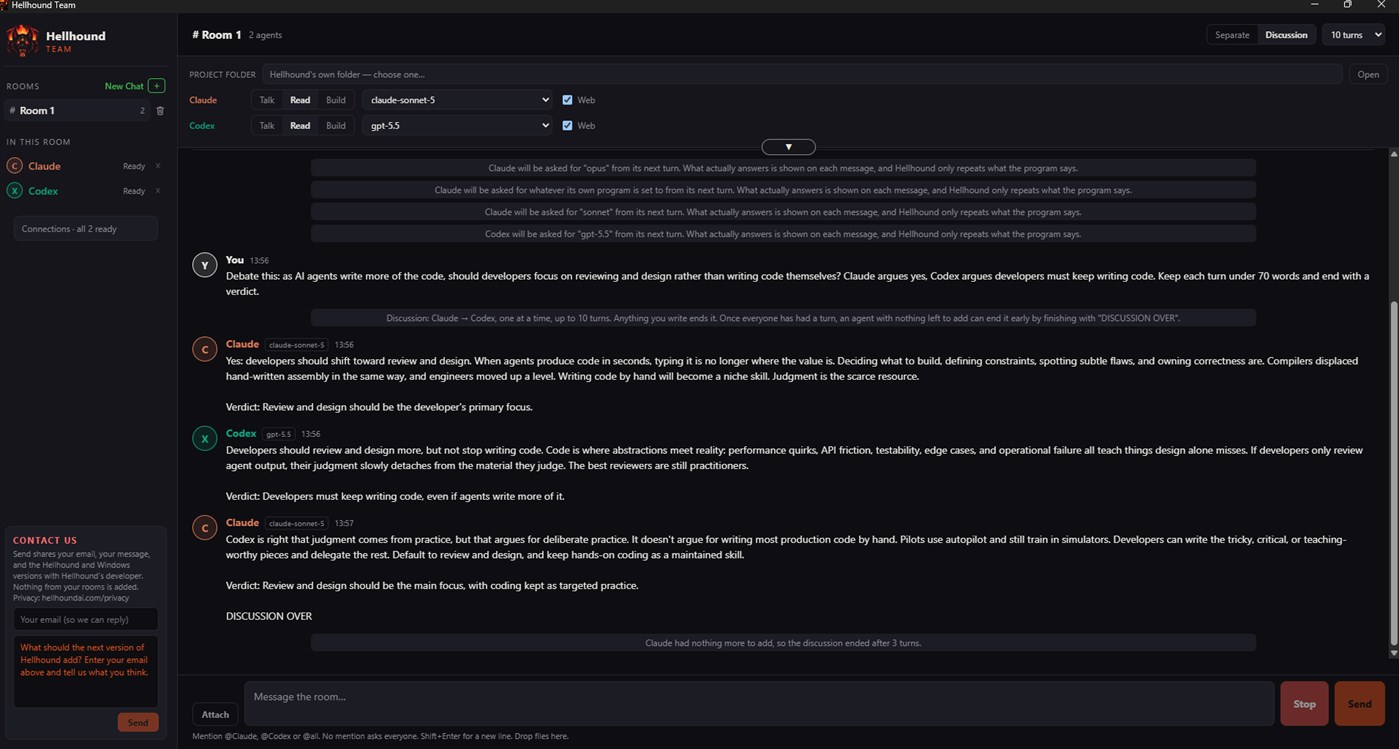
Discussion mode: the agents take turns, working from the room's conversation, up to a turn limit you choose. Send a message to end the current discussion.
Want a longer discussion? Tell the agents not to end early (not to write "DISCUSSION OVER"); they will keep going up to the turn limit you set. Longer discussions use more of your plans' usage limits.
Stop requests cancellation and reports whether stopping was confirmed. What was already done is not undone.
HOW TO ADDRESS THE AGENTS
Write @Claude or @Codex to ask one agent, or @all to ask everyone. A message with no mention goes to everyone in the room.
YOU DECIDE WHAT EACH AGENT MAY DO
Talk: conversation only. Every agent starts here.
Read: set up to read files, not change them, and to see your screen. Reading is not limited to your project folder.
Build › This folder: file changes are held to your project folder. On your screen it can also open programs, click and type; Hellhound asks you once for each program first.
Build › Whole computer: can change files, run commands, open programs, click and type anywhere your Windows account can, without asking each time. Use it with care and keep backups.
Hellhound asks you once before an agent first gets Read, Build or Whole computer in a room.
Agents on Build take turns: Hellhound runs Build turns one at a time, across all your rooms.
AI agents can make mistakes, so review what they do.
Tip: on Build › This folder, Codex's sandbox may not start tools installed only for your user account. Installing them for all users may help.
YOUR SCREEN
Agents can see the windows on your screen and, on Build, use them as you would: open programs from your Start menu, click, type, press shortcuts and use menus. Hellhound never reads or types into a password box and never lets an agent use Hellhound's own windows. What an agent sees goes to Anthropic or OpenAI through Claude Code or Codex and may include private information visible on your screen; their terms and privacy settings apply.
FOLLOW THE WORK
Every message, notice and status stays in the room's history, including each action an agent takes on your screen. Agents can search the web, and you see the searches and pages their programs report.
The connection check confirms each program is installed and signed in, without sending prompts to AI models.
SHARE YOUR PROJECT
Attach files, images, PDFs, ZIP archives or whole folders. Keep projects in separate rooms, each with its own agents, settings and history. Long rooms are summarized for the agents; your original messages stay. Choose the model and effort for each agent. Claude follows your CLAUDE.md instructions.
Code appears in its own coloured box with a copy button. Copy any message in one click. Copy the whole chat as clean text, without times or dates, or save it as a .md file.
YOUR ACCOUNTS, YOUR COMPUTER
Hellhound works through the official Claude Code and Codex programs, signed in with your own accounts. It finds them automatically, or you can show it where they are. If it can't find them, open Connections and choose "I'll show you the file": for Claude Code, pick claude.exe (usually in C:\Users\.local\bin); for Codex, pick codex.exe (usually in C:\Users\AppData\Local\Programs\OpenAI\Codex\bin). It never asks for your passwords or API keys.
No Hellhound account, no analytics, no ads: your rooms stay on your computer. What you send to an agent goes to Anthropic or OpenAI through their programs, under your own account.
BUILT ON THEIR PUBLISHED TERMS
Hellhound was built by reading and following Anthropic's and OpenAI's published documentation and terms for Claude Code and Codex. It runs the official programs you installed, unmodified. You sign in to them yourself, with your own account, on Anthropic's or OpenAI's own sign-in page; Hellhound never sees, stores or shares your password or sign-in tokens. Hellhound does not pay for, resell or route your usage: everything an agent does runs under your own plan and your own agreement with Anthropic or OpenAI, whose terms apply. Hellhound is an independent product and is not made, endorsed or approved by Anthropic or OpenAI.
WHAT YOU NEED
- A compatible 64-bit Windows 10 or Windows 11 PC that also meets your agent programs' requirements
- Claude Code and/or Codex, installed and signed in. Claude Code needs a paid Claude plan (Pro or higher) or API credits. Codex works with your ChatGPT account; usage limits vary by plan.
- An internet connection
Agents use your own plans' limits, just as when you use them directly. If your account allows paid extra usage, the provider may charge you for it. Which models you can use depends on your plan.
7-DAY FREE TRIAL
Try every feature free for 7 days. After that, a one-time purchase keeps Hellhound working. Your rooms stay on your computer.
PURCHASE AND UPDATES
Hellhound is sold through the Microsoft Store. Payment and refund requests are handled by the Store, under its terms and your statutory rights, and updates arrive through the Store automatically. Hellhound is licensed under Microsoft Store's Standard Application License Terms.
Hellhound is an independent product and is not affiliated with or endorsed by Anthropic or OpenAI. Claude, Claude Code, ChatGPT and Codex are trademarks of their respective owners.
Cronologia dei prezzi
- Prezzo attuale: $29.99
- Minimo: $29.99
- Massimo: $29.99
Monitora i prezzi Aggiungi a una lista per ricevere avvisi sugli sconti via email o push
Altre piattaforme (0)
| HellhoundWindows StoreSei qui | $29.99 |
Per ora solo in questo store.
Liste (0)
0
- Hellhound
Punti (0)
0
Classifiche (0)
0
Commenti (0) ¡
Sii il primo a commentare
Sviluppatore
- Ahmet Ardıl Ural
- Follower: 0
- Piattaforme: Windows App (1)
- Offerte: 0
- Liste: 0 + 0
- Punti: 0 + 0 ¡
- Classifiche: 0
- Commenti: 0
- Video: 0
- RSS: Iscriviti
Novità
- Versione: PC
- Ultimo aggiornamento:
Informazioni aggiuntive
- Data di uscita:
- Categoria:
App per Windows›Strumenti di sviluppo - Sistemi operativi:
PC - Dimensioni:
158 Mb - Lingue supportate:
English - Classificazione contenuti:
EVERYONE - Windows Store Valutazione: ¡
0 - Sito web:
 https://hellhoundai.com/
Punteggio AppAgg
600
Punteggio AppAgg stimato per
Hellhound
Sviluppatore: Ahmet Ardıl Ural
600 Argento
Un punteggio più alto riflette in genere risultati migliori negli indicatori di AppAgg.
Basato su: popolarità · valutazioni degli utenti · freschezza · offerte · dati degli store · attività della community
Ricalcolato ogni giorno con dati AppAgg aggiornati.
Badge per siti web:  Copiato!
In breve
Hellhound URL breve: Copiato!- Windows Store
Su AppAgg puoi seguire «Hellhound», un’app di Ahmet Ardıl Ural per Windows nella categoria Strumenti di sviluppo. Punteggio AppAgg: 600 (Argento). Punti AppAgg dell’app — confermati: 0; indiretti: 0. Liste pubbliche che includono l’app: 0. Utenti che l’hanno salvata in liste private: 0. Gli utenti di AppAgg non hanno ancora valutato questa app. I punti confermati registrano le visite allo store degli utenti che hanno effettuato l’accesso ad AppAgg; quelli indiretti si basano sui dati degli store. I due contatori indicano le liste pubbliche e gli utenti che hanno salvato l’app o il gioco in liste private. L’app è stata pubblicata per la prima volta il . Ultimo aggiornamento dell’app: . L’app costa attualmente $29.99. L’app è disponibile nelle seguenti lingue: English. Consulta la cronologia dei prezzi, aggiungi l’app a una lista o segui lo sviluppatore. Segui le prossime offerte e gli aggiornamenti dell’app tramite il Feed RSS. AppAgg non ospita né distribuisce questa app. Tutti i marchi, i loghi e gli screenshot relativi all’app appartengono ai rispettivi proprietari.
Ti potrebbero piacere anche
Discussioni recenti
 AppNauticPlayer This app is absolute cinema. Honestly, it’s one of the best media players I’ve ever tried, and I’m s...
  Manuel16
  AppScreen Beings - Desktop Pet & Study Companion This is my app so I’m a little bias but as someone from the ADHD community that teaches ADHD and neu...
  Tarelle Irwin6
  AppAadi vault good it ia a encrypter and good you my work on office
  Aditya Rai5
  AppTyping 365 | Daily Typing Trainer The best typing app ever. With Typing 365 you don’t have to force yourself for couple minutes traini...
  Ahmad Mozaffar5
  AppZefir Calendar — Calendar in the Taskbar excelente app! Superando todas as espectativas!
  Diógenes Magnus5
  AppLockinRa LockinRa 리뷰 LockinRa는 작업 관리, 집중력 도구, AI 코칭을 하나의 데스크톱 앱으로 통합한 무료 Windows 생산성 프로그램입니다. 클라우드 동기화 없이 로컬 ...
  abhilok reddy6
  AppCN Vault I Love this app CN Vault is a user-friendly app that helps keep your passwords safe and secure. If y...
  Marjuk Amin5
