
书签
为此书签设置标题。
书签已保存
摘要
广告
屏幕截图 1
其他平台 0
价格历史 0
- 目前价格: 免费
- 最小值: 免费
- 最大值: 免费
首页专属动态
为「新上架与最近更新」选择平台,首页就只显示你需要的应用和游戏。
描述

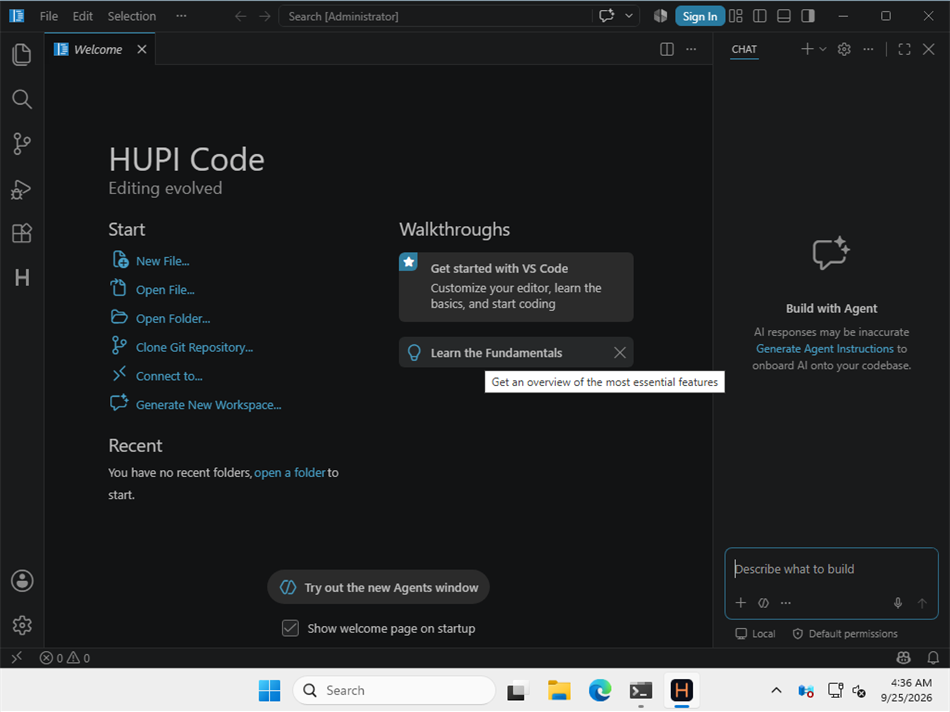
Everything you'd expect from Cursor-style AI coding tools — a chat sidebar, inline edit, ghost-text completions, multi-file review — built directly into the editor instead of installed as an extension. The difference: it's backed by HUPI, a self-hosted, provider-independent memory gateway you run yourself, not a vendor's cloud service.
Why HUPI Code, not another AI editor
Every other AI coding assistant ties you to one vendor's model, one vendor's servers, and one vendor's idea of what happens to your code and conversations. HUPI Code doesn't. Point it at your own HUPI gateway — self-hosted, your database, your encryption key — and it works the same way with any model you choose: OpenAI, Anthropic, Azure, or a local model running on your own machine.
HUPI also remembers. Every conversation, decision, and piece of context you've given it is captured, grounded, and retrievable — not just within one chat session, but across every tool that talks to your HUPI gateway. Ask it about something you discussed last week; it actually knows.
What's included
Chat sidebar — ask questions about your codebase with your active file or selection automatically included as context.
@hupi in VS Code's native Chat view — works alongside Copilot Chat or any other participant already there.
Inline edit (Ctrl+K / Cmd+K) — select code, describe a change, review a real diff before anything touches your file.
Inline completions — Copilot-style ghost text as you type, powered by your own gateway (off by default, since it fires on every typing pause).
Multi-file edit — describe a change across several open files, review a diff for each, apply only what you want.
Built for people who want AI coding tools without giving up control. No telemetry beyond what you explicitly configure, no proprietary lock-in, no data leaving your own infrastructure unless you choose a hosted model provider yourself.
Requirements: a running HUPI gateway (self-hosted — see hupi.dev for setup) and an API key or SSO sign-in for your deployment. Extensions install from open-vsx.org rather than the Microsoft Marketplace.
Learn more and get started: hupi.dev
来自开发者
你是开发者吗?
在页面顶部发布新闻,关注者会通过邮件收到。添加你的 YouTube 视频,它们会排在“视频”版块最前面。
开发者
- HUPI Code
- 关注者: 0
- 平台: Windows 应用 (1)
- 折扣: 0
- 列表: 0 0
- 积分: 0
- 排名: 0
- 评论: 0
- 视频: 0
- RSS: 订阅
列表 0
-
 HUPI Code
积分 0
-

- +1 积分

排名 0
-
- 您的评分
新版变化
- 版本: PC
- 最后更新:
- Chat sidebar — ask questions about your codebase with your active file or selection automatically included as context.
@hupi in VS Code's native Chat view — works alongside Copilot Chat or any other participant already there.
Inline edit (Ctrl+K / Cmd+K) — select code, describe a change, review a real diff before anything touches your file.
Inline completions — Copilot-style ghost text as you type, powered by your own gateway (off by default, since it fires on every typing pause).
Multi-file edit — describe a change across several open files, review a diff for each, apply only what you want.
其他信息
- 发布日期:
- 类别:
Windows 应用›开发人员工具 - 操作系统:
PC - 大小:
280 Mb - 支持的语言:
英语 - 内容分级:
EVERYONE - Windows Store 评分: ¡
0 - 网站:
 https://hupi.dev
评论 0 ¡
来发第一条评论吧
AppAgg 评分
580
AppAgg 预估评分:
HUPI Code
开发者: HUPI Code
580 青铜
评分越高,通常表示其在 AppAgg 上的各项指标表现越好。
基于: 热度 · 用户评分 · 新鲜度 · 优惠 · 商店数据 · 社区活跃度
根据最新 AppAgg 数据每日重新计算。
网站徽章:  已复制!
HUPI Code 短网址: 已复制!- Windows Store

