
Bookmarks
| Developer: | Gain Publications (25) | ||
| Price: | Free | ||
| Score: | 580 Bronze | ||
| Rankings: | 0 | ||
| Comments: | 0 Add a comment | ||
| Lists: | 0 0 | ||
| Points: | 0 | ||
| +1 Point | |||
Summary
IconForge is an app by Gain Publications in the Developer tools category.
Released , still pretty fresh.
Free, no ads, no in-app purchases. Just you and the app.
The Microsoft Store is built into Windows, so it installs in a couple of clicks.
Its AppAgg Score is 580. Bronze for now, with plenty of room to grow.
Just 48 megabytes, it’ll fit even on a full drive.
Rated “EVERYONE”, so it’s fine for kids too.
Only one language, and it’s English.
Used it? Your review would be the first one here.
The developer has 3 more games and 21 apps on AppAgg. Worth a look.
By the way, this developer has 2 deals right now.
Want to hear about updates and new apps first? Follow the developer or subscribe to the RSS feed. Push alerts come through the AppAgg Alerts app for Android and iOS.
Screenshots 1
Other platforms 0
Price History 0
- Current price: Free
- Minimum: Free
- Maximum: Free
Your own feed on the home page
Description

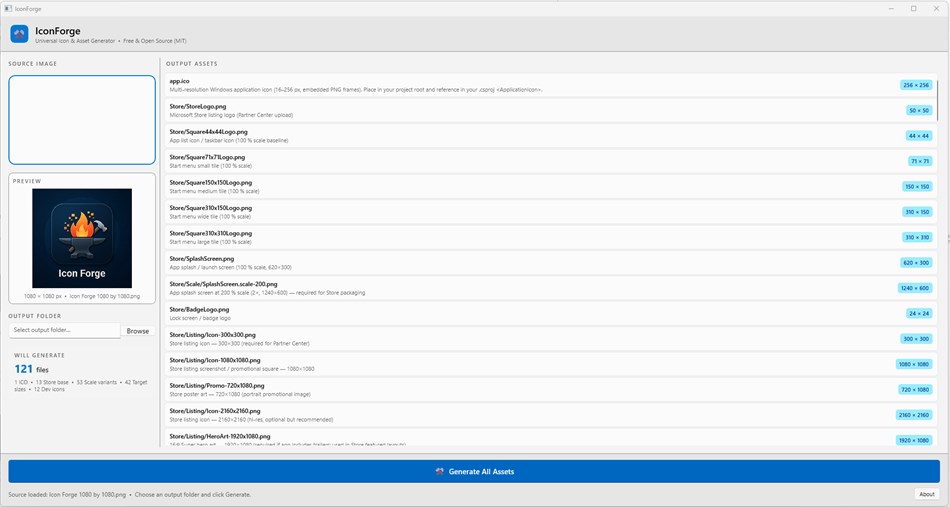
Every Windows app that targets the Store needs dozens of correctly sized, correctly named image files before it can be submitted. Tiles at multiple scale factors. Target-size icons at fourteen different pixel dimensions across three theme variants. Splash screen variants. Badge logos. A multi-resolution ICO for the Windows shell. Store listing images for Partner Center. Getting every file right — right size, right name, right qualifier order in the filename — requires either a lot of manual work or knowing exactly what Microsoft expects.
Drop your source image onto IconForge and it takes care of all of it. One image in. 121 files out. Everything organized into named subfolders, ready to copy directly into your MSIX project.
WHAT IT GENERATES
Windows ICO — a multi-resolution ICO file with 17 frame sizes from 16px to 256px, each frame stored as an embedded PNG for maximum compatibility with the Windows shell and legacy applications.
App list icons — the Square44x44Logo asset at all seven scale factors (100% through 400%), plus the complete set of 14 target-size variants in all three required theme variants: default (plated), dark-unplated, and light-unplated. This is the asset Windows uses for your taskbar icon, the Start menu all-apps list, search results, and context menus.
Tile assets — Small tile, Medium tile, Wide tile, and Large tile, each with a full set of scale variants from 100% through 400% including 250% and 300% for high-density displays.
Supporting assets — StoreLogo, SplashScreen, and BadgeLogo at all required scale factors.
Store listing images — the 300×300 app tile for Partner Center, 1080×1080 and 2160×2160 box art, 720×1080 poster art, and the 1920×1080 hero art image used in Store featured layouts and required if your listing includes trailers.
Developer icon pack — general-purpose PNGs at standard toolbar, desktop shortcut, system tray, and notification sizes for use in any Windows application.
IMAGE QUALITY
IconForge uses Lanczos resampling for all resize operations. Non-square source images are letterboxed with transparent padding to maintain aspect ratio, matching Microsoft's Store asset guidelines. All output files use maximum lossless compression — no post-processing or external compression tools needed.
OFFLINE AND FREE
No internet connection required at any point. No account. No upload. Your images never leave your computer. IconForge is free forever, MIT licensed, and open source on GitHub.
Requires Windows 10 (1803) or Windows 11, x64. Windows App SDK 1.5 runtime included with the Store version.
Built by Daniel E. Gain at Gain Publications.
From the developer
Developer
- Gain Publications
- Followers: 0
- Platforms: Windows Apps (22) Windows Games (3)
- Deals: 2
- Lists: 0 0
- Points: 0
- Rankings: 0
- Comments: 0
- Videos: 0
- RSS: Subscribe
Lists 0
-
 IconForge
Points 0
-

- +1 Point

Rankings 0
-
- Your rating
What's new
- Version: PC
- Last Updated:
- This update corrects two silent bugs from v1.0 and significantly expands the generated asset set.
The first bug involved qualifier ordering in unplated icon filenames. Windows uses a precise naming convention to locate theme-aware assets, and v1.0 had the order reversed — causing Windows to silently fall back to a scaled-down substitute instead of the correct pre-rendered icon. Apps packaged using v1.0 output may have had pixelated taskbar and Start menu icons as a result. Fixed.
The second bug disabled DEFLATE compression on all PNG output, producing files far larger than necessary. Fixed — all files are now properly compressed.
Asset coverage has been expanded to match current Microsoft documentation:
• Target-size icons now cover all 14 required sizes across all 3 theme variants (up from 5 sizes, 2 variants)
• Scale variants at 250% and 300% added for all tile and logo types
• Small tile, large tile, and badge logo now include full scale sets
• Missing splash screen scales added (125%, 150%, 400%)
• 16:9 hero art (1920×1080) added to Store listing output
Total output: 121 files, up from 57.
Additional Information
- Release Date:
- Category:
Windows Apps›Developer tools - OS:
PC - Size:
48 Mb - Supported Languages:
English - Content Rating:
EVERYONE - Windows Store Rating: ¡
0 - Website:
 https://gainpublications.com
Comments 0 ¡
AppAgg Score
Estimated AppAgg Score for
IconForge
Developer: Gain Publications
Higher scores usually reflect better results across AppAgg’s indicators.
Based on: popularity · ratings · freshness · deals · store data · community signals
Recalculated daily using fresh AppAgg data.
IconForge Short URL: Copied!- Windows Store
You may also like
Recent discussionsMore →
 AppTapeFlo this app is the best app i use in my life Because. you trade. journal. Discipline. rule's that you w...
 Shurem Boy35
 AppGame4Class Game4Class makes lesson review fun and interactive. I like how easily students can join from their o...
 Mehdi Gateway62
 AppAniMate Waifu - AI Anime Desktop Pet This is the best anime desktop pets I have ever had, The dancing feature is amazing.
 shaw chaney34
 AppSpark Motion Create 26 The graphics are amazing! Now I can design my ball layouts and watch then spin in 3D animation.
 Jim Kirker40
 AppLocalDub – Real-Time Game Dubbing Hello Kırtay Interactive, I am using LocalDub - Real-Time Game Dubbing. I would like to know if Hind...
 rashid game53
 AppNauticPlayer This app is absolute cinema. Honestly, it’s one of the best media players I’ve ever tried, and I’m s...
 Manuel92
 AppScreen Beings - Interactive Accessibility Companion This is my app so I’m a little bias but as someone from the ADHD community that teaches ADHD and neu...
 Tarelle Irwin54
 AppAadi vault good it ia a encrypter and good you my work on office
 Aditya Rai50
 AppTyping 365 | Daily Typing Trainer The best typing app ever. With Typing 365 you don’t have to force yourself for couple minutes traini...
 Ahmad Mozaffar50
 AppZefir Calendar — Calendar in the Taskbar excelente app! Superando todas as espectativas!
 Diógenes Magnus50

