
Saved
Choose the name that will be shown in your Saved menu.
Done!
| Developer: | noshitaki (1) | ||
| Price: | $5.39 | ||
| Score: | 610 Bronze | ||
| Rankings: | 0 | ||
| Comments: | 0 Add a comment | ||
| Lists: | 0 + 0 | ||
| Points: | 0 + 0 ¡ | ||
| +1 Points | |||
Description

Say goodbye to expensive subscription tools!
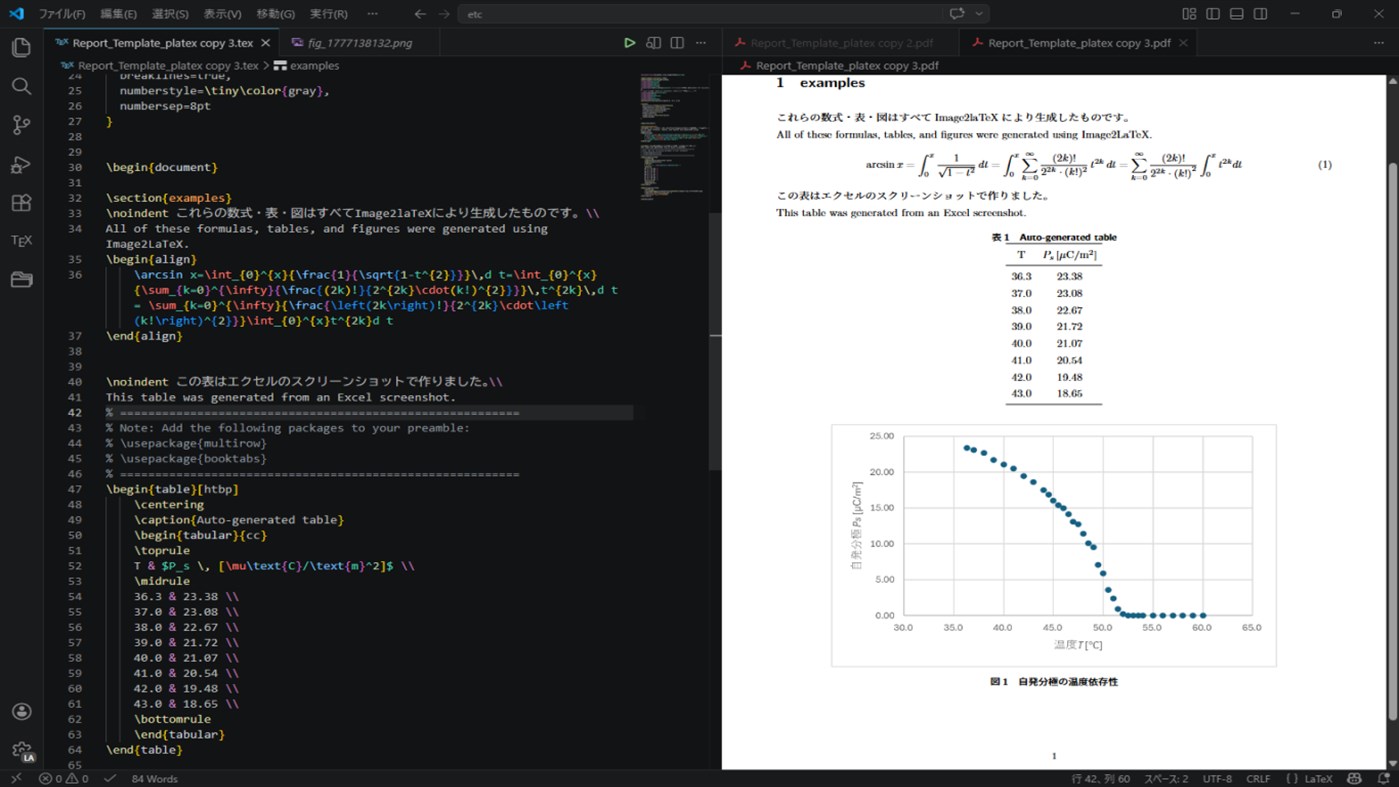
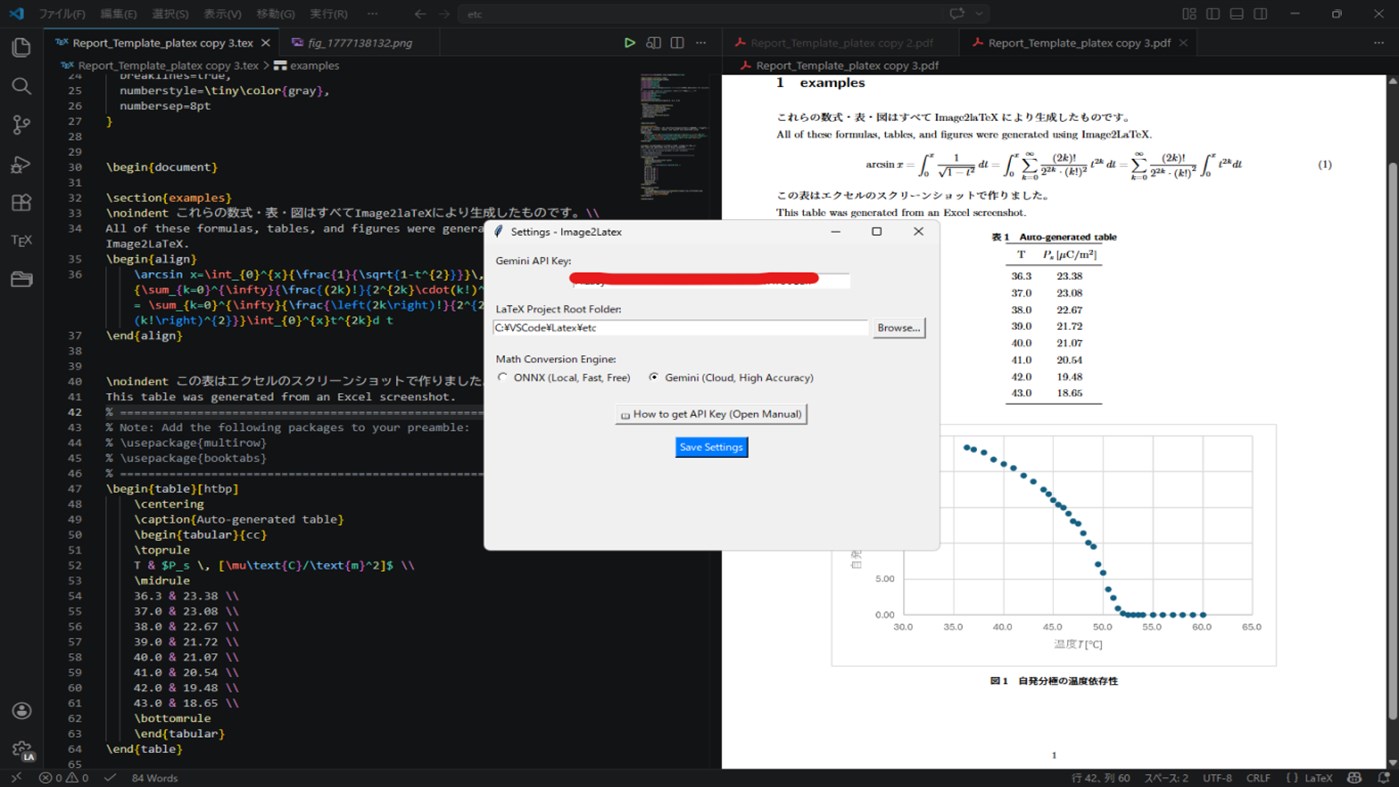
"Image2LaTeX" is the ultimate one-time purchase productivity tool that instantly generates LaTeX insertion codes for math formulas, tables, and figures directly from images in your clipboard. By setting up your own Gemini API key (which offers a generous free tier), you can minimize running costs while leveraging the latest AI capabilities.
[3 Powerful Features]
1. Hybrid Math OCR: Lightning-Fast Local & High-Precision Cloud (Math Mode)
You can freely switch the math conversion engine from the settings screen (Alt + A) to suit your needs:
・ONNX Engine (Local): Completely free, offline, and lightning-fast. Perfect for everyday math formulas.
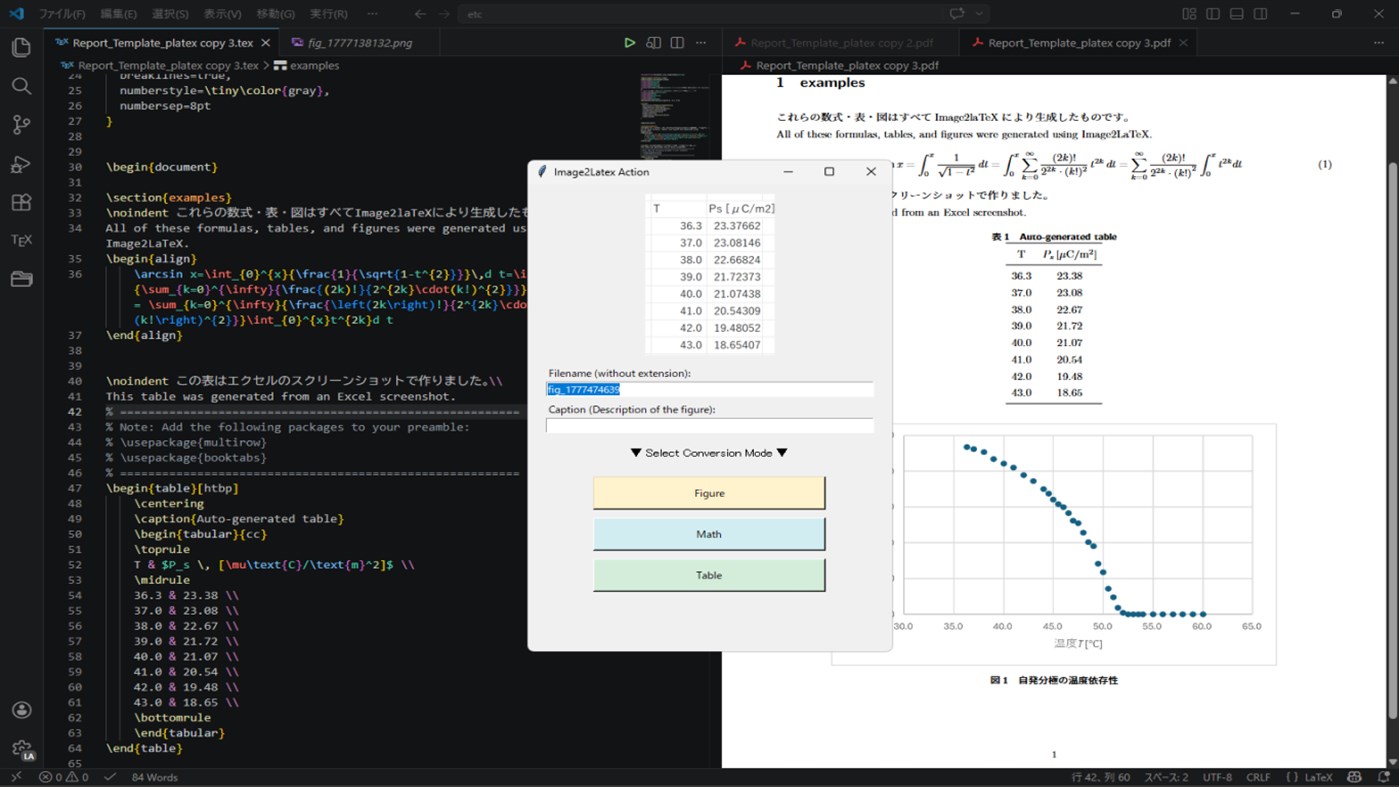
・Gemini Engine (Cloud): Delivers high-precision recognition for complex 2D structures like matrices and systems of equations. Simply copy an image, press "Alt + L", and select "Math" to instantly copy the LaTeX code to your clipboard.
2. High-Precision Table Conversion via AI (Table Mode)
Utilizes the latest LLMs (such as Gemini 1.5 Flash) to read complex tables in images. Even for tables with merged cells or embedded math formulas, just press "Alt + L" and select "Table" to accurately convert them into LaTeX table code. This drastically reduces the painful hours spent formatting tables for your papers.
3. 1-Click Image Saving & Code Generation (Figure Mode)
Automates the most tedious parts of LaTeX writing: saving images and writing codes!
Just copy an image to your clipboard, press "Alt + L", enter a filename and caption, and select "Figure". The image will be automatically saved to the "images" folder of your project (specified in the settings screen), and the \begin{figure}... LaTeX code will be copied to your clipboard simultaneously.
[Recommended For]
・Students and researchers who want to save on monthly subscription fees.
・Those who want to drastically reduce the typing of math formulas and tables.
・Those who want to automate image saving and Figure environment coding to focus on writing.
[About the Paid API Tier (Pay-as-you-go)]
While the app works perfectly with the free tier of the Gemini API, we highly recommend upgrading to the paid tier (Pay-as-you-go) for researchers handling unpublished data.
By using the paid tier, your transmitted image data will NOT be used for Google's AI training, significantly enhancing your data privacy and confidentiality.
Moreover, the running cost is incredibly low. Based on the pricing for the "Gemini Flash-Lite Latest" model used by this app (Input: $0.10 / 1M tokens, Output: $0.40 / 1M tokens), the estimated costs are as follows:
・Math Mode: Approx. 300 input tokens and 100 output tokens per conversion.
→ Approx. $0.007 per 100 conversions.
・Table Mode: Approx. 400 input tokens and 500 output tokens per conversion.
→ Approx. $0.024 per 100 conversions.
Unlike expensive monthly subscription tools, you only pay a fraction of a cent for what you use, ensuring the highest level of accuracy and security.
Note: The above calculations are estimates; actual token usage varies depending on the complexity of the image and formula. Additionally, pricing may change in the future due to Google's Gemini API specification updates or price revisions.
[Initial Setup]
To use the Gemini engine (for Table mode and Cloud Math conversion), you need to obtain a Google Gemini API key. A PDF manual explaining how to get the key is included in the app, making it easy even for beginners to set up.
[Note on Cloud Environments]
The Figure mode saves images directly to a local folder on your PC, so it cannot be used directly with cloud-based LaTeX environments like Cloud LaTeX or Overleaf. We recommend using a local environment (such as VS Code or TeXworks) for this feature.
(Note: Math and Table modes only copy text to your clipboard, so they work perfectly in any environment.)
Credits / Third-party Licenses
This software uses the following open-source libraries:
rapid_latex_ocr (MIT License)
Pillow (HPND License)
google-genai (Apache License 2.0)
pystray (LGPL-3.0 License)
keyboard (MIT License)
pyperclip (BSD-3-Clause License)
beautifulsoup4 (MIT License)
opencv-python (MIT License)
numpy (BSD-3-Clause License)
Screenshots
Ad
Price History
- Current price: $5.39
- Minimum: $5.39
- Maximum: $5.39
Track prices
AppAgg Score
610
Estimated AppAgg Score for
Image2LaTeX
610 Bronze
Higher scores usually mean stronger signals on AppAgg.
Based on: popularity · ratings · freshness · deals · store data · community signals
Recalculated daily using fresh AppAgg data.
Short URL: Copied!
What's new
- Version: PC
- Last Updated:
Additional Information
- Release Date:
- Category:
Windows Apps›Developer tools - OS:
PC - Size:
264 Mb - Supported Languages:
Japanese - Content Rating:
EVERYONE - Windows Store Rating:
0 - Website:
 https://x.com/DAzik1588
Developer
- noshitaki
- Platforms: Windows Apps (1)
- Lists: 0 + 0
- Points: 0 + 0 ¡
- Rankings: 0
- Comments: 0
- Deals: 0
- Videos: 0
- RSS: Subscribe
Lists (0)
0
- Image2LaTeX
Points (0)
0
Rankings (0)
0
Comments (0)
Be the first to comment
Summary
Image2LaTeX Short URL: Copied!- Share
- Windows Store
«Image2LaTeX» is a Developer tools app for Windows, developed by «noshitaki». It was first released on and last updated on . The lowest historical price was $5.39, and the highest was $5.39. This app has not yet received any ratings on AppAgg. Available languages: Japanese. AppAgg continuously tracks the price history, ratings, and user feedback for «Image2LaTeX». AppAgg does not host applications or distribute software. All trademarks, logos and screenshots belong to their respective owners. Subscribe to this app or follow its RSS feed to get notified about future deals or updates.
Similar
-
- Windows Terminal
- Windows Apps: Developer tools By: Microsoft Corporation
- Free
- Lists: 7 + 3 0 0
- Points: 5 + 9,455 13K · Gold Version: PC The Windows Terminal is a modern, fast, efficient, powerful, and productive terminal application for users of command-line tools and shells like Command Prompt, PowerShell, and WSL. ...
-
- App Installer (Mobile) - WinUI 3
- Windows Apps: Developer tools By: wherewhere
- Free
- Lists: 3 + 2 0 0
- Points: 20 + 3,250 8K · Gold Version: PC Android™ App Installer for Windows 10/11 makes sideloading Android applications easy for WSA, Anbox, etc.: Just double-click the app package, and you won't have to run Android Debug ...
-
- Arduino IDE
- Windows Apps: Developer tools By: Arduino LLC
- Free
- Lists: 0 + 2 0 0
- Points: 2 + 928 4K · Silver Version: PC Arduino is an open-source electronics platform based on easy-to-use hardware and software. It's intended for anyone making interactive projects. IMPORTANT: This app performs with core ...
-
- Ubuntu on Windows
- Windows Apps: Developer tools By: Canonical Group Limited
- Free
- Lists: 2 0 0
- Points: 11 + 832 5K · Silver Version: PC Ubuntu on Windows allows you to use Ubuntu Terminal and run Ubuntu command line utilities including bash, ssh, git, apt and many more. Please note that Windows 10 S does not support ...
-
- DevToys
- Windows Apps: Developer tools By: etiennebaudoux
- Free
- Lists: 3 + 1 0 0
- Points: 5 + 699 7K · Gold Version: PC An Open-Source Swiss Army knife for developers. DevToys helps in everyday tasks like formatting JSON, comparing text, testing RegExp. No need to use many untruthful websites to do ...
-
- Termius - Modern SSH Client
- Windows Apps: Developer tools By: Termius Corporation
- * Free
- Lists: 0 + 4 0 0
- Points: 8 + 540 39K · Legend Version: PC Termius is a modern SSH client designed for productivity and collaboration. Connect with one click from desktop and mobile no re-entering IP addresses, ports, and passwords. With a ...
-
- TurboWarp
- Windows Apps: Developer tools By: Thomas Weber
- Free
- Lists: 0 0 0
- Points: 1 + 542 6K · Gold Version: PC TurboWarp is a mod of the Scratch programming language with a compiler to run projects faster, dark mode, new extensions, a bunch of addons, and more. - Runs projects up to 100x faster
-
- Python 3.12
- Windows Apps: Developer tools By: Python Software Foundation
- Free
- Lists: 0 0 0
- Points: 1 + 413 4K · Silver Version: PC Python is an easy to learn, powerful programming language. It has efficient high-level data structures and a simple but effective approach to object-oriented programming. Python s ...