
Lesezeichen
| Entwickler: | BEAS - Soon (4) | ||
| Preis: | Kostenlos | ||
| Score: | 570 Bronze | ||
| Ranglisten: | 0 | ||
| Kommentare: | 0 Kommentar posten | ||
| Listen: | 0 0 | ||
| Punkte: | 0 | ||
| +1 Punkt | |||
Kurzinfo
JSON Aggregator Pro ist eine App von BEAS - Soon aus der Kategorie „Entwicklungstools“.
Erst erschienen, also noch ziemlich frisch.
Gratis, keine Werbung, keine In-App-Käufe. Nur du und die App.
Der Microsoft Store ist in Windows eingebaut, die Installation ist also in ein paar Klicks erledigt.
Der AppAgg-Score liegt bei 570. Vorerst Bronze, aber mit viel Luft nach oben.
Nur 18 Megabyte, passt sogar auf eine volle Festplatte.
Altersfreigabe „EVERYONE“, also auch für Kinder geeignet.
Spricht nur eine Sprache, und das ist nicht Deutsch.
Auf AppAgg hat die App noch niemand bewertet. Jetzt ist deine Chance, den Anfang zu machen.
Der Entwickler hat noch 3 weitere Apps auf AppAgg. Ein Blick lohnt sich.
Willst du als Erstes von Updates und neuen Apps erfahren? Folge dem Entwickler oder abonniere den RSS-Feed. Push-Nachrichten kommen über die App AppAgg Alerts für Android und iOS.
Screenshots 1
Andere Plattformen 0
Preisentwicklung 0
- Aktueller Preis: Kostenlos
- Minimum: Kostenlos
- Maximum: Kostenlos
Dein eigener Feed auf der Startseite
Beschreibung

Tired of writing scripts just to summarize JSON data? JSON Aggregator Pro lets you aggregate and analyze any JSON instantly - no coding required.
━━━━━━━━━━━━━━━━━━━━━━━━━━━━━━━━━━━━
✨ KEY FEATURES
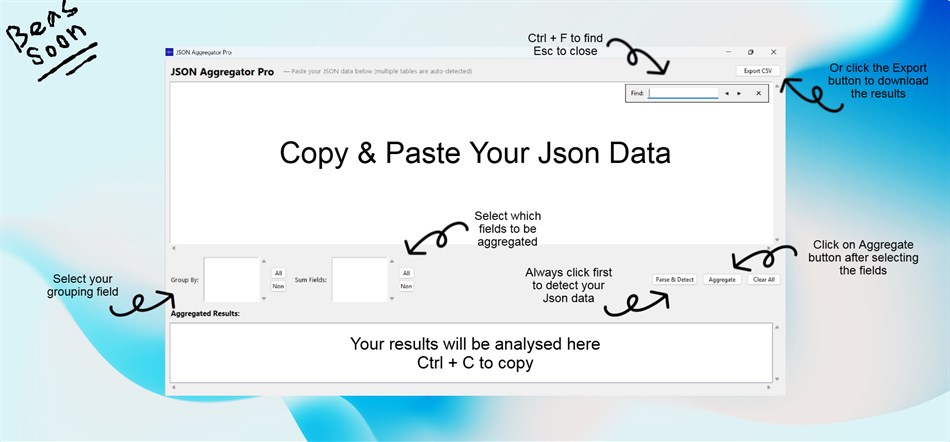
- Paste & Parse - Simply paste JSON from any source. The tool automatically detects data arrays and ignores wrapper metadata.
- Smart Field Detection - All fields are auto-detected. Numeric fields are ready for aggregation instantly.
- Flexible Grouping - Group by one field or multiple fields for hierarchical analysis.
- Instant Results - See aggregated totals in a clean, sortable table.
- Export Options - Export to CSV or copy directly to clipboard for Excel, Sheets, or reports.
- Built-in Search - Use Ctrl+F to quickly find text in large JSON datasets.
━━━━━━━━━━━━━━━━━━━━━━━━━━━━━━━━━━━━
📋 PERFECT FOR
- Developers working with API responses
- Data Analysts processing JSON exports
- Anyone who works with JSON regularly
━━━━━━━━━━━━━━━━━━━━━━━━━━━━━━━━━━━━
🔒 PRIVACY FIRST
- 100% offline - no internet required
- No data collection or tracking
- Your data never leaves your device
━━━━━━━━━━━━━━━━━━━━━━━━━━━━━━━━━━━━
💡 HOW IT WORKS
1. Paste your JSON data
2. Click "Parse & Detect"
3. Select grouping field(s) and numeric fields to sum
4. Click "Aggregate"
5. Export or copy your results
Turn 15 minutes of scripting into 30 seconds of clicking!
Vom Entwickler
Entwickler
- BEAS - Soon
- Follower: 0
- Plattformen: Windows Apps (4)
- Angebote: 0
- Listen: 0 0
- Punkte: 1
- Ranglisten: 0
- Kommentare: 0
- Videos: 0
- RSS: Abonnieren
Listen 0
-
 JSON Aggregator Pro
Punkte 0
-

- +1 Punkt

Ranglisten 0
-
- Deine Bewertung
Neue Funktionen
- Version: PC
- Zuletzt aktualisiert:
- 📥 Data Input:
- Supports multiple JSON formats: objects, arrays, and nested structures
- Handles multiple JSON tables at once (separated by blank lines, ---, or back-to-back)
- Ignores wrapper metadata like status codes and total counts
━━━━━━━━━━━━━━━━━━━━━━━━━━━━━━━━━━━━
📖 How to Use:
Step 1: Paste JSON
- Copy JSON from any source (API, database, log file)
- Paste into the input box
Step 2: Parse
- Click "Parse & Detect"
- Fields appear automatically in the selection boxes
Step 3: Select Fields
- Choose grouping field(s) from "Group By"
- Choose numeric field(s) from "Sum Fields"
- Use "All" or "None" for quick selection
Step 4: Aggregate
- Click "Aggregate"
- Results appear in the table below
Step 5: Export
- Click "Export CSV" to save as file
- Or right-click → Copy All to clipboard
━━━━━━━━━━━━━━━━━━━━━━━━━━━━━━━━━━━━
⌨️ Keyboard Shortcuts:
- Ctrl+F — Open find bar
- Enter — Find next match
- Shift+Enter — Find previous match
- Esc — Close find bar
- Ctrl+C — Copy selected rows
Weitere Informationen
- Veröffentlichungsdatum:
- Kategorie:
Windows-Apps›Entwicklungstools - Betriebssysteme:
PC - Größe:
18 Mb - Unterstützte Sprachen:
Englisch - Altersfreigabe:
EVERYONE - Windows Store Bewertung: ¡
0 - Webseite:
 https://beas-soon.odoo.com/
Kommentare 0 ¡
AppAgg-Score
Geschätzter AppAgg-Score für
JSON Aggregator Pro
Entwickler: BEAS - Soon
Ein höherer Score weist meist auf bessere Werte bei den von AppAgg erfassten Kennzahlen hin.
Basierend auf: Popularität · Nutzerbewertungen · Aktualität · Angeboten · Store-Daten · Community-Aktivität
Wird täglich anhand aktueller AppAgg-Daten neu berechnet.
JSON Aggregator Pro Kurz-URL: Kopiert!- Windows Store

