
Segnalibri
| Sviluppatore: | BEAS - Soon (4) | ||
| Prezzo: | Gratis | ||
| Punteggio: | 570 Bronzo | ||
| Classifiche: | 0 | ||
| Commenti: | 0 Pubblica commento | ||
| Liste: | 0 0 | ||
| Punti: | 0 | ||
| +1 Punto | |||
In breve
JSON Aggregator Pro è un’app di BEAS - Soon della categoria «Strumenti di sviluppo».
Uscita , è ancora bella fresca.
Gratis: niente pubblicità, niente acquisti in-app. Solo tu e l’app.
Il Microsoft Store è integrato in Windows, quindi si installa in un paio di clic.
Il suo Punteggio AppAgg è 570. Per ora livello Bronzo, con tanto margine per crescere.
Solo 18 megabyte. Ci sta anche su un disco pieno zeppo.
Classificazione «EVERYONE»: va bene anche per i bambini.
Parla una sola lingua, e non è l’italiano.
Su AppAgg nessuno l’ha ancora votata. Tocca a te aprire le danze.
Lo sviluppatore ha 3 altre app su AppAgg. Vale la pena dare un’occhiata.
Vuoi sapere prima di tutti di aggiornamenti e nuove app? Segui lo sviluppatore o iscriviti al feed RSS. Le notifiche push arrivano tramite l’app AppAgg Alerts per Android e iOS.
Screenshot 1
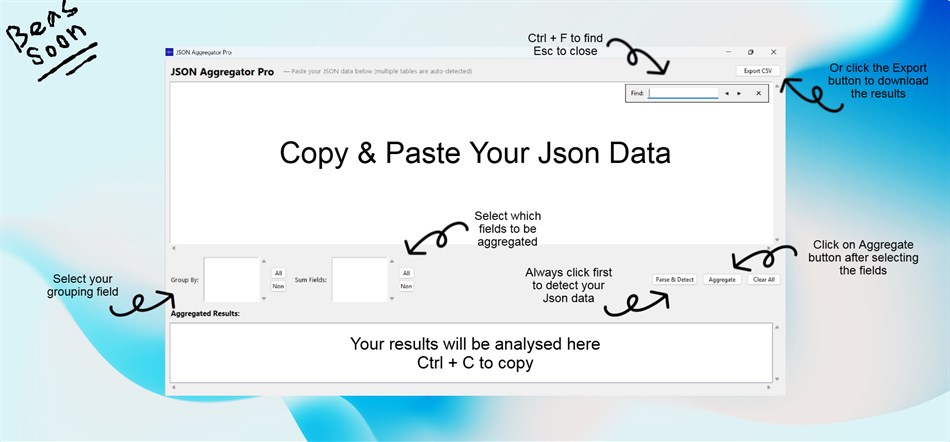
Altre piattaforme 0
Cronologia dei prezzi 0
- Prezzo attuale: Gratis
- Minimo: Gratis
- Massimo: Gratis
Il tuo feed personale nella home
Descrizione

Tired of writing scripts just to summarize JSON data? JSON Aggregator Pro lets you aggregate and analyze any JSON instantly - no coding required.
━━━━━━━━━━━━━━━━━━━━━━━━━━━━━━━━━━━━
✨ KEY FEATURES
- Paste & Parse - Simply paste JSON from any source. The tool automatically detects data arrays and ignores wrapper metadata.
- Smart Field Detection - All fields are auto-detected. Numeric fields are ready for aggregation instantly.
- Flexible Grouping - Group by one field or multiple fields for hierarchical analysis.
- Instant Results - See aggregated totals in a clean, sortable table.
- Export Options - Export to CSV or copy directly to clipboard for Excel, Sheets, or reports.
- Built-in Search - Use Ctrl+F to quickly find text in large JSON datasets.
━━━━━━━━━━━━━━━━━━━━━━━━━━━━━━━━━━━━
📋 PERFECT FOR
- Developers working with API responses
- Data Analysts processing JSON exports
- Anyone who works with JSON regularly
━━━━━━━━━━━━━━━━━━━━━━━━━━━━━━━━━━━━
🔒 PRIVACY FIRST
- 100% offline - no internet required
- No data collection or tracking
- Your data never leaves your device
━━━━━━━━━━━━━━━━━━━━━━━━━━━━━━━━━━━━
💡 HOW IT WORKS
1. Paste your JSON data
2. Click "Parse & Detect"
3. Select grouping field(s) and numeric fields to sum
4. Click "Aggregate"
5. Export or copy your results
Turn 15 minutes of scripting into 30 seconds of clicking!
Dallo sviluppatore
Sviluppatore
- BEAS - Soon
- Follower: 0
- Piattaforme: Windows App (4)
- Offerte: 0
- Liste: 0 0
- Punti: 1
- Classifiche: 0
- Commenti: 0
- Video: 0
- RSS: Iscriviti
Liste 0
-
 JSON Aggregator Pro
Punti 0
-

- +1 Punto

Classifiche 0
-
- La tua valutazione
Novità
- Versione: PC
- Ultimo aggiornamento:
- 📥 Data Input:
- Supports multiple JSON formats: objects, arrays, and nested structures
- Handles multiple JSON tables at once (separated by blank lines, ---, or back-to-back)
- Ignores wrapper metadata like status codes and total counts
━━━━━━━━━━━━━━━━━━━━━━━━━━━━━━━━━━━━
📖 How to Use:
Step 1: Paste JSON
- Copy JSON from any source (API, database, log file)
- Paste into the input box
Step 2: Parse
- Click "Parse & Detect"
- Fields appear automatically in the selection boxes
Step 3: Select Fields
- Choose grouping field(s) from "Group By"
- Choose numeric field(s) from "Sum Fields"
- Use "All" or "None" for quick selection
Step 4: Aggregate
- Click "Aggregate"
- Results appear in the table below
Step 5: Export
- Click "Export CSV" to save as file
- Or right-click → Copy All to clipboard
━━━━━━━━━━━━━━━━━━━━━━━━━━━━━━━━━━━━
⌨️ Keyboard Shortcuts:
- Ctrl+F — Open find bar
- Enter — Find next match
- Shift+Enter — Find previous match
- Esc — Close find bar
- Ctrl+C — Copy selected rows
Informazioni aggiuntive
- Data di uscita:
- Categoria:
App per Windows›Strumenti di sviluppo - Sistemi operativi:
PC - Dimensioni:
18 Mb - Lingue supportate:
Inglese - Classificazione contenuti:
EVERYONE - Windows Store Valutazione: ¡
0 - Sito web:
 https://beas-soon.odoo.com/
Commenti 0 ¡
Punteggio AppAgg
Punteggio AppAgg stimato per
JSON Aggregator Pro
Sviluppatore: BEAS - Soon
Un punteggio più alto riflette in genere risultati migliori negli indicatori di AppAgg.
Basato su: popolarità · valutazioni degli utenti · freschezza · offerte · dati degli store · attività della community
Ricalcolato ogni giorno con dati AppAgg aggiornati.
JSON Aggregator Pro URL breve: Copiato!- Windows Store

