
Lesezeichen
| Entwickler: | Kaptin (1) | ||
| Preis: | Kostenlos Neu | ||
| Score: | 790 Silber | ||
| Ranglisten: | 0 | ||
| Kommentare: | 0 Kommentar posten | ||
| Listen: | 0 0 | ||
| Punkte: | 0 | ||
| +1 Punkt | |||
Kurzinfo
Vorhang auf für Kaptin, eine App von Kaptin aus der Kategorie „Entwicklungstools“.
Neuerscheinung: erst erschienen, du bist also ganz vorne mit dabei.
Gratis, keine Werbung, keine In-App-Käufe. Nur du und die App.
Der Microsoft Store ist in Windows eingebaut, die Installation ist also in ein paar Klicks erledigt.
Der AppAgg-Score liegt bei 790. Silber, und das ist gar nicht übel.
Nur 8 Megabyte, passt sogar auf eine volle Festplatte.
Altersfreigabe „EVERYONE“, also auch für Kinder geeignet.
Spricht nur eine Sprache, und das ist nicht Deutsch.
Hier herrscht noch Funkstille: keine Bewertungen, keine Kommentare. Brich das Schweigen.
Das ist die einzige App des Entwicklers auf AppAgg. Noch.
Willst du als Erstes von Updates und neuen Apps erfahren? Folge dem Entwickler oder abonniere den RSS-Feed. Push-Nachrichten kommen über die App AppAgg Alerts für Android und iOS.
Andere Plattformen 0
Preisentwicklung 0
- Aktueller Preis: Kostenlos
- Minimum: Kostenlos
- Maximum: Kostenlos
Dein eigener Feed auf der Startseite
Screenshots 4
Video 1
Beschreibung

ONE WORKSPACE FOR YOUR AGENTS
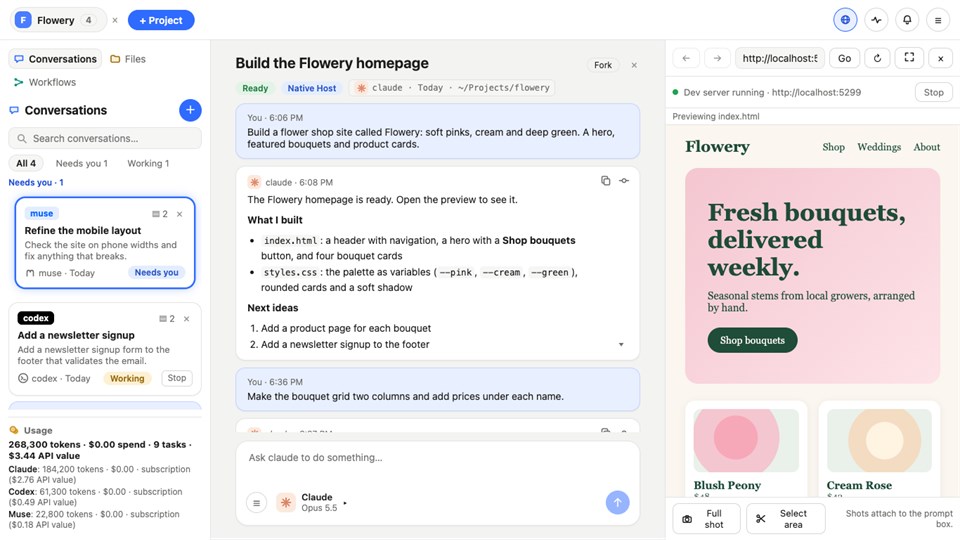
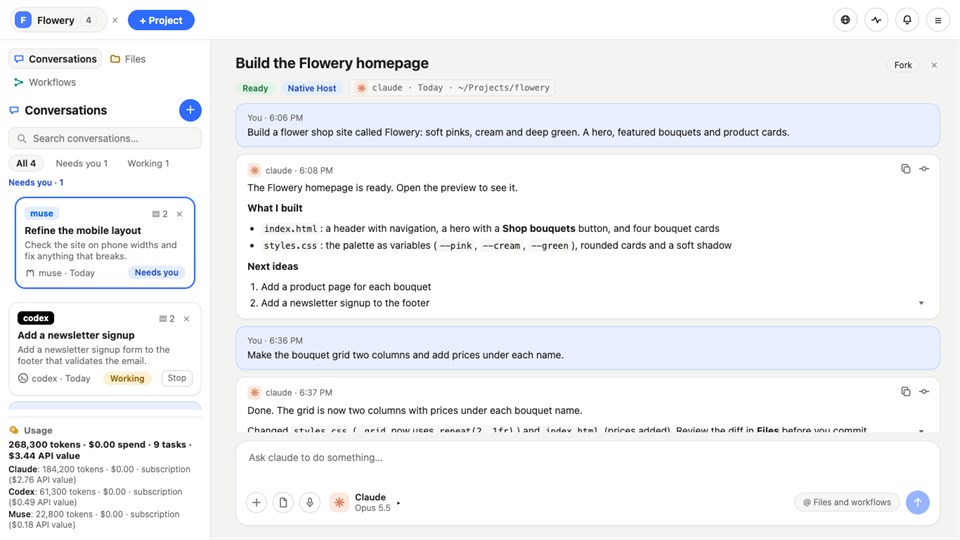
Run Claude, Codex and Muse side by side, using the CLIs and subscriptions you already have. Pick an agent per conversation, or switch agents mid-conversation: each reply keeps the agent that wrote it.
ORGANIZED BY PROJECT AND CONVERSATION
Keep the homepage redesign, the bug fix and the experiment in separate conversations, each with its own history and agent. See at a glance which conversations are working, finished, or need you. Fork a conversation to try a different direction.
SEE IT THE MOMENT IT'S BUILT
Preview web projects in the built-in browser next to the conversation that made them. Kaptin starts your project's dev server for you, and you can attach a full or partial screenshot of the preview straight back into the chat, so the agent sees what you see.
REVIEW BEFORE ANYTHING GOES FURTHER
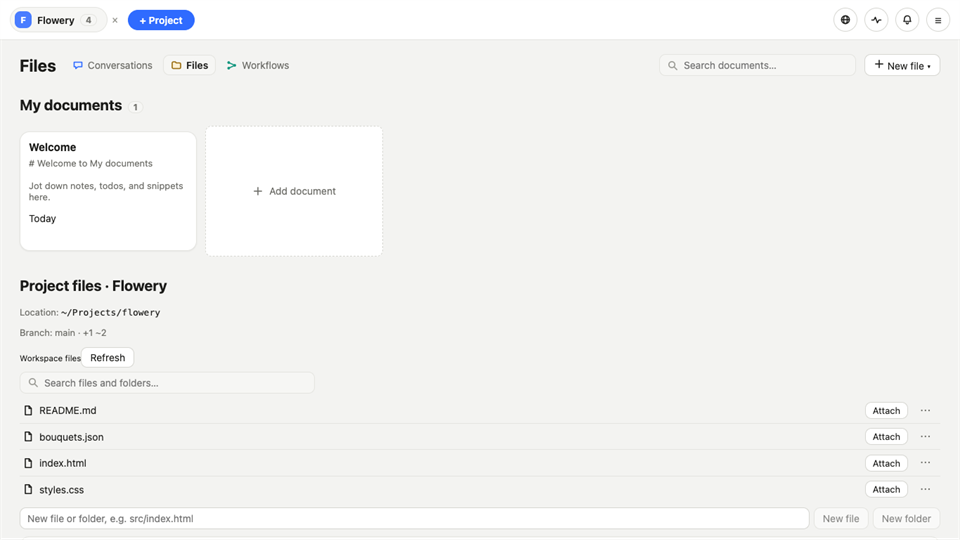
Every change lands in real files on your machine. Browse and edit project files, check what changed, and write your commit message from the agent's replies. Nothing commits until you do.
WORKFLOWS
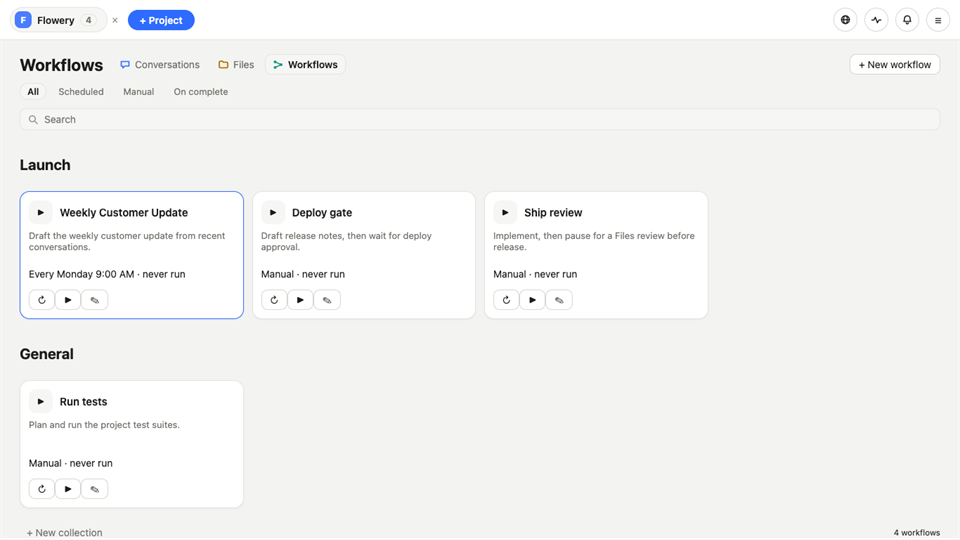
Automate repeated work with workflows that combine agent steps and shell commands. Run them by hand or on a schedule, answer prompts from running commands, and pause for your approval before a step continues.
SAFE BY DEFAULT
Kaptin uses each agent's own safety and approval controls. Routine actions are approved by the agent's built-in review, and risky ones ask you. Prefer to approve everything yourself? Choose "Ask me every time".
YOUR CODE AND KEYS STAY ON YOUR MACHINE
Projects stay in folders you control. Kaptin doesn't upload your code; your prompts go to the agent provider you choose, under that provider's terms.
PRICING
7-day free trial, then USD 5.99 per month. Cancel anytime. AI usage is not included: agents run on your own Claude, Codex or Muse subscription or API key, so you never pay for models twice.
REQUIREMENTS
An account with at least one supported AI agent (Claude, Codex or Muse). Kaptin can install the agent's CLI for you and walk you through signing in.
Vom Entwickler
Listen 0
-
 Kaptin
Punkte 0
-

- +1 Punkt

Ranglisten 0
-
- Deine Bewertung
Entwickler 1
- Kaptin
- Follower: 0
- Plattformen: Windows Apps (1)
- Angebote: 0
- Listen: 0 0
- Punkte: 0
- Ranglisten: 0
- Kommentare: 0
- Videos: 1
- RSS: Abonnieren
Neue Funktionen
- Version: PC
- Zuletzt aktualisiert:
- New in 1.0.6:
Added
Workflow cards now have a Delete button with confirmation, so you can permanently delete a workflow and its run history directly from the Workflows tab.
Settings → Archive now has Delete all beside each category title for archived projects, archived conversations, workflows in the selected project, and cleared notifications. Each action permanently deletes the listed Kaptin records, asks for confirmation, offers Cancel, and reports failures. Deleting projects leaves their folders and files on disk.
Fixed
Deleting an individual workflow in Settings → Archive now asks for confirmation.
The bulk deletion confirmation shows its message first, followed by Confirm delete all and Cancel.
- New in 1.0.5:
### Added
- **Plan usage** for Claude, Codex and Muse: Settings → Models → each agent now has **General** and **Usage** tabs. Usage shows how much of your plan's limits you've used and when each resets, the way each vendor shows it: Claude's current session and weekly limit, with whether you're on track for the week; Codex's 5-hour and weekly limits; Muse's plan and its current and weekly usage. Kaptin reads these from each agent's own CLI without using any of your quota, and refreshes them every few minutes.
- The sidebar **Usage** section now starts with a color-coded bar for each limit (green, then amber from 50%, red from 80%).
### Changed
- Workflow shell steps: the answer box now appears only when the command is actually asking something (its output stops on an unfinished line, like `version: `), focused and labeled "The command is waiting for your answer". While output is flowing you see just **Stop**, plus a small **Send input…** for the rare program that reads input without printing a prompt first.
### Known issues
- Muse shows usage only after its server has reported some for your plan; until then, Usage shows the plan name only.
### Fixed
- Approving a workflow command that needs your approval (like a deploy script) no longer freezes Kaptin until the command finishes. The command now runs in the background: its output streams to the run view, and you can answer its prompts or stop it while it runs.
- Kaptin no longer stops responding while it push - New in 1.0.4:
• Links to the Terms of Service and Privacy Policy on the sign-in screen and in About Kaptin.
• Deleting your account now also cancels your subscription.
Weitere Informationen
- Veröffentlichungsdatum:
- Kategorie:
Windows-Apps›Entwicklungstools - Betriebssysteme:
PC - Größe:
8 Mb - Verfügbare Funktionen:
Mixed reality - Unterstützte Sprachen:
Englisch - Altersfreigabe:
EVERYONE - Windows Store Bewertung: ¡
0 - Webseite:
 https://kaptin.dev/contact.html
AppAgg-Score
Geschätzter AppAgg-Score für
Kaptin
Entwickler: Kaptin
Ein höherer Score weist meist auf bessere Werte bei den von AppAgg erfassten Kennzahlen hin.
Basierend auf: Popularität · Nutzerbewertungen · Aktualität · Angeboten · Store-Daten · Community-Aktivität
Wird täglich anhand aktueller AppAgg-Daten neu berechnet.
Kommentare 0 ¡
Teilen
Kaptin Kurz-URL: Kopiert!- Windows Store

