
Bogmærker
Vælg en titel til dette bogmærke.
Bogmærke gemt
| Udvikler: | Kenji (22) | ||
| Pris: | ▼ Gratis | ||
| Score: | 900 Sølv | ||
| Ranglister: | 0 | ||
| Kommentarer: | 0 Skriv kommentar | ||
| Lister: | 0 + 1 | ||
| Point: | 1 + 0 ¡ | ||
| +1 Point | |||
Skærmbilleder
Reklame
Beskrivelse

The "thinking pad" of the AI era - LogicPad is here!
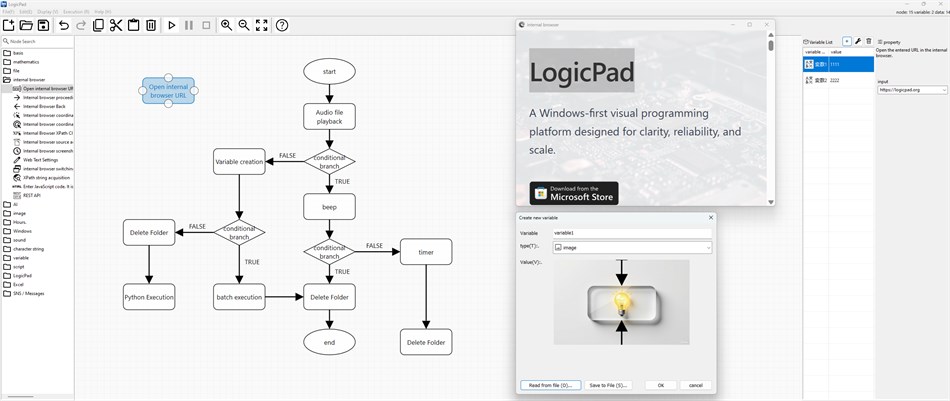
From the era of writing code in text to the era of intuitively constructing logic visually. LogicPad is a new generation visual programming tool that allows even those with no programming experience to intuitively build complex processes and algorithms like a flowchart.
Just drag and drop to place nodes and connect them with lines. Turn your ideas into visible logic. That's the basis of LogicPad.
◆ Why LogicPad?
◎ Easy no-code, yet advanced and high-speed operability
While many no-code tools emphasize "simplicity," LogicPad removes all limitations and does not compromise on "scalability," "computing power," "flexibility," and "robustness."
It supports not only basic conditional branching and repetitive processing, but also advanced mathematical functions. It is widely used in a variety of applications, from educational purposes to AI control logic design, simulation, and algorithm construction.
◎ Design logic with a flow chart feel
The greatest feature of LogicPad is that you can write logic as if you were drawing a flow chart. Each node has a clear role, such as "input," "processing," and "output," and by connecting them with lines (edges), you can intuitively design processing flows. During execution, you can visually grasp the flow of processing, and in the event of an error, the node is colored red, making debugging and improvement smooth.
◎ AI compatibility
LogicPad is designed with the expectation of integration with various AIs.
API integration with natural language processing AI such as ChatGPT, Gemini, and Claude
General-purpose OpenAI compatible AI model call node
◆ List of main features
Node-based process construction (drag & drop)
Supports conditional branching, repetition, variable definition, and functionization
Advanced mathematical functions (integer arithmetic, trigonometric functions, exponential functions, etc.)
Integration with external APIs (OpenAI, Google Cloud, etc.)
JSON-based data saving and loading
Script execution node (extendable with PowerShell, Windows batch, Python, PowerShell, Visual Basic, C#, etc.)
Multi-person collaboration (chat, email, file sharing, etc.)
Created logic can be shared in executable format (execution with arguments)
◆ Compatible AI/tools
LogicPad provides seamless integration with the following AI/tools.
ChatGPT / Claude / Gemini / Grok / DeepSeek: prompt design, text generation, summarization, etc.
Cloud Vision: image recognition
DALL-E 3 / Stable Diffusion / Luma: image generation flow automation
DeepL: text translation
◆ Useful in education and business
Ideal for educational purposes:
Since it allows you to visualize and learn the concepts of logic and algorithms, it is also ideal for basic programming education. More and more educational institutions are introducing it in mathematics and information classes.
Suitable for business purposes:
It can also be used to automate business flows, design prototypes for introducing AI, and create presentation materials. Since you can organize your logic while looking at the same screen as your team members, you can reduce discrepancies in your understanding.
About price:
Currently, LogicPad is developed by me, an individual. In the beta version, it was released free of charge, but we have changed it to a paid service in order to continue development in the future.
If the price is too high and you cannot pay it, please contact us by email address. We will continue to provide it free of charge to students, those involved in education, and those working in non-profit organizations, so please contact us by email address. Contact: contact@logicpad.org
◆ Recommended for
Those who want to start AI and automation with no code
Students and teachers interested in visualization of mathematics and logic
Developers who want to visually design and manage complex processes
Creative people who are not good at programming
Leaders who want to organize their thoughts and design business processes in teams
Turn your ideas into "working logic" right away.
LogicPad is for everyone who thinks.
Solve problems with AI while drawing flows.
Start your next-generation development experience that combines intuition and creativity with LogicPad now!
Andre platforme
| LogicPadWindows Store900 SølvDu er her | ▼Gratis |
Lige nu kun i denne butik.
Prishistorik
- Nuværende pris: Gratis
$9.99-100% - Minimum: ▼ Gratis
- Maksimum: $9.99
Overvåg priser Føj til en liste for at få besked om rabatter via e-mail eller push
Lister 0
0
- LogicPad
Point 1
-

- 13,968 Simon Chan
- +1

Ranglister 0
-
- Din bedømmelse

Kommentarer 0 ¡
Vær den første til at kommentere
Udvikler
- Kenji
- Følgere: 0
- Platforme: Windows Apps (16) Windows Spil (6)
- Tilbud: 1
- Lister: 0 + 1
- Point: 5 + 0 ¡
- Ranglister: 0
- Kommentarer: 0
- Videoer: 1
- RSS: Abonner
Nyheder
- Version: PC
- Sidst opdateret:
- LogicPad 0.0.0.86 Release Notes
✨ What's New & Improvements
1. Zero White Flash on Launch and Dialog Display
- Eliminated initial white flashes when launching the application in dark mode. The main window, canvas, and all docked palettes (Node Palette, Output Window, Variable List, Properties, Toolbar) now render seamlessly in dark colors from the very first frame.
- Applied WS_CLIPCHILDREN and WS_CLIPSIBLINGS, dark background brushes, optimized Direct2D initialization, and eliminated unneeded background erase cycles to deliver instant, smooth dark rendering.
- Resolved the momentary white flicker when opening the Property dialog and Node Input popup.
2. Custom Modern TaskDialog for Updates and Alerts
- Replaced legacy white Win32 message boxes with our custom dark-themed TaskDialog for update checks (latest version notification and update prompts) and error dialogs.
- Title bars, message surfaces, status icons, and action buttons now seamlessly match the system dark theme.
3. Polished Dark Mode Styling across All Palettes and Controls
- Refined colors and contrast across docking panes (CDockSystem), floating frames, scrollbars, and input controls for optimal readability and eye comfort in low-light environments.
Yderligere oplysninger
- Udgivelsesdato:
- Kategori:
Windows-apps›Udviklerværktøjer - Operativsystem:
PC - Størrelse:
41 Mb - Understøttede sprog:
Japanese - Indholdsklassificering:
EVERYONE - Windows Store Bedømmelse: ¡
0 - Websted:
 https://logicpad.org
AppAgg-score
900
Estimeret AppAgg-score for
LogicPad
Udvikler: Kenji
900 Sølv
En højere score afspejler som regel bedre resultater på de områder, AppAgg måler.
Baseret på: popularitet · brugervurderinger · aktualitet · tilbud · butiksdata · fællesskabsaktivitet
Genberegnes dagligt ud fra aktuelle AppAgg-data.
Badge til websites:  Kopieret!
Kort fortalt
LogicPad Kort webadresse: Kopieret!- Windows Store
På AppAgg kan du følge »LogicPad«, en app fra Kenji til Windows i kategorien Udviklerværktøjer. AppAgg-score: 900 (Sølv). Appens AppAgg-point — bekræftede: 1; indirekte: 0. Offentlige lister med appen: 0. Brugere, der har gemt den på private lister: 1. Brugerne på AppAgg har endnu ikke bedømt appen. Bekræftede point registrerer butiksbesøg fra brugere, der er logget ind på AppAgg. Indirekte point bygger på butiksdata. De to tællere viser antallet af offentlige lister og brugere, der har gemt appen eller spillet på private lister. Appen blev udgivet første gang . Appen blev senest opdateret . Appen er gratis i øjeblikket. Den laveste registrerede pris for appen var $0.00 (); den højeste var $9.99 (). Appen understøtter følgende sprog: Japanese. Se prishistorikken, føj appen til en liste, eller følg udvikleren. Følg kommende tilbud og opdateringer til appen via appens RSS-feed. AppAgg hoster eller distribuerer ikke denne app. Alle varemærker, logoer og skærmbilleder med tilknytning til appen tilhører deres respektive ejere.
Du vil måske også kunne lide
Seneste diskussioner
 AppLocalDub – Real-Time Game Dubbing Hello Kırtay Interactive, I am using LocalDub - Real-Time Game Dubbing. I would like to know if Hind...
  rashid game5
  AppNauticPlayer This app is absolute cinema. Honestly, it’s one of the best media players I’ve ever tried, and I’m s...
  Manuel16
  AppScreen Beings - Desktop Pet & Study Companion This is my app so I’m a little bias but as someone from the ADHD community that teaches ADHD and neu...
  Tarelle Irwin6
  AppAadi vault good it ia a encrypter and good you my work on office
  Aditya Rai5
  AppTyping 365 | Daily Typing Trainer The best typing app ever. With Typing 365 you don’t have to force yourself for couple minutes traini...
  Ahmad Mozaffar5
  AppZefir Calendar — Calendar in the Taskbar excelente app! Superando todas as espectativas!
  Diógenes Magnus5
  AppLockinRa LockinRa 리뷰 LockinRa는 작업 관리, 집중력 도구, AI 코칭을 하나의 데스크톱 앱으로 통합한 무료 Windows 생산성 프로그램입니다. 클라우드 동기화 없이 로컬 ...
  abhilok reddy6
  AppCN Vault I Love this app CN Vault is a user-friendly app that helps keep your passwords safe and secure. If y...
  Marjuk Amin5
