
Gemte
Vælg det navn, der skal vises i menuen Gemte.
Færdig!
| Udvikler: | Real Time Logic LLC (1) | ||
| Pris: | Gratis | ||
| Vurdering: | 570 Bronze | ||
| Rangeringer: | 0 | ||
| Kommentarer: | 0 Skriv kommentar | ||
| Lister: | 0 + 0 | ||
| Point: | 0 + 0 ¡ | ||
| +1 Point | |||
Beskrivelse

Mako Server is a compact, ready-to-run Lua application server for building web, content-management, IoT, and embedded-device applications on Windows.
This edition includes the Mako Developer Edition resource package with Xedge, LSP-Claw, FuguHub CMS, and local MQTT development tools.
FuguHub CMS
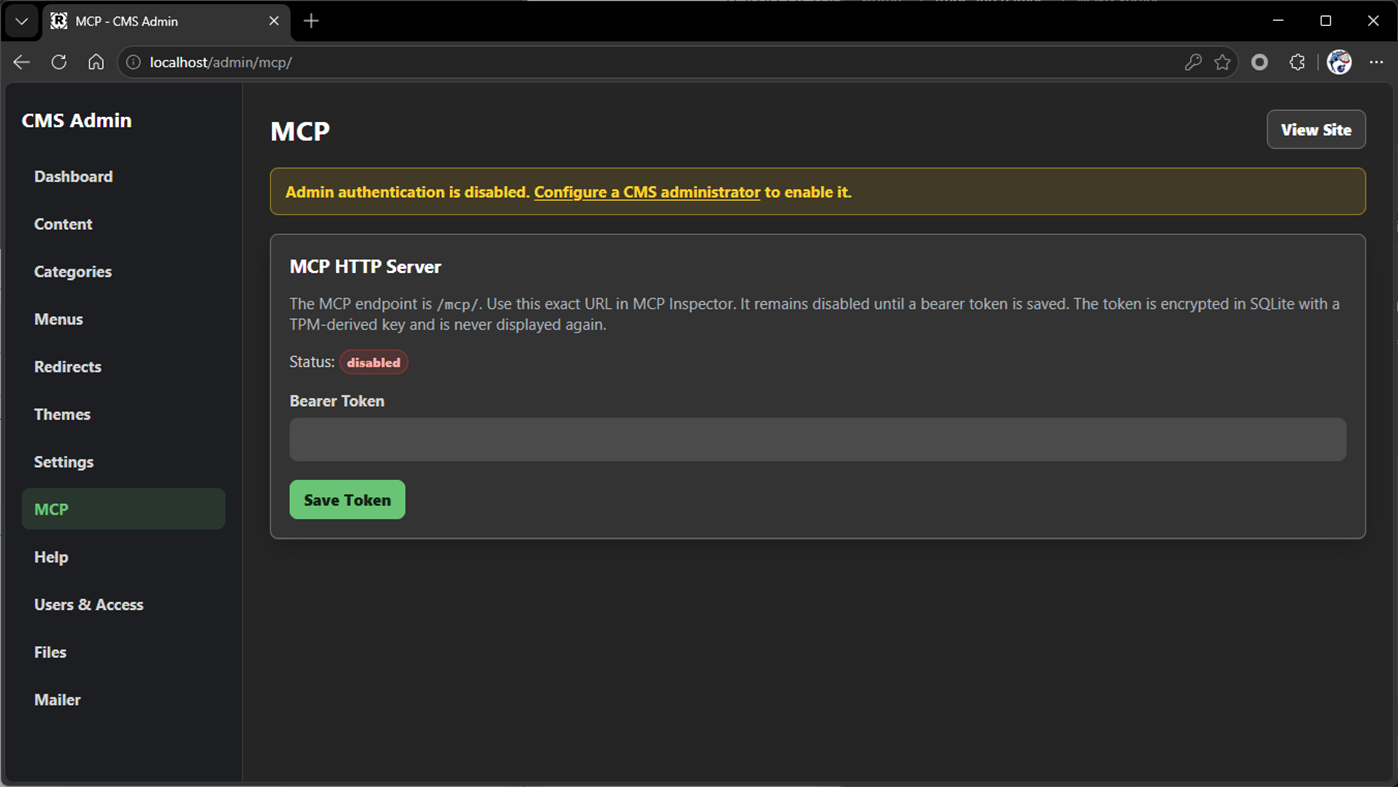
FuguHub is a compact content-management system and Lua web-application platform. It supports database-backed pages and posts, clean URLs, server-side Lua Server Pages (LSP), SQLite, themes, HTMX navigation, SMQ real-time events and messaging, optional plugins, and an authenticated Streamable HTTP MCP interface for AI-assisted administration.
Development Tools
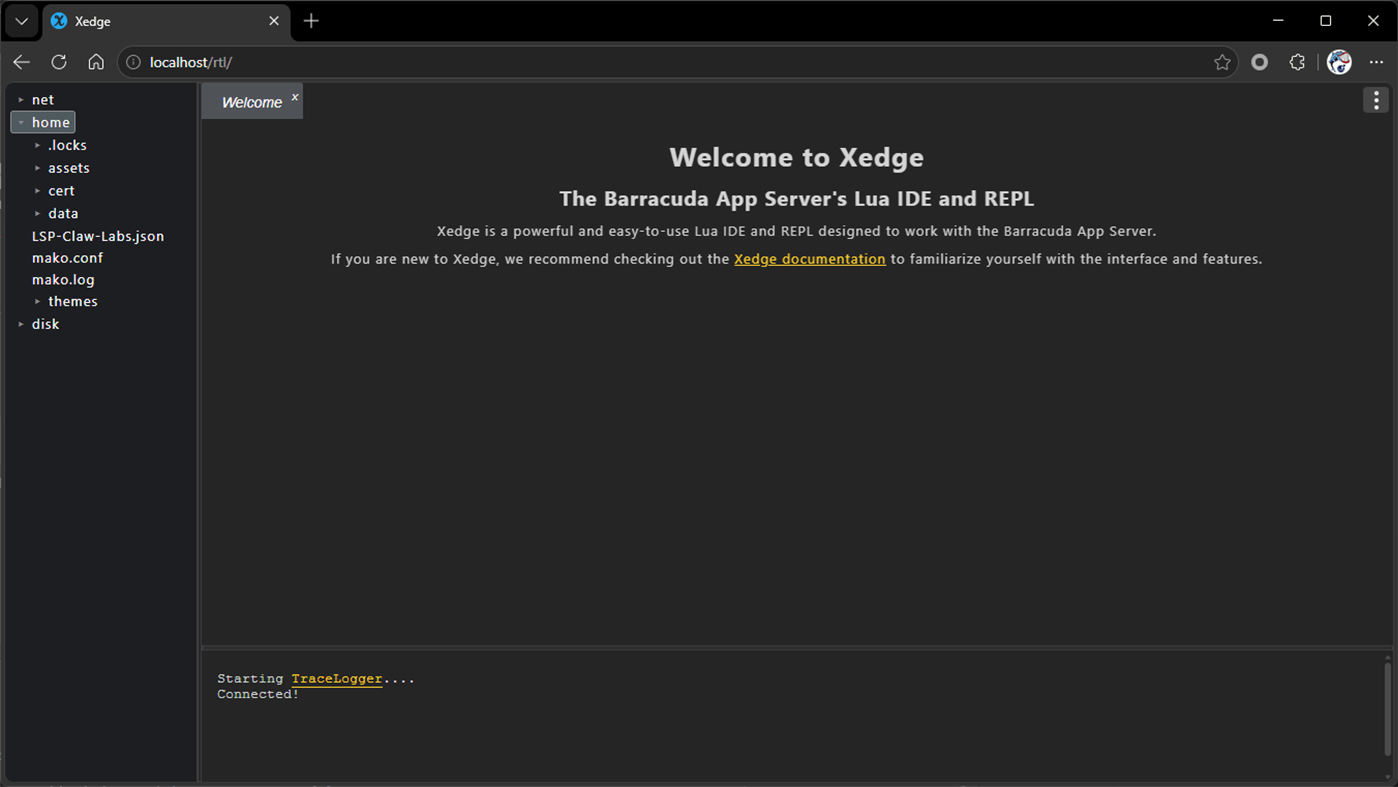
Use the browser-based Xedge IDE to create and manage Lua and Lua Server Pages applications.
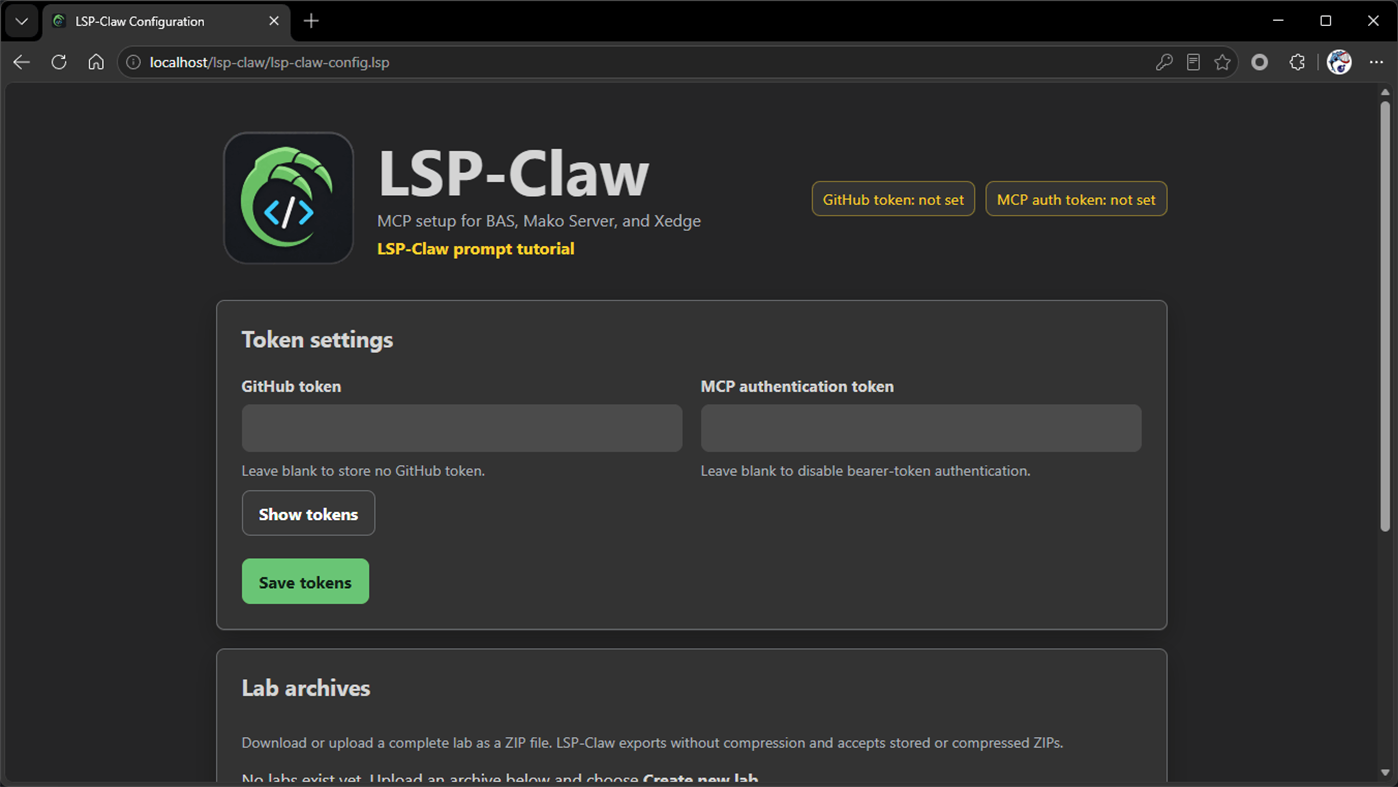
Use LSP-Claw as an MCP-enabled development environment for AI-assisted inspection, creation, testing, and debugging of Lua applications.
The included Lua MQTT broker supports local MQTT 3.1.1 and MQTT 5.0 development and experimentation.
Mako Server also provides REST and JSON APIs, WebSockets, TLS, SQLite, and integrated server APIs in a compact native runtime. By default, the Developer Edition interfaces are restricted to the local computer.
Getting Started
After starting Mako Server, open the following URLs in your browser:
FuguHub site: http://localhost/
FuguHub administration: http://localhost/admin/
Xedge IDE: http://localhost/rtl/
LSP-Claw: http://localhost/lsp-claw/
Mako Server is designed for content management, learning, prototyping, local application development, and preparing BAS, Mako Server, and Xedge applications for deployment to embedded and RTOS targets.
Documentation: https://makoserver.net/documentation/developer-package/
Security and Network Access
When Mako Server starts with the mako.zip Developer Edition, it binds exclusively to the loopback interface by default. The browser interfaces and MCP endpoints are therefore accessible only to applications and users running on the same computer.
To allow Mako Server to listen on other network interfaces, open the existing configuration file:
%USERPROFILE%\Documents\MakoServer\mako.conf
and add the following settings:
host=nil
sslhost=nil
This configures the server to listen on all available interfaces. Configure appropriate authentication and security controls before exposing the Developer Edition to another computer or network.
Initializing Credentials and MCP Access
On first startup, you can initialize the same administrator username and password and the same MCP bearer token for the included applications.
Open Command Prompt (CMD) and run:
mako -credentials username\:password -token XjTi57sCSQgHyUrPrMuL59GO7iauxjqn
Replace the example username, password, and token with private, unpredictable values. The value supplied to -token must be at least 16 bytes.
Note: This command imports the credentials into the embedded applications, each of which maintains its own authentication and authorization state. Existing credentials are not replaced. Imported secrets are protected using Mako Server’s TPM-derived encryption and are not transferable to another computer.
Installing Mako Server as a Windows Service
Mako Server can be installed as a Windows Service so that it starts automatically with Windows and runs in the background.
First, make sure Mako Server is not currently running. Then open Command Prompt (CMD) and run:
mako -installauto
Windows will request administrator privileges. Click Yes to allow the installation.
After installation, Mako Server runs as a background service and starts automatically when Windows starts.
To remove the Windows Service, run:
mako -remove
Important: Remove the Windows Service before uninstalling Mako Server.
Reklame
Skærmbilleder
Prishistorie
- Nuværende pris: Gratis
- Minimum: Gratis
- Maksimalt: Gratis
Overvåg priser Føj til en liste for at få besked om rabatter via e-mail eller push
AppAgg-vurdering
570
Estimeret AppAgg-vurdering for
Mako Server
Udvikler: Real Time Logic LLC
570 Bronze
Højere vurderinger betyder som regel stærkere signaler på AppAgg.
Baseret på: popularitet · brugervurderinger · aktualitet · tilbud · butiksdata · fællesskabsaktivitet
Genberegnes dagligt ud fra aktuelle AppAgg-data.
Kort webadresse: Kopieret!
Nyheder
- Version: PC
- Sidst opdateret:
Yderligere oplysninger
- Udgivelsesdato:
- Kategori:
Windows Apps›Udviklerværktøjer - Operativsystem:
PC - Størrelse:
2 Mb - Understøttet sprog:
English - Indholdsklassificering:
EVERYONE - Windows Store Bedømmelse:
0 - Websted:
 https://realtimelogic.com/
Udvikler
- Real Time Logic LLC
- Følgere: 0
- Platforme: Windows Apps (1)
- Rabatter: 0
- Lister: 0 + 0
- Point: 0 + 0 ¡
- Rangeringer: 0
- Kommentarer: 0
- Videoer: 0
- RSS: Abonner
Lister (0)
0
- Mako Server
Point (0)
0
Rangeringer (0)
0
Kommentarer (0)
Vær den første til at kommentere
Kort fortalt
Mako Server Kort webadresse: Kopieret!- Del
- Windows Store
«Mako Server». Platform: Windows. Kategori: Udviklerværktøjer. Udvikler: «Real Time Logic LLC». Første udgivelse: . Sidste opdatering: . Nuværende pris: gratis. Denne titel har endnu ikke modtaget vurderinger eller anmeldelser på AppAgg. Tilgængelige sprog: English. AppAgg sporer prishistorik, vurderinger og brugerfeedback for «Mako Server». AppAgg hoster ikke applikationer eller distribuerer software. Alle varemærker, logoer og skærmbilleder tilhører deres respektive ejere. Følg fremtidige rabatter og opdateringer via RSS
Lignende
-
- Server Creator
- Windows Apps: Udviklerværktøjer Ved: portwarp.com
- Gratis
- Lister: 0 0 0
- Point: 0 + 0 600 · Sølv Version: PC Server Creator makes it easy to create and manage your own game servers in just a few clicks. Launch servers for Minecraft (Java & Bedrock), FiveM, and other supported games without ...
- Ny
- Server Express
- Windows Apps: Udviklerværktøjer Ved: ZhouCheng
- Gratis
- Lister: 0 0 0
- Point: 0 + 0 500 · Bronze Version: PC An SFTP client for file management on remote servers
-
- SQL Server Description Editor
- Windows Apps: Udviklerværktøjer Ved: Eden Wu
- Gratis
- Lister: 0 0 0
- Point: 0 + 0 500 · Bronze Version: PC 1. The "Description" comment on Table or Field in SQL Server. 2. Can be exported into Excel file for easy editing, and import after the updated the Excel file. 3. Native mode app. ...
-
- Halo 5: Guardians Local Server
- Windows Apps: Udviklerværktøjer Ved: Microsoft Studios
- Gratis
- Lister: 0 + 1 0 0
- Point: 1 + 16 5K · Guld Version: PC REQUIRES HALO 5: GUARDIANS ON XBOX ONE. THIS IS A TOOL FOR HOSTING LOCAL MULTIPLAYER MATCHES AND DOES NOT CONTAIN ACTUAL GAME CONTENT Halo 5: Guardians Local Server provides a new way ...
-
- WebSocket Debug Tools: Client & Server
- Windows Apps: Udviklerværktøjer Ved: YH Software
- * Gratis
- Lister: 1 + 1 0 0
- Point: 1 + 0 1K · Sølv Version: PC This is a testing and debugging UWP app for WebSocket that helps you debug WebSocket connections! Both client and server debugger are included and you can view and copy detail message ...
-
- Personal DNS Server
- Windows Apps: Udviklerværktøjer Ved: Psalmsoft Solutions
- $3.34
- Lister: 0 0 0
- Point: 0 + 0 580 · Bronze Version: PC Take control of your network with Personal DNS Server a lightweight, privacy-focused DNS server that runs entirely on your Windows PC. No cloud services, no subscriptions, no data ...
-
- X410 - X Server for Windows
- Windows Apps: Udviklerværktøjer Ved: Choung Networks
- * Gratis
- Lister: 1 0 0
- Point: 0 + 24 7K · Guld Version: PC Do you want to seamlessly use Linux GUI apps side by side with Windows apps? Simply start X410 and adjust a few settings; your Linux GUI apps then suddenly appear in Windows and you ...
-
- Simple HTTP Server
- Windows Apps: Udviklerværktøjer Ved: Firefly
- Gratis
- Lister: 0 0 0
- Point: 0 + 15 570 · Bronze Version: PC A simple HTTP server application, it can let your device as a simple HTTP server.
-
- BanglaHost Local Web Server
- Windows Apps: Udviklerværktøjer Ved: IT Amadersomaj Inc
- Gratis
- Lister: 0 0 0
- Point: 0 + 0 1K · Sølv Version: PC BanglaHost Local Web Server is a modern, free, and open-source local development environment for Windows. It provides developers with everything needed to build, test, and manage web ...
- Ny
- MarcoDB Server
- Windows Apps: Udviklerværktøjer Ved: SoteroApps
- $6.19
- Lister: 0 0 0
- Point: 0 + 0 590 · Bronze Version: PC MarcoDB Enterprise Server is the native, high-performance database engine of the QOrigin ecosystem. Designed from the ground up for maximum security, resilience, and speed, MarcoDB ...
-
- Easy Web Server
- Windows Apps: Udviklerværktøjer Ved: ATGOX
- Gratis
- Lister: 2 0 0
- Point: 0 + 25 1K · Guld Version: PC Build your Web environment quickly A lightweight, fast and efficient tool that can quickly build a Web environment. FEATURES:Easy,Development,Fast,Mini,Light,Temp,Transfer
-
- Bluetooth LE Explorer
- Windows Apps: Udviklerværktøjer Ved: Microsoft Corporation
- Gratis
- Lister: 2 0 0
- Point: 4 + 30 6K · Guld Version: PC Bluetooth LE Explorer allows users to find and interrogate nearby Bluetooth LE devices, read their service and characteristics and write to them. It can also be used in server mode to ...
-
- SQLPro for MSSQL
- Windows Apps: Udviklerværktøjer Ved: Hankinsoft Development Inc
- * Gratis
- Lister: 0 0 0
- Point: 1 + 11 8K · Guld Version: PC SQLPro for MSSQL is a lightweight Microsoft SQL Server database client, allowing quick and simple access to MSSQL Servers, including those hosted via cloud services such as SQL Azure ...
-
- File Protect System-SE
- Windows Apps: Udviklerværktøjer Ved: Gatelink Ltd.
- * $123.99
- Lister: 0 5 (1) 0
- Point: 2 + 0 8K · Guld Version: PC DEFINITION A file protection system (FPS) is a professional file organizer that manages and protects digital data located on local, server, or external media. Protection includes ...

