
Segnalibri
| Sviluppatore: | Villi Development (2) | ||
| Prezzo: | $19.99 Novità | ||
| Punteggio: | 1100 Argento | ||
| Classifiche: | 0 | ||
| Commenti: | 0 Pubblica commento | ||
| Liste: | 0 0 | ||
| Punti: | 0 | ||
| +1 Punto | |||
In breve
Master Toolkit è un’app di Villi Development della categoria «Strumenti di sviluppo».
Nuova di zecca, è uscita . Profuma ancora di codice fresco.
$19.99. Mai in offerta su AppAgg, neanche una volta. Imposta un avviso di prezzo. Noi non ce ne dimentichiamo, anche se tu sì.
Il Microsoft Store è integrato in Windows, quindi si installa in un paio di clic.
Il suo Punteggio AppAgg è 1100. Livello Argento, e non è affatto male.
Solo 8 megabyte. Ci sta anche su un disco pieno zeppo.
Classificazione «EVERYONE»: va bene anche per i bambini.
Parla una sola lingua, e non è l’italiano.
L’hai usata? La tua recensione sarebbe la prima qui.
Lo sviluppatore ha 1 altra app su AppAgg. Vale la pena dare un’occhiata.
Vuoi sapere prima di tutti di offerte, aggiornamenti e nuove app? Imposta un avviso di prezzo, segui lo sviluppatore o iscriviti al feed RSS. Le notifiche push arrivano tramite l’app AppAgg Alerts per Android e iOS.
Altre piattaforme 0
 | Master ToolkitWindows Store1K ArgentoWindows | $19.99 |
Per ora solo in questo store.
Cronologia dei prezzi 0
- Prezzo attuale: $19.99
- Minimo: $19.99
- Massimo: $19.99
Il tuo feed personale nella home
Screenshot 8
Descrizione
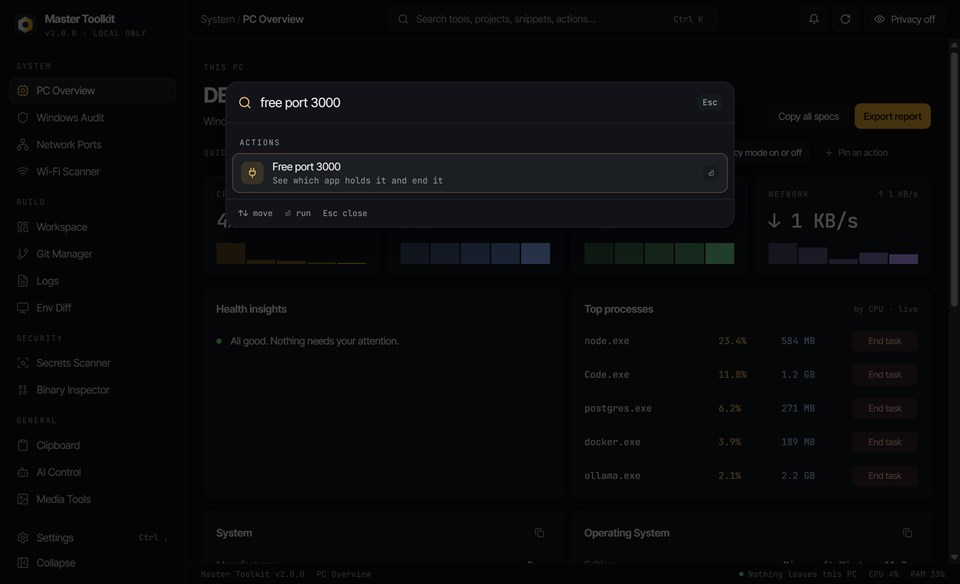
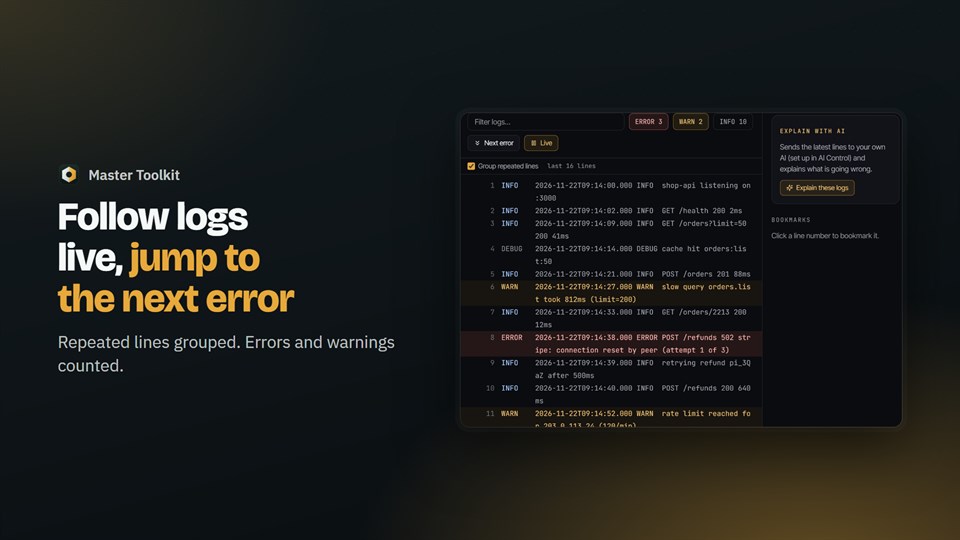
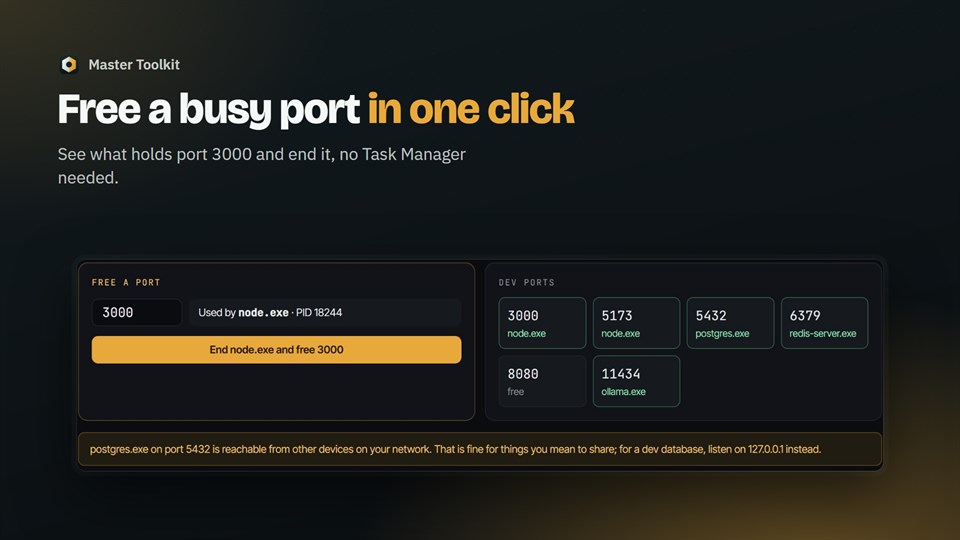
Use it to find what is holding port 3000 and free it, or to catch a key in a commit before you push. It can follow a log file and jump to the next error, and put your PATH back the way it was last week. Press Ctrl+K to open any tool or run an action from the keyboard.
What is inside:
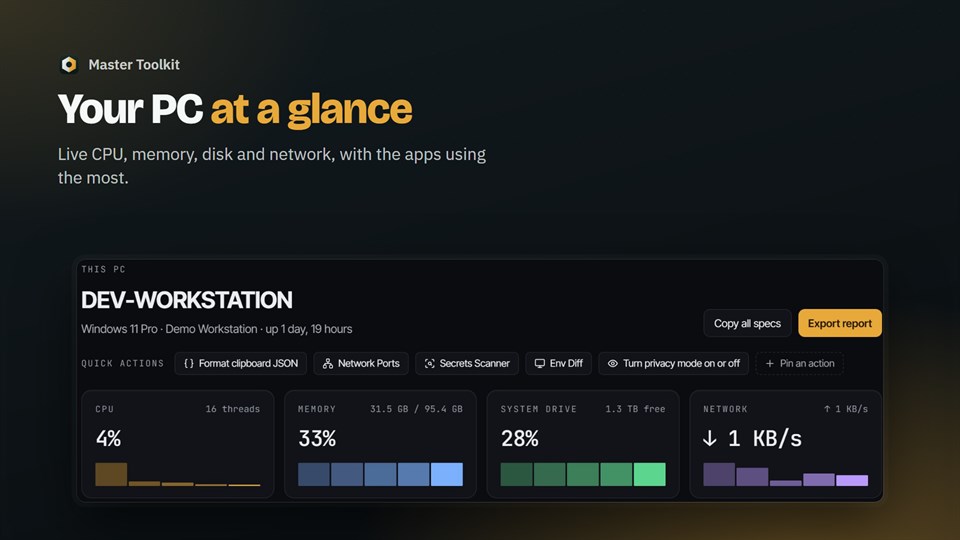
- PC Overview: live CPU, memory, disk and network, the apps using the most, and plain tips when something needs a look.
- Workspace: add a project folder and Master Toolkit detects the stack, runs its scripts with live output and checks its packages.
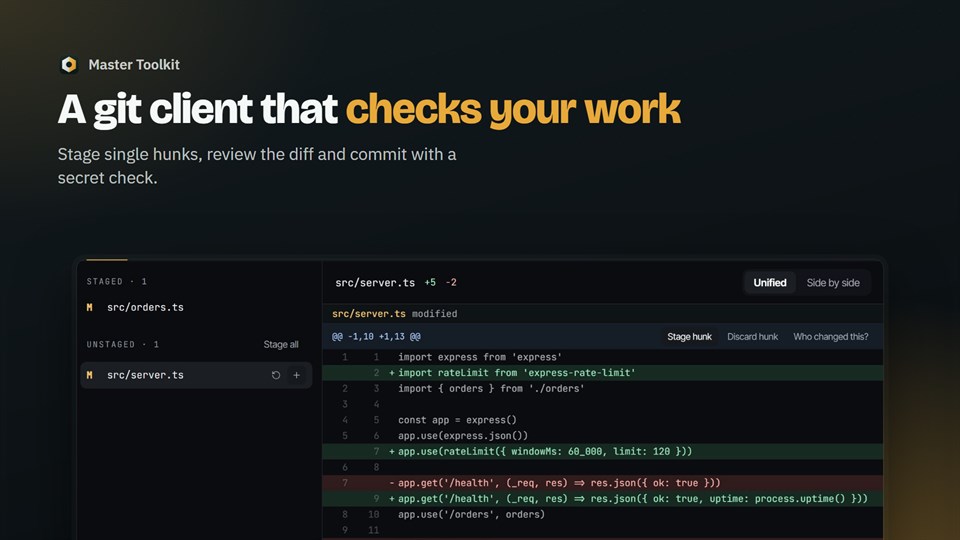
- Git Manager: stage single hunks, read blame and side-by-side diffs, undo the last commit and push. Every commit is checked for keys first.
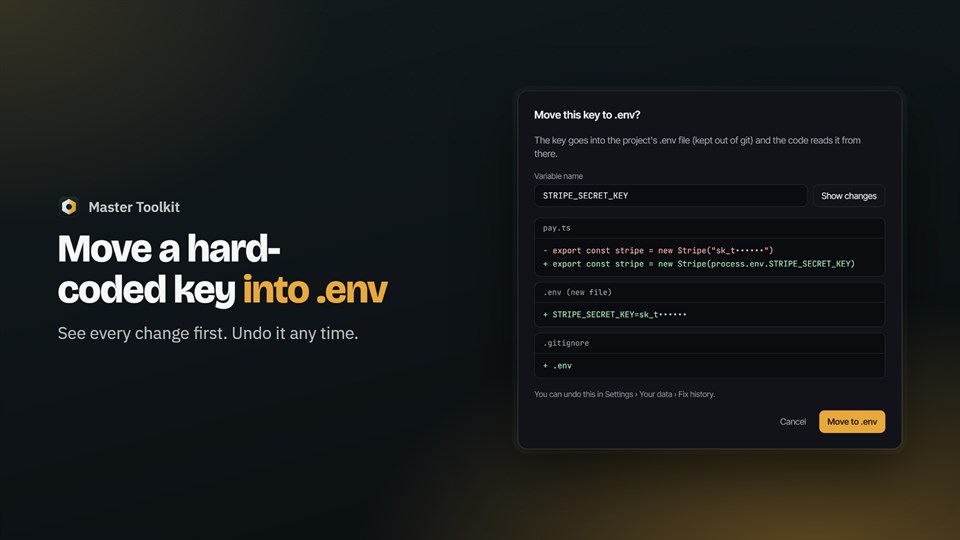
- Secrets Scanner: scan a project and its git history for keys and passwords. Move a hard-coded key into .env with a preview of every change, or block commits that contain secrets.
- Logs: follow files live, filter by level, jump to the next error, bookmark lines and read several files on one timeline.
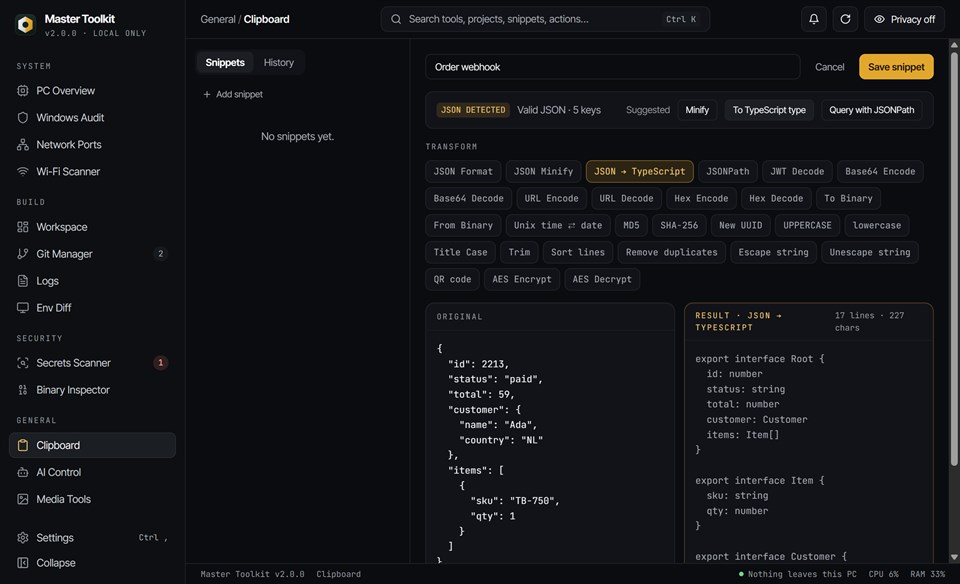
- Clipboard: history and snippets with JSON, JWT, Base64, hashing and QR tools. Quick paste (Ctrl+Shift+Alt+V) works in any app, skips password managers and clears copied keys after 2 minutes.
- Network Ports: see which app holds a port and free it in one click, with a warning when a dev database is open to your network.
- Windows Audit: a score you can track over time, with one-click fixes for simple problems.
- Env Diff: snapshots of PATH, variables and runtimes, and restore PATH from an earlier snapshot.
- AI Control: use a local model with Ollama or your own OpenAI or Anthropic key, with token estimates before you run.
- Binary Inspector: look inside any .exe or .dll and see the hash, architecture, sections, imports, exports and strings. Nothing is uploaded.
- Wi-Fi Scanner: nearby networks with channel crowding, a connection test, and share a network as a QR code.
- Media Tools: batch convert images, build .ico files, read or edit EXIF data and remove location data from photos.
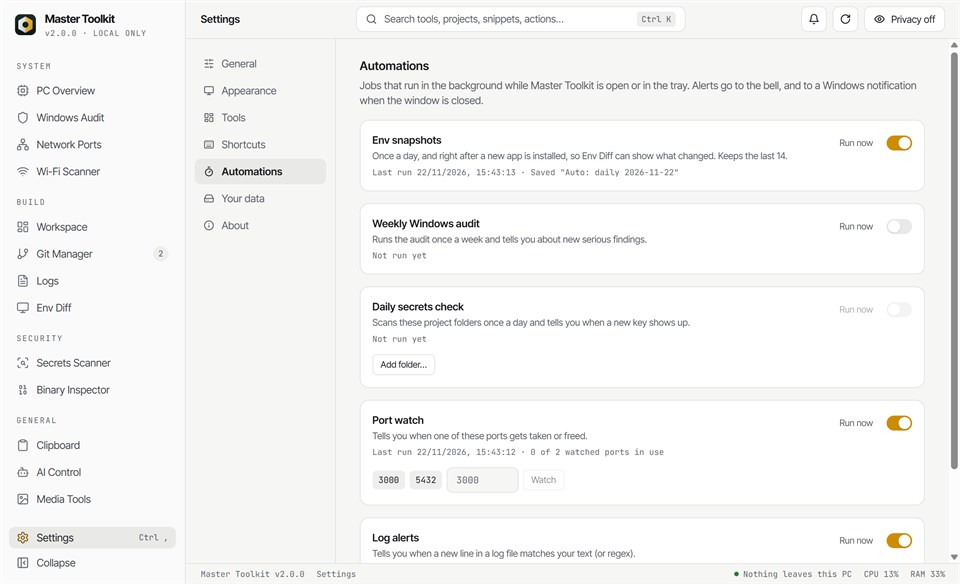
Automations run checks for you: daily env snapshots, port watch, log alerts, a weekly Windows audit and a daily secrets check. Changes Master Toolkit makes to Windows are always shown first and can be undone from Settings.
Your data stays on your PC. There is no account, no analytics and no tracking. Only a few optional features go online: AI with your own key, the outdated packages check and the Wi-Fi connection test. Keys are kept in Windows Credential Manager.
Built for Windows 10 and 11, with light and dark themes that follow Windows, accent colours, a compact mode, custom shortcuts, and a privacy mode that hides your PC name and IP addresses when you share your screen. Back up all your settings and data in one file.
Buy it once. No subscription.
Dallo sviluppatore
Liste 0
-
 Master Toolkit
Punti 0
-

- +1 Punto

Classifiche 0
-
- La tua valutazione
Sviluppatore 2
- Villi Development
- Follower: 0
- Piattaforme: Windows App (2)
- Offerte: 0
- Liste: 0 0
- Punti: 0
- Classifiche: 0
- Commenti: 0
- Video: 0
- RSS: Iscriviti
Novità
- Versione: PC
- Ultimo aggiornamento:
- Master Toolkit 2.0 is a free update with a new design and new features in every tool.
- New design: a cleaner sidebar, a status bar, accent colours and a compact mode. It follows the Windows light or dark theme.
- Command palette (Ctrl+K) to jump to any tool or run an action, for example "free port 3000".
- PC Overview shows live CPU, memory, disk and network, the heaviest apps, and plain tips.
- Git Manager can stage single hunks, show blame and side-by-side diffs, undo the last commit, push, and check for keys before you commit.
- Secrets Scanner can scan git history, move a key into .env for you, and stop commits that contain secrets.
- Logs follow files live, with level filters, jump to next error, bookmarks and one timeline for several files.
- Network Ports frees a busy port in one click and warns about ports open to your network.
- Windows Audit gives a score, tracks it over time, and fixes simple problems with one click. Every change can be undone.
- Quick paste (Ctrl+Shift+Alt+V) brings your clipboard history and snippets to any app. Password managers are skipped and copied keys are cleared after 2 minutes.
- Automations: daily env snapshots, port watch, log alerts, a weekly audit and a daily secrets check.
- Back up and restore all your settings and data in one file.
Your data still stays on your PC, and there is still no account or tracking.
Informazioni aggiuntive
- Data di uscita:
- Categoria:
App per Windows›Strumenti di sviluppo - Sistemi operativi:
PC - Dimensioni:
8 Mb - Lingue supportate:
Inglese - Classificazione contenuti:
EVERYONE - Windows Store Valutazione: ¡
0 - Sito web:
 https://villi.dev
Punteggio AppAgg
Punteggio AppAgg stimato per
Master Toolkit
Sviluppatore: Villi Development
Un punteggio più alto riflette in genere risultati migliori negli indicatori di AppAgg.
Basato su: popolarità · valutazioni degli utenti · freschezza · offerte · dati degli store · attività della community
Ricalcolato ogni giorno con dati AppAgg aggiornati.
Commenti 0 ¡
Condividi
Master Toolkit URL breve: Copiato!- Windows Store

