
Bogmærker
| Udvikler: | MegaStation Ltd (2) | ||
| Pris: | Gratis | ||
| Score: | 580 Bronze | ||
| Ranglister: | 0 | ||
| Kommentarer: | 0 Skriv kommentar | ||
| Lister: | 0 0 | ||
| Point: | 0 | ||
| +1 Point | |||
Kort fortalt
Mega Code er en app fra MegaStation Ltd i kategorien »Udviklerværktøjer«.
Udkom og er stadig ret frisk.
Gratis: ingen reklamer og ingen køb i appen. Kun dig og appen.
Microsoft Store er bygget ind i Windows, så installationen klares med et par klik.
AppAgg-scoren er 580. Bronze indtil videre, med masser af plads til at vokse.
Aldersgrænse »TEEN«: for teenagere og opefter.
Kan 2 sprog, men dansk er ikke blandt dem endnu.
Har du brugt den? Din anmeldelse bliver den første her.
Udvikleren har yderligere 1 app på AppAgg. Tag et kig.
Vil du høre om opdateringer og nye apps først? Følg udvikleren eller abonner på vores RSS-feed. Push-beskeder kommer via appen AppAgg Alerts til Android og iOS.
Skærmbilleder 1
Andre platforme 0
Prishistorik 0
- Nuværende pris: Gratis
- Minimum: Gratis
- Maksimum: Gratis
Dit eget feed på forsiden
Beskrivelse

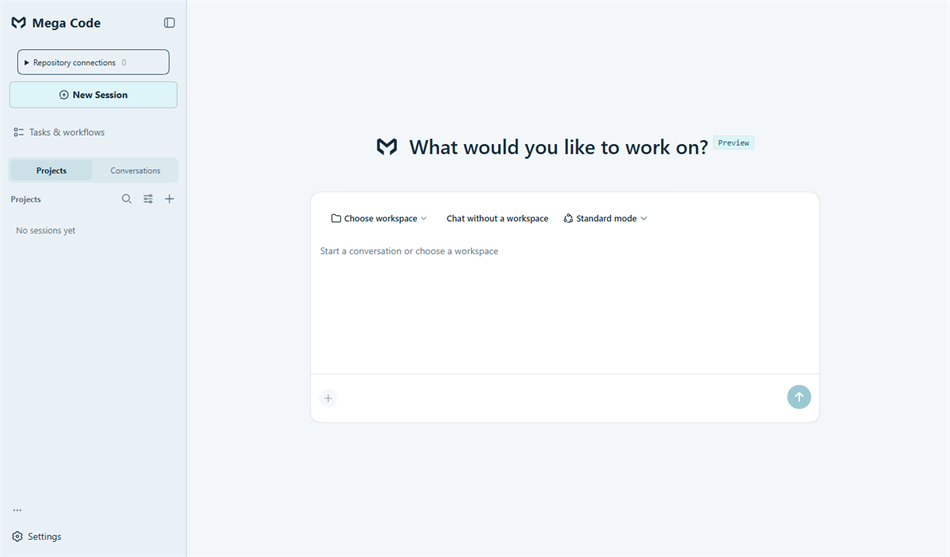
Mega Code is a desktop AI coding workspace from MegaStation Ltd. Start a conversation without a project, or open a local workspace to explore code, edit files and run development tasks.
Choose and configure your own model providers. Supported connections include OpenAI Codex, Claude through the official Claude Code tool, Google, NVIDIA, Z.ai and local or remote Ollama servers. Availability depends on the provider, your account and installed tools. Provider subscriptions, API charges and usage limits are separate from the Microsoft Store download.
Organize work with standard and delegation modes, model routes and subagents. Connect supported GitHub, Azure DevOps and MegaGit repositories to retrieve projects and synchronize changes. Optional Google Drive and device synchronization require your own connected accounts and configuration.
The interface supports Arabic with right-to-left layouts and English. The installer starts with a fresh profile: it contains no developer accounts, provider API keys, personal conversations or private projects. Sign in to Mega Code, then connect only the optional services you choose to use.
AI responses and generated changes can be incorrect. Review code and terminal actions before using them. Local tools may read and modify files in your workspace or run commands with your permission. Internet access and a configured model connection are needed for hosted AI features; Ollama requires a running, compatible server and available model.
Mega Code is a customized desktop build based on DeepSeek Harness. This is an early release; some integrations depend on external services.
Fra udvikleren
Udvikler
- MegaStation Ltd
- Følgere: 0
- Platforme: Windows Apps (2)
- Tilbud: 0
- Lister: 0 0
- Point: 0
- Ranglister: 0
- Kommentarer: 0
- Videoer: 0
- RSS: Abonner
Lister 0
-
 Mega Code
Point 0
-

- +1 Point

Ranglister 0
-
- Din bedømmelse
Nyheder
- Version: PC
- Sidst opdateret:
- 3.0.3: Secure account sign-in and device approval, OS-protected remembered application login, administrator-authorized local offline-owner access, and device management. Includes conversation synchronization and project/service/session folders. Existing local account and project data is retained when updating; no saved customer accounts, provider keys or personal projects are included in the package.
Yderligere oplysninger
- Udgivelsesdato:
- Kategori:
Windows-apps›Udviklerværktøjer - Operativsystem:
PC - Størrelse:
356 Mb - Understøttede sprog:
Arabisk,Engelsk - Indholdsklassificering:
TEEN - Windows Store Bedømmelse: ¡
0 - Websted:
 https://megastation.uk/
Kommentarer 0 ¡
AppAgg-score
Estimeret AppAgg-score for
Mega Code
Udvikler: MegaStation Ltd
En højere score afspejler som regel bedre resultater på de områder, AppAgg måler.
Baseret på: popularitet · brugervurderinger · aktualitet · tilbud · butiksdata · fællesskabsaktivitet
Genberegnes dagligt ud fra aktuelle AppAgg-data.
Mega Code Kort webadresse: Kopieret!- Windows Store

