
Закладки
| Разработчик: | MegaStation Ltd (2) | ||
| Цена: | Бесплатно | ||
| Оценка: | 580 Бронза | ||
| Рейтинги: | 0 | ||
| Комментарии: | 0 Оставить комментарий | ||
| Списки: | 0 0 | ||
| Очки: | 0 | ||
| +1 Очко | |||
Кратко
Это Mega Code, приложение от MegaStation Ltd из раздела «Средства разработчика».
Вышло , ещё вполне свежее.
Бесплатно: ни рекламы, ни встроенных покупок. Только вы и приложение.
Microsoft Store встроен в Windows, так что ставится в пару кликов.
Оценка AppAgg: 580. Пока «Бронза», но всё впереди.
Возрастной рейтинг «TEEN»: для подростков и старше.
Знает 2 языка, но русский пока не выучило.
Пользовались? Ваш отзыв будет здесь первым.
У этого разработчика на AppAgg ещё 1 приложение. Загляните.
Хотите первым узнавать об обновлениях и новых приложениях? Подпишитесь на разработчика или на RSS-канал. Push приходят в приложении AppAgg Alerts для Android и iOS.
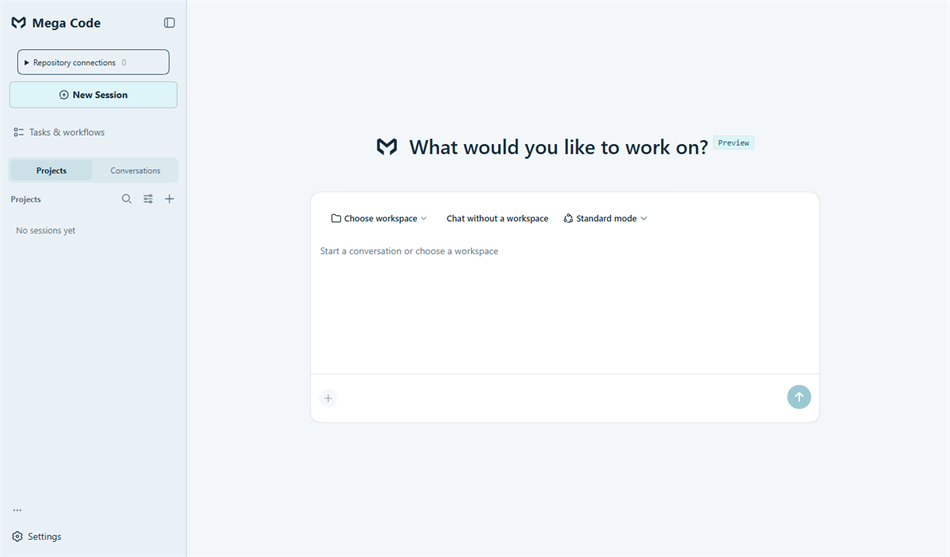
Скриншоты 1
Другие платформы 0
История цен 0
- Текущая цена: Бесплатно
- Минимум: Бесплатно
- Максимум: Бесплатно
Своя лента на главной
Описание

Mega Code is a desktop AI coding workspace from MegaStation Ltd. Start a conversation without a project, or open a local workspace to explore code, edit files and run development tasks.
Choose and configure your own model providers. Supported connections include OpenAI Codex, Claude through the official Claude Code tool, Google, NVIDIA, Z.ai and local or remote Ollama servers. Availability depends on the provider, your account and installed tools. Provider subscriptions, API charges and usage limits are separate from the Microsoft Store download.
Organize work with standard and delegation modes, model routes and subagents. Connect supported GitHub, Azure DevOps and MegaGit repositories to retrieve projects and synchronize changes. Optional Google Drive and device synchronization require your own connected accounts and configuration.
The interface supports Arabic with right-to-left layouts and English. The installer starts with a fresh profile: it contains no developer accounts, provider API keys, personal conversations or private projects. Sign in to Mega Code, then connect only the optional services you choose to use.
AI responses and generated changes can be incorrect. Review code and terminal actions before using them. Local tools may read and modify files in your workspace or run commands with your permission. Internet access and a configured model connection are needed for hosted AI features; Ollama requires a running, compatible server and available model.
Mega Code is a customized desktop build based on DeepSeek Harness. This is an early release; some integrations depend on external services.
От разработчика
Разработчик
- MegaStation Ltd
- Подписчики: 0
- Платформы: Windows Приложения (2)
- Скидки: 0
- Списки: 0 0
- Очки: 0
- Рейтинги: 0
- Комментарии: 0
- Видео: 0
- RSS: Подписаться
Списки 0
-
 Mega Code
Очки 0
-

- +1 Очко

Рейтинги 0
-
- Ваша оценка
Что нового
- Версия: PC
- Последнее обновление:
- 3.0.3: Secure account sign-in and device approval, OS-protected remembered application login, administrator-authorized local offline-owner access, and device management. Includes conversation synchronization and project/service/session folders. Existing local account and project data is retained when updating; no saved customer accounts, provider keys or personal projects are included in the package.
Дополнительная информация
- Дата выпуска:
- Категория:
Приложения для Windows›Средства разработчика - Операционные системы:
PC - Размер:
356 Mb - Поддерживаемые языки:
Английский,Арабский - Возрастные ограничения:
TEEN - Windows Store Рейтинг: ¡
0 - Сайт:
 https://megastation.uk/
Комментарии 0 ¡
Оценка AppAgg
Примерная оценка AppAgg для
Mega Code
Разработчик: MegaStation Ltd
Более высокая оценка обычно означает лучшие результаты по показателям AppAgg.
На основе: популярности · оценок пользователей · актуальности · скидок · данных магазинов · активности сообщества
Пересчитывается ежедневно на основе актуальных данных AppAgg.
Mega Code Короткий URL: Скопировано!- Windows Store

