
Lesezeichen
Wähle einen Titel für dieses Lesezeichen.
Lesezeichen gespeichert
| Entwickler: | Golden Eagle Studio (7) | ||
| Preis: | * Kostenlos Neu | ||
| Score: | 910 Silber | ||
| Ranglisten: | 0 | ||
| Kommentare: | 0 Kommentar posten | ||
| Listen: | 0 + 0 | ||
| Punkte: | 0 + 0 ¡ | ||
| +1 Punkt | |||
Dein eigener Feed auf der Startseite ¡
Wähle Plattformen für die Liste „Neu & aktualisiert“, und auf der Startseite erscheinen nur die Apps und Spiele, die du brauchst.
Screenshots 6
Werbung
Beschreibung

✨ **Write Smarter. Code Faster. Stay in Flow!** ✨
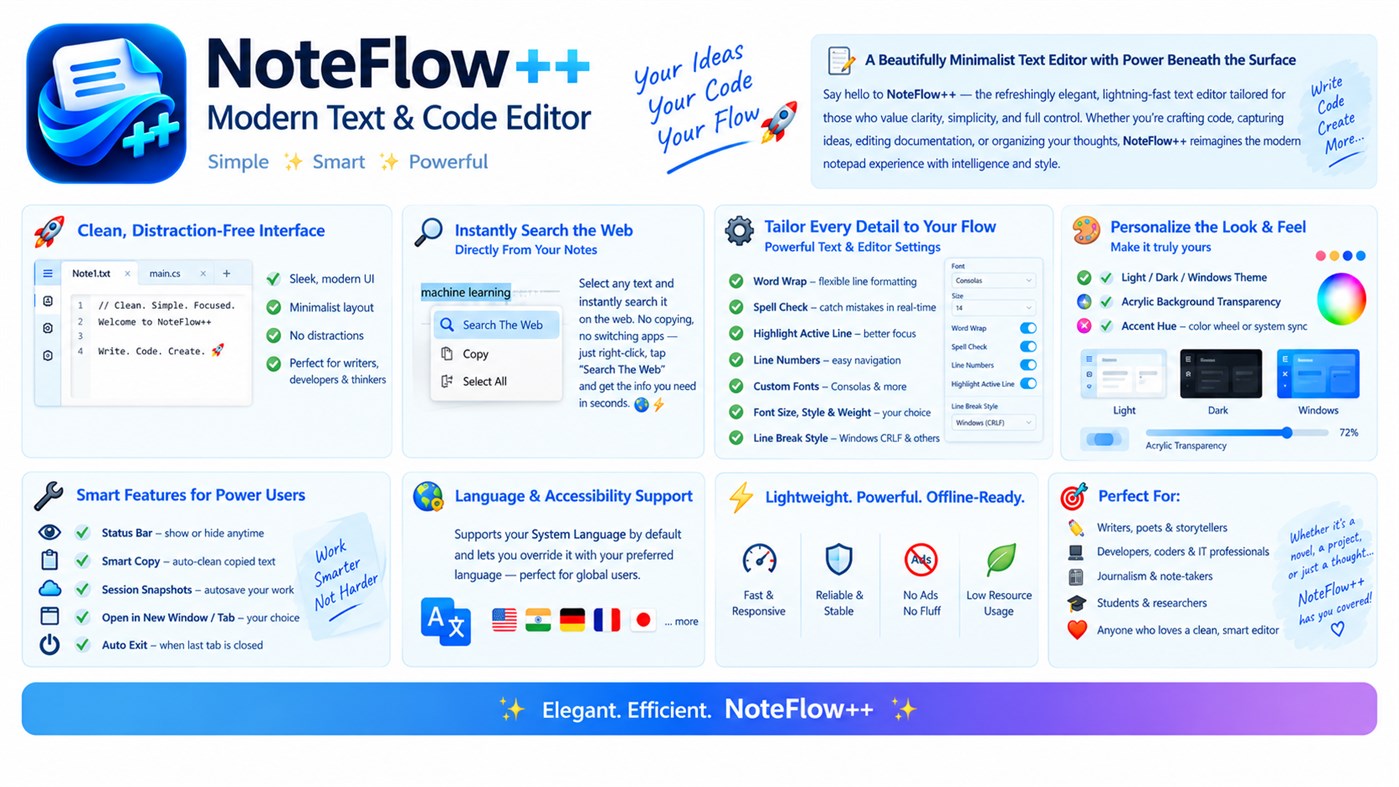
Welcome to **NoteFlow++**, your modern, lightweight, and customizable text editor designed for productivity, creativity, and focus! 💻⚡ Whether you're writing notes, editing code, creating documentation, capturing ideas, or managing text files, NoteFlow++ gives you a clean, comfortable workspace with powerful features beneath the surface. 🎯📝
## 🚀 ✨ Clean, Modern & Distraction-Free Interface
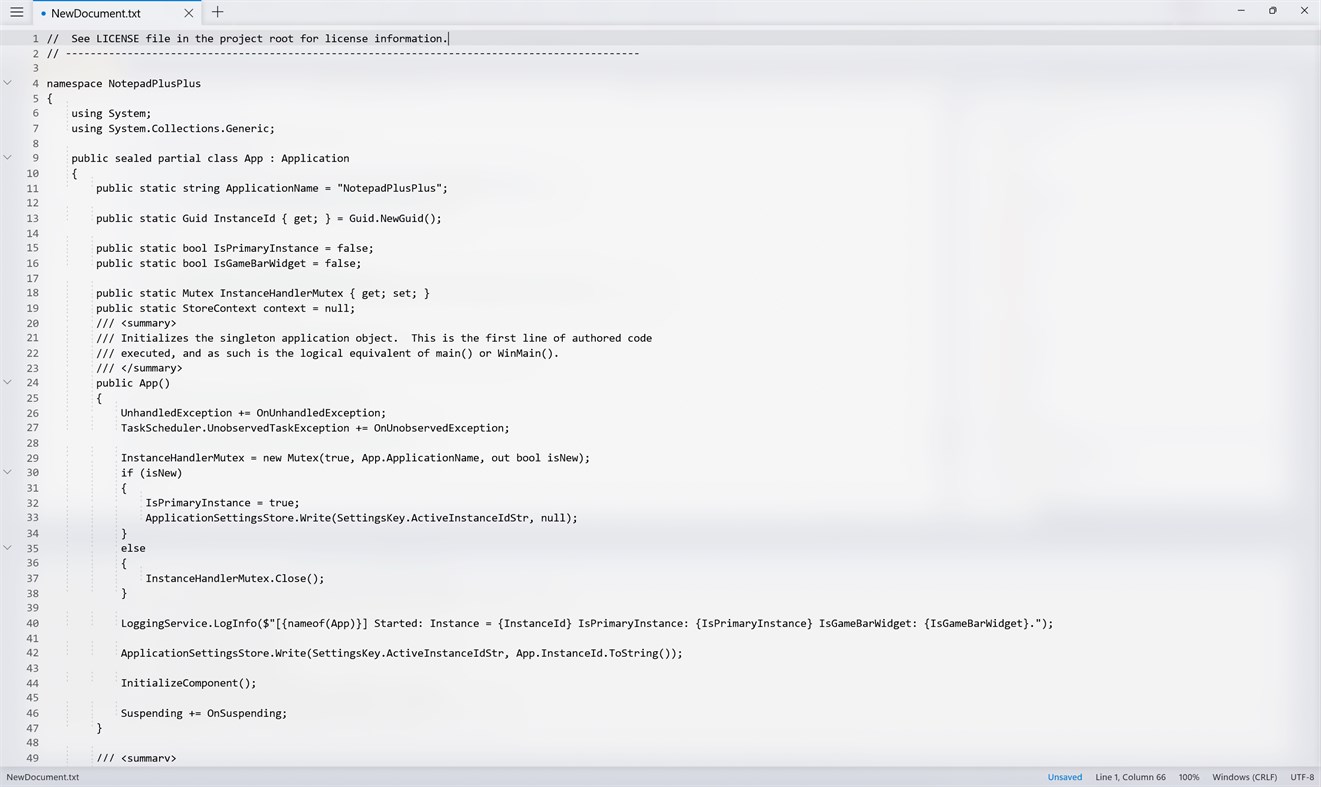
Enjoy a sleek, minimalist interface that keeps your content front and center. 🖥️💙 With a modern layout and convenient tabbed documents, you can focus on what matters most without unnecessary clutter.
✅ Clean and elegant user interface
✅ Work with multiple documents using tabs 📑
✅ Smooth and responsive editing experience ⚡
✅ A comfortable workspace for writing and coding 💻
## 🔍 🌐 Search the Web Directly From Your Text
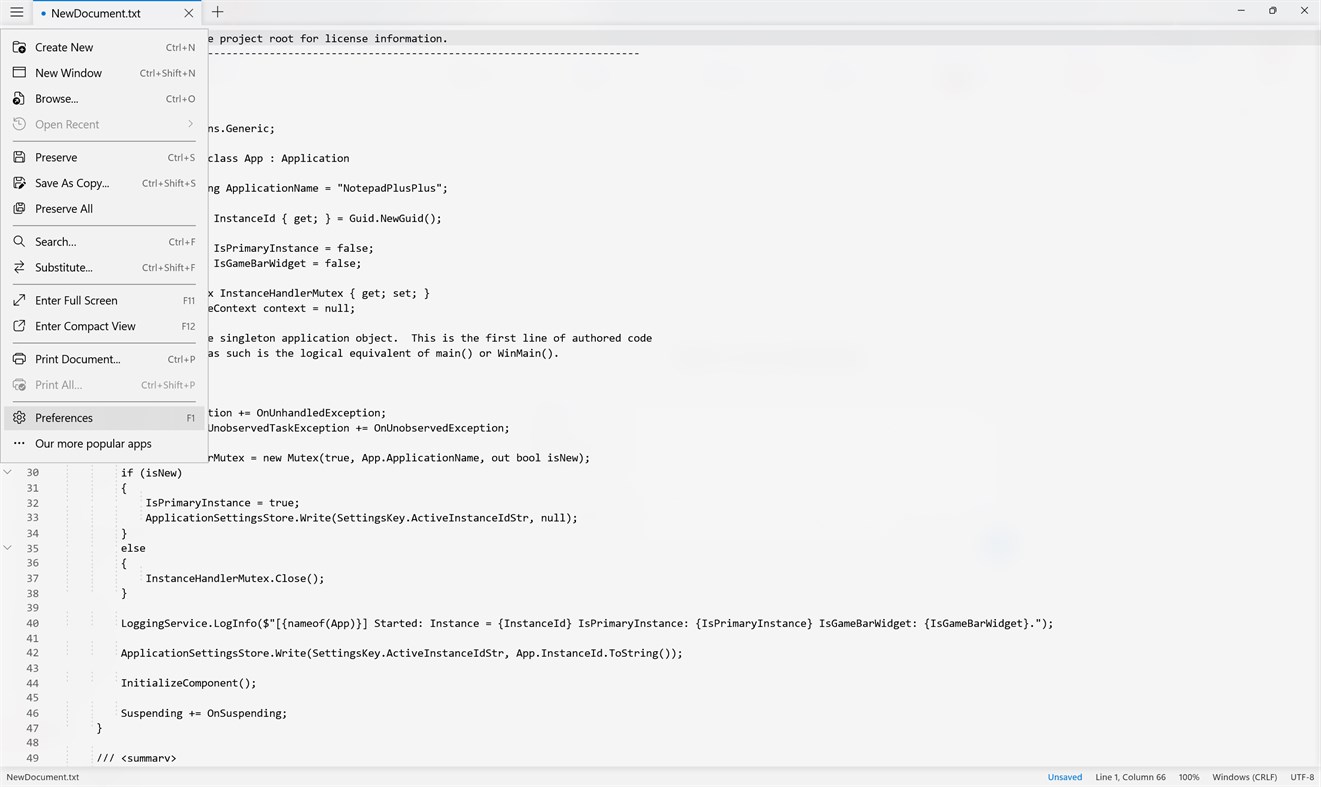
Need to check a word, explore a topic, or find technical documentation? 🌍 Simply select text and choose **“Search The Web”** from the right-click menu to look it up instantly!
🚀 Search selected text in seconds
📚 Explore information and documentation
⚡ Save time without manually copying and pasting
## ⚙️ 🛠️ Powerful Text & Editor Settings
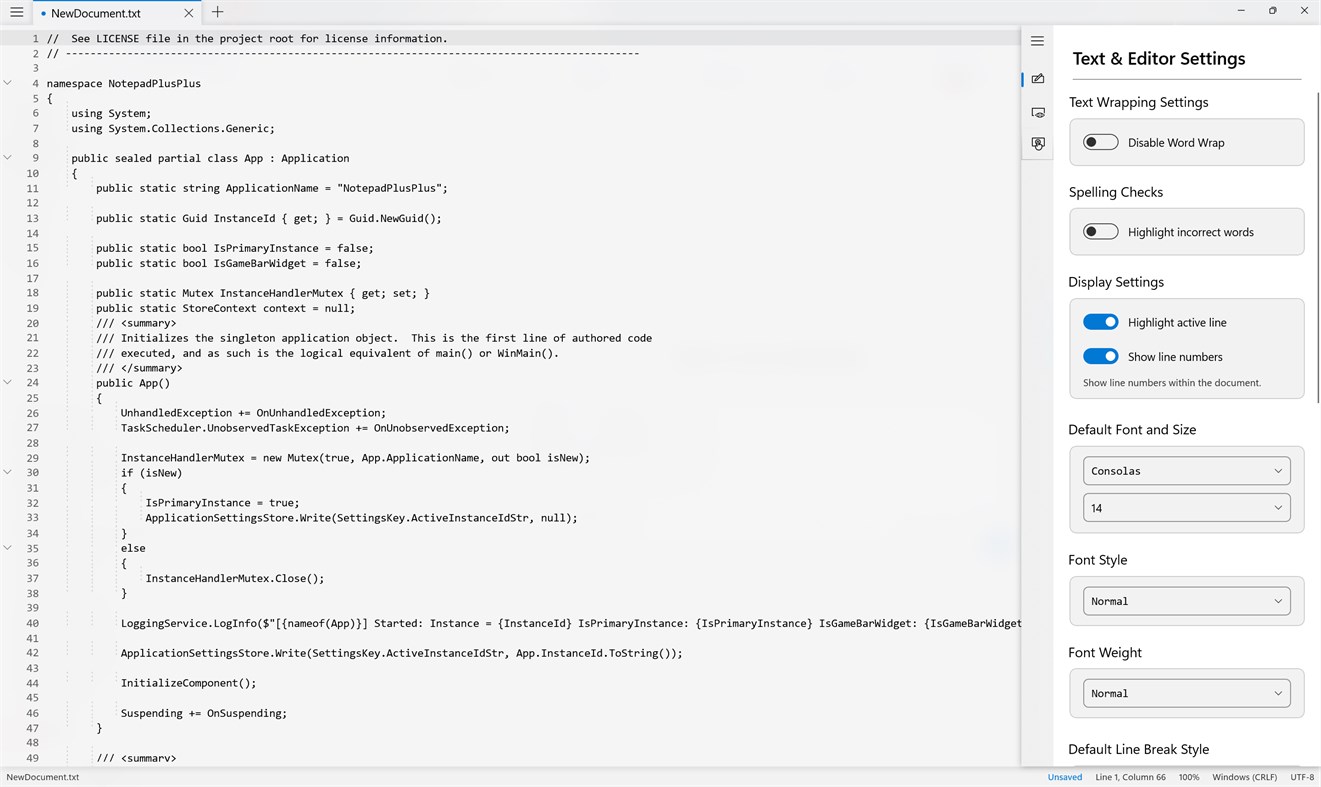
Customize your editing experience to match your workflow! 🎛️ NoteFlow++ gives you control over essential tools and text formatting.
🔹 **Word Wrap** — Keep long lines readable with flexible wrapping.
🔹 **Spell Check** — Highlight spelling mistakes while you write.
🔹 **Active Line Highlighting** — Keep your current editing position in focus.
🔹 **Line Numbers** — Navigate and reference lines easily.
🔹 **Custom Fonts** — Choose Consolas and other available fonts.
🔹 **Font Size, Style & Weight** — Adjust text to your preference.
🔹 **Line Break Settings** — Choose Windows CRLF and other supported line-ending styles.
## 🎨 🌈 Make Your Editor Your Own
Give your workspace a personal touch with flexible appearance settings! 💎
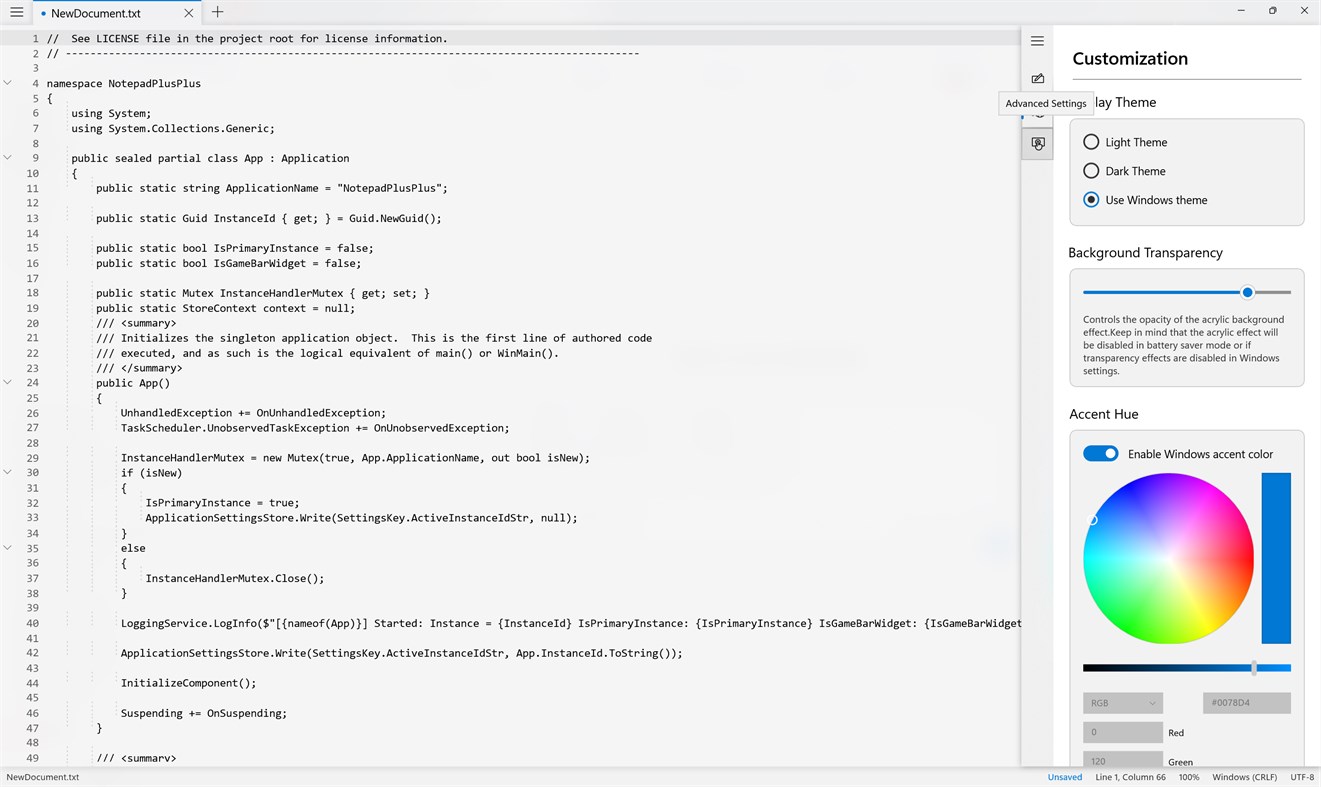
🌞 **Light Theme** — Bright, clean, and comfortable.
🌙 **Dark Theme** — A sleek look for low-light environments.
🪟 **Windows Theme** — Follow your system's appearance.
✨ **Acrylic Transparency** — Adjust the glass-inspired background effect.
🎨 **Accent Colors** — Choose a vibrant color or use your Windows accent color.
Create an editor that feels uniquely yours! 💙💜
## 🔧 🚀 Smart Features for Everyday Productivity
NoteFlow++ includes practical tools that help you work more efficiently and customize your document workflow.
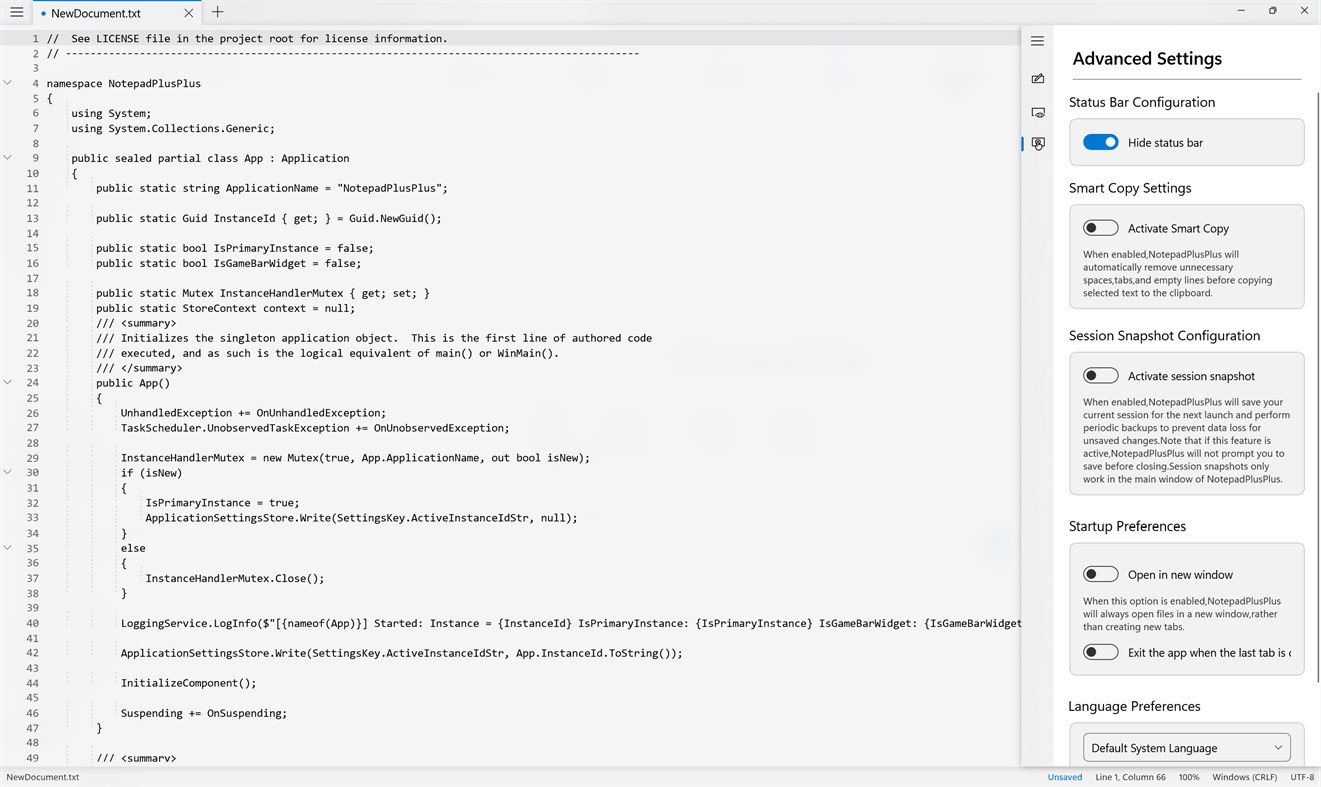
📊 **Customizable Status Bar** — Show or hide the status bar to suit your workspace.
📋 **Smart Copy** — Automatically clean unnecessary spaces, tabs, and empty lines when copying selected text.
💾 **Session Snapshots** — Save session information to help preserve your work between launches.
🗂️ **Flexible Document Opening** — Choose whether files open in new windows or tabs.
🔄 **Startup Preferences** — Customize how the editor behaves when launching and closing.
⚡ **Auto Exit Option** — Choose whether the app closes when the last tab is closed.
## 🌍 🗣️ Language & Accessibility Preferences
Make NoteFlow++ comfortable for your preferred language and workflow. 🌐 The editor can use your system language by default and offers language preferences where supported.
## ⚡ 💙 Lightweight, Responsive & Productivity-Focused
Why settle for a cluttered editor when you can keep things simple? NoteFlow++ focuses on a streamlined editing experience with useful customization options.
🚀 Fast and responsive text editing
🎯 A clean workspace for focused work
🎨 Personalized themes and appearance
🛠️ Practical tools for everyday editing
💻 Designed for Windows productivity
## 🎯 👨💻 Who Is NoteFlow++ For?
📝 **Writers & Bloggers** — Capture ideas, draft content, and edit text.
💻 **Developers & Programmers** — Work with source code and technical text.
🎓 **Students & Researchers** — Organize notes and prepare documentation.
📚 **Professionals** — Edit text files and manage written information.
💡 **Everyday Users** — Enjoy a modern alternative to a basic notepad.
## 🌟 Your Ideas. Your Code. Your Flow.
From quick notes and everyday writing to code snippets and technical documentation, **NoteFlow++ — Advanced Text & Code Editor** gives you a flexible workspace to write, edit, customize, and create. 📝💻✨
🔥 **Simple. Smart. Powerful.**
🚀 **Download NoteFlow++ and make every line count!** 💙
Vom Entwickler ¡
Sind Sie der Entwickler?
Ihre Neuigkeiten oben auf der Seite, Follower erhalten sie per E-Mail
Andere Plattformen 0
| NoteFlow++Windows Store910 SilberWindowsIn-App-Käufe | Kostenlos |
Derzeit nur in diesem Store.
Preisentwicklung 0
- Aktueller Preis: Kostenlos
- Minimum: Kostenlos
- Maximum: Kostenlos
Preise beobachten Zur Liste hinzufügen und Rabattbenachrichtigungen per E-Mail oder Push erhalten
Listen 0
-
 NoteFlow++
Punkte 0
-

- +1 Punkt

Ranglisten 0
-
- Deine Bewertung
Kommentare 0 ¡
Schreibe den ersten Kommentar
Entwickler 7
- Golden Eagle Studio
- Follower: 0
- Plattformen: Windows Apps (6) Windows Spiele (1)
- Angebote: 0
- Listen: 0 + 0
- Punkte: 0 + 0 ¡
- Ranglisten: 0
- Kommentare: 0
- Videos: 0
- RSS: Abonnieren
Neue Funktionen
- Version: PC
- Zuletzt aktualisiert:
Weitere Informationen
- Veröffentlichungsdatum:
- Kategorie:
Windows-Apps›Entwicklungstools - Betriebssysteme:
HoloLensMobilePCSurface Hub - Größe:
29 Mb - Unterstützte Sprachen:
Deutsch,Arabisch,Bulgarisch,Chinesisch,Dänisch,Englisch,Finnisch,Französisch,Griechisch,Hindi,Indonesisch,Italienisch,Japanisch,Katalanisch,Koreanisch,Kroatisch,Lettisch,Litauisch,Malaiisch,Niederländisch,Persisch,Polnisch,Portugiesisch,Rumänisch,Russisch,Schwedisch,Slowakisch,Slowenisch,Spanisch,Thailändisch,Tschechisch,Turkmenisch,Türkisch,Ukrainisch,Ungarisch,Vietnamesisch - Altersfreigabe:
EVERYONE - Windows Store Bewertung: ¡
0
AppAgg-Score
910
Geschätzter AppAgg-Score für
NoteFlow++
Entwickler: Golden Eagle Studio
910 Silber
Ein höherer Score weist meist auf bessere Werte bei den von AppAgg erfassten Kennzahlen hin.
Basierend auf: Popularität · Nutzerbewertungen · Aktualität · Angeboten · Store-Daten · Community-Aktivität
Wird täglich anhand aktueller AppAgg-Daten neu berechnet.
Badge für Websites:  Kopiert!
Kurzinfo
NoteFlow++ Kurz-URL: Kopiert!- Windows Store
Auf AppAgg kannst du „NoteFlow++“ verfolgen, eine App von Golden Eagle Studio für Windows in der Kategorie Entwicklungstools. AppAgg-Score: 910 (Silber). AppAgg-Punkte der App — bestätigt: 0; indirekt: 0. Öffentliche Listen mit dieser App: 0. Nutzer, die sie in privaten Listen gespeichert haben: 0. AppAgg-Nutzer haben die App noch nicht bewertet. Bestätigte Punkte erfassen Store-Aufrufe angemeldeter AppAgg-Nutzer; indirekte Punkte beruhen auf Store-Daten. AppAgg zählt öffentliche Listen mit einer App oder einem Spiel sowie Nutzer, die sie oder es in privaten Listen gespeichert haben. Die App wurde erstmals am veröffentlicht. Die App wurde zuletzt am aktualisiert. Die App ist derzeit kostenlos verfügbar. Die App ist in folgenden Sprachen verfügbar: Deutsch, Arabisch, Bulgarisch, Chinesisch, Dänisch, Englisch, Finnisch, Französisch, Griechisch, Hindi, Indonesisch, Italienisch, Japanisch, Katalanisch, Koreanisch, Kroatisch, Lettisch, Litauisch, Malaiisch, Niederländisch, Persisch, Polnisch, Portugiesisch, Rumänisch, Russisch, Schwedisch, Slowakisch, Slowenisch, Spanisch, Thailändisch, Tschechisch, Turkmenisch, Türkisch, Ukrainisch, Ungarisch, Vietnamesisch. Sieh dir den Preisverlauf an, füge die App einer Liste hinzu oder folge dem Entwickler. Verfolge künftige Angebote und Updates der App über den RSS-Feed. AppAgg hostet oder vertreibt diese App nicht. Alle Marken, Logos und Screenshots im Zusammenhang mit der App gehören ihren jeweiligen Eigentümern.
Das könnte dir auch gefallen
Zuletzt angesehen
AppAgg-Nutzer ¡Mehr →
Quests der WocheMelde dich an, um jede Woche 3 Quests und XP dafür zu bekommen.

