
Saved
Choose the name that will be shown in your Saved menu.
Done!
| Developer: | pancake-lee (1) | ||
| Price: | $2.99 | ||
| Score: | 580 Bronze | ||
| Rankings: | 0 | ||
| Comments: | 0 Add a comment | ||
| Lists: | 0 + 0 | ||
| Points: | 0 + 0 ¡ | ||
| +1 Points | |||
Description

What You Get
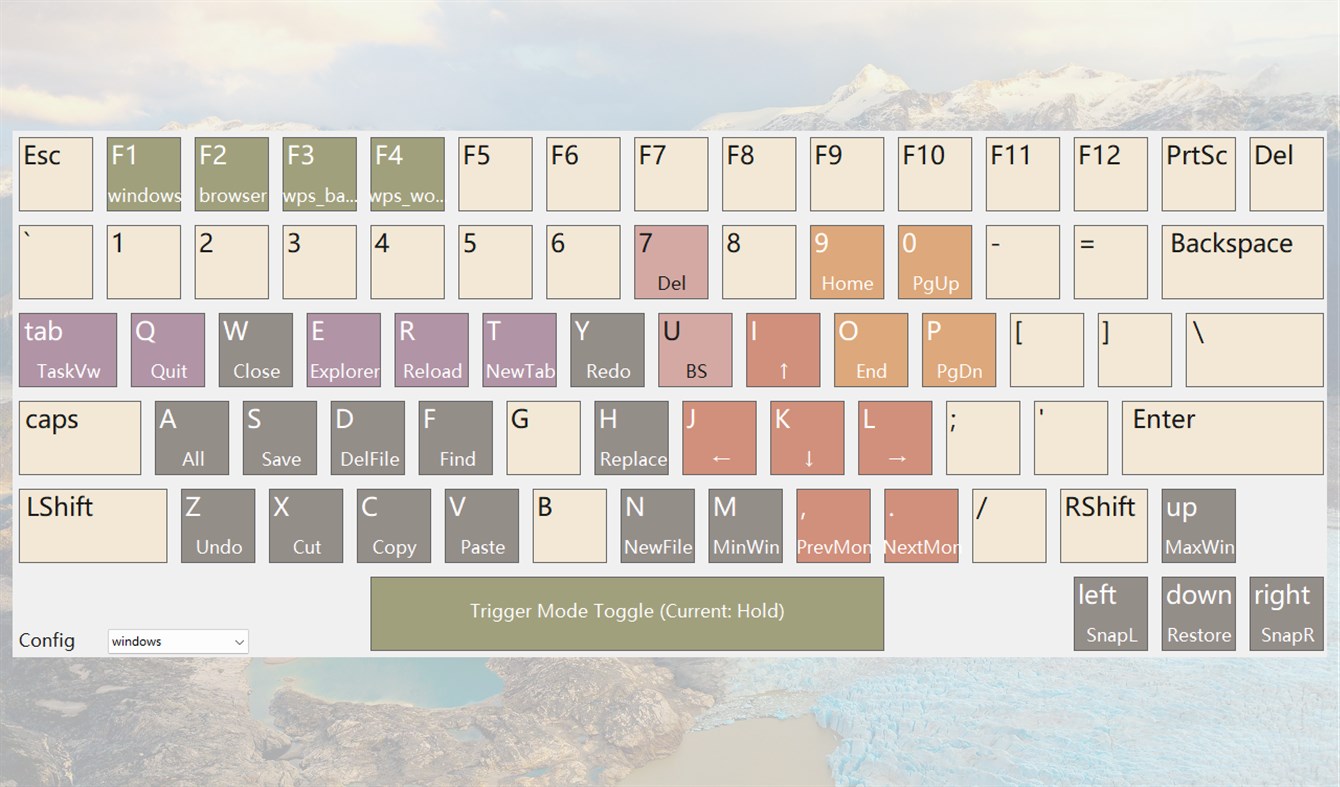
- Too many shortcuts, always mixing them up or forgetting? — Stop memorizing. Press CapsLock and a keyboard thumbnail appears above your keys, showing exactly what every mapped key does.
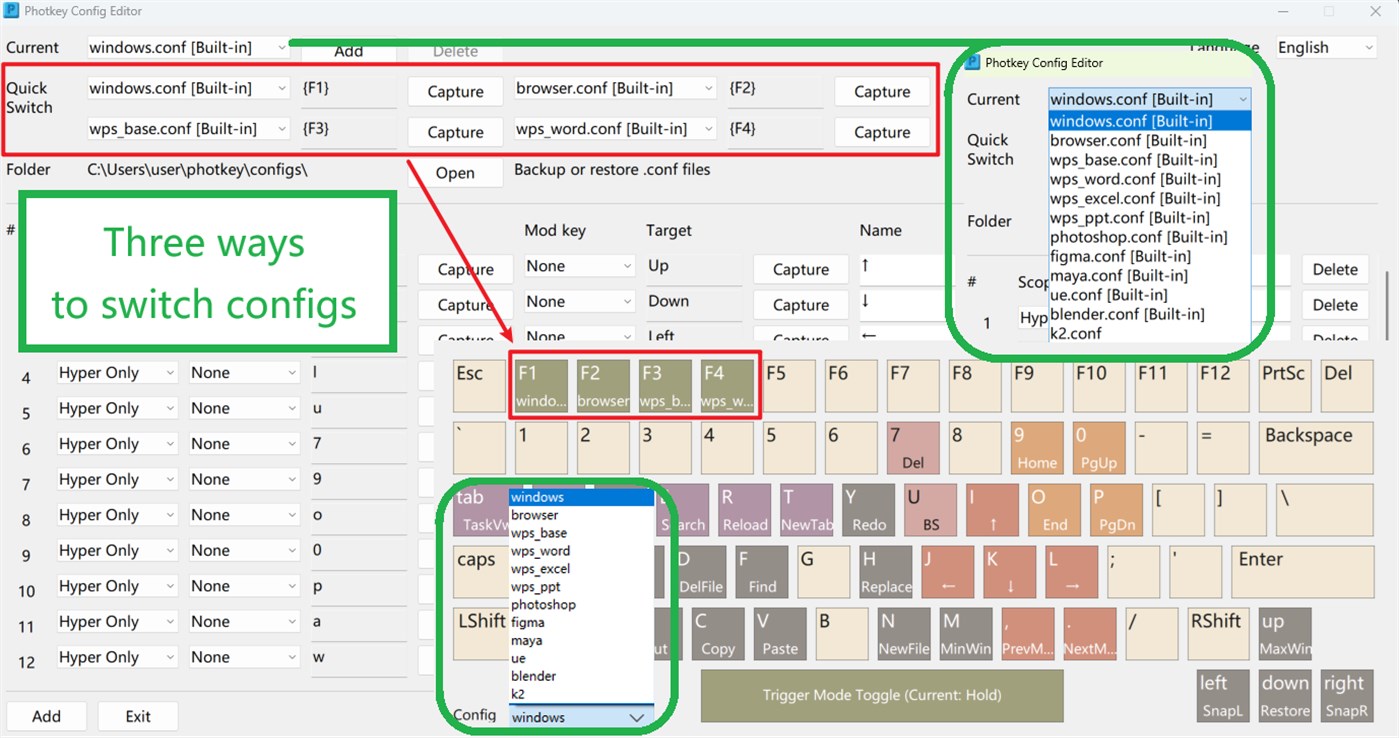
- Switching apps means learning a whole new shortcut set? — Create a separate profile for each app. Switch apps and switch profiles — your shortcuts always match the current scene.
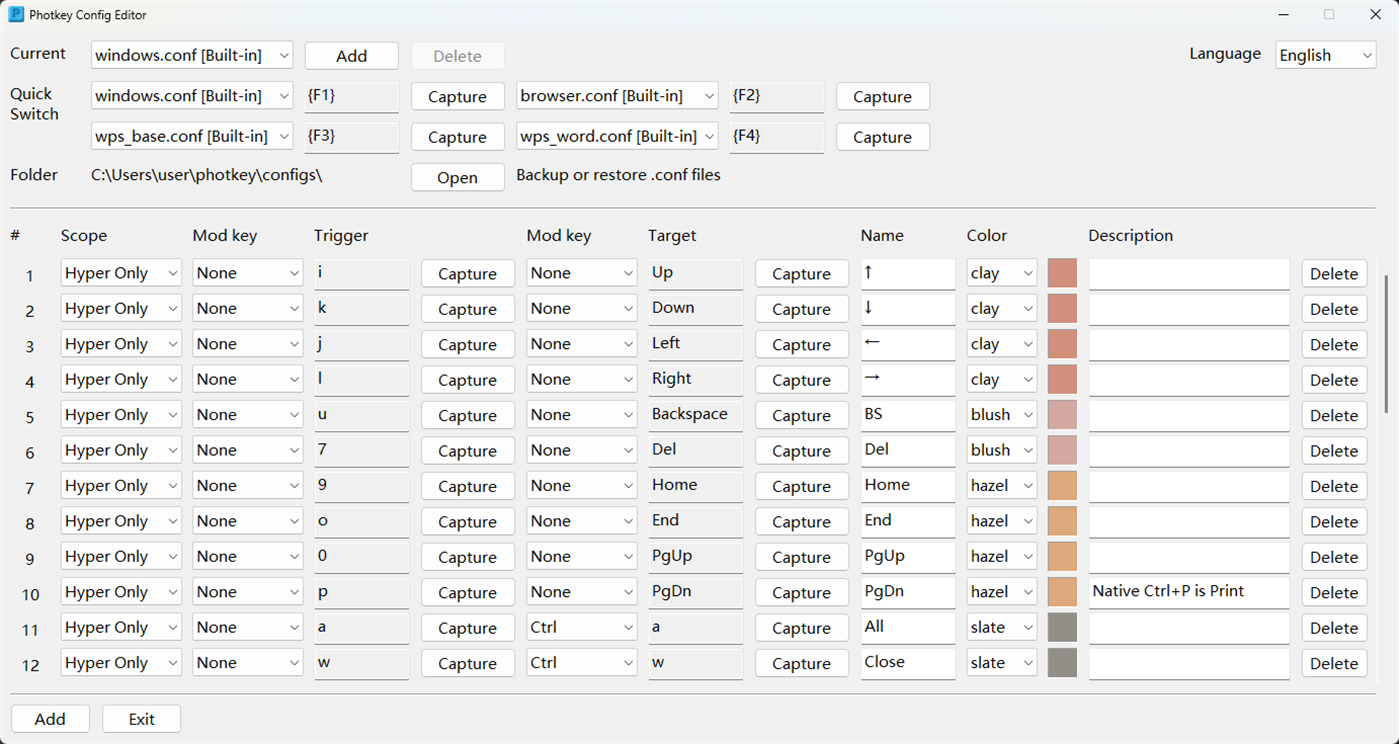
- Default hotkeys feel awkward, want your own layout? — Map any key to a single key or a combination. Full keyboard coverage, fully yours.
- Repetitive tasks wearing out your fingers? — Map frequently-used combinations to a single key. One press does what used to take multiple fingers.
Designed for You
PHotKey's core idea is simple: turn CapsLock into a "Hyper key." Press it, and a live shortcut diagram appears instantly — every mapped key labeled, every action visible. Look down, find the key, press it. No more "what was that shortcut again?"
Perfect for:
- Users who constantly jump between apps (Word, browser, Photoshop, WPS, Figma, Blender…) and can't keep every shortcut set straight.
- Anyone who prefers a visual reference over mental memory — let the thumbnail be your real-time shortcut guide.
- Power users willing to spend a few minutes on a personalized layout for long-term efficiency.
Key Features
- Live Keyboard Thumbnail — A real-time mapping overlay appears in Hyper state. See every key's purpose at a glance.
- Fully Customizable Mappings — Single keys or combinations. Covers letters, numbers, function keys, media keys, and more.
- Multiple Profiles + Quick Switching — One profile per app or scenario. Switch profiles and the thumbnail & hotkeys update instantly. Bind F1–F4 for one-press profile switching.
- Hold / Switch Dual Modes — Hold CapsLock for temporary Hyper, or tap once to toggle. Your choice.
- One-Click Suspend — Pause all mappings from the tray menu. Perfect for games or full-screen apps.
Feedback & Support
I'd love to hear from you. For any suggestions or issues, please contact me at:
pancake-lee@outlook.com
Every piece of feedback is taken seriously, and PHotKey will keep getting better.
Screenshots
Ad
Price History
- Current price: $2.99
- Minimum: $2.99
- Maximum: $2.99
Track prices
AppAgg Score
580
Estimated AppAgg Score for
photkey
580 Bronze
Higher scores usually mean stronger signals on AppAgg.
Based on: popularity · ratings · freshness · deals · store data · community signals
Recalculated daily using fresh AppAgg data.
Short URL: Copied!
What's new
- Version: PC
- Last Updated:
Additional Information
- Release Date:
- Category:
Windows Apps›Developer tools - OS:
PC - Size:
1 Mb - Supported Languages:
Chinese,English - Content Rating:
EVERYONE - Windows Store Rating:
0
 https://pancake-lee.github.io/pancake-io/
Developer
- pancake-lee
- Platforms: Windows Apps (1)
- Lists: 0 + 0
- Points: 0 + 0 ¡
- Rankings: 0
- Comments: 0
- Deals: 0
- Videos: 0
- RSS: Subscribe
Lists (0)
0
- photkey
Points (0)
0
Rankings (0)
0
Comments (0)
Be the first to comment
Summary
photkey Short URL: Copied!- Share
- Windows Store
«photkey» is a Developer tools app for Windows, developed by «pancake-lee». It was first released on and last updated on . The lowest historical price was $2.99, and the highest was $2.99. This app has not yet received any ratings on AppAgg. Available languages: Chinese, English. AppAgg continuously tracks the price history, ratings, and user feedback for «photkey». AppAgg does not host applications or distribute software. All trademarks, logos and screenshots belong to their respective owners. Subscribe to this app or follow its RSS feed to get notified about future deals or updates.
Similar
-
- Windows Terminal
- Windows Apps: Developer tools By: Microsoft Corporation
- Free
- Lists: 7 + 3 0 0
- Points: 5 + 9,458 13K · Gold Version: PC The Windows Terminal is a modern, fast, efficient, powerful, and productive terminal application for users of command-line tools and shells like Command Prompt, PowerShell, and WSL. ...
-
- App Installer (Mobile) - WinUI 3
- Windows Apps: Developer tools By: wherewhere
- Free
- Lists: 3 + 2 0 0
- Points: 20 + 3,251 8K · Gold Version: PC Android™ App Installer for Windows 10/11 makes sideloading Android applications easy for WSA, Anbox, etc.: Just double-click the app package, and you won't have to run Android Debug ...
-
- Arduino IDE
- Windows Apps: Developer tools By: Arduino LLC
- Free
- Lists: 0 + 2 0 0
- Points: 2 + 929 4K · Silver Version: PC Arduino is an open-source electronics platform based on easy-to-use hardware and software. It's intended for anyone making interactive projects. IMPORTANT: This app performs with core ...
-
- Ubuntu on Windows
- Windows Apps: Developer tools By: Canonical Group Limited
- Free
- Lists: 2 0 0
- Points: 11 + 832 5K · Silver Version: PC Ubuntu on Windows allows you to use Ubuntu Terminal and run Ubuntu command line utilities including bash, ssh, git, apt and many more. Please note that Windows 10 S does not support ...
-
- DevToys
- Windows Apps: Developer tools By: etiennebaudoux
- Free
- Lists: 3 + 1 0 0
- Points: 5 + 699 7K · Gold Version: PC An Open-Source Swiss Army knife for developers. DevToys helps in everyday tasks like formatting JSON, comparing text, testing RegExp. No need to use many untruthful websites to do ...
-
- Termius - Modern SSH Client
- Windows Apps: Developer tools By: Termius Corporation
- * Free
- Lists: 0 + 4 0 0
- Points: 8 + 542 39K · Legend Version: PC Termius is a modern SSH client designed for productivity and collaboration. Connect with one click from desktop and mobile no re-entering IP addresses, ports, and passwords. With a ...
-
- TurboWarp
- Windows Apps: Developer tools By: Thomas Weber
- Free
- Lists: 0 0 0
- Points: 1 + 544 6K · Gold Version: PC TurboWarp is a mod of the Scratch programming language with a compiler to run projects faster, dark mode, new extensions, a bunch of addons, and more. - Runs projects up to 100x faster
-
- Python 3.12
- Windows Apps: Developer tools By: Python Software Foundation
- Free
- Lists: 0 0 0
- Points: 1 + 413 4K · Silver Version: PC Python is an easy to learn, powerful programming language. It has efficient high-level data structures and a simple but effective approach to object-oriented programming. Python s ...