
Bookmarks
| Developer: | Harmanpreet singh (3) | ||
| Price: | Free | ||
| Score: | 590 Bronze | ||
| Rankings: | 0 | ||
| Comments: | 0 Add a comment | ||
| Lists: | 0 0 | ||
| Points: | 0 | ||
| +1 Point | |||
Summary
Meet PingRoute, an app from Harmanpreet singh in the Developer tools category.
Released . No longer new, not yet a veteran.
Free, no ads, no in-app purchases. Just you and the app.
The Microsoft Store is built into Windows, so it installs in a couple of clicks.
Its AppAgg Score is 590. Bronze for now, with plenty of room to grow.
Just 14 megabytes, it’ll fit even on a full drive.
Rated “EVERYONE”, so it’s fine for kids too.
Only one language, and it’s English.
Used it? Your review would be the first one here.
The developer has 2 more apps on AppAgg. Worth a look.
Want to hear about updates and new apps first? Follow the developer or subscribe to the RSS feed. Push alerts come through the AppAgg Alerts app for Android and iOS.
Screenshots 3
Other platforms 0
Price History 0
- Current price: Free
- Minimum: Free
- Maximum: Free
Your own feed on the home page
Description

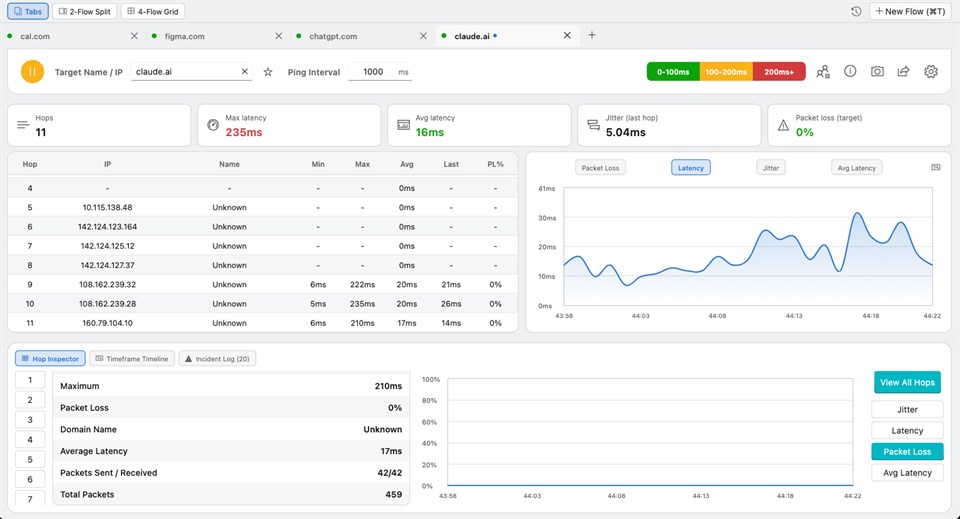
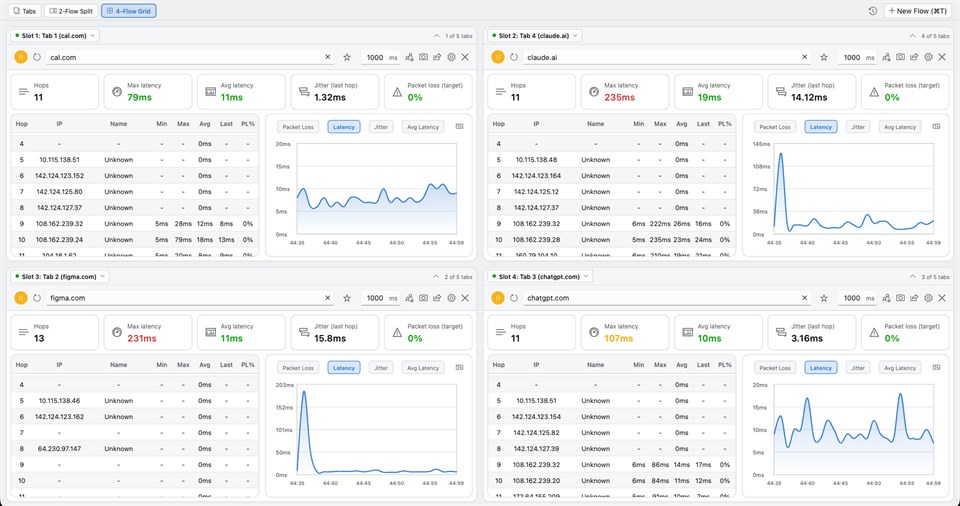
Unlike traditional command-line traceroute or single-target ping utilities, PingRoute combines continuous MTR-style route tracing with a modern, multi-flow visual interface. Probe multiple destinations simultaneously across dedicated flow tabs, analyze comparative latency side-by-side in 2-Flow Split or 4-Flow Grid matrices, and pinpoint intermittent latency spikes, route flapping, and packet loss with per-hop precision.
PingRoute features a comprehensive telemetry toolkit: an interactive hop data table with smart IPv4 octet sorting and context menus, animated real-time graphs (latency, jitter, packet loss %, and moving averages), an interactive Timeframe Timeline with historical scrubber, and an anomaly incident log that flags packet drops and latency spikes automatically.
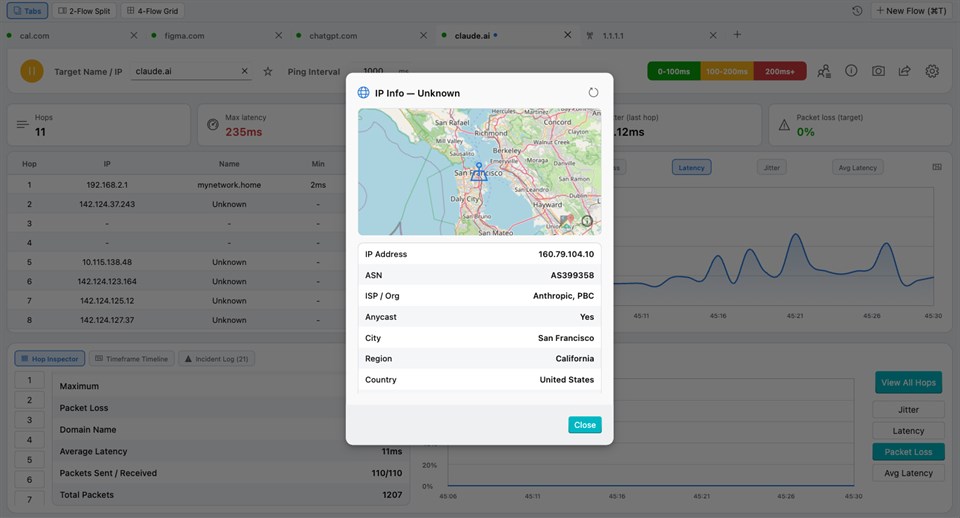
With integrated IP Geolocation and interactive OpenStreetMap route visualization, you can track the physical path of your packets across ASNs and global networks. Save point-in-time Session Snapshots to inspect historical network states, run one-click System Network Diagnostics, and export telemetry seamlessly to MTR ASCII, CSV, JSON, or Markdown.
Whether troubleshooting home Wi-Fi bottlenecks, analyzing enterprise WAN paths, or diagnosing CDN routing, PingRoute delivers total network transparency in an elegant, responsive Fluent UI desktop and mobile experience.
🚀 Updated Product Features
🔀 Multi-Flow & Multi-Pane Monitoring
Concurrent Multi-Target Probing: Run multiple independent traceroute and ping telemetry sessions simultaneously across tabs.
Multi-Pane Split & Grid Views: Compare routes side-by-side in Single Tab, 2-Flow Split View, or a 4-Flow Grid Matrix (2x2) with arbitrary flow-to-slot assignment.
Flow Management: Quickly open (Ctrl/Cmd+T), switch (Ctrl/Cmd+1–9), duplicate, rename, or pause flows on demand.
📊 Continuous MTR Route Tracing & Deep Hop Telemetry
Per-Hop Real-Time Metrics: Live tracking of Min, Max, Avg, Last latency, Packet Loss % (PL%), and Cumulative Jitter for every intermediate hop.
Smart Octet Sorting: Sort tables naturally by IPv4 address octets, hop number, DNS hostname, or any latency/loss metric.
Actionable Hop Context Menus: Right-click any hop to copy IPs, save to Target Directory, or spawn a dedicated child probe directly targeting that intermediate node.
📈 Interactive Visualizations & Timeline Time-Travel
Real-Time Telemetry Graphs: Animated live charts for Latency (ms), Packet Loss (%), Jitter (ms), and Moving Averages.
Historical Timeframe Timeline: Scrub through past telemetry with time presets (30s, 1m, 2m, 5m, All) to inspect historical dips and spikes.
Automated Anomaly Incident Log: Automatic detection and chronological logging of packet loss events, latency spikes, and route changes with exact timestamps.
🗺️ IP Geolocation & Interactive Route Map
ASN & Geolocation Intelligence: Automatic lookup of City, Region, Country, Autonomous System Number (ASN), and ISP Organization for all public hops.
Interactive Map Visualization: Visualize the geographic path of your network route hop-by-hop on an OpenStreetMap canvas.
📁 Target Directory & Session Snapshots
Target Directory & Favorites: Bookmark frequently diagnosed servers, gateways, and domains with custom labels, favorite pins, ping counters, and last-tested timestamps.
LIFO Recent History: Quick-access dropdown for instant re-testing of recent targets.
Session Snapshots: Save, name, and reload full telemetry snapshots (including hop metrics, anomaly logs, and timeline buffers) for retrospective root-cause analysis.
🛠️ System Network Diagnostics & Multi-Format Export
One-Click System Audit: Instant inspection of local network interfaces (IPv4/IPv6), default gateway, DNS servers, public IP, ISP/ASN, and geographic egress.
Universal Telemetry Exporting: Export reports in MTR ASCII Table, CSV, Structured JSON, or Markdown formats for reports, spreadsheets, and automated CI/CD pipelines.
🎨 Modern, Fluent & Responsive Experience
Adaptive Multi-Platform Layout: Seamless responsive scaling from 4K multi-monitor desktop setups to tablets and mobile layouts (MobileShell with bottom navigation).
Fluent Design & Customization: Light, Dark, and System theme modes with custom accent colors, UI scaling adjustments, and full keyboard shortcut navigation.
100% Local & Private: All probing and analysis runs locally on your machine with zero cloud telemetry or tracking.
From the developer
Developer
- Harmanpreet Singh
- Followers: 0
- Platforms: iOS Apps (2) Windows Apps (1)
- Deals: 0
- Lists: 0 0
- Points: 0
- Rankings: 0
- Comments: 0
- Videos: 0
- RSS: Subscribe
Lists 0
-
 PingRoute
Points 0
-

- +1 Point

Rankings 0
-
- Your rating
What's new
- Version: PC
- Last Updated:
Additional Information
- Release Date:
- Category:
Windows Apps›Developer tools - OS:
PC - Size:
14 Mb - Supported Languages:
English - Content Rating:
EVERYONE - Windows Store Rating: ¡
0 - Website:
 https://harman.vercel.app/
Comments 0 ¡
AppAgg Score
Estimated AppAgg Score for
PingRoute
Developer: Harmanpreet singh
Higher scores usually reflect better results across AppAgg’s indicators.
Based on: popularity · ratings · freshness · deals · store data · community signals
Recalculated daily using fresh AppAgg data.
PingRoute Short URL: Copied!- Windows Store
You may also like
Recent discussionsMore →
 AppTapeFlo this app is the best app i use in my life Because. you trade. journal. Discipline. rule's that you w...
 Shurem Boy35
 AppGame4Class Game4Class makes lesson review fun and interactive. I like how easily students can join from their o...
 Mehdi Gateway62
 AppAniMate Waifu - AI Anime Desktop Pet This is the best anime desktop pets I have ever had, The dancing feature is amazing.
 shaw chaney34
 AppSpark Motion Create 26 The graphics are amazing! Now I can design my ball layouts and watch then spin in 3D animation.
 Jim Kirker40
 AppLocalDub – Real-Time Game Dubbing Hello Kırtay Interactive, I am using LocalDub - Real-Time Game Dubbing. I would like to know if Hind...
 rashid game53
 AppNauticPlayer This app is absolute cinema. Honestly, it’s one of the best media players I’ve ever tried, and I’m s...
 Manuel92
 AppScreen Beings - Interactive Accessibility Companion This is my app so I’m a little bias but as someone from the ADHD community that teaches ADHD and neu...
 Tarelle Irwin54
 AppAadi vault good it ia a encrypter and good you my work on office
 Aditya Rai50
 AppTyping 365 | Daily Typing Trainer The best typing app ever. With Typing 365 you don’t have to force yourself for couple minutes traini...
 Ahmad Mozaffar50
 AppZefir Calendar — Calendar in the Taskbar excelente app! Superando todas as espectativas!
 Diógenes Magnus50

