
Bookmarks
| Developer: | Ivan Luengo (1) | ||
| Price: | $0.99 New | ||
| Score: | 590 Bronze | ||
| Rankings: | 0 | ||
| Comments: | 0 Add a comment | ||
| Lists: | 0 0 | ||
| Points: | 0 | ||
| +1 Point | |||
Summary
Meet Plims, an app from Ivan Luengo in the Developer tools category.
New release: it came out , so you’re among the first.
$0.99, and not a single discount on AppAgg so far. Tough nut to crack.
The Microsoft Store is built into Windows, so it installs in a couple of clicks.
Its AppAgg Score is 590. Bronze for now, with plenty of room to grow.
Rated “EVERYONE”, so it’s fine for kids too.
Speaks 2 languages, English included.
Nobody on AppAgg has rated it yet. Your chance to be first is right now.
It’s the developer’s only app on AppAgg. For now.
Want to hear about deals, updates and new apps first? Set a price alert, follow the developer or subscribe to the RSS feed. Push alerts come through the AppAgg Alerts app for Android and iOS.
Screenshots 3
Other platforms 0
Price History 0
- Current price: $0.99
- Minimum: $0.99
- Maximum: $0.99
Your own feed on the home page
Description

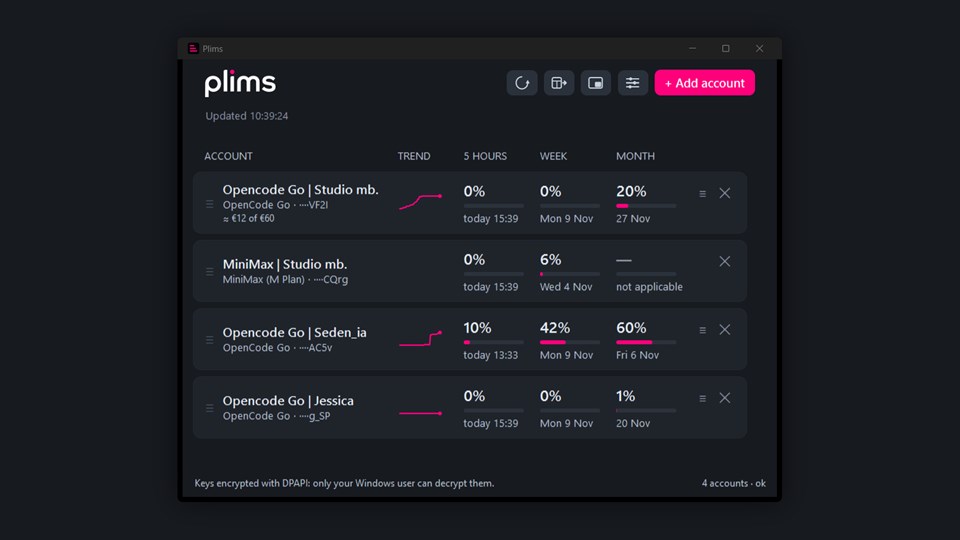
See at a glance the 5-hour window, the week and the month for every account: percentage used, when it resets and a line showing what you spent in the last hours. With every account in one table you know which one will run out before you finish the job.
Built for people who live on this and don't want surprises:
• One row per account, with the percentage and the exact time of the next reset.
• Tray icon with the percentage inside: 37 % shows without opening anything.
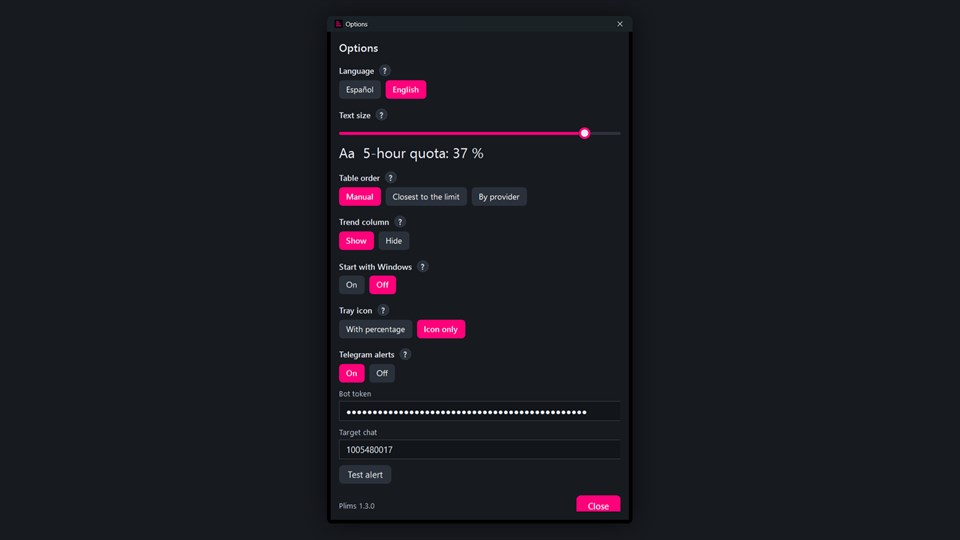
• Alerts when a window crosses the threshold you set, as a Windows notification or a Telegram message, with its own threshold and channel for 5 hours, week and month.
• An alert when quota resets.
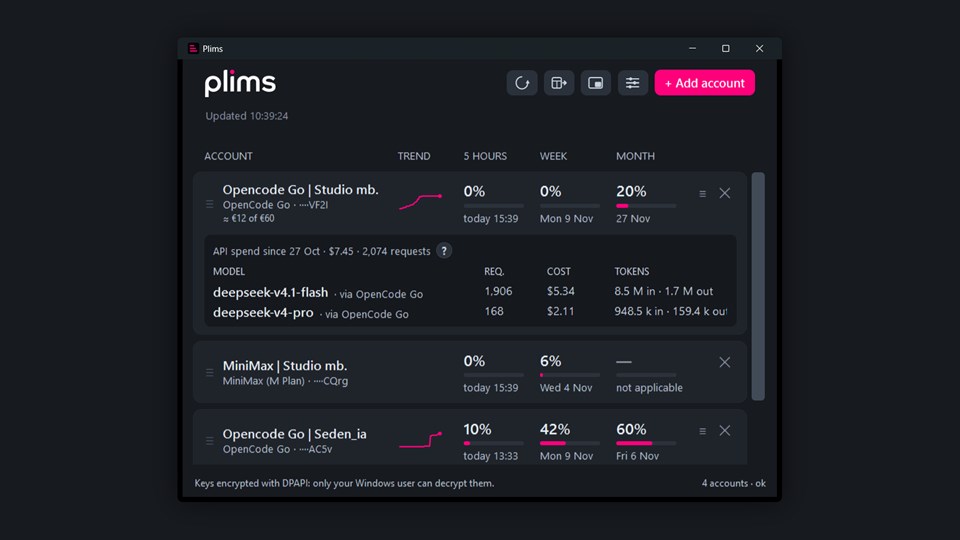
• Real spend per model, read from the provider's server: it counts usage from any computer, not just this one.
• A trend line per account and local history to see how fast you're burning it.
• Per-row colours, drag-to-reorder and CSV export for any date range.
• Spanish and English, and ten text sizes for whoever needs it bigger.
API keys never leave your machine unencrypted and are never stored in the clear: they are encrypted with DPAPI, tied to your Windows user, and only travel to the provider you configure. No account to create, no sign-up and no telemetry.
Requirements: Windows 10 (1809) or Windows 11, 64-bit. No .NET install needed: it ships inside.
From the developer
Developer
- Ivan Luengo
- Followers: 0
- Platforms: Windows Apps (1)
- Deals: 0
- Lists: 0 0
- Points: 0
- Rankings: 0
- Comments: 0
- Videos: 0
- RSS: Subscribe
Lists 0
-
 Plims
Points 0
-

- +1 Point

Rankings 0
-
- Your rating
What's new
- Version: PC
- Last Updated:
- - New optional "compact view": a small always-on-top window listing the account
names and their three usage percentages. It is off by default and is opened
from a toolbar button or the tray menu; it can be closed with the expand
button, a double-click, or the tray menu.
- Toolbar icons are now drawn as vector paths instead of font glyphs.
- Two layout fixes (footer text no longer overlaps) and one label renamed.
- No new capabilities, no new network endpoints, no new permissions, no changes
to how data is stored or transmitted.
- First published version.
Additional Information
- Release Date:
- Category:
Windows Apps›Developer tools - OS:
PC - Size:
67 Mb - Supported Languages:
English,Spanish - Content Rating:
EVERYONE - Windows Store Rating: ¡
0
Comments 0 ¡
AppAgg Score
Estimated AppAgg Score for
Plims
Developer: Ivan Luengo
Higher scores usually reflect better results across AppAgg’s indicators.
Based on: popularity · ratings · freshness · deals · store data · community signals
Recalculated daily using fresh AppAgg data.
Plims Short URL: Copied!- Windows Store
You may also like
Recent discussionsMore →
 AppTapeFlo this app is the best app i use in my life Because. you trade. journal. Discipline. rule's that you w...
 Shurem Boy35
 AppGame4Class Game4Class makes lesson review fun and interactive. I like how easily students can join from their o...
 Mehdi Gateway62
 AppAniMate Waifu - AI Anime Desktop Pet This is the best anime desktop pets I have ever had, The dancing feature is amazing.
 shaw chaney34
 AppSpark Motion Create 26 The graphics are amazing! Now I can design my ball layouts and watch then spin in 3D animation.
 Jim Kirker40
 AppLocalDub – Real-Time Game Dubbing Hello Kırtay Interactive, I am using LocalDub - Real-Time Game Dubbing. I would like to know if Hind...
 rashid game53
 AppNauticPlayer This app is absolute cinema. Honestly, it’s one of the best media players I’ve ever tried, and I’m s...
 Manuel92
 AppScreen Beings - Interactive Accessibility Companion This is my app so I’m a little bias but as someone from the ADHD community that teaches ADHD and neu...
 Tarelle Irwin54
 AppAadi vault good it ia a encrypter and good you my work on office
 Aditya Rai50
 AppTyping 365 | Daily Typing Trainer The best typing app ever. With Typing 365 you don’t have to force yourself for couple minutes traini...
 Ahmad Mozaffar50
 AppZefir Calendar — Calendar in the Taskbar excelente app! Superando todas as espectativas!
 Diógenes Magnus50

