
Segnalibri
| Sviluppatore: | TriptoAfsin (5) | ||
| Prezzo: | Gratis Novità | ||
| Punteggio: | 570 Bronzo | ||
| Classifiche: | 0 | ||
| Commenti: | 0 Pubblica commento | ||
| Liste: | 0 0 | ||
| Punti: | 0 | ||
| +1 Punto | |||
In breve
Porter App è un’app di TriptoAfsin della categoria «Strumenti di sviluppo».
Novità: è uscita , quindi sei tra i primi.
Gratis: niente pubblicità, niente acquisti in-app. Solo tu e l’app.
Il Microsoft Store è integrato in Windows, quindi si installa in un paio di clic.
Il suo Punteggio AppAgg è 570. Per ora livello Bronzo, con tanto margine per crescere.
Solo 4 megabyte. Ci sta anche su un disco pieno zeppo.
Classificazione «EVERYONE»: va bene anche per i bambini.
Parla una sola lingua, e non è l’italiano.
Qui per ora silenzio totale (niente voti, niente commenti). Rompi il ghiaccio.
Lo sviluppatore ha 4 altre app su AppAgg. Vale la pena dare un’occhiata.
Vuoi sapere prima di tutti di aggiornamenti e nuove app? Segui lo sviluppatore o iscriviti al feed RSS. Le notifiche push arrivano tramite l’app AppAgg Alerts per Android e iOS.
Screenshot 2
Altre piattaforme 0
Cronologia dei prezzi 0
- Prezzo attuale: Gratis
- Minimo: Gratis
- Massimo: Gratis
Il tuo feed personale nella home
Descrizione

Built for developers who keep hitting "port 3000 is already in use".
WHAT YOU SEE
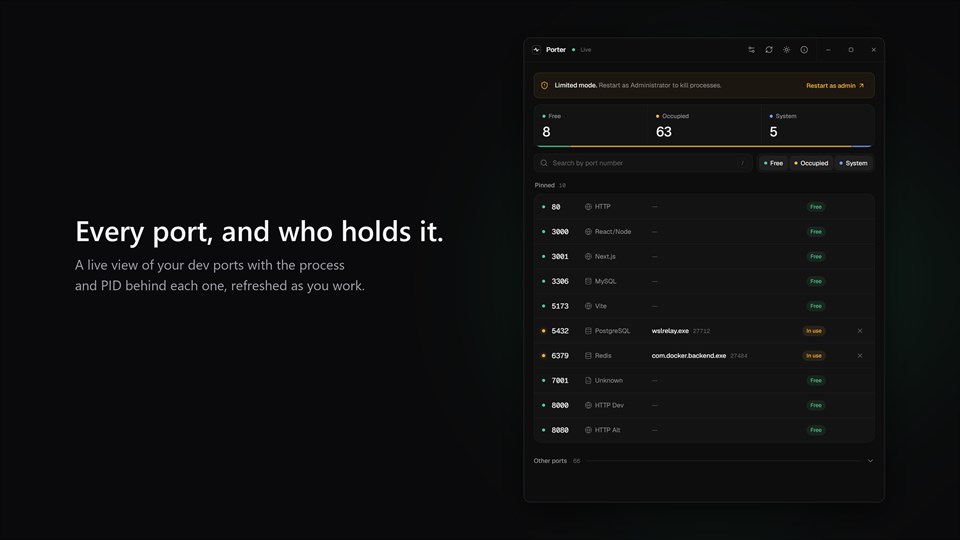
• Your pinned ports at the top, such as 3000, 5173, 5432 and 8080, with Free, In use or System beside each one
• The process name and PID behind every port that's taken
• Every other listening port on the machine, sorted by port, process or status
• A By app view that groups ports under the program that opened them
• Totals for free, occupied and system ports, updated live
WHAT YOU CAN DO
• End the process holding a port, straight from its row
• Pin the ports you care about. They stay on top, running or not
• Press / to search by port number or process name
• Filter to Free, In use or System ports
• Optionally list outgoing connections as well as listening ports
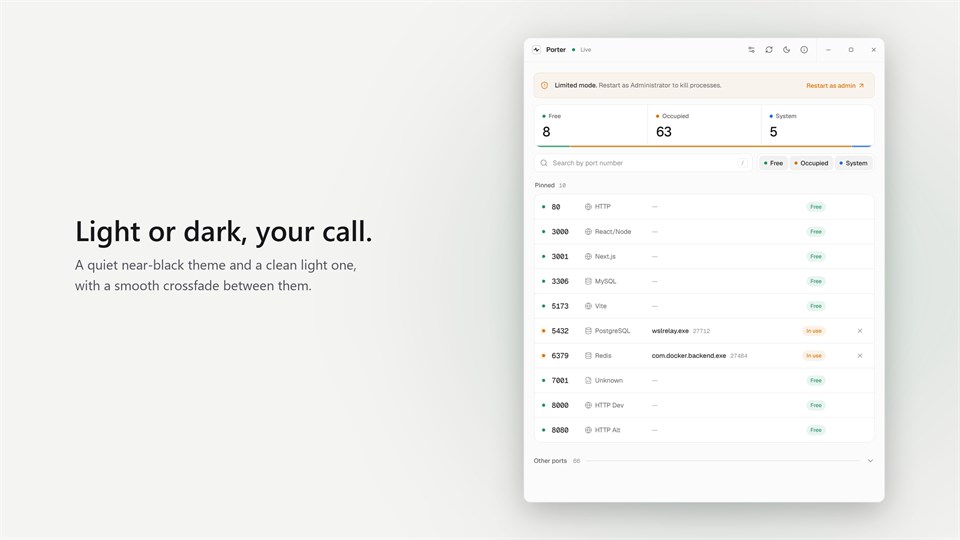
• Pick one of four interface sizes (Ctrl + / Ctrl −), and a light or dark theme
ADMIN RIGHTS
Porter runs without admin rights and shows every port. Ending a process that belongs to Windows or another user needs administrator rights. Click "Restart as admin" in the app, or right-click Porter in the Start menu and choose "Run as administrator".
PRIVATE BY DESIGN
No account, no ads, no analytics, no telemetry. Porter reads your port table on your PC and nothing leaves it. The Store version makes no network requests at all, since the Store handles its updates.
Free and open source under the MIT licence: github.com/t21dev/porter-app
Dallo sviluppatore
Liste 0
-
 Porter App
Punti 0
-

- +1 Punto

Classifiche 0
-
- La tua valutazione
Sviluppatore 5
- TriptoAfsin
- Follower: 0
- Piattaforme: Windows App (5)
- Offerte: 0
- Liste: 0 0
- Punti: 0
- Classifiche: 0
- Commenti: 0
- Video: 0
- RSS: Iscriviti
Novità
- Versione: PC
- Ultimo aggiornamento:
- First release on the Microsoft Store.
• Updates now arrive through the Store
• Starts on PCs without the Visual C++ runtime installed
Informazioni aggiuntive
- Data di uscita:
- Categoria:
App per Windows›Strumenti di sviluppo - Sistemi operativi:
PC - Dimensioni:
4 Mb - Lingue supportate:
Inglese - Classificazione contenuti:
EVERYONE - Windows Store Valutazione: ¡
0 - Sito web:
 https://porter.t21.dev
Punteggio AppAgg
Punteggio AppAgg stimato per
Porter App
Sviluppatore: TriptoAfsin
Un punteggio più alto riflette in genere risultati migliori negli indicatori di AppAgg.
Basato su: popolarità · valutazioni degli utenti · freschezza · offerte · dati degli store · attività della community
Ricalcolato ogni giorno con dati AppAgg aggiornati.
Commenti 0 ¡
Condividi
Porter App URL breve: Copiato!- Windows Store

