
Saved
Choose the name that will be shown in your Saved menu.
Done!
| Developer: | Dr. Chuck (1) | ||
| Price: | Free | ||
| Score: | 580 Bronze | ||
| Rankings: | 0 | ||
| Comments: | 0 Add a comment | ||
| Lists: | 0 + 0 | ||
| Points: | 0 + 0 ¡ | ||
| +1 Points | |||
Description

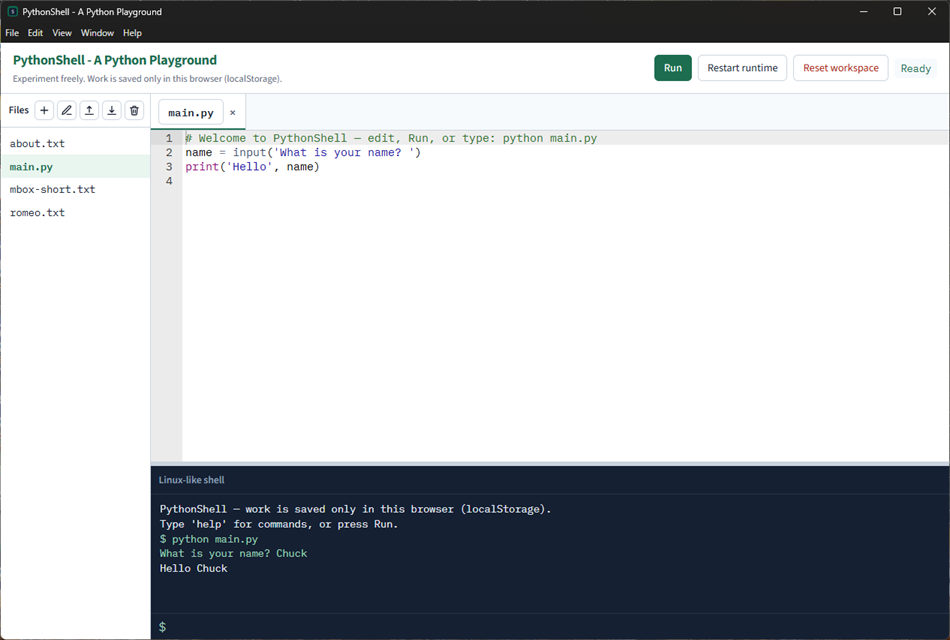
Write Python in a multi-file editor, press Run, and see the result in a small Linux-like shell. The same shell understands commands such as `python main.py`, `ls`, `rm`, `help`, `upload`, and `download`. When a program calls `input()`, type the answer at the shell prompt.
Python 3.12 runs locally in the app (Pyodide). Your code is not sent to a server to be executed. Work is saved only on this device (localStorage in the app). Clearing app data, resetting the workspace, or using another PC will lose it — that is intentional. This is a place to experiment, not an assignment drop-box.
First launch needs an internet connection so the Python runtime can download. Later launches reuse the cached runtime.
The web version is at https://shell.py4e.com/
What you can do
• Edit several files in tabs (create, rename, delete, upload, download)
• Run the current file, or type `python file.py` in the shell
• See print output, errors, and tracebacks
• Answer `input()` prompts in the shell
• Stop a runaway program (the runtime times out and restarts)
• Reset the workspace to the starter files (`main.py`, `about.txt`, `romeo.txt`, `mbox-short.txt`)
What it is not
• Not a full Linux terminal (no pipes, redirects, or globs)
• Not an interactive Python REPL (`>>>`); run a file instead
• Not a grader and not connected to a learning-management system
• Not a place to install extra native Python packages beyond the bundled standard library
PythonShell is part of Python for Everybody (https://www.py4e.com/).
Advertisement
Screenshots
Price History
- Current price: Free
- Minimum: Free
- Maximum: Free
Track prices Add to a list to get discount alerts by email or push
AppAgg Score
580
Estimated AppAgg Score for
PythonShell
Developer: Dr. Chuck
580 Bronze
Higher scores usually mean stronger signals on AppAgg.
Based on: popularity · ratings · freshness · deals · store data · community signals
Recalculated daily using fresh AppAgg data.
Short URL: Copied!
What's new
- Version: PC
- Last Updated:
Additional Information
- Release Date:
- Category:
Windows Apps›Developer tools - OS:
PC - Size:
132 Mb - Supported Languages:
English - Content Rating:
EVERYONE - Windows Store Rating: ¡
0 - Website:
 https://www.py4e.com/
Developer
- Dr. Chuck
- Followers: 0
- Platforms: Windows Apps (1)
- Deals: 0
- Lists: 0 + 0
- Points: 0 + 0 ¡
- Rankings: 0
- Comments: 0
- Videos: 0
- RSS: Subscribe
Lists (0)
0
- PythonShell
Points (0)
0
Rankings (0)
0
Comments (0)
Be the first to comment
Summary
PythonShell Short URL: Copied!- Windows Store
On AppAgg, you can track the Windows app “PythonShell” by Dr. Chuck, listed under Developer tools. AppAgg Score: 580 (Bronze). AppAgg Points for the app — confirmed: 0; indirect: 0. Public lists containing the app: 0. Users who have saved it in private lists: 0. AppAgg users have not rated the app yet. Confirmed Points record visits to a store by signed-in AppAgg users; indirect Points are based on store data. AppAgg counts public lists containing an app or game and users who have saved it in private lists. The app was first released on . The app was last updated on . The app is currently available for free. The app is available in these languages: English. Explore the price history, add the app to a list, or follow its developer. Follow future deals and updates for the app via its RSS feed. AppAgg does not host or distribute the app. All trademarks, logos, and screenshots related to the app belong to their respective owners.

