
Lesezeichen
| Entwickler: | Lionel Fung (7) | ||
| Preis: | Kostenlos Neu | ||
| Score: | 600 Silber | ||
| Ranglisten: | 0 | ||
| Kommentare: | 0 Kommentar posten | ||
| Listen: | 0 0 | ||
| Punkte: | 0 | ||
| +1 Punkt | |||
Kurzinfo
Vorhang auf für Qimo, eine App von Lionel Fung aus der Kategorie „Entwicklungstools“.
Neuerscheinung: erst erschienen, du bist also ganz vorne mit dabei.
Gratis, keine Werbung, keine In-App-Käufe. Nur du und die App.
Der Microsoft Store ist in Windows eingebaut, die Installation ist also in ein paar Klicks erledigt.
Der AppAgg-Score liegt bei 600. Silber, und das ist gar nicht übel.
Nur 18 Megabyte, passt sogar auf eine volle Festplatte.
Altersfreigabe „EVERYONE“, also auch für Kinder geeignet.
Kann 2 Sprachen, aber Deutsch ist noch nicht dabei.
Auf AppAgg hat die App noch niemand bewertet. Jetzt ist deine Chance, den Anfang zu machen.
Der Entwickler hat noch 6 weitere Apps auf AppAgg. Ein Blick lohnt sich.
Willst du als Erstes von Updates und neuen Apps erfahren? Folge dem Entwickler oder abonniere den RSS-Feed. Push-Nachrichten kommen über die App AppAgg Alerts für Android und iOS.
Screenshots 4
Andere Plattformen 0
Preisentwicklung 0
- Aktueller Preis: Kostenlos
- Minimum: Kostenlos
- Maximum: Kostenlos
Dein eigener Feed auf der Startseite
Beschreibung

Key features:
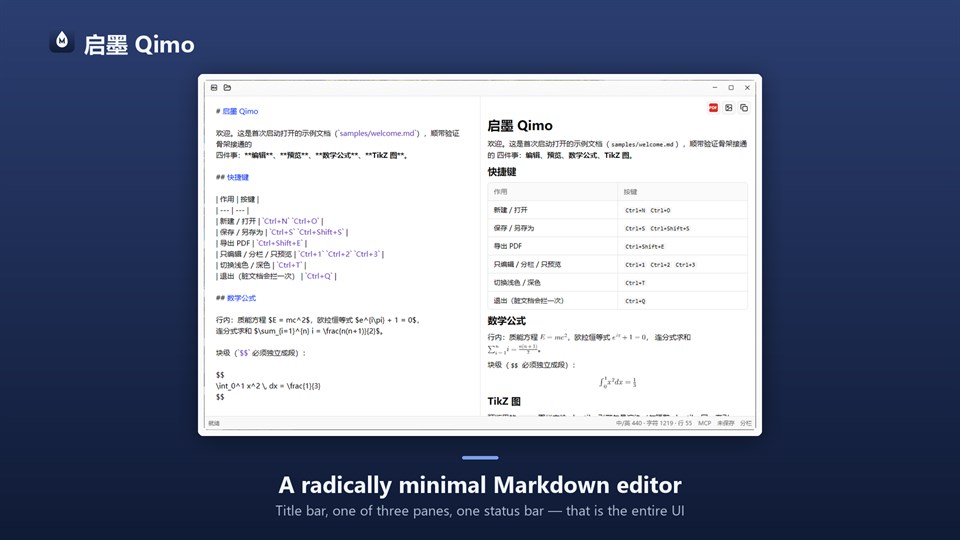
[Radically minimal] A custom title bar, three pane modes (edit / split / preview), one status bar. Every command has a shortcut; the status bar doubles as the only error surface and the unsaved-changes dot (● before the path).
[Native math typesetting] `$…$` inline and `$$…$$` display formulas go TeX → MathML → vector layout with the embedded Latin Modern Math font — fractions, radicals, sum limits, matrices rendered as in print. No screenshots, no placeholders, no TeX distribution to install.
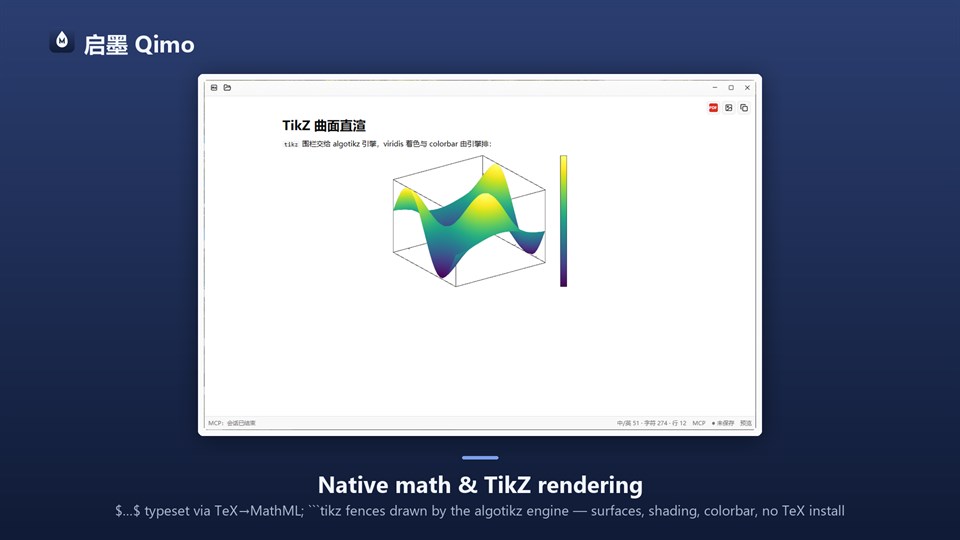
[TikZ drawn by the engine] ```tikz fences are evaluated and drawn live by algotikz — an independent open-source implementation with PGF semantics: axes, curves, mindmaps, and 3D surfaces with viridis-style shading and colorbars, all vector. Engine and font assets are embedded; one file, zero setup.
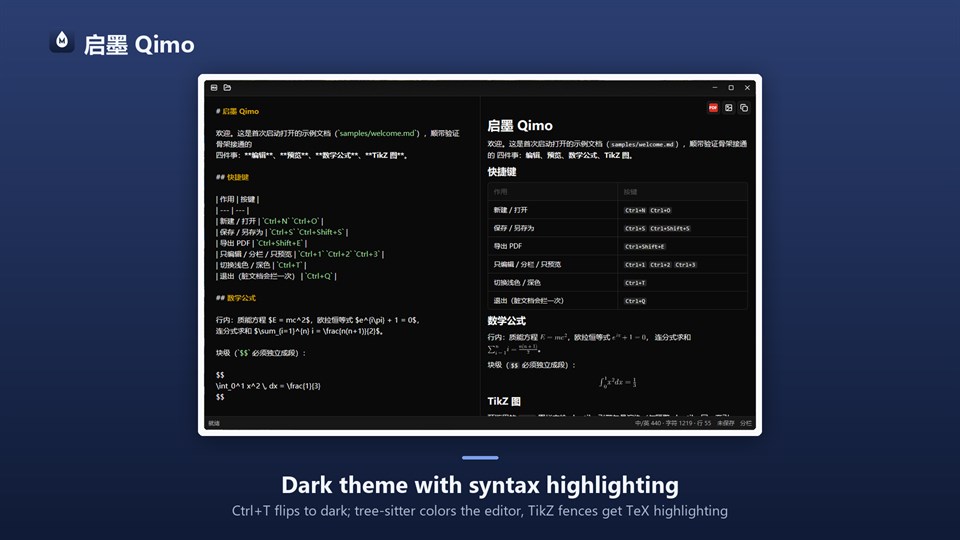
[Syntax highlighting] tree-sitter colors Markdown, and ```tikz / ```latex fences get LaTeX injection highlighting — writing and reading share one color language.
[Two-way scroll sync] Editing follows preview and back, anchored on top-level blocks: scroll the source, the preview follows; drag the preview, the editor comes along.
[Print-grade export] Ctrl+Shift+E exports PDF or PNG: CJK line-break rules, widow/orphan control, headings never orphaned, table headers repeated on continuations, hanging indent for wrapped code; font subsets embedded with selectable text; math and TikZ are drawn as vectors, and the same input always produces byte-identical output. Long-image export stitches pages for you.
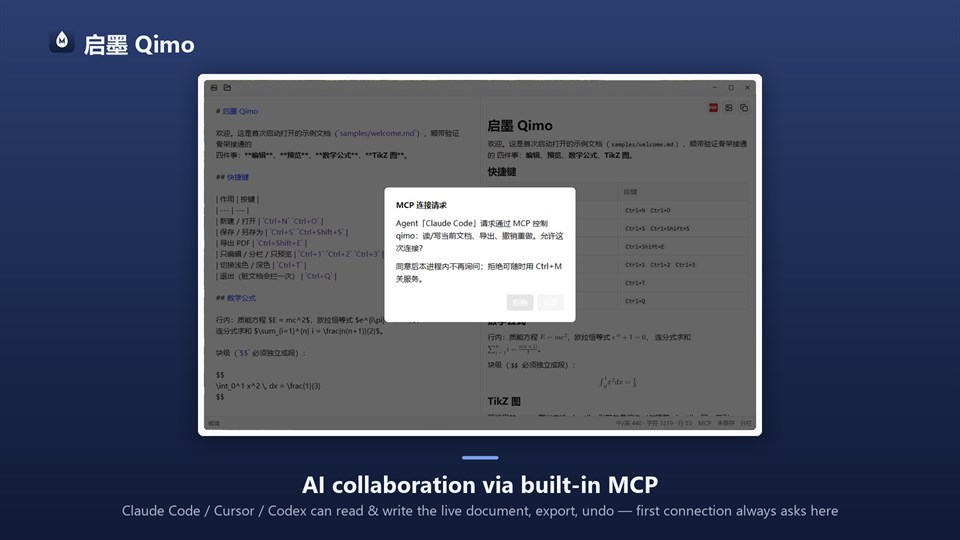
[AI collaboration via MCP] A built-in MCP server connects AI assistants (Claude Code, Cursor, Codex, …) to the document you are editing — read, write, patch, undo/redo, export, and fetch real diagnostics through 10 tools, via the official qimo-mcp bridge. The first connection always asks for your approval in-app; nothing happens before you click Allow, and Ctrl+M switches the service off.
[Double-click to open] Set Qimo as the default app for .md files and double-click anything. Light/dark theme follows the system or flips with one keystroke.
Great for: reading notes, technical documentation and READMEs, STEM notes with real math, papers and tutorials, and as a local writing desk for your AI assistant.
Vom Entwickler
Listen 0
-
 Qimo
Punkte 0
-

- +1 Punkt

Ranglisten 0
-
- Deine Bewertung
Entwickler 7
- Lionel Fung
- Follower: 0
- Plattformen: Windows Apps (7)
- Angebote: 0
- Listen: 0 0
- Punkte: 0
- Ranglisten: 0
- Kommentare: 0
- Videos: 0
- RSS: Abonnieren
Neue Funktionen
- Version: PC
- Zuletzt aktualisiert:
Weitere Informationen
- Veröffentlichungsdatum:
- Kategorie:
Windows-Apps›Entwicklungstools - Betriebssysteme:
PC - Größe:
18 Mb - Unterstützte Sprachen:
Chinesisch,Englisch - Altersfreigabe:
EVERYONE - Windows Store Bewertung: ¡
0
AppAgg-Score
Geschätzter AppAgg-Score für
Qimo
Entwickler: Lionel Fung
Ein höherer Score weist meist auf bessere Werte bei den von AppAgg erfassten Kennzahlen hin.
Basierend auf: Popularität · Nutzerbewertungen · Aktualität · Angeboten · Store-Daten · Community-Aktivität
Wird täglich anhand aktueller AppAgg-Daten neu berechnet.
Kommentare 0 ¡
Teilen
Qimo Kurz-URL: Kopiert!- Windows Store

