
Bookmarks
| Developer: | Lionel Fung (7) | ||
| Price: | Free New | ||
| Score: | 600 Silver | ||
| Rankings: | 0 | ||
| Comments: | 0 Add a comment | ||
| Lists: | 0 0 | ||
| Points: | 0 | ||
| +1 Point | |||
Summary
Meet Qimo, an app from Lionel Fung in the Developer tools category.
New release: it came out , so you’re among the first.
Free, no ads, no in-app purchases. Just you and the app.
The Microsoft Store is built into Windows, so it installs in a couple of clicks.
Its AppAgg Score is 600. Silver, and that’s not bad at all.
Just 18 megabytes, it’ll fit even on a full drive.
Rated “EVERYONE”, so it’s fine for kids too.
Speaks 2 languages, English included.
Nobody on AppAgg has rated it yet. Your chance to be first is right now.
The developer has 6 more apps on AppAgg. Worth a look.
Want to hear about updates and new apps first? Follow the developer or subscribe to the RSS feed. Push alerts come through the AppAgg Alerts app for Android and iOS.
Screenshots 4
Other platforms 0
Price History 0
- Current price: Free
- Minimum: Free
- Maximum: Free
Your own feed on the home page
Description

Key features:
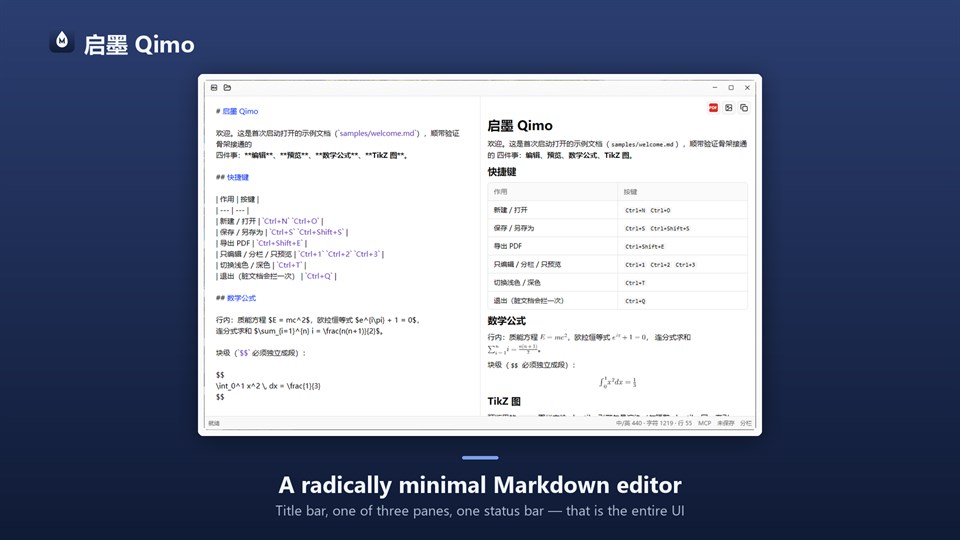
[Radically minimal] A custom title bar, three pane modes (edit / split / preview), one status bar. Every command has a shortcut; the status bar doubles as the only error surface and the unsaved-changes dot (● before the path).
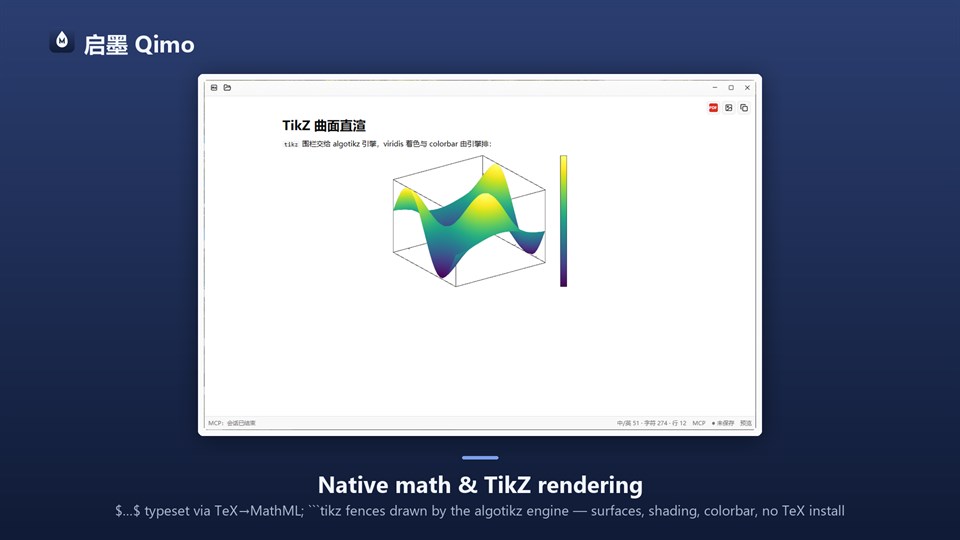
[Native math typesetting] `$…$` inline and `$$…$$` display formulas go TeX → MathML → vector layout with the embedded Latin Modern Math font — fractions, radicals, sum limits, matrices rendered as in print. No screenshots, no placeholders, no TeX distribution to install.
[TikZ drawn by the engine] ```tikz fences are evaluated and drawn live by algotikz — an independent open-source implementation with PGF semantics: axes, curves, mindmaps, and 3D surfaces with viridis-style shading and colorbars, all vector. Engine and font assets are embedded; one file, zero setup.
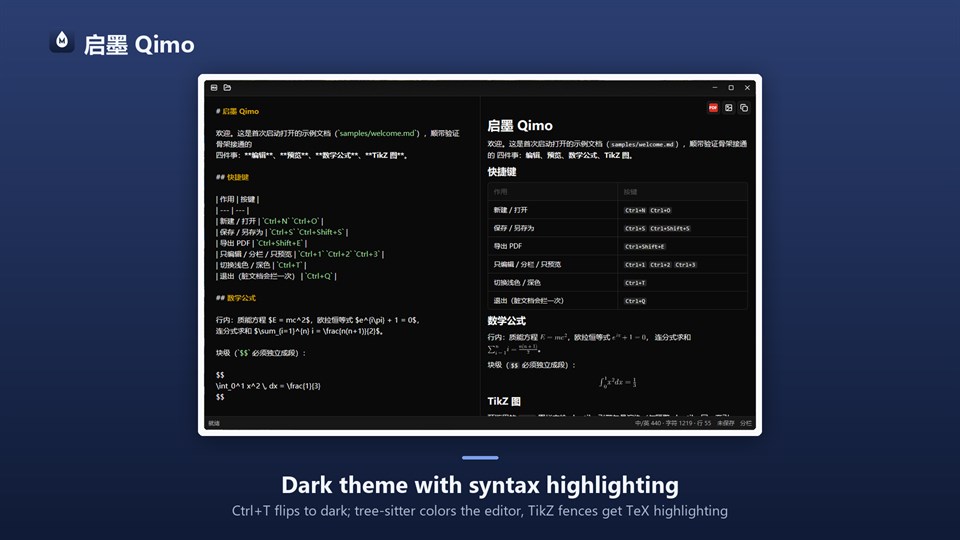
[Syntax highlighting] tree-sitter colors Markdown, and ```tikz / ```latex fences get LaTeX injection highlighting — writing and reading share one color language.
[Two-way scroll sync] Editing follows preview and back, anchored on top-level blocks: scroll the source, the preview follows; drag the preview, the editor comes along.
[Print-grade export] Ctrl+Shift+E exports PDF or PNG: CJK line-break rules, widow/orphan control, headings never orphaned, table headers repeated on continuations, hanging indent for wrapped code; font subsets embedded with selectable text; math and TikZ are drawn as vectors, and the same input always produces byte-identical output. Long-image export stitches pages for you.
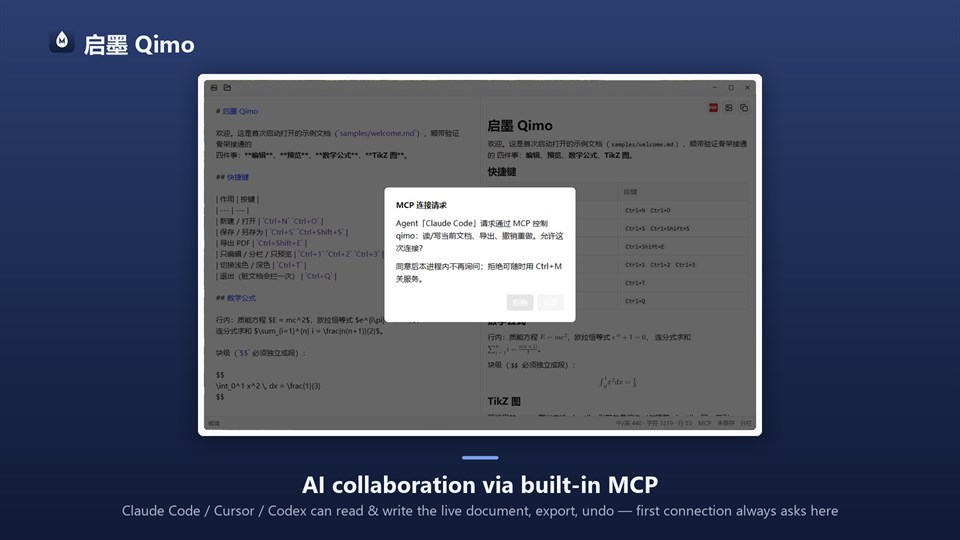
[AI collaboration via MCP] A built-in MCP server connects AI assistants (Claude Code, Cursor, Codex, …) to the document you are editing — read, write, patch, undo/redo, export, and fetch real diagnostics through 10 tools, via the official qimo-mcp bridge. The first connection always asks for your approval in-app; nothing happens before you click Allow, and Ctrl+M switches the service off.
[Double-click to open] Set Qimo as the default app for .md files and double-click anything. Light/dark theme follows the system or flips with one keystroke.
Great for: reading notes, technical documentation and READMEs, STEM notes with real math, papers and tutorials, and as a local writing desk for your AI assistant.
From the developer
Lists 0
-
 Qimo
Points 0
-

- +1 Point

Rankings 0
-
- Your rating
Developer 7
- Lionel Fung
- Followers: 0
- Platforms: Windows Apps (7)
- Deals: 0
- Lists: 0 0
- Points: 0
- Rankings: 0
- Comments: 0
- Videos: 0
- RSS: Subscribe
What's new
- Version: PC
- Last Updated:
Additional Information
- Release Date:
- Category:
Windows Apps›Developer tools - OS:
PC - Size:
18 Mb - Supported Languages:
English,Chinese - Content Rating:
EVERYONE - Windows Store Rating: ¡
0
AppAgg Score
Estimated AppAgg Score for
Qimo
Developer: Lionel Fung
Higher scores usually reflect better results across AppAgg’s indicators.
Based on: popularity · ratings · freshness · deals · store data · community signals
Recalculated daily using fresh AppAgg data.
Comments 0 ¡
Share
Qimo Short URL: Copied!- Windows Store
You may also like
Recent discussionsMore →
 AppTapeFlo this app is the best app i use in my life Because. you trade. journal. Discipline. rule's that you w...
 Shurem Boy15
 AppGame4Class Game4Class makes lesson review fun and interactive. I like how easily students can join from their o...
 Mehdi Gateway62
 AppAniMate Waifu - AI Anime Desktop Pet This is the best anime desktop pets I have ever had, The dancing feature is amazing.
 shaw chaney34
 AppSpark Motion Create 26 The graphics are amazing! Now I can design my ball layouts and watch then spin in 3D animation.
 Jim Kirker40
 AppLocalDub – Real-Time Game Dubbing Hello Kırtay Interactive, I am using LocalDub - Real-Time Game Dubbing. I would like to know if Hind...
 rashid game53
 AppNauticPlayer This app is absolute cinema. Honestly, it’s one of the best media players I’ve ever tried, and I’m s...
 Manuel92
 AppScreen Beings - Interactive Accessibility Companion This is my app so I’m a little bias but as someone from the ADHD community that teaches ADHD and neu...
 Tarelle Irwin54
 AppAadi vault good it ia a encrypter and good you my work on office
 Aditya Rai50
 AppTyping 365 | Daily Typing Trainer The best typing app ever. With Typing 365 you don’t have to force yourself for couple minutes traini...
 Ahmad Mozaffar50
 AppZefir Calendar — Calendar in the Taskbar excelente app! Superando todas as espectativas!
 Diógenes Magnus50

