
书签
为此书签设置标题。
书签已保存
| 开发者: | Lionel Fung (7) | ||
| 价格: | 免费 新 | ||
| 评分: | 600 白银 | ||
| 排名: | 0 | ||
| 评论: | 0 发表评论 | ||
| 列表: | 0 0 | ||
| 积分: | 0 | ||
| +1 积分 | |||
摘要
来认识一下 Qimo,Lionel Fung 出品的应用,归在“开发人员工具”分类下。
新上线:发布于,你可是第一批用户。
免费,没有广告,没有内购。只有你和这款应用。
Microsoft Store 内置在 Windows 里,点几下就装好了。
AppAgg 评分 600。白银级,已经很不错了。
只有 18 MB,硬盘塞满了也装得下。
年龄分级为“EVERYONE”,孩子也适合。
会说 2 种语言,中文也在其中。
AppAgg 上还没人给它打过分。第一个打分的机会就在眼前。
这位开发者在 AppAgg 上还有 6 款应用,值得一看。
想第一时间知道更新和新应用?关注开发者或订阅RSS 订阅源。推送通知通过 AppAgg Alerts 应用发送,支持 Android 和 iOS。
广告
屏幕截图 4
其他平台 0
价格历史 0
- 目前价格: 免费
- 最小值: 免费
- 最大值: 免费
首页专属动态
为「新上架与最近更新」选择平台,首页就只显示你需要的应用和游戏。
描述

Key features:
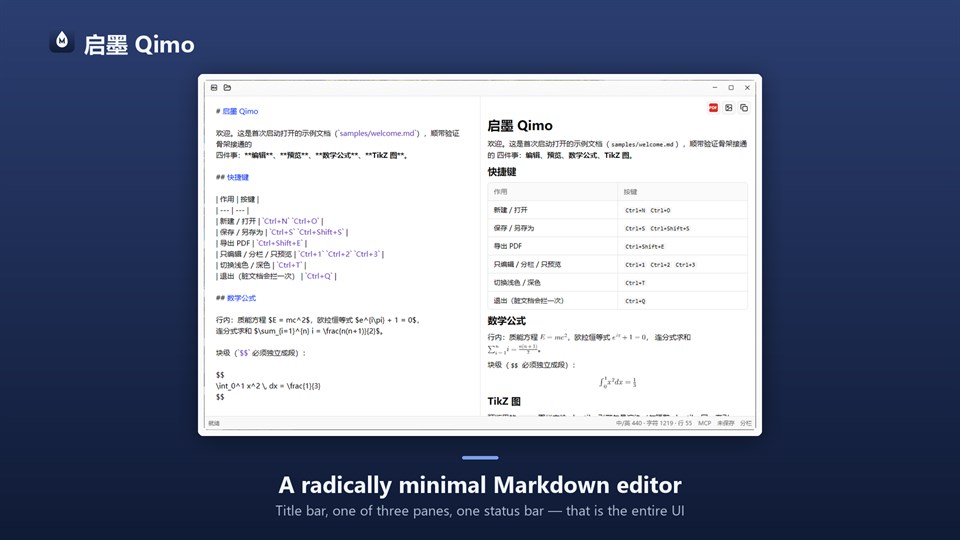
[Radically minimal] A custom title bar, three pane modes (edit / split / preview), one status bar. Every command has a shortcut; the status bar doubles as the only error surface and the unsaved-changes dot (● before the path).
[Native math typesetting] `$…$` inline and `$$…$$` display formulas go TeX → MathML → vector layout with the embedded Latin Modern Math font — fractions, radicals, sum limits, matrices rendered as in print. No screenshots, no placeholders, no TeX distribution to install.
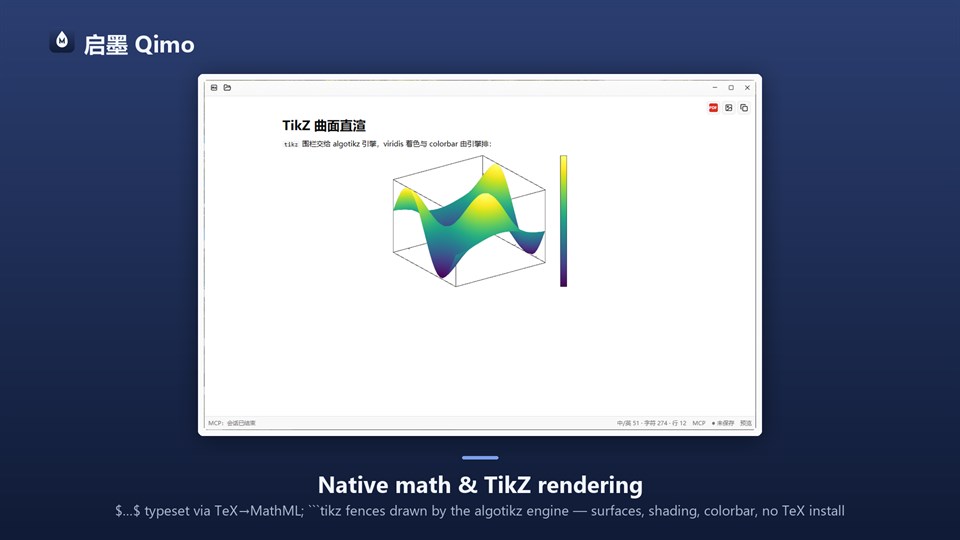
[TikZ drawn by the engine] ```tikz fences are evaluated and drawn live by algotikz — an independent open-source implementation with PGF semantics: axes, curves, mindmaps, and 3D surfaces with viridis-style shading and colorbars, all vector. Engine and font assets are embedded; one file, zero setup.
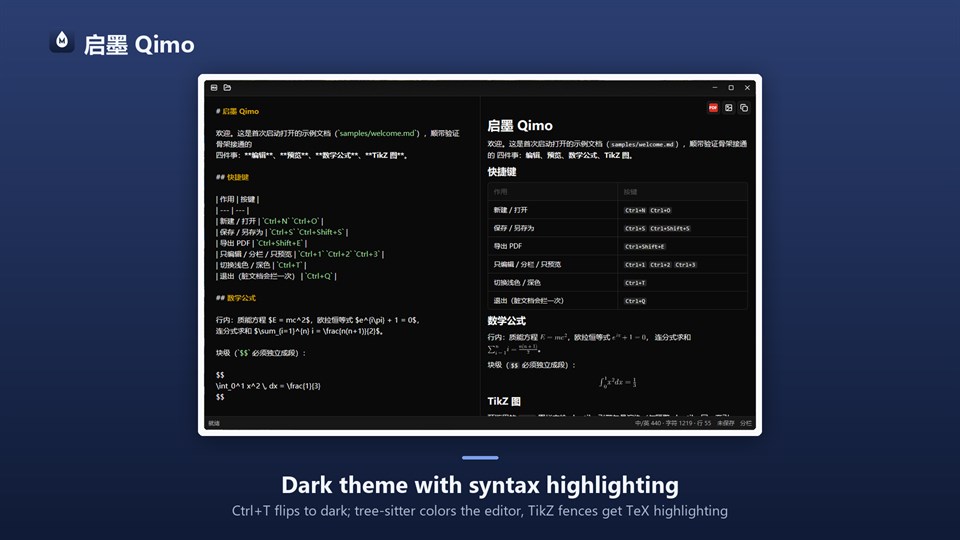
[Syntax highlighting] tree-sitter colors Markdown, and ```tikz / ```latex fences get LaTeX injection highlighting — writing and reading share one color language.
[Two-way scroll sync] Editing follows preview and back, anchored on top-level blocks: scroll the source, the preview follows; drag the preview, the editor comes along.
[Print-grade export] Ctrl+Shift+E exports PDF or PNG: CJK line-break rules, widow/orphan control, headings never orphaned, table headers repeated on continuations, hanging indent for wrapped code; font subsets embedded with selectable text; math and TikZ are drawn as vectors, and the same input always produces byte-identical output. Long-image export stitches pages for you.
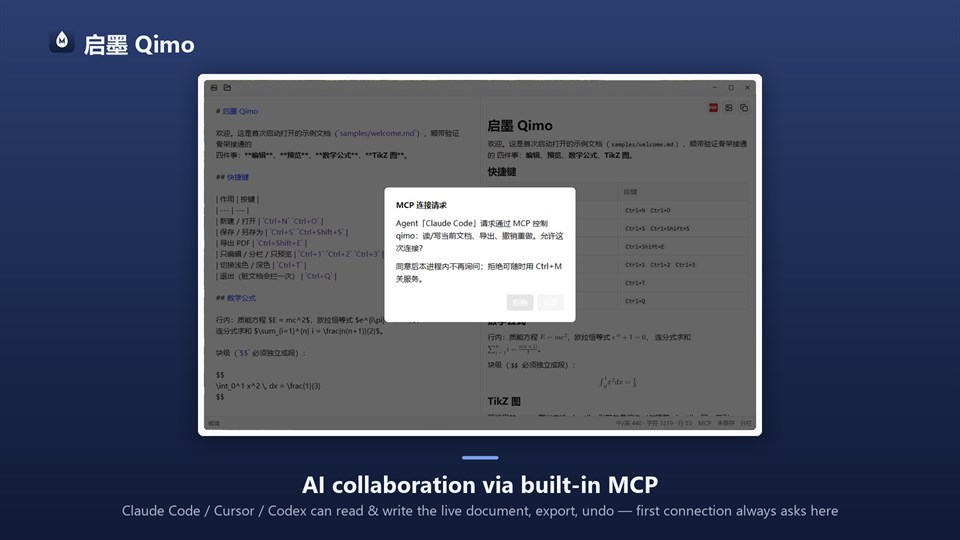
[AI collaboration via MCP] A built-in MCP server connects AI assistants (Claude Code, Cursor, Codex, …) to the document you are editing — read, write, patch, undo/redo, export, and fetch real diagnostics through 10 tools, via the official qimo-mcp bridge. The first connection always asks for your approval in-app; nothing happens before you click Allow, and Ctrl+M switches the service off.
[Double-click to open] Set Qimo as the default app for .md files and double-click anything. Light/dark theme follows the system or flips with one keystroke.
Great for: reading notes, technical documentation and READMEs, STEM notes with real math, papers and tutorials, and as a local writing desk for your AI assistant.
来自开发者
你是开发者吗?
在页面顶部发布新闻,关注者会通过邮件收到。添加你的 YouTube 视频,它们会排在“视频”版块最前面。
列表 0
-
 Qimo
积分 0
-

- +1 积分

排名 0
-
- 您的评分
开发者 7
- Lionel Fung
- 关注者: 0
- 平台: Windows 应用 (7)
- 折扣: 0
- 列表: 0 0
- 积分: 0
- 排名: 0
- 评论: 0
- 视频: 0
- RSS: 订阅
新版变化
- 版本: PC
- 最后更新:
其他信息
AppAgg 评分
600
AppAgg 预估评分:
Qimo
开发者: Lionel Fung
600 白银
评分越高,通常表示其在 AppAgg 上的各项指标表现越好。
基于: 热度 · 用户评分 · 新鲜度 · 优惠 · 商店数据 · 社区活跃度
根据最新 AppAgg 数据每日重新计算。
网站徽章:  已复制!
评论 0 ¡
来发第一条评论吧
分享
Qimo 短网址: 已复制!- Windows Store

