
Lesezeichen
| Entwickler: | sumalab studio (1) | ||
| Preis: | $9.99 Neu | ||
| Score: | 600 Silber | ||
| Ranglisten: | 0 | ||
| Kommentare: | 0 Kommentar posten | ||
| Listen: | 0 0 | ||
| Punkte: | 0 | ||
| +1 Punkt | |||
Kurzinfo
RsyncZilla ist eine App von sumalab studio aus der Kategorie „Entwicklungstools“.
Brandneu, erst erschienen. Riecht noch nach frischem Code.
$9.99. Auf AppAgg noch nie im Angebot, kein einziges Mal. Richte einen Preisalarm ein. Wir denken dran, auch wenn du es vergisst.
Der Microsoft Store ist in Windows eingebaut, die Installation ist also in ein paar Klicks erledigt.
Der AppAgg-Score liegt bei 600. Silber, und das ist gar nicht übel.
Altersfreigabe „EVERYONE“, also auch für Kinder geeignet.
Kann 2 Sprachen, aber Deutsch ist noch nicht dabei.
Hier herrscht noch Funkstille: keine Bewertungen, keine Kommentare. Brich das Schweigen.
Das ist die einzige App des Entwicklers auf AppAgg. Noch.
Willst du als Erstes von Angeboten, Updates und neuen Apps erfahren? Richte einen Preisalarm ein, folge dem Entwickler oder abonniere den RSS-Feed. Push-Nachrichten kommen über die App AppAgg Alerts für Android und iOS.
Screenshots 3
Andere Plattformen 0
Preisentwicklung 0
- Aktueller Preis: $9.99
- Minimum: $9.99
- Maximum: $9.99
Dein eigener Feed auf der Startseite
Beschreibung

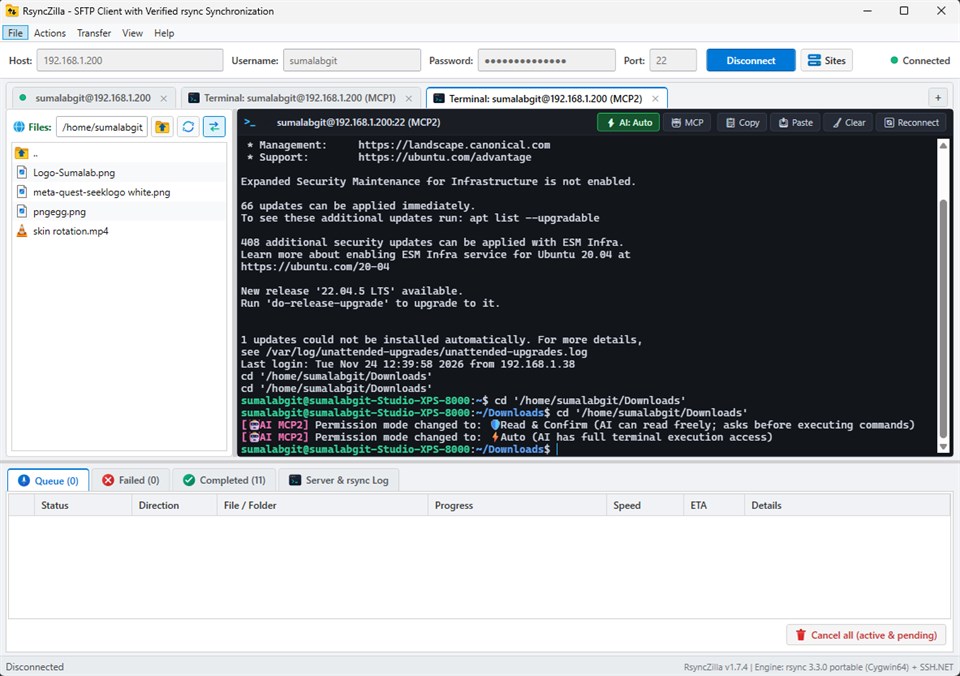
Connect Claude, ChatGPT, Cursor, Antigravity, or your own local AI model directly to your live SSH terminal sessions without ever sharing your server passwords. Let your AI inspect logs, run commands, read or edit remote files, and upload/download data while you watch everything happen live on screen with strict per-tab permissions (AI: Off, AI: Confirm with one-click Allow/Deny, or AI: Auto).
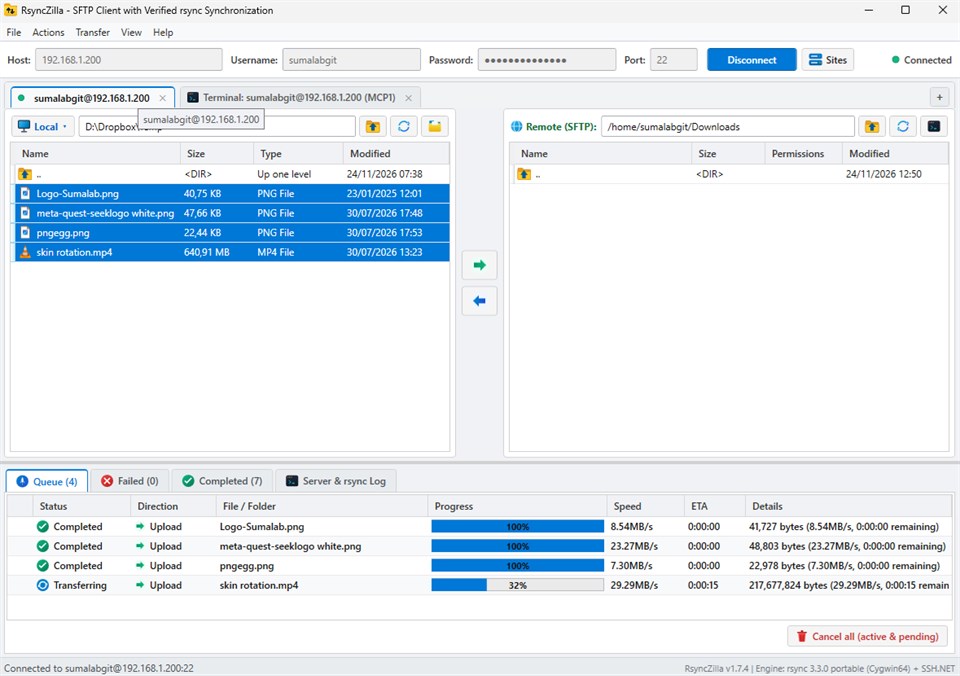
Instead of re-uploading entire folders or leaving broken half-transferred files on your server, RsyncZilla uses bundled rsync over SSH so only changed blocks are transferred with automatic resume, real error reporting, and atomic file updates.
Key highlights:
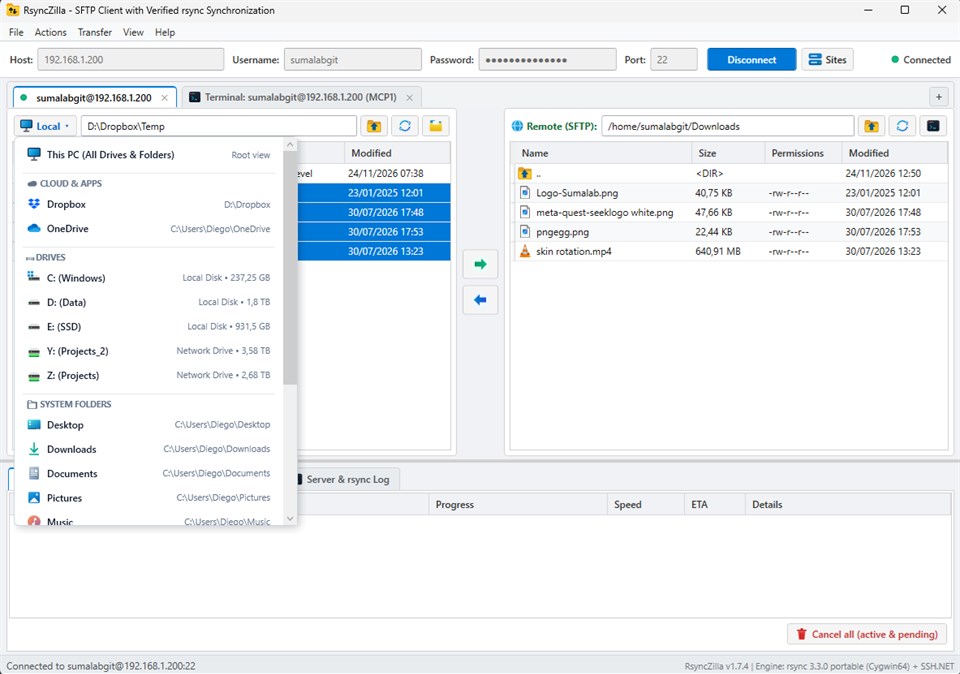
• Dual-pane Local & Remote SFTP Explorer with drag-and-drop (including dragging directly to Windows Explorer / Desktop), Windows 11 native icons, and quick navigation to Drives, Cloud folders (Dropbox, OneDrive...), and Quick Access.
• Resumable rsync over SSH Transfer Queue with live progress, speed stats, overwrite rules (--update, --checksum, --ignore-times), and automatic retry.
• Integrated Interactive SSH Terminal (xterm.js) with a synchronized remote file tree that tracks your `cd` commands in real time.
• Optional Local AI MCP Server (Model Context Protocol): disabled by default per tab (AI: Off / AI: Confirm / AI: Auto), letting AI assistants like Claude, ChatGPT, Cursor, or Antigravity assist with your live terminal sessions under your explicit control.
• Site Manager with FileZilla XML Import & Optional AES-256-GCM Encrypted Password Vault (PBKDF2 key derivation, zero plaintext storage).
• Remote File Editing ("View/Edit" & "Open with...") with automatic upload sync on save.
RsyncZilla is free and open source (MIT license) on GitHub. Purchasing it on the Microsoft Store provides a Microsoft-signed package with automatic updates and directly supports ongoing development by Sumalab.
Vom Entwickler
Entwickler
- sumalab studio
- Follower: 0
- Plattformen: Windows Apps (1)
- Angebote: 0
- Listen: 0 0
- Punkte: 0
- Ranglisten: 0
- Kommentare: 0
- Videos: 0
- RSS: Abonnieren
Listen 0
-
 RsyncZilla
Punkte 0
-

- +1 Punkt

Ranglisten 0
-
- Deine Bewertung
Neue Funktionen
- Version: PC
- Zuletzt aktualisiert:
- Version 1.7.4:
- Formatted Markdown release notes viewer and new Help -> Release Notes menu.
- Terminal toolbar buttons now immediately return keyboard focus to the live terminal.
- Shell prompt is automatically preserved and restored after MCP commands and notices.
- Local Quick Navigation panel (This PC, Cloud folders like Dropbox/OneDrive, Drives, and Explorer Quick Access).
- Integrated AI MCP server (per-tab Off / Confirm / Auto permissions) with multi-tab support (MCP1, MCP2...).
Weitere Informationen
- Veröffentlichungsdatum:
- Kategorie:
Windows-Apps›Entwicklungstools - Betriebssysteme:
PC - Größe:
79 Mb - Unterstützte Sprachen:
Englisch,Spanisch - Altersfreigabe:
EVERYONE - Windows Store Bewertung: ¡
0 - Webseite:
 https://www.sumalab.com/
Kommentare 0 ¡
AppAgg-Score
Geschätzter AppAgg-Score für
RsyncZilla
Entwickler: sumalab studio
Ein höherer Score weist meist auf bessere Werte bei den von AppAgg erfassten Kennzahlen hin.
Basierend auf: Popularität · Nutzerbewertungen · Aktualität · Angeboten · Store-Daten · Community-Aktivität
Wird täglich anhand aktueller AppAgg-Daten neu berechnet.
RsyncZilla Kurz-URL: Kopiert!- Windows Store

