
Segnalibri
| Sviluppatore: | sumalab studio (1) | ||
| Prezzo: | $9.99 Novità | ||
| Punteggio: | 600 Argento | ||
| Classifiche: | 0 | ||
| Commenti: | 0 Pubblica commento | ||
| Liste: | 0 0 | ||
| Punti: | 0 | ||
| +1 Punto | |||
In breve
RsyncZilla è un’app di sumalab studio della categoria «Strumenti di sviluppo».
Nuova di zecca, è uscita . Profuma ancora di codice fresco.
$9.99. Mai in offerta su AppAgg, neanche una volta. Imposta un avviso di prezzo. Noi non ce ne dimentichiamo, anche se tu sì.
Il Microsoft Store è integrato in Windows, quindi si installa in un paio di clic.
Il suo Punteggio AppAgg è 600. Livello Argento, e non è affatto male.
Classificazione «EVERYONE»: va bene anche per i bambini.
Conosce 2 lingue, ma l’italiano non ancora.
Qui per ora silenzio totale (niente voti, niente commenti). Rompi il ghiaccio.
È l’unica app dello sviluppatore su AppAgg. Per ora.
Vuoi sapere prima di tutti di offerte, aggiornamenti e nuove app? Imposta un avviso di prezzo, segui lo sviluppatore o iscriviti al feed RSS. Le notifiche push arrivano tramite l’app AppAgg Alerts per Android e iOS.
Screenshot 3
Altre piattaforme 0
Cronologia dei prezzi 0
- Prezzo attuale: $9.99
- Minimo: $9.99
- Massimo: $9.99
Il tuo feed personale nella home
Descrizione

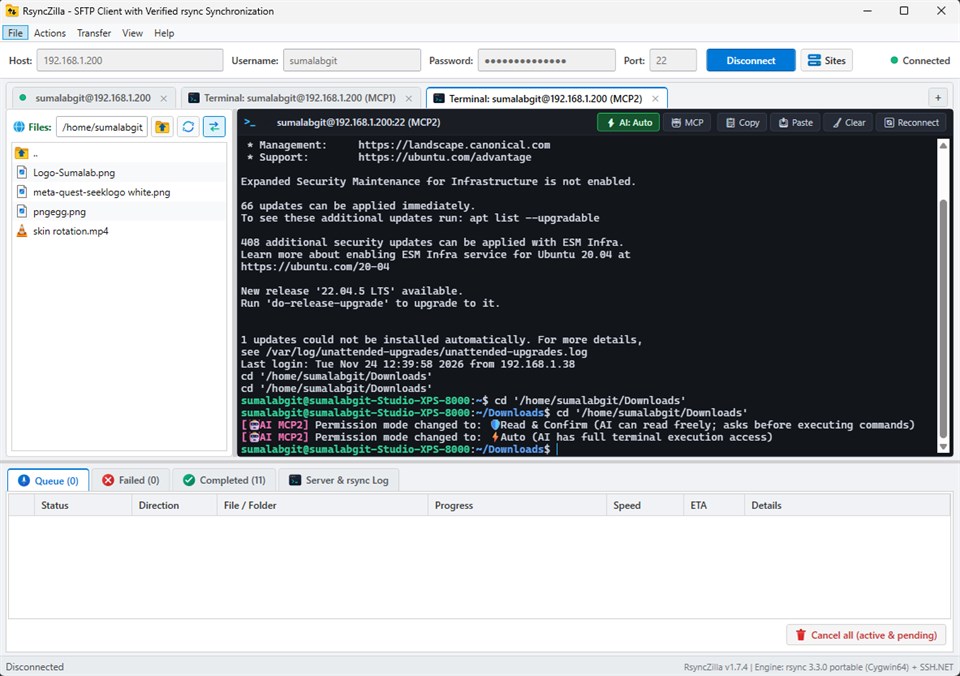
Connect Claude, ChatGPT, Cursor, Antigravity, or your own local AI model directly to your live SSH terminal sessions without ever sharing your server passwords. Let your AI inspect logs, run commands, read or edit remote files, and upload/download data while you watch everything happen live on screen with strict per-tab permissions (AI: Off, AI: Confirm with one-click Allow/Deny, or AI: Auto).
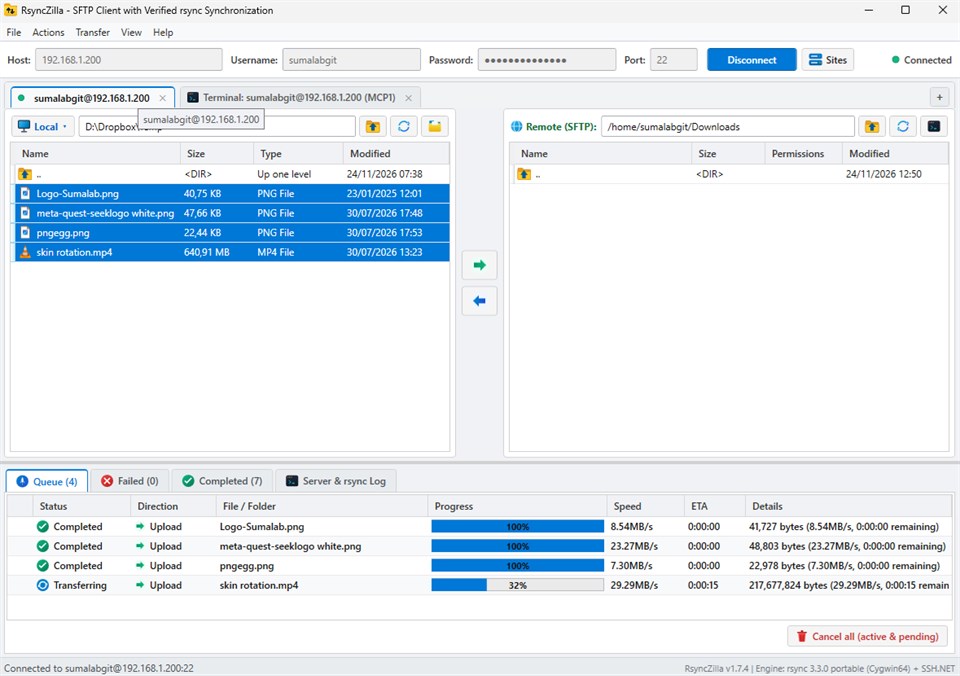
Instead of re-uploading entire folders or leaving broken half-transferred files on your server, RsyncZilla uses bundled rsync over SSH so only changed blocks are transferred with automatic resume, real error reporting, and atomic file updates.
Key highlights:
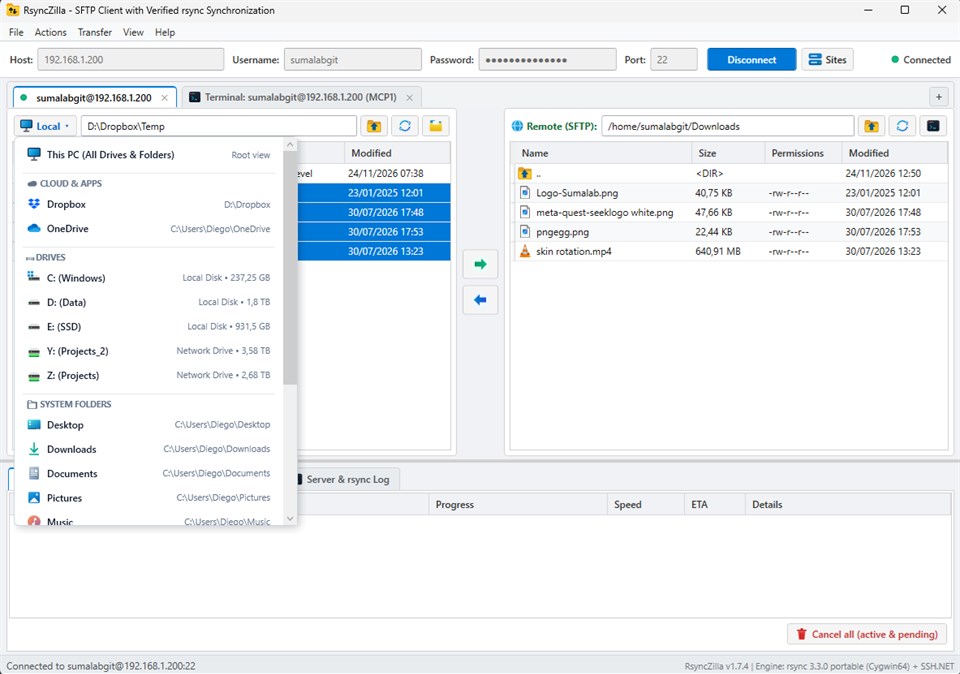
• Dual-pane Local & Remote SFTP Explorer with drag-and-drop (including dragging directly to Windows Explorer / Desktop), Windows 11 native icons, and quick navigation to Drives, Cloud folders (Dropbox, OneDrive...), and Quick Access.
• Resumable rsync over SSH Transfer Queue with live progress, speed stats, overwrite rules (--update, --checksum, --ignore-times), and automatic retry.
• Integrated Interactive SSH Terminal (xterm.js) with a synchronized remote file tree that tracks your `cd` commands in real time.
• Optional Local AI MCP Server (Model Context Protocol): disabled by default per tab (AI: Off / AI: Confirm / AI: Auto), letting AI assistants like Claude, ChatGPT, Cursor, or Antigravity assist with your live terminal sessions under your explicit control.
• Site Manager with FileZilla XML Import & Optional AES-256-GCM Encrypted Password Vault (PBKDF2 key derivation, zero plaintext storage).
• Remote File Editing ("View/Edit" & "Open with...") with automatic upload sync on save.
RsyncZilla is free and open source (MIT license) on GitHub. Purchasing it on the Microsoft Store provides a Microsoft-signed package with automatic updates and directly supports ongoing development by Sumalab.
Dallo sviluppatore
Sviluppatore
- sumalab studio
- Follower: 0
- Piattaforme: Windows App (1)
- Offerte: 0
- Liste: 0 0
- Punti: 0
- Classifiche: 0
- Commenti: 0
- Video: 0
- RSS: Iscriviti
Liste 0
-
 RsyncZilla
Punti 0
-

- +1 Punto

Classifiche 0
-
- La tua valutazione
Novità
- Versione: PC
- Ultimo aggiornamento:
- Version 1.7.4:
- Formatted Markdown release notes viewer and new Help -> Release Notes menu.
- Terminal toolbar buttons now immediately return keyboard focus to the live terminal.
- Shell prompt is automatically preserved and restored after MCP commands and notices.
- Local Quick Navigation panel (This PC, Cloud folders like Dropbox/OneDrive, Drives, and Explorer Quick Access).
- Integrated AI MCP server (per-tab Off / Confirm / Auto permissions) with multi-tab support (MCP1, MCP2...).
Informazioni aggiuntive
- Data di uscita:
- Categoria:
App per Windows›Strumenti di sviluppo - Sistemi operativi:
PC - Dimensioni:
79 Mb - Lingue supportate:
Inglese,Spagnolo - Classificazione contenuti:
EVERYONE - Windows Store Valutazione: ¡
0 - Sito web:
 https://www.sumalab.com/
Commenti 0 ¡
Punteggio AppAgg
Punteggio AppAgg stimato per
RsyncZilla
Sviluppatore: sumalab studio
Un punteggio più alto riflette in genere risultati migliori negli indicatori di AppAgg.
Basato su: popolarità · valutazioni degli utenti · freschezza · offerte · dati degli store · attività della community
Ricalcolato ogni giorno con dati AppAgg aggiornati.
RsyncZilla URL breve: Copiato!- Windows Store

