
Закладки
| Разработчик: | sumalab studio (1) | ||
| Цена: | $9.99 Новинка | ||
| Оценка: | 600 Серебро | ||
| Рейтинги: | 0 | ||
| Комментарии: | 0 Оставить комментарий | ||
| Списки: | 0 0 | ||
| Очки: | 0 | ||
| +1 Очко | |||
Кратко
Это RsyncZilla, приложение от sumalab studio из раздела «Средства разработчика».
Совсем свежее: вышло . Ещё пахнет новым кодом.
$9.99. Скидок на AppAgg не было ни разу. Совсем. Включите оповещение о цене. Мы не забудем, даже если вы забудете.
Microsoft Store встроен в Windows, так что ставится в пару кликов.
Оценка AppAgg: 600. «Серебро», и это уже неплохо.
Возрастной рейтинг «EVERYONE», подходит и детям.
Знает 2 языка, но русский пока не выучило.
Здесь о нём пока тишина: ни оценок, ни комментариев. Нарушьте молчание.
Это единственное приложение разработчика на AppAgg. Пока что.
Хотите первым узнавать о скидках, обновлениях и новых приложениях? Включите оповещение о цене, подпишитесь на разработчика или на RSS-канал. Push приходят в приложении AppAgg Alerts для Android и iOS.
Скриншоты 3
Другие платформы 0
История цен 0
- Текущая цена: $9.99
- Минимум: $9.99
- Максимум: $9.99
Своя лента на главной
Описание

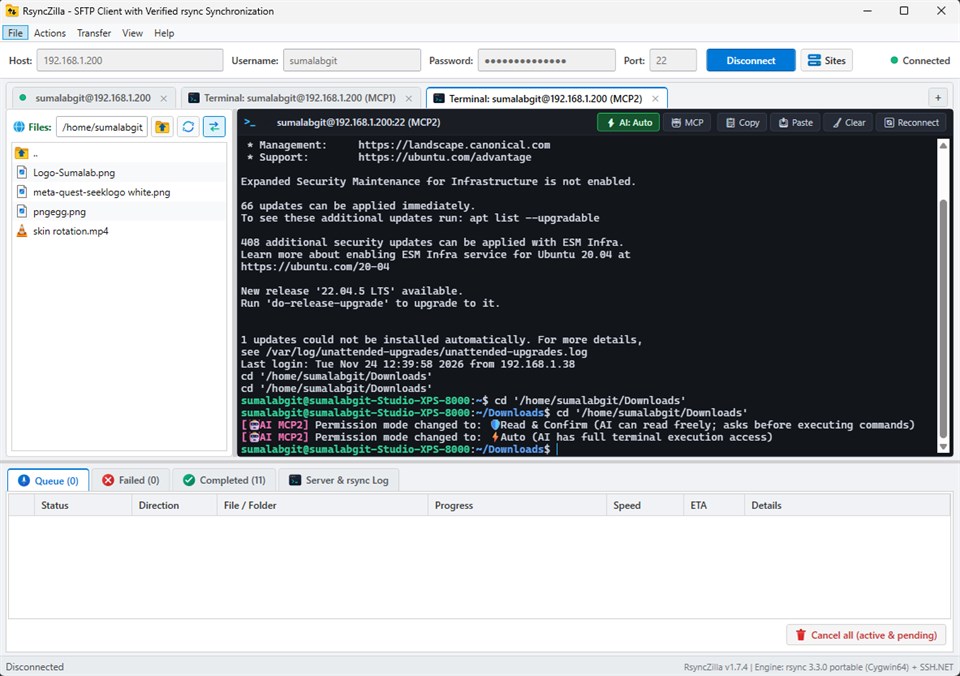
Connect Claude, ChatGPT, Cursor, Antigravity, or your own local AI model directly to your live SSH terminal sessions without ever sharing your server passwords. Let your AI inspect logs, run commands, read or edit remote files, and upload/download data while you watch everything happen live on screen with strict per-tab permissions (AI: Off, AI: Confirm with one-click Allow/Deny, or AI: Auto).
Instead of re-uploading entire folders or leaving broken half-transferred files on your server, RsyncZilla uses bundled rsync over SSH so only changed blocks are transferred with automatic resume, real error reporting, and atomic file updates.
Key highlights:
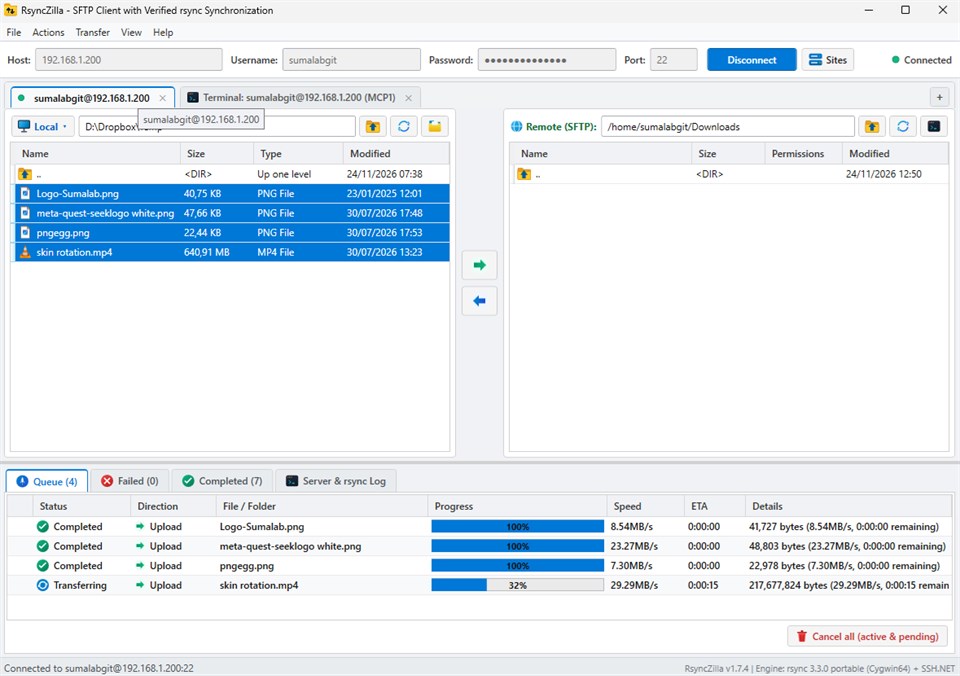
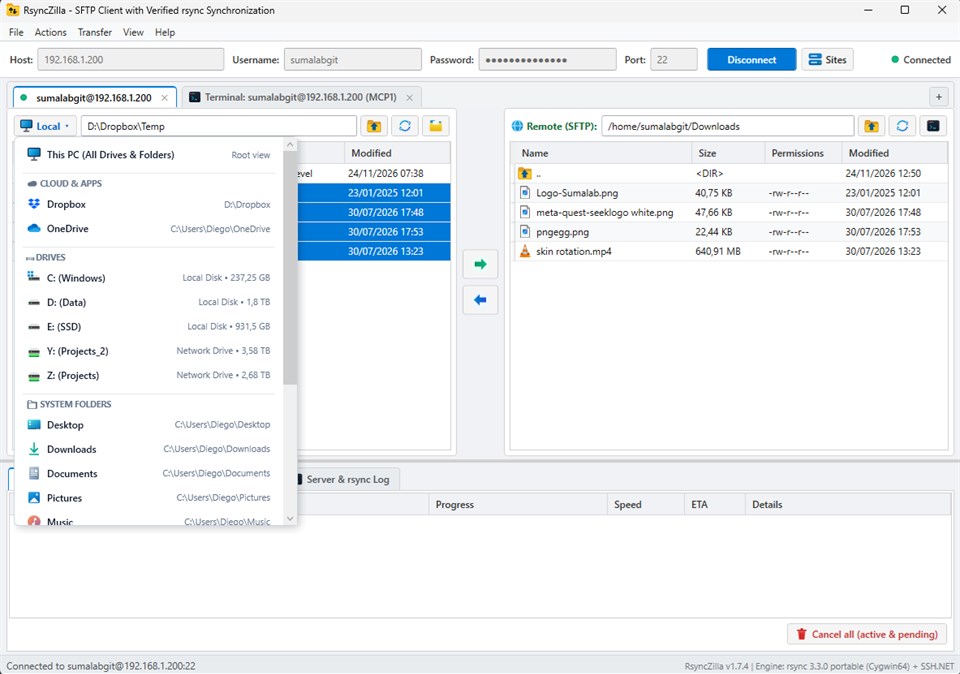
• Dual-pane Local & Remote SFTP Explorer with drag-and-drop (including dragging directly to Windows Explorer / Desktop), Windows 11 native icons, and quick navigation to Drives, Cloud folders (Dropbox, OneDrive...), and Quick Access.
• Resumable rsync over SSH Transfer Queue with live progress, speed stats, overwrite rules (--update, --checksum, --ignore-times), and automatic retry.
• Integrated Interactive SSH Terminal (xterm.js) with a synchronized remote file tree that tracks your `cd` commands in real time.
• Optional Local AI MCP Server (Model Context Protocol): disabled by default per tab (AI: Off / AI: Confirm / AI: Auto), letting AI assistants like Claude, ChatGPT, Cursor, or Antigravity assist with your live terminal sessions under your explicit control.
• Site Manager with FileZilla XML Import & Optional AES-256-GCM Encrypted Password Vault (PBKDF2 key derivation, zero plaintext storage).
• Remote File Editing ("View/Edit" & "Open with...") with automatic upload sync on save.
RsyncZilla is free and open source (MIT license) on GitHub. Purchasing it on the Microsoft Store provides a Microsoft-signed package with automatic updates and directly supports ongoing development by Sumalab.
От разработчика
Разработчик
- sumalab studio
- Подписчики: 0
- Платформы: Windows Приложения (1)
- Скидки: 0
- Списки: 0 0
- Очки: 0
- Рейтинги: 0
- Комментарии: 0
- Видео: 0
- RSS: Подписаться
Списки 0
-
 RsyncZilla
Очки 0
-

- +1 Очко

Рейтинги 0
-
- Ваша оценка
Что нового
- Версия: PC
- Последнее обновление:
- Version 1.7.4:
- Formatted Markdown release notes viewer and new Help -> Release Notes menu.
- Terminal toolbar buttons now immediately return keyboard focus to the live terminal.
- Shell prompt is automatically preserved and restored after MCP commands and notices.
- Local Quick Navigation panel (This PC, Cloud folders like Dropbox/OneDrive, Drives, and Explorer Quick Access).
- Integrated AI MCP server (per-tab Off / Confirm / Auto permissions) with multi-tab support (MCP1, MCP2...).
Дополнительная информация
- Дата выпуска:
- Категория:
Приложения для Windows›Средства разработчика - Операционные системы:
PC - Размер:
79 Mb - Поддерживаемые языки:
Английский,Испанский - Возрастные ограничения:
EVERYONE - Windows Store Рейтинг: ¡
0 - Сайт:
 https://www.sumalab.com/
Комментарии 0 ¡
Оценка AppAgg
Примерная оценка AppAgg для
RsyncZilla
Разработчик: sumalab studio
Более высокая оценка обычно означает лучшие результаты по показателям AppAgg.
На основе: популярности · оценок пользователей · актуальности · скидок · данных магазинов · активности сообщества
Пересчитывается ежедневно на основе актуальных данных AppAgg.
RsyncZilla Короткий URL: Скопировано!- Windows Store

