
Bogmærker
| Udvikler: | adell (3) | ||
| Pris: | Gratis Ny | ||
| Score: | 640 Sølv | ||
| Ranglister: | 0 | ||
| Kommentarer: | 0 Skriv kommentar | ||
| Lister: | 0 0 | ||
| Point: | 0 | ||
| +1 Point | |||
Kort fortalt
Sisal . er en app fra adell i kategorien »Udviklerværktøjer«.
Den kører endda på HoloLens: Windows i mixed reality.
Der findes endda en version til Windows Mobile. Hilsner fra fortiden.
Gratis: ingen reklamer og ingen køb i appen. Kun dig og appen.
Nyhed: den udkom , så du er blandt de første.
Virker endda på Surface Hub, til de store mødelokaler.
AppAgg-scoren er 640. Sølv, og det er slet ikke dårligt.
Aldersgrænse »EVERYONE«: også fint for børn.
Taler kun ét sprog, og det er ikke dansk.
Har du brugt den? Din anmeldelse bliver den første her.
Udvikleren har yderligere 2 apps på AppAgg. Tag et kig.
Vil du høre om opdateringer og nye apps først? Følg udvikleren eller abonner på vores RSS-feed. Push-beskeder kommer via appen AppAgg Alerts til Android og iOS.
Skærmbilleder 5
Andre platforme 0
Prishistorik 0
- Nuværende pris: Gratis
- Minimum: Gratis
- Maksimum: Gratis
Dit eget feed på forsiden
Beskrivelse

WHY Sisal
Many coordination problems are only found after a nuisance outage or a fault. Sisal helps you find them earlier. Sisal looks for devices that may trip in the wrong order, overlap too much, or leave too little time separation. Sisal is not a full power-system simulator. It is a focused coordination analysis workbench built around explicit upstream and downstream device pairs, so every finding is easy to follow and easy to check.
EVERY FAILED CHECK IS EXPLAINED
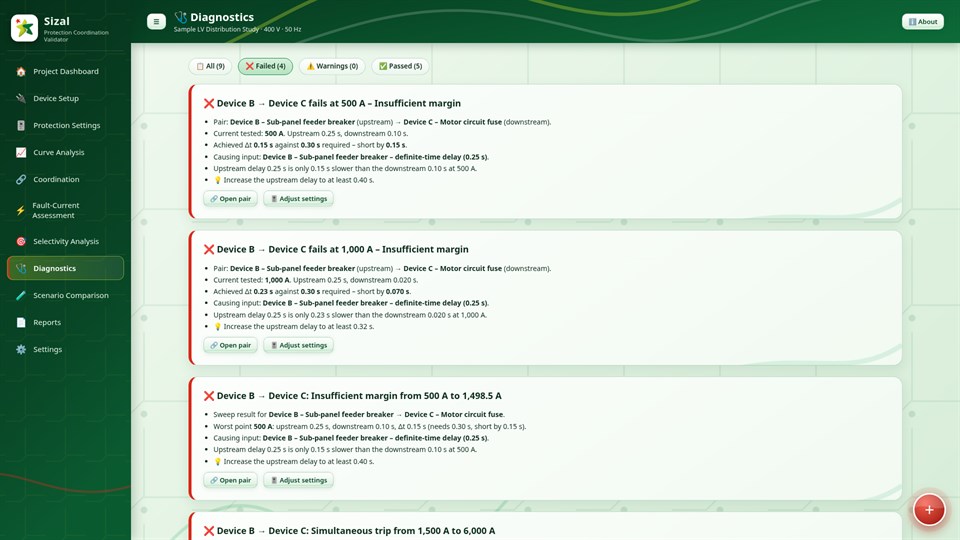
The strongest idea in Sisal is explainable diagnostics. When a pair fails, Sisal tells you which device pair failed, at what current, by how much, and which input or characteristic caused the result. Sisal then suggests a change to review, such as a longer delay, a different time multiplier or a higher instantaneous pickup. You never have to guess why Sisal reported a problem.
A SIMPLE SIX-STAGE WORKFLOW
1. Create an electrical project with a name, supply voltage, system frequency and distribution configuration. 2. Add protective devices as upstream and downstream records. 3. Configure protection curves with pickup, time multiplier, instantaneous settings and curve type. 4. Define coordination relationships linking devices. 5. Run validation and read the margins at your chosen currents. 6. Review diagnostics with failed checks, numerical results and areas for engineering review.
DEVICE SETUP
Sisal lets you create circuit breaker, fuse and protective relay records. Each record has a name, rated current, breaking capacity and a source note. Device records are generic and user-entered, so you stay in control of the data and can document where every value came from. Sisal does not ship manufacturer libraries. Add your own documented values, duplicate a device, edit it later or remove it.
PROTECTION SETTINGS AND CURVES
Sisal supports IEC standard inverse, IEC very inverse, IEC extremely inverse, definite time and user-defined point curves. Enter the pickup current, time multiplier, definite-time delay, instantaneous pickup and instantaneous time. Sisal calculates the operating time with the standard equations, for example t = TMS × 0.14 / ((I/Is)^0.02 − 1) for the standard inverse curve. User-defined curves are interpolated on logarithmic axes across the points you enter.
TIME-CURRENT CURVE ANALYSIS
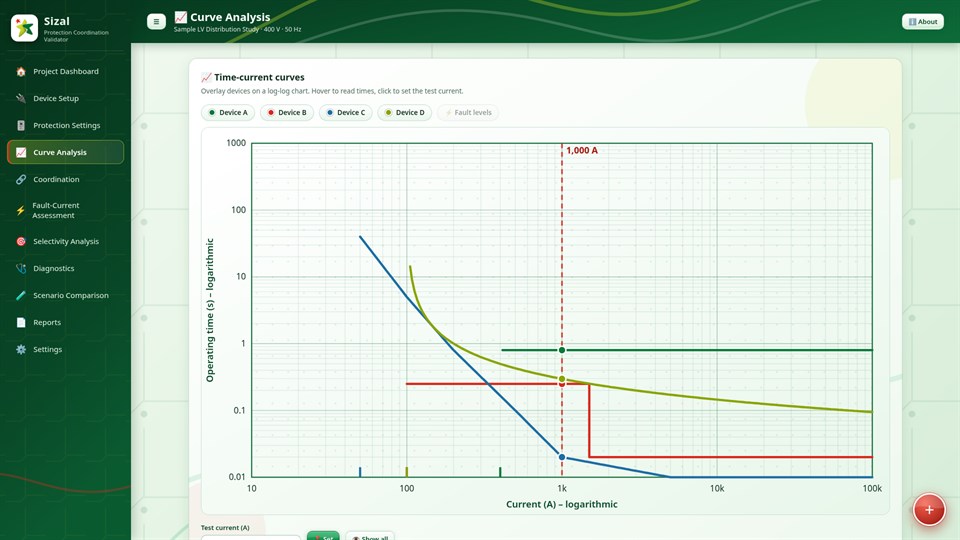
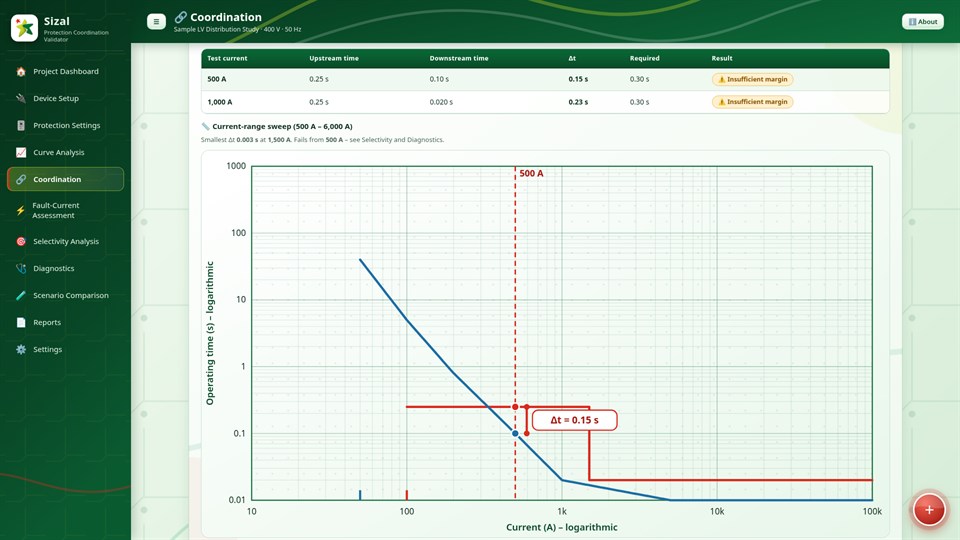
Sisal draws a logarithmic time-current chart that overlays any devices you choose. Hover over the chart to read the operating time of every device at that current, click to set a test current, and switch fault-level markers on or off. The Sisal pair chart marks the time separation Δt directly on the plot so you can see the margin at a glance.
COORDINATION MARGIN CHECKS
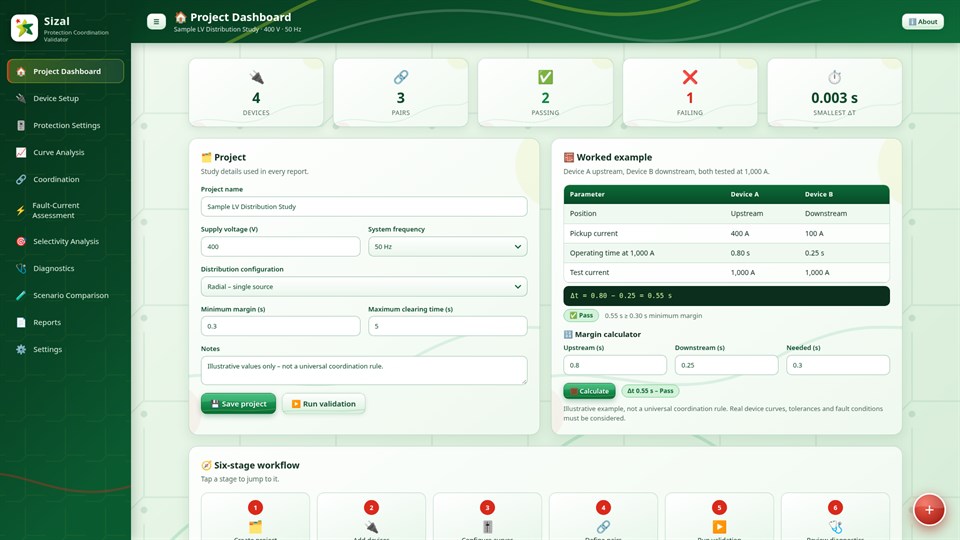
In Sisal each coordination pair has an upstream device, a downstream device and one or more test currents. Sisal calculates Δt = t(upstream) − t(downstream) and compares it with the minimum margin you configure, for example 0.30 s. Sisal also sweeps a logarithmic current range, so a pair that passes at one current but fails at another is not missed. A worked example: Device A (upstream, pickup 400 A, 0.8 s at 1,000 A) and Device B (downstream, pickup 100 A, 0.25 s at 1,000 A) give Δt = 0.8 − 0.25 = 0.55 s, which passes a 0.30 s requirement. This is an illustrative example, not a universal coordination rule.
FAULT-CURRENT ASSESSMENT
Enter the maximum and minimum available fault current at each device location. Sisal compares the maximum fault with the breaking capacity, checks the clearing time at the minimum fault against your maximum clearing time, and shows when the instantaneous region is reached. Sisal warns you about unusual settings such as a pickup far above the rated current.
SELECTIVITY ANALYSIS
Sisal classifies each pair as selective, insufficient margin, simultaneous trip, wrong order or downstream does not trip. A colour strip shows the result across the whole current range, and Sisal reports the selectivity limit, the current up to which the pair stays selective.
SCENARIO COMPARISON
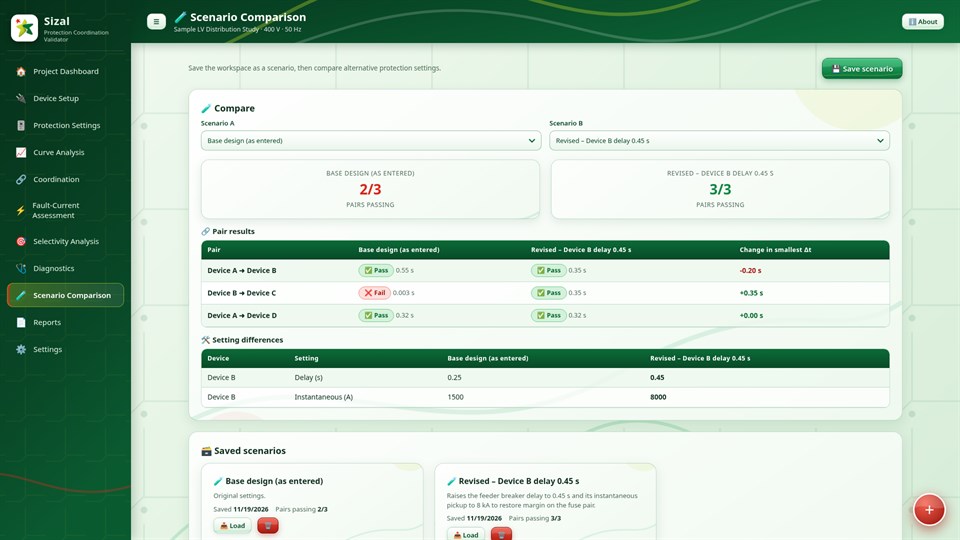
Save your workspace as a scenario and test alternative protection settings. Sisal compares any two scenarios side by side, shows which pairs pass in each, shows the change in the smallest margin and lists every setting that differs. Load a scenario back into the workspace when you decide to adopt it.
REPORTS
Sisal produces a study report with the project details, pair results, device settings and sweep summary. Export the pair results or the device list as CSV, print the report, copy a text summary, or create a JSON backup you can restore later. Everything is created on your own computer.
PRIVATE AND OFFLINE
Sisal does not gather or access any information from you. There is no account, no sign-in, no analytics, no advertising and no cloud synchronisation. Sisal works fully offline after installation, never contacts a server and never uses the camera, microphone or your media. Your projects are saved only in local storage on your device.
IMPORTANT NOTE
Sisal provides engineering analysis and decision support. It is not certified proof of electrical safety. Actual device curves, tolerances, fault conditions and tested combinations must be considered, and qualified engineers must verify final protection settings and applicable standards before anything is implemented.
WHO USES Sisal
Electrical engineers use Sisal to review a proposed design before it is issued. Power distribution designers use Sisal to test several setting ideas quickly. Consultants use Sisal to show clients why a pair fails and what to change. Industrial maintenance engineers use Sisal to review settings after a plant change. Protection and control technicians use Sisal to prepare for commissioning. Students use Sisal to see how time multipliers, pickup values and delays change the time separation of two devices.
WHAT Sisal IS NOT
Sisal is not a replacement for a full power-system simulation suite. It does not model complete networks, load flow or cable damage curves. Sisal deliberately concentrates on explicit device-pair relationships, user-managed device records and explainable coordination findings. That focus keeps Sisal quick to learn, quick to run and easy to audit.
SAMPLE PROJECT
The first time you open Sisal it contains a small sample study named Sample LV Distribution Study. It has a main incomer breaker, a sub-panel feeder breaker, a motor circuit fuse and a relay-fed feeder. The pair from the main incomer to the feeder breaker passes with Δt = 0.55 s. The pair from the feeder breaker to the motor fuse fails, so you can open Diagnostics in Sisal and see a complete explanation. Two saved scenarios show how a longer delay and a higher instantaneous pickup resolve the failure. Restore the sample at any time from Settings.
HOW Sisal CLASSIFIES A RESULT
Pass means the margin Δt meets your minimum, or the upstream device does not operate at that current. Insufficient margin means the order is correct but the time separation is smaller than required. Simultaneous trip means both devices operate within your tolerance of each other. Wrong order means the downstream device is slower than the upstream device. Downstream does not trip means the upstream device operates while the downstream device does not. Sisal lets you change the minimum margin, the simultaneous tolerance and the maximum clearing time in Settings.
DESIGNED FOR A DESKTOP WORKFLOW
Sisal has a clear sidebar with eleven screens, large readable tables and a chart that scales with your window. A quick-action button gives you fast access to adding a device, adding a pair, saving a scenario and running validation. Toast messages confirm each action and disappear on their own. Sisal also adapts to narrow windows, so the same workspace is comfortable on a small screen.
CURVE EQUATIONS USED BY Sisal
With I as the current, Is as the pickup and TMS as the time multiplier, Sisal uses t = TMS × 0.14 / ((I/Is)^0.02 − 1) for standard inverse, t = TMS × 13.5 / ((I/Is) − 1) for very inverse and t = TMS × 80 / ((I/Is)^2 − 1) for extremely inverse. Definite time operates after the set delay once the current reaches the pickup. Inverse curves start to operate at 1.05 × pickup. When an instantaneous element is enabled, Sisal uses the faster of the curve and the instantaneous time.
TIPS FOR STRONGER RESULTS
Use a source note for every device. Test currents near the fault levels you expect. Keep the minimum margin realistic for your devices and tolerances. Run Sisal with several scenarios before you decide.
FREQUENTLY ASKED QUESTIONS
Does Sisal need an internet connection? No. Sisal works fully offline after installation. Does Sisal collect my data? No. Sisal does not gather or access any information from you. Where are my projects stored? In local storage on your own device. Can I move my work to another computer? Yes, use the JSON backup in Sisal and restore it on the other computer. Does Sisal include manufacturer curves? No. You enter your own documented values, and Sisal keeps a source note with each device. Is Sisal certified? No. Sisal is decision support, and qualified engineers must verify final settings and applicable standards.
GET STARTED WITH Sisal
Open Sisal and the home page shows a sample study with four devices and three pairs so you can explore immediately. Replace the sample with your own devices, run validation and let Sisal explain the results. Sisal is a calm, focused tool for protection and coordination checks on Windows.
Fra udvikleren
Lister 0
-
 Sisal .
Point 0
-

- +1 Point

Ranglister 0
-
- Din bedømmelse
Udvikler 3
- adell
- Følgere: 0
- Platforme: Android Apps (1) Windows Apps (2)
- Tilbud: 0
- Lister: 0 0
- Point: 0
- Ranglister: 0
- Kommentarer: 0
- Videoer: 0
- RSS: Abonner
Nyheder
- Version: PC
- Sidst opdateret:
- Welcome to Sisal version 1.0, the first release of the offline electrical protection coordination validator for Windows. Sisal helps you check that breakers, fuses and relays operate in the right order with enough time separation, and it explains every result.
• Project Dashboard with voltage, frequency, distribution configuration, key figures and a worked margin example.
• Device Setup for circuit breakers, fuses and protective relays with source notes.
• Protection Settings for IEC standard inverse, very inverse, extremely inverse, definite time and user-defined curves.
• Curve Analysis with a logarithmic time-current chart, hover read-out and test current marker.
• Coordination checks for upstream and downstream pairs with test currents and a full current sweep.
• Fault-Current Assessment covering breaking capacity and clearing time.
• Selectivity Analysis with a colour strip and selectivity limit for every pair.
• Diagnostics that explain which pair failed, at what current, by how much and why.
• Scenario Comparison to test alternative Sisal settings side by side.
• Reports with CSV export, print view and JSON backup.
• Sample study with a passing pair, a failing pair and two saved scenarios so you can explore Sisal at once.
• Settings for the minimum margin, simultaneous tolerance, maximum clearing time and sweep resolution.
• A quick-action button and a responsive layout.
Sisal does not gather or access any information from you and works fully offline.
Yderligere oplysninger
- Udgivelsesdato:
- Kategori:
Windows-apps›Udviklerværktøjer - Operativsystem:
HoloLensMobilePCSurface Hub - Størrelse:
886 Kb - Understøttede sprog:
Engelsk - Indholdsklassificering:
EVERYONE - Windows Store Bedømmelse: ¡
0
AppAgg-score
Estimeret AppAgg-score for
Sisal .
Udvikler: adell
En højere score afspejler som regel bedre resultater på de områder, AppAgg måler.
Baseret på: popularitet · brugervurderinger · aktualitet · tilbud · butiksdata · fællesskabsaktivitet
Genberegnes dagligt ud fra aktuelle AppAgg-data.
Kommentarer 0 ¡
Del
Sisal . Kort webadresse: Kopieret!- Windows Store

