
Bookmarks
| Developer: | f1resh (1) | ||
| Price: | Free | ||
| Score: | 760 Silver | ||
| Rankings: | 0 | ||
| Comments: | 0 Add a comment | ||
| Lists: | 0 0 | ||
| Points: | 0 | ||
| +1 Point | |||
Summary
Meet SSHTermaq, an app from f1resh in the Developer tools category.
Released , still pretty fresh.
Free, no ads, no in-app purchases. Just you and the app.
The Microsoft Store is built into Windows, so it installs in a couple of clicks.
Its AppAgg Score is 760. Silver, and that’s not bad at all.
Just 5 megabytes, it’ll fit even on a full drive.
Rated “EVERYONE”, so it’s fine for kids too.
Only one language, and it’s English.
Used it? Your review would be the first one here.
It’s the developer’s only app on AppAgg. For now.
Want to hear about updates and new apps first? Follow the developer or subscribe to the RSS feed. Push alerts come through the AppAgg Alerts app for Android and iOS.
Other platforms 0
Price History 0
- Current price: Free
- Minimum: Free
- Maximum: Free
Your own feed on the home page
Screenshots 6
Description

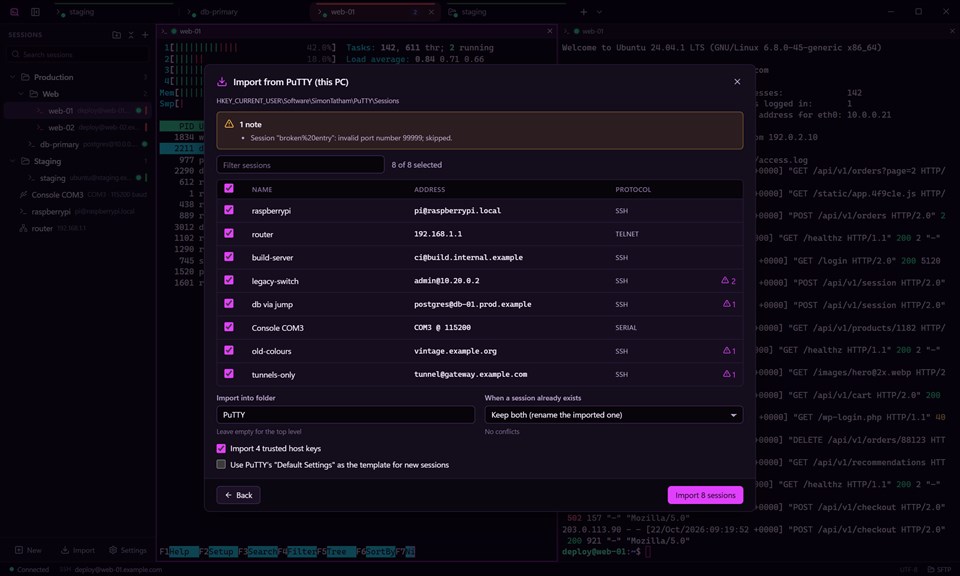
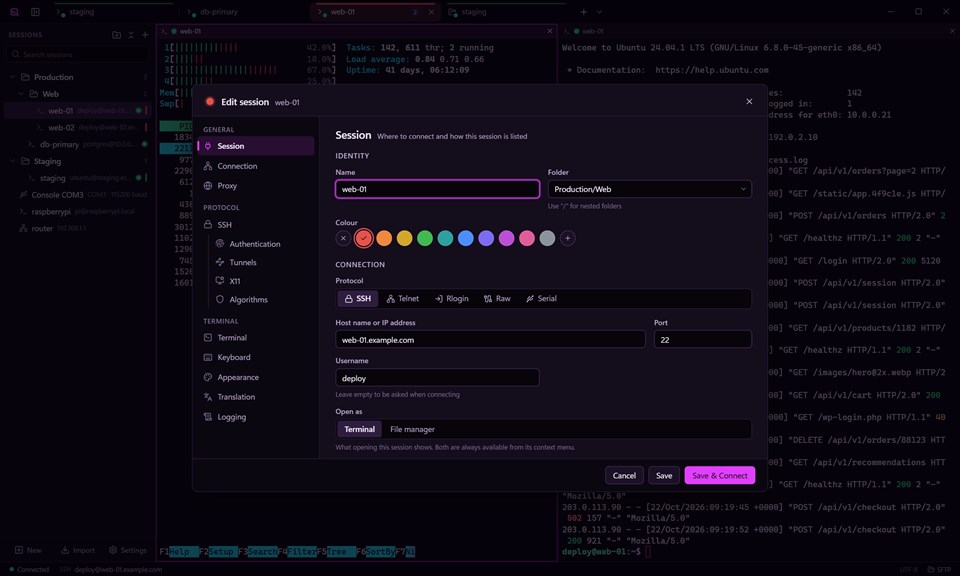
EVERYTHING PUTTY DOES • PuTTY-style settings for every session, PuTTY keyboard modes and PuTTY's command-line options • PuTTY .ppk keys (v2 and v3), OpenSSH and PEM keys, Pageant and the Windows OpenSSH agent • One-click import of your PuTTY sessions, default settings and trusted host keys, from the registry or a .reg file, and of the hosts in ~/.ssh/config
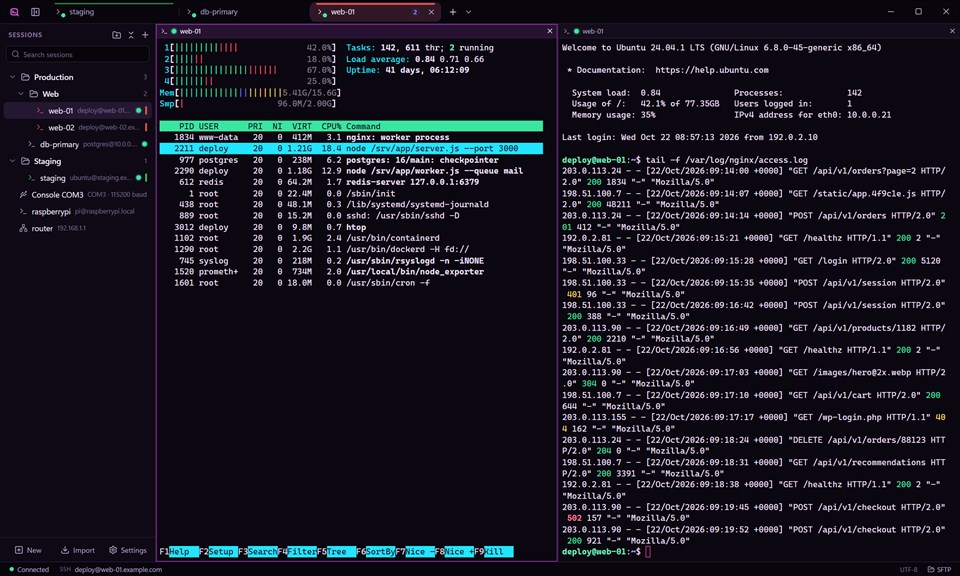
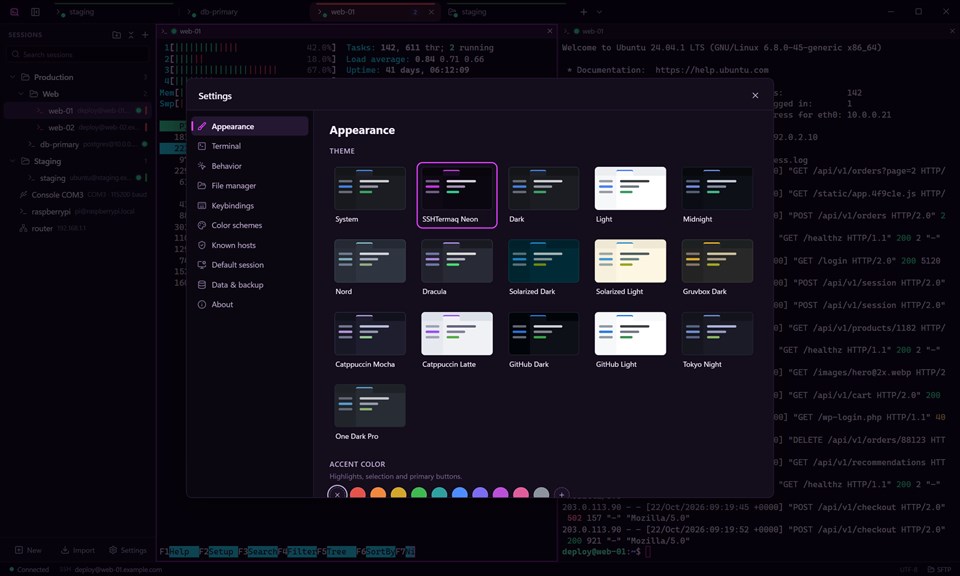
A MODERN WORKSPACE • Tabs and split panes, with input broadcast to all panes • Sessions in folders with colours, notes and search • Command palette, quick connect and configurable shortcuts • Your tabs and splits come back at the next start • 15 app themes, 30 terminal colour schemes and a scheme editor
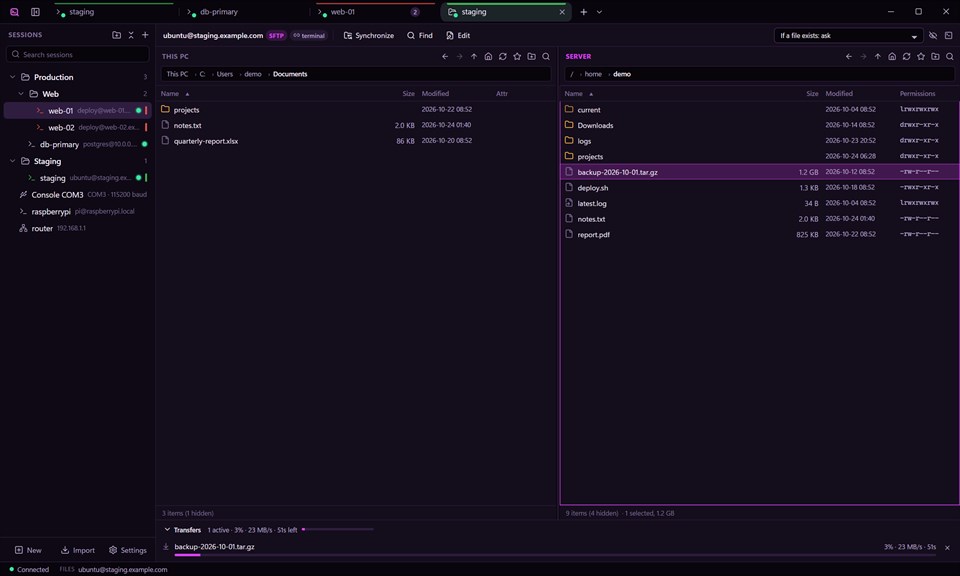
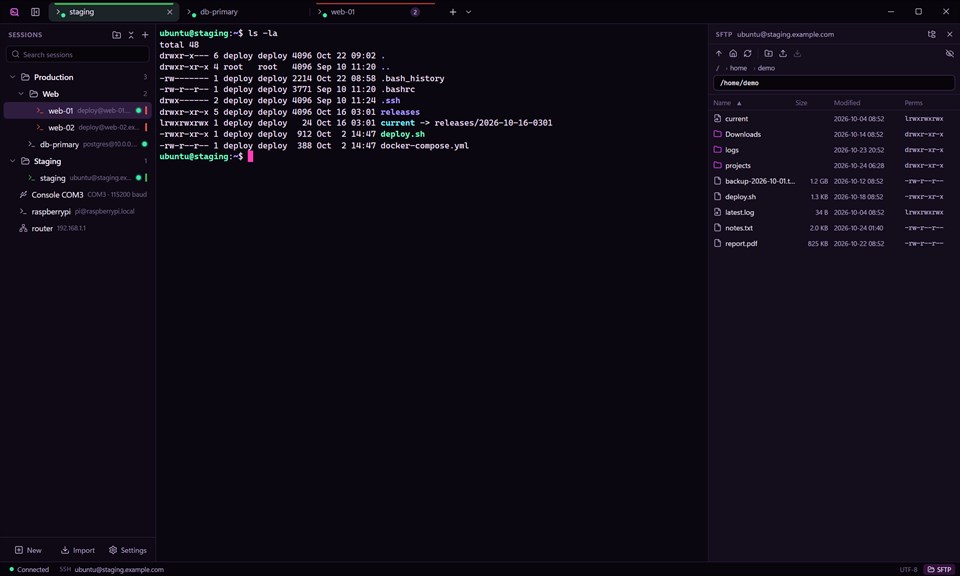
A FILE MANAGER BUILT IN • Local terminals: PowerShell, Command Prompt, Git Bash and WSL in the same tabs and split panes as your servers • An SFTP panel beside any SSH terminal, on the terminal's own connection: no second login • A two-pane file manager: this PC on the left, the server on the right, the transfer queue below • Drag and drop from Explorer, resume of interrupted transfers, overwrite and rename questions • Edit a server file in your own editor; it is uploaded on every save • Folder sync with a preview, file search on the server, bookmarks and permissions • Falls back to SCP on routers and other servers without SFTP
TUNNELS, PROXIES AND MORE • Local, remote and dynamic (SOCKS) port forwarding, agent forwarding and X11 forwarding • Jump hosts, and SOCKS, HTTP and Telnet proxies • Telnet, Rlogin, Raw TCP and serial ports (COM ports with all line settings) • Session logging, PuTTY-compatible character sets, 2FA (keyboard-interactive) logins • Saved passwords are encrypted for your Windows account (DPAPI) • ssh://, sftp://, scp:// and telnet:// links open in SSHTermaq
Requires the Microsoft Edge WebView2 Runtime, which Windows 11 includes. On Windows 10 without it, SSHTermaq offers its download page.
SSHTermaq is free and open source (MIT licence). It is not affiliated with the PuTTY project.
From the developer
Lists 0
-
 SSHTermaq
Points 0
-

- +1 Point

Rankings 0
-
- Your rating
Developer 1
- f1resh
- Followers: 0
- Platforms: Windows Apps (1)
- Deals: 0
- Lists: 0 0
- Points: 0
- Rankings: 0
- Comments: 0
- Videos: 0
- RSS: Subscribe
What's new
- Version: PC
- Last Updated:
- New in 1.1.0
• Local terminals: Command Prompt, Windows PowerShell, PowerShell 7, Git Bash, Cygwin, MSYS2 and WSL in the same tabs and split panes as your servers. Open one with Ctrl+Shift+` or the + menu, from quick connect (local:bash) or with SSHTermaq.exe -local. Pick the default shell in Settings, or save a shell as a session with its own start folder.
• Upload or download a file or folder under a new name, as a copy or as a move.
• Rename a tab with Ctrl+Shift+R, and give the panes of a split tab their own names by double-clicking a pane's title. Names come back after a restart (you can turn that off in Settings).
• Clearer error reports: a problem in the window shows an error page instead of an empty window, and the app log records connections and errors for bug reports.
• "Leave out .DS_Store and ._ files" is now off by default on new Windows installations.
• Tabs keep their width instead of shrinking to the length of their title.
• The Mica and Acrylic window backgrounds are switched off for now: with them, the window buttons appeared twice. They will return in a later version.
Known issue: downloading a folder with thousands of small files from a distant server is slow, because the files are copied one at a time. A later version will copy several at once.
Additional Information
- Release Date:
- Category:
Windows Apps›Developer tools - OS:
PC - Size:
5 Mb - Supported Languages:
English - Content Rating:
EVERYONE - Windows Store Rating: ¡
0 - Website:
 https://f1resh.github.io/sshtermaq/
AppAgg Score
Estimated AppAgg Score for
SSHTermaq
Developer: f1resh
Higher scores usually reflect better results across AppAgg’s indicators.
Based on: popularity · ratings · freshness · deals · store data · community signals
Recalculated daily using fresh AppAgg data.
Comments 0 ¡
Share
SSHTermaq Short URL: Copied!- Windows Store
You may also like
Recent discussionsMore →
 AppGame4Class Game4Class makes lesson review fun and interactive. I like how easily students can join from their o...
 Mehdi Gateway62
 AppAniMate Waifu - AI Anime Desktop Pet This is the best anime desktop pets I have ever had, The dancing feature is amazing.
 shaw chaney34
 AppSpark Motion Create 26 The graphics are amazing! Now I can design my ball layouts and watch then spin in 3D animation.
 Jim Kirker40
 AppLocalDub – Real-Time Game Dubbing Hello Kırtay Interactive, I am using LocalDub - Real-Time Game Dubbing. I would like to know if Hind...
 rashid game53
 AppNauticPlayer This app is absolute cinema. Honestly, it’s one of the best media players I’ve ever tried, and I’m s...
 Manuel92
 AppScreen Beings - Interactive Accessibility Companion This is my app so I’m a little bias but as someone from the ADHD community that teaches ADHD and neu...
 Tarelle Irwin54
 AppAadi vault good it ia a encrypter and good you my work on office
 Aditya Rai50
 AppTyping 365 | Daily Typing Trainer The best typing app ever. With Typing 365 you don’t have to force yourself for couple minutes traini...
 Ahmad Mozaffar50
 AppZefir Calendar — Calendar in the Taskbar excelente app! Superando todas as espectativas!
 Diógenes Magnus50
 AppBlazin IPTV Player This compact IPTV player is amazing. I threw multiple playlists at it and it handles it with no issu...
 Mike Anderson40

