
Segnalibri
| Sviluppatore: | LTC Labs (10) | ||
| Prezzo: | Gratis | ||
| Punteggio: | 1100 Argento | ||
| Classifiche: | 0 | ||
| Commenti: | 0 Pubblica commento | ||
| Liste: | 0 0 | ||
| Punti: | 0 | ||
| +1 Punto | |||
In breve
Ti presentiamo StreamView Terminal, un’app di LTC Labs della categoria «Strumenti di sviluppo».
Uscita , è ancora bella fresca.
Gratis: niente pubblicità, niente acquisti in-app. Solo tu e l’app.
Il Microsoft Store è integrato in Windows, quindi si installa in un paio di clic.
Il suo Punteggio AppAgg è 1100. Livello Argento, e non è affatto male.
Classificazione «EVERYONE»: va bene anche per i bambini.
Parla una sola lingua, e non è l’italiano.
L’hai usata? La tua recensione sarebbe la prima qui.
Lo sviluppatore ha 9 altre app su AppAgg. Vale la pena dare un’occhiata.
Vuoi sapere prima di tutti di aggiornamenti e nuove app? Segui lo sviluppatore o iscriviti al feed RSS. Le notifiche push arrivano tramite l’app AppAgg Alerts per Android e iOS.
Altre piattaforme 0
Cronologia dei prezzi 0
- Prezzo attuale: Gratis
- Minimo: Gratis
- Massimo: Gratis
Il tuo feed personale nella home
Screenshot 5
Video 1
Descrizione

Windows Terminal is a good terminal. Tabs are a bad way to run four AI CLI coding sessions.
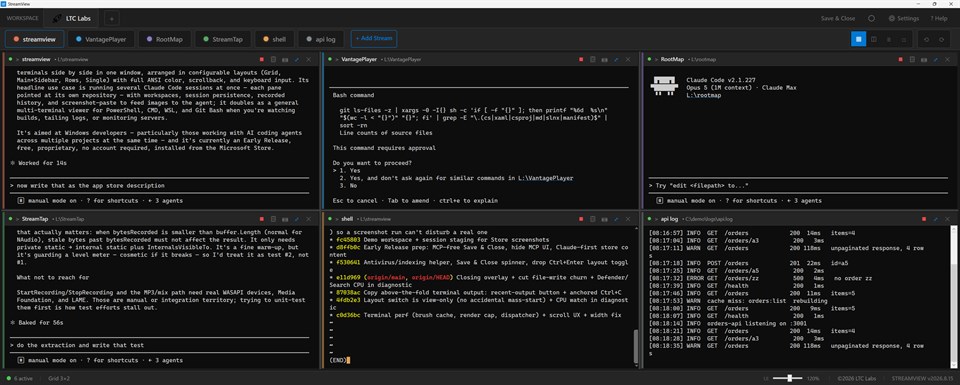
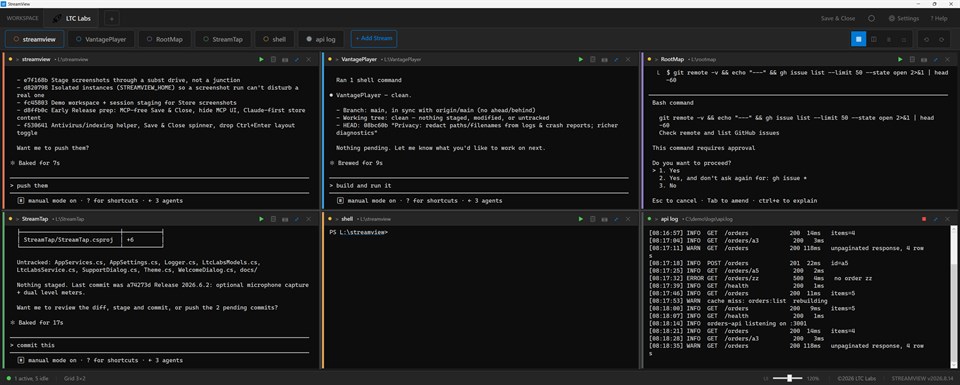
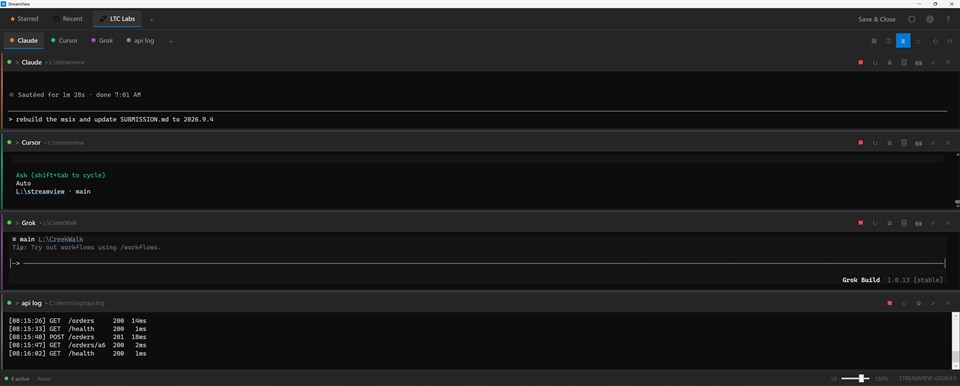
Every tab looks the same. The title updates out from under you. You click the wrong one and paste into the repo you did not mean. StreamView was built by someone hitting that every day - it is still the author's daily driver. Each session is a named pane with its own color and its own folder, all on one screen.
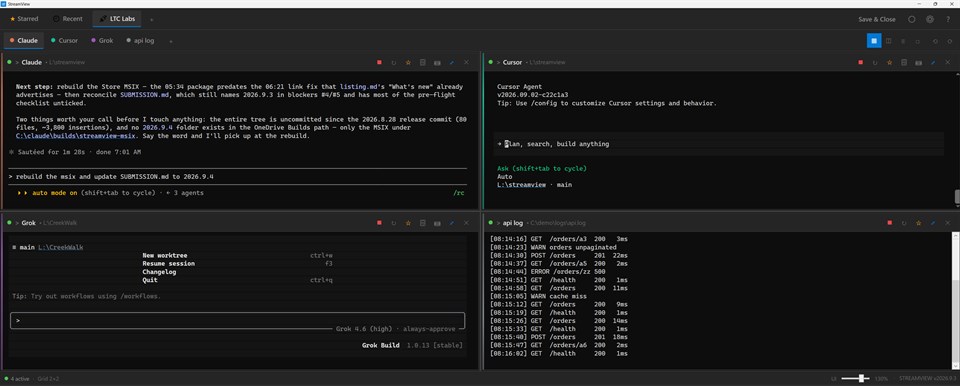
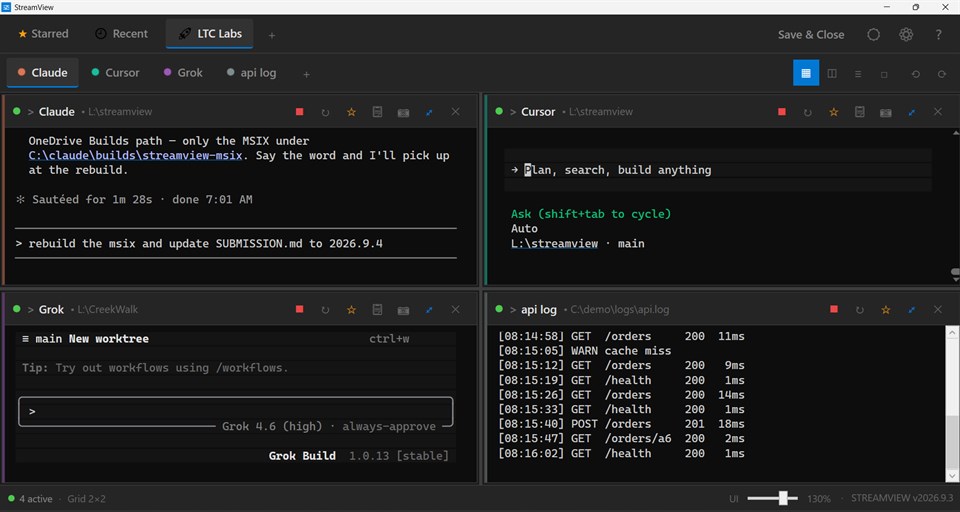
It is a modern Windows terminal made for AI CLI tools (Claude Code, Cursor Agent, Grok, and others you already have installed). It is also a proper multi-pane terminal for PowerShell, Command Prompt, WSL, Git Bash, logs, and builds.
Early Release. Updates most weeks. Free for personal and commercial use - no account, no trial, no premium tier. You will find rough edges. Help → Contact Support inside the app goes to a person.
RUN SEVERAL AI CODING SESSIONS AT ONCE
One session in a terminal is easy. Four is a window-management problem.
- Each pane is a real Windows terminal (ConPTY). Full-screen TUIs render properly: color, keyboard, mouse wheel, alternate screen.
- A pane goes Idle when its output stops (30 seconds by default). That is usually the agent finishing or asking you something. It is a silence timer, not a prompt detector. Ctrl+Tab jumps to the next active session and skips the quiet ones.
- Click the path in the pane header to copy the working folder. Ctrl+click opens it in Explorer.
- Right-click a selection and Send to… to drop an error or snippet into another session. It is pasted, not executed.
- F11 expands the pane you are reading, then returns you to the layout.
CLAUDE WRITES. CURSOR REVIEWS.
Point Claude and Cursor at the same folder. Tick Cursor's Read-only (review mode) so it can analyze and report but cannot edit. No second checkout. A Grok pane and a log tail sit beside them.
PASTE SCREENSHOTS STRAIGHT IN
AI tools read images by file path. Copy any image, press Ctrl+Shift+V, and StreamView saves a PNG and types the path into the pane. You press Enter.
CLOSE WITHOUT LOSING CLAUDE'S THREAD
Save & Close asks each open Claude Code pane to print a short summary: what it was doing, what's unfinished, the next step. StreamView stores that locally. Next launch, those panes show a Resume banner. Cursor and Grok keep their own transcripts; they do not get that prompt.
REAL TERMINALS FOR EVERYTHING ELSE
This is not a log viewer with terminals bolted on.
- PowerShell, Command Prompt, WSL, Git Bash, elevated shells, and anything you can launch
- Reads your Windows Terminal profiles
- Save a setup as a template: command, folder, color, recording mode
- Tail File mode follows any file like tail -f, no shell process
- Clickable http(s) URLs and Windows paths in output
- Scrollback, selection that survives live output, copy that reaches text above the fold
LAYOUTS AND WORKSPACES
- Grid, Main + Sidebar, Rows, or Single. Drag splitters. Switching layout never starts a stopped process.
- Group panes into a workspace per project. Starred and Recent gather live panes without restarting them.
- Layouts and panes restore on launch.
YOUR HISTORY, ON YOUR MACHINE
- Plain JSONL in a folder you choose. Searchable, exportable, yours.
- Per-stream recording: all, input only (the default for AI panes - TUI redraws are noise), output only, or off.
- Point the data directory at OneDrive if you want settings on more than one PC. StreamView has no cloud of its own.
PRIVACY
Terminal output never leaves your machine. Two anonymous events per session (opened, closed) plus a crash report if it crashes, all opt-out in Settings. Full list: ltclabs.dev/docs/streamview/telemetry. No account. No sign-in. No subscription.
Dallo sviluppatore
Liste 0
-
 StreamView Terminal
Punti 0
-

- +1 Punto

Classifiche 0
-
- La tua valutazione
Sviluppatore 10
- LTC Labs
- Follower: 0
- Piattaforme: Windows App (10)
- Offerte: 0
- Liste: 0 0
- Punti: 0
- Classifiche: 0
- Commenti: 0
- Video: 5
- RSS: Iscriviti
Novità
- Versione: PC
- Ultimo aggiornamento:
- • Saved prompts: a ✦ button on AI panes sends your favorite prompts in one click, and a stream can send one each time its pane starts. Manage them in Settings > Prompts.
• CPU meter and dashboard: see which pane is slowing your PC, down to each pane's process tree.
• Bigger, easier-to-read text. Zoom the whole window from 75% to 200% with Ctrl+plus, Ctrl+minus or Ctrl + mouse wheel.
• Each pane remembers its text size, and you can set a different terminal text size for each monitor.
• Claude panes are named after their pane, with optional Remote Control so your Claude sessions on other computers can reach them.
• A tidier Settings page, Page Up and Page Down through scrollback, and rename a workspace by double-clicking its tab.
Plus reliability and performance improvements.
- - Add Stream: a Recent section at the top shows your last 5 picks, and Windows Terminal profiles that duplicate one of your saved templates are hidden
- Command-line tools you install while StreamView is open are found right away, with no restart needed
- Optimize is more reliable, and if it can't finish it tells you why, with Try again and Copy command buttons
- Your workspace restores more reliably when OneDrive or antivirus software is holding the session file
- Support form checks your email address for typos and shows character counts
- Smoother first launch on high-DPI screens
Plus reliability, performance and privacy improvements.
Informazioni aggiuntive
- Data di uscita:
- Categoria:
App per Windows›Strumenti di sviluppo - Sistemi operativi:
PC - Dimensioni:
75 Mb - Lingue supportate:
Inglese - Classificazione contenuti:
EVERYONE - Windows Store Valutazione: ¡
0 - Sito web:
 https://www.ltclabs.dev/
Punteggio AppAgg
Punteggio AppAgg stimato per
StreamView Terminal
Sviluppatore: LTC Labs
Un punteggio più alto riflette in genere risultati migliori negli indicatori di AppAgg.
Basato su: popolarità · valutazioni degli utenti · freschezza · offerte · dati degli store · attività della community
Ricalcolato ogni giorno con dati AppAgg aggiornati.
Commenti 0 ¡
Condividi
StreamView Terminal URL breve: Copiato!- Windows Store

