
Bogmærker
| Udvikler: | Oasys Digital (1) | ||
| Pris: | Gratis | ||
| Score: | 1.180 Sølv | ||
| Ranglister: | 0 | ||
| Kommentarer: | 0 Skriv kommentar | ||
| Lister: | 0 0 | ||
| Point: | 0 | ||
| +1 Point | |||
Kort fortalt
Termbaker er en app fra Oasys Digital i kategorien »Udviklerværktøjer«.
Udkom og er stadig ret frisk.
Gratis: ingen reklamer og ingen køb i appen. Kun dig og appen.
Microsoft Store er bygget ind i Windows, så installationen klares med et par klik.
AppAgg-scoren er 1.180. Sølv, og det er slet ikke dårligt.
Aldersgrænse »EVERYONE«: også fint for børn.
Kan 11 sprog, men dansk er ikke blandt dem endnu.
Total stilhed her indtil videre: ingen bedømmelser, ingen kommentarer. Bryd tavsheden.
Det er udviklerens eneste app på AppAgg. Indtil videre.
Vil du høre om opdateringer og nye apps først? Følg udvikleren eller abonner på vores RSS-feed. Push-beskeder kommer via appen AppAgg Alerts til Android og iOS.
Andre platforme 0
Prishistorik 0
- Nuværende pris: Gratis
- Minimum: Gratis
- Maksimum: Gratis
Dit eget feed på forsiden
Skærmbilleder 9
Beskrivelse

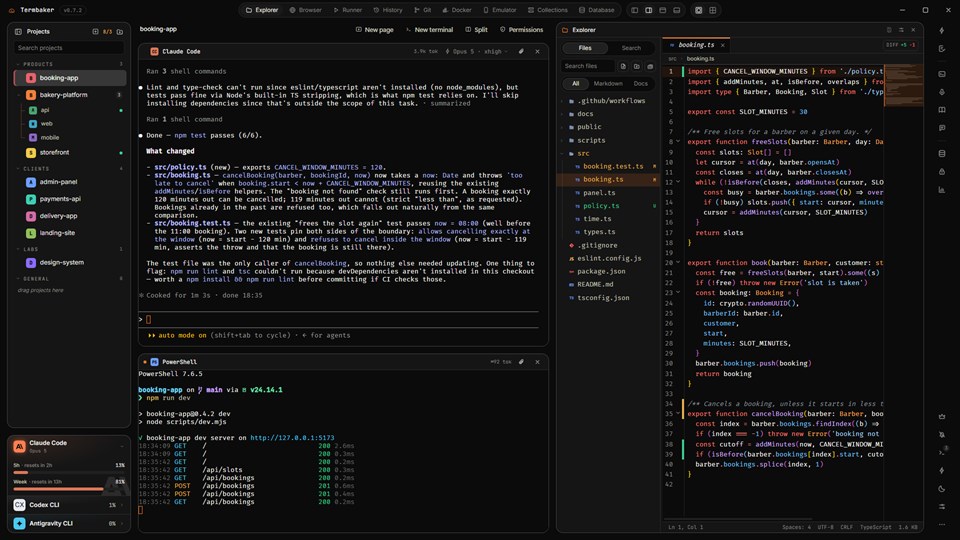
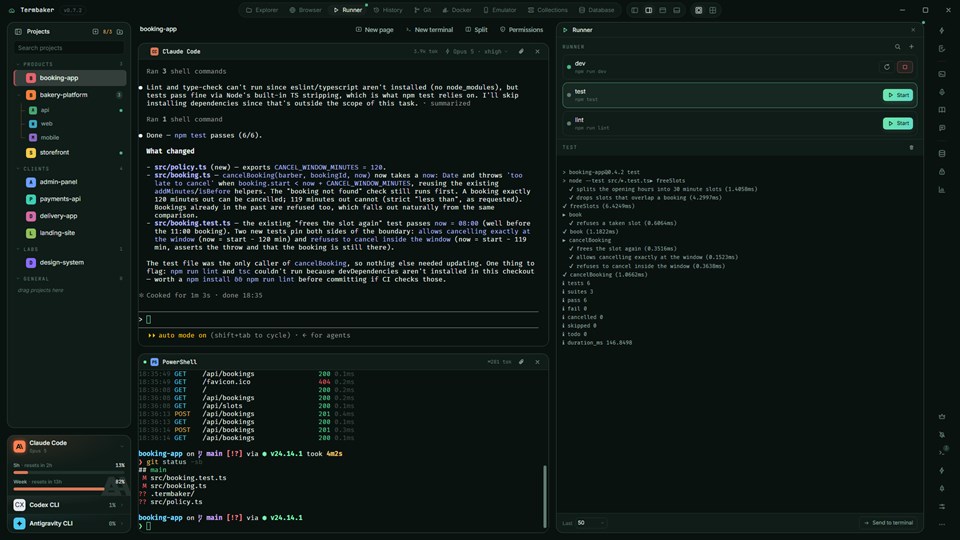
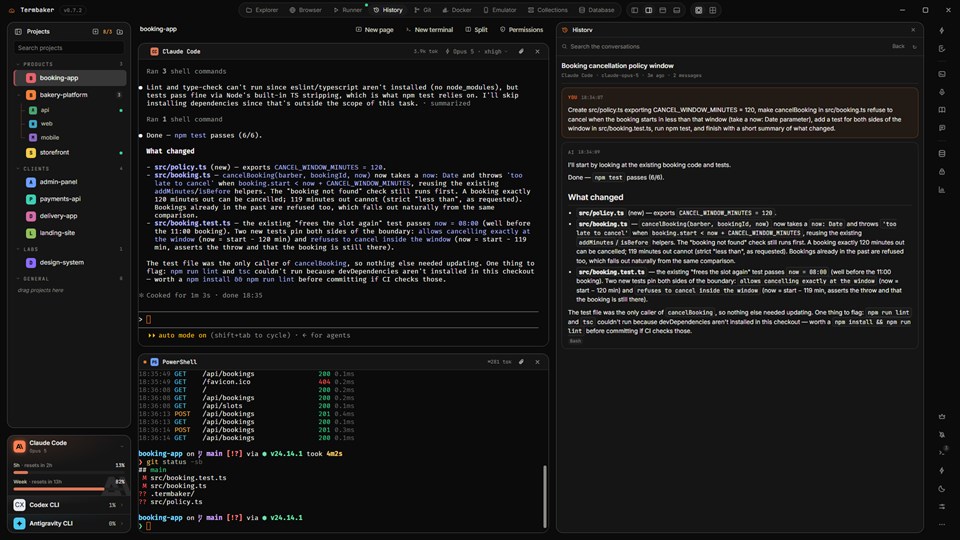
Projects live in tabs. Each project gets its own terminals with horizontal and vertical splits, its own browser, its own Git dock and its own Runner for dev commands. Open a folder that holds several repositories and each one shows up on its own, with its own panes. On a laptop or a vertical monitor, compact mode glues the columns together and folds the buttons into a drawer.
What is inside
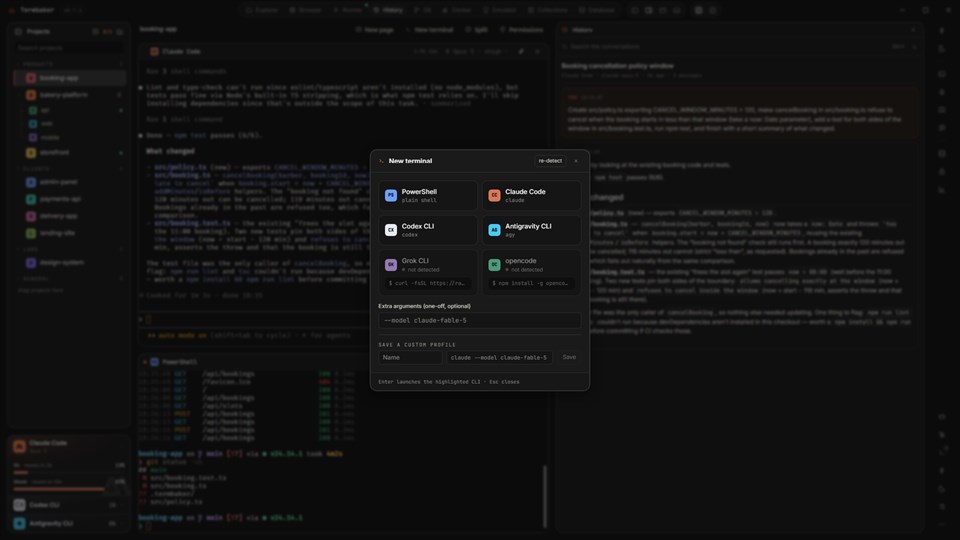
Terminals. Real PTYs with native latency. The launcher detects the AI CLIs installed on your machine and opens them in one click. Paste a screenshot or drop a file on the terminal and the path goes straight to the CLI.
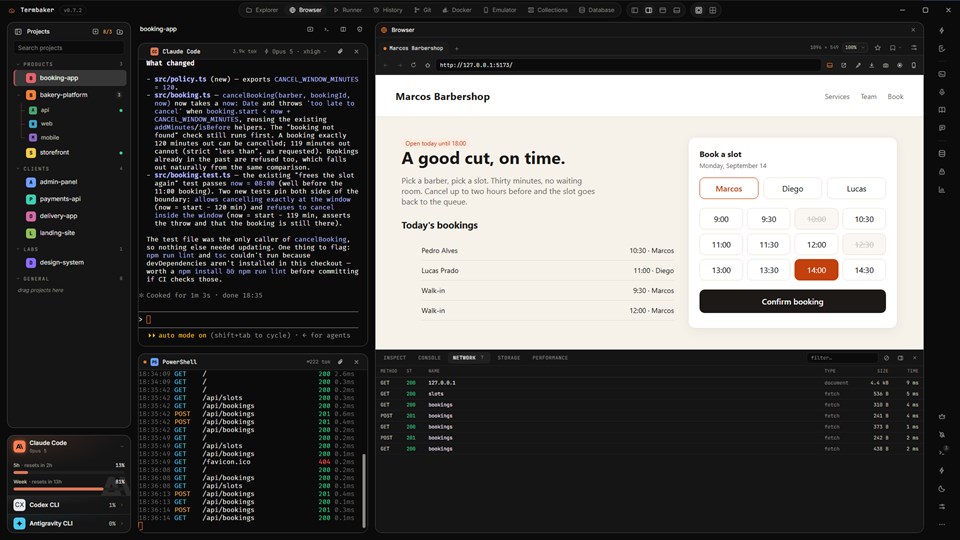
Browser. Embedded Chromium your CLI controls over MCP, with a cursor that shows every click it makes. Console, network, performance and an element inspector live under the page. Two projects open, two browsers.
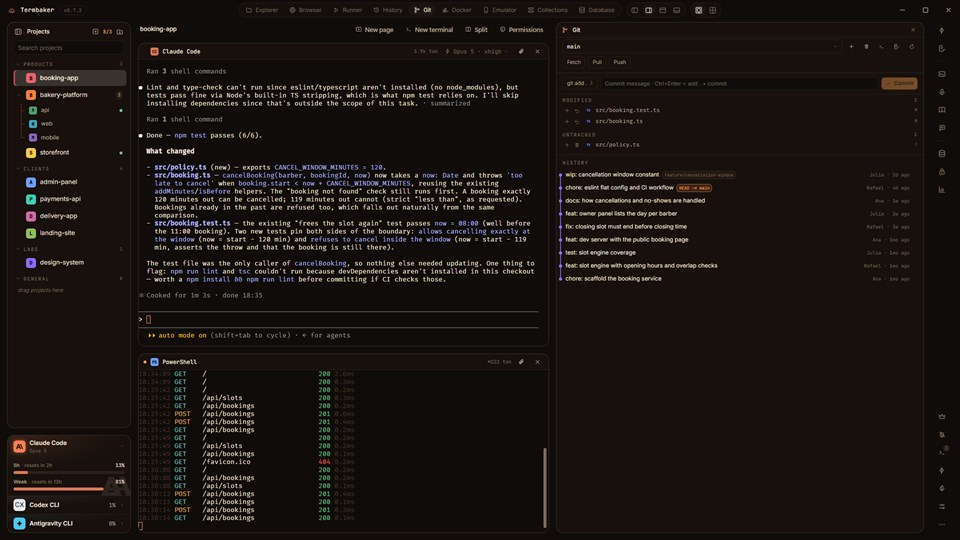
Git. Commit graph, branches by recency, add, commit and push without leaving the keyboard. One button hands a commit to the AI in the terminal you are working in.
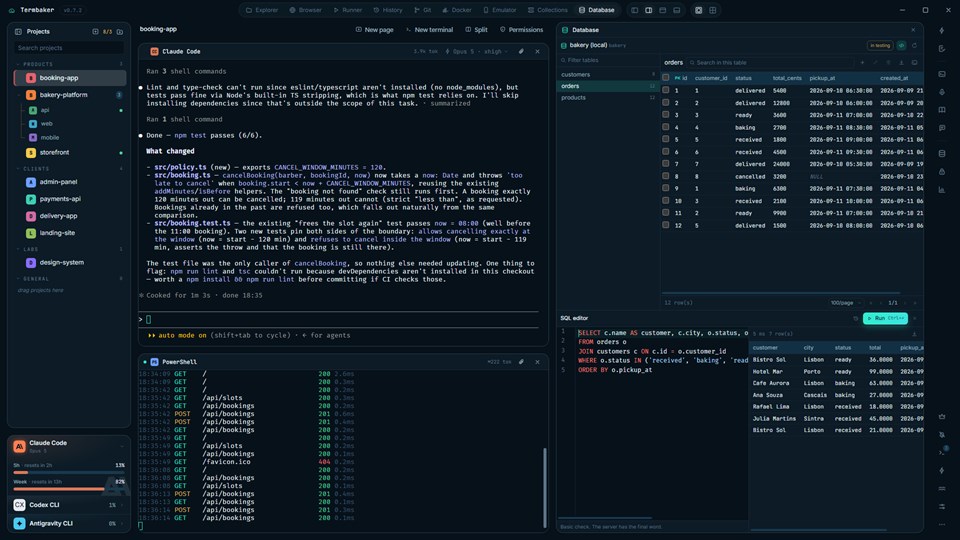
Database. MySQL, MariaDB, Postgres and MongoDB. Browse rows with paging and search, edit with the primary key in hand, run SQL with syntax checking, export to xlsx, sql, html or pdf, and send the rows you picked into the chat.
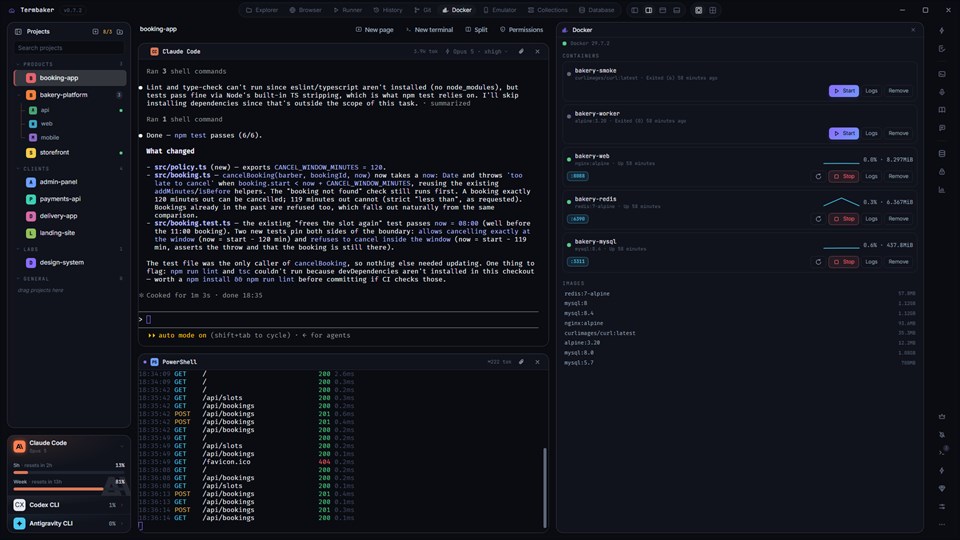
Docker. Containers next to the code, with state, logs and CPU and memory sparklines. Clickable ports open in the app browser.
Collections. A built-in API client. Import Postman, Insomnia or OpenAPI files and fire requests with Ctrl+Enter, with environments per project.
Voice. Hold Ctrl+Space, dictate the prompt, release. The transcript lands in the focused terminal.
Explorer. A file tree with keyboard navigation, git decorations and multi-select; an editor with preview tabs, breadcrumbs, quick diff against HEAD, minimap, split view and auto save; search with include and exclude patterns that honours your .gitignore. Hot exit keeps unsaved edits through a crash, and file operations can be undone. Spreadsheets and PDFs open inside the dock.
Secrets vault. Passwords, tokens and keys encrypted on your machine, per project. The AI uses them in commands, in the Runner and in the browser without ever seeing the values, and an activity log says who used what and when.
Mega Baker. Tell the chef what to build, your way. He asks what he needs to know, one question at a time and with what he would do, puts a crew of AI workers on it, each with its own CLI and model, and runs the mission on its own to the end: the app checks every task, a failed check goes back to whoever built it until it passes, and each finished task becomes a commit. Talk to him at any time and he replans.
Insights. Active time per project, tokens per terminal, a day by hour heatmap and efficiency over time. All local, nothing leaves your machine.
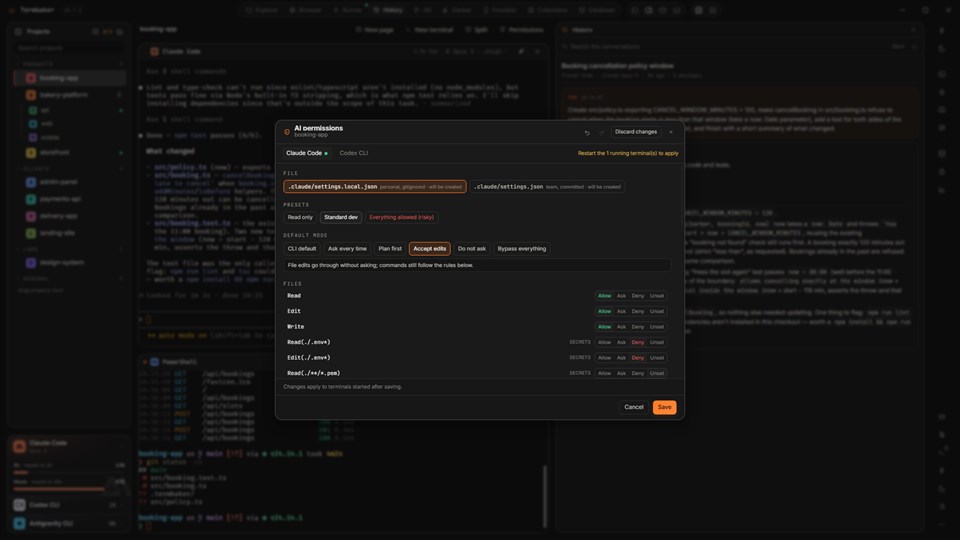
Also in the box: AI permissions per project, a skills library, searchable conversation history, a Runner for your dev commands, eight color themes plus one you build yourself, and an interface in 11 languages.
Termbaker does not ship an AI of its own and never proxies your prompts. It works with the CLIs and API keys you already have, and your keys stay encrypted on your machine.
Free, forever, for the essentials: 3 projects, unlimited terminals and splits, the AI browser, Git, Docker, Runner, Collections and voice. The Pro plan removes the limits and adds Mega Baker and the AI QA runs. Pro is sold on termbaker.com, not inside the app.
Fra udvikleren
Lister 0
-
 Termbaker
Point 0
-

- +1 Point

Ranglister 0
-
- Din bedømmelse
Udvikler 1
- Oasys Digital
- Følgere: 0
- Platforme: Windows Apps (1)
- Tilbud: 0
- Lister: 0 0
- Point: 0
- Ranglister: 0
- Kommentarer: 0
- Videoer: 0
- RSS: Abonner
Nyheder
- Version: PC
- Sidst opdateret:
- New:
- The Mega Baker, rebuilt from the ground up, lives in his own pane of the dock. Tell him the idea your way: he asks one question at a time, with what he would do.
- A crew of pixel-art characters, twelve roles from frontend to security, each with its own CLI, model and effort level, which you can change.
- The mission runs on its own: the app checks every task, a failed check goes back to whoever built it until it passes, and each finished task becomes a commit.
- Talk to the Mega Baker at any time and he replans. While a mission runs, its area takes the place of the terminals.
- A Changelog inside the app, in the three-dots menu.
- MCP servers can ask you questions in the conversation, for Claude and Codex.
Improved:
- The conversation shows what the CLI says: a message a hook stopped, an API retry, a usage limit getting close.
- Stopping the AI mid-answer closes the permission cards it no longer needs.
- Codex shows the result of each MCP tool, and Antigravity shows edits as diffs.
Fixed:
- In the conversation, Claude reaches the Claude in Chrome extension, and Codex can use MCP tools in the modes that ask.
- An Antigravity conversation that fails to load no longer leaves the chat spinning.
- A script on the debugging port can no longer close Termbaker.
- New:
- A free 2FA authenticator for each project, in the vault, whose codes the AI types without seeing the seed.
- Multiple-choice questions from Claude, Codex and Antigravity come up in a drawer and wait for your choice.
- Attachments show in the conversation, and drag into your message as citations.
- A developer Console and Network in the browser: whole messages, objects that open, JSON in colors, copy as cURL or fetch.
- Code in the conversation colored for every language, readable on every theme.
Improved:
- Antigravity asks before running commands, stops without restarting and changes model at once.
- A thicker chat cursor, and clearer AI usage numbers.
Fixed:
- Long console messages are no longer cut, and objects open instead of showing Object.
- Claude no longer answers its own multiple-choice questions in the conversation. - New:
- A CPU and memory meter in the title bar.
- Search the conversation with the magnifier or Ctrl+F: any text, commands and their output included, or only your messages.
- The shells the AI leaves running in the background, with their live output (Claude).
- Spell check in the message box, with suggestions on right-click.
- The microphone in the conversation’s message box, the project’s size on disk in the Explorer, and a full width option for the conversation.
Improved:
- Closing a terminal, a conversation or Termbaker also ends the processes started from them.
- Saved files survive a power cut, and a failing part of the window no longer takes the terminals down.
- The answer fills its column, and the Manager works at any window size.
Fixed:
- With Codex, the Manager, the Blueprint and Collections now write in projects where you already use Codex.
- Scrolling a long conversation is steady, and the conversation keeps following the answer after a long message.
- Closing Termbaker with a terminal open could crash it; it now closes in under a second.
- Renaming or moving an open file keeps its tab and unsaved changes. - New:
- Permission modes in the conversation view of all three CLIs. Claude Code gains Auto, where the AI runs what is safe on its own and blocks what is risky. Codex gets Ask first, Accept edits and Auto, where a Codex reviewer decides the requests by their risk. Antigravity gets Ask first and Plan.
- Each mode in the menu says in one line what it does in that CLI.
Improved:
- The mode pill always shows the mode the CLI is really in, including the one your terminal flags set, and the chosen mode stays when you go to the terminal and back or start the conversation again.
- The model and mode menus open right above their button.
Fixed:
- A Codex terminal opened without approvals (the Mega Baker High Heat, or your own flags) no longer asks for permission in the conversation view.
- The first command Antigravity cannot run in a conversation now shows a card to allow it, instead of stopping silently. - New:
- The Blueprint: a map of your app, written by the AI.
- The Mega Baker now happens entirely inside its panel.
- Git before and after, side by side or unified, with the changed lines marked and the changed characters highlighted inside them.
- An area of the page for the AI.
- Simulated network in the browser: latency, 3G, slow 3G and offline, with a badge on the bar while it is on.
Improved:
- What the AI writes comes out formatted.
- The activity block under a project name slides instead of jumping.
- Ctrl+F in the browser's inspect, console, network and storage panels, with the matches highlighted and Enter walking through them.
- The top bar says where you stand: clicking the version number checks for updates, with a spinner and a toast when you are already current, and a Pro pill sits next to it for whoever is on the free plan.
Fixed:
- The TERMBAKER button only calls the environment ready when the instructions and the MCP of that CLI are both wired.
- Stopping the Mega Baker in the middle no longer leaves an empty gap under the project name.
- The Mega Baker form has a floor and a ceiling for its width, and what is missing before launch is written on its own line above the buttons, only when something is in the way.
Yderligere oplysninger
- Udgivelsesdato:
- Kategori:
Windows-apps›Udviklerværktøjer - Operativsystem:
PC - Størrelse:
156 Mb - Understøttede sprog:
Engelsk,Fransk,Italiensk,Japansk,Kinesisk,Koreansk,Portugisisk,Russisk,Spansk,Tyrkisk,Tysk - Indholdsklassificering:
EVERYONE - Windows Store Bedømmelse: ¡
0 - Websted:
 https://oasysdigital.com.br/
AppAgg-score
Estimeret AppAgg-score for
Termbaker
Udvikler: Oasys Digital
En højere score afspejler som regel bedre resultater på de områder, AppAgg måler.
Baseret på: popularitet · brugervurderinger · aktualitet · tilbud · butiksdata · fællesskabsaktivitet
Genberegnes dagligt ud fra aktuelle AppAgg-data.
Kommentarer 0 ¡
Del
Termbaker Kort webadresse: Kopieret!- Windows Store

