
Закладки
| Разработчик: | Alireza Noori Software (4) | ||
| Цена: | * Бесплатно | ||
| Оценка: | 1 650 Золото | ||
| Рейтинги: | 0 | ||
| Комментарии: | 0 Оставить комментарий | ||
| Списки: | 0 0 | ||
| Очки: | 0 | ||
| +1 Очко | |||
Кратко
Это Textwright, приложение от Alireza Noori Software из раздела «Средства разработчика».
Вышло , ещё вполне свежее.
Вход бесплатный, а магазин внутри работает.
Microsoft Store встроен в Windows, так что ставится в пару кликов.
Оценка AppAgg: 1 650. Это «Золото».
Всего 46 мегабайт, поместится даже на забитый диск.
Возрастной рейтинг «EVERYONE», подходит и детям.
Говорит только на одном языке, и это не русский.
Здесь о нём пока тишина: ни оценок, ни комментариев. Нарушьте молчание.
У этого разработчика на AppAgg ещё 3 приложения. Загляните.
Хотите первым узнавать об обновлениях и новых приложениях? Подпишитесь на разработчика или на RSS-канал. Push приходят в приложении AppAgg Alerts для Android и iOS.
Другие платформы 0
История цен 0
- Текущая цена: Бесплатно
- Минимум: Бесплатно
- Максимум: Бесплатно
Своя лента на главной
Скриншоты 10
Видео 1
Описание

It's a native Windows app, compiled ahead of time, with acrylic glass behind it and the standard Windows title bar.
WHAT IT DOES
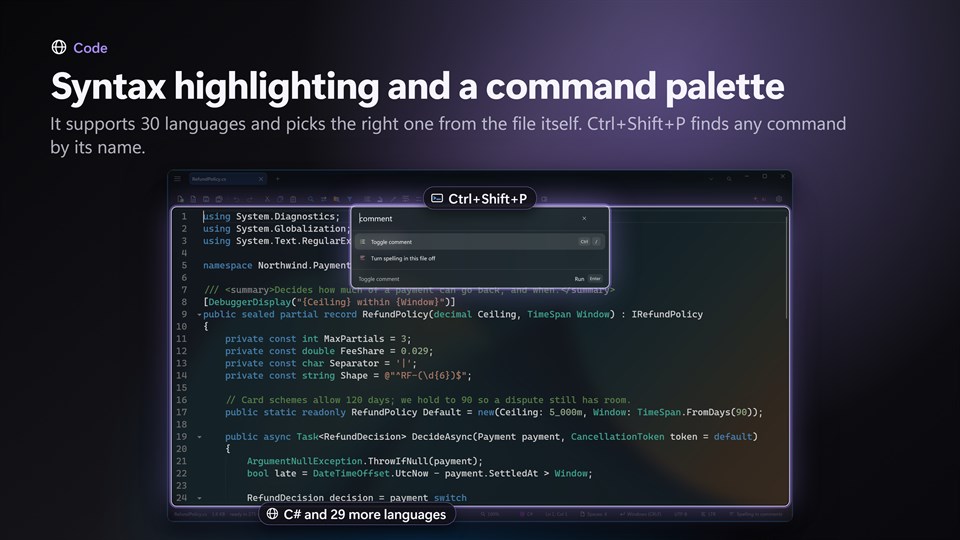
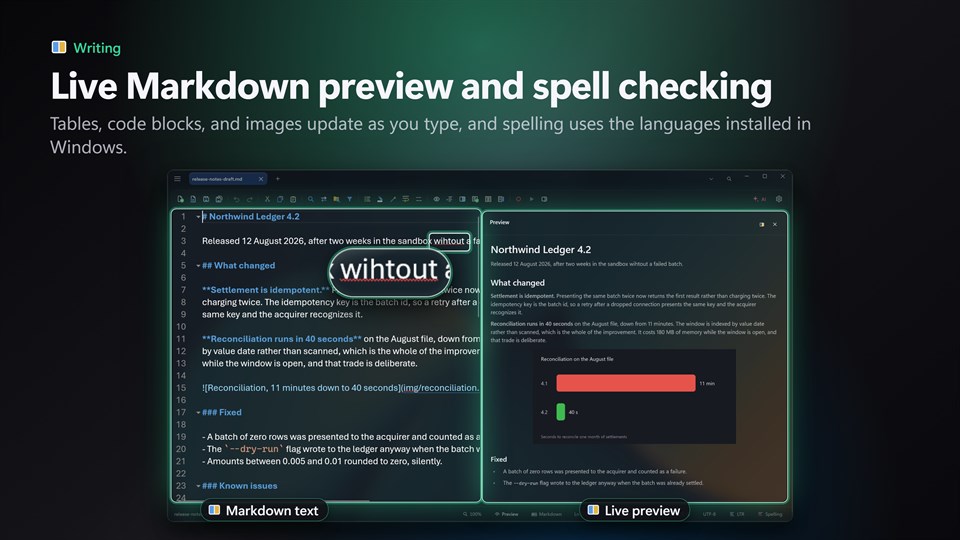
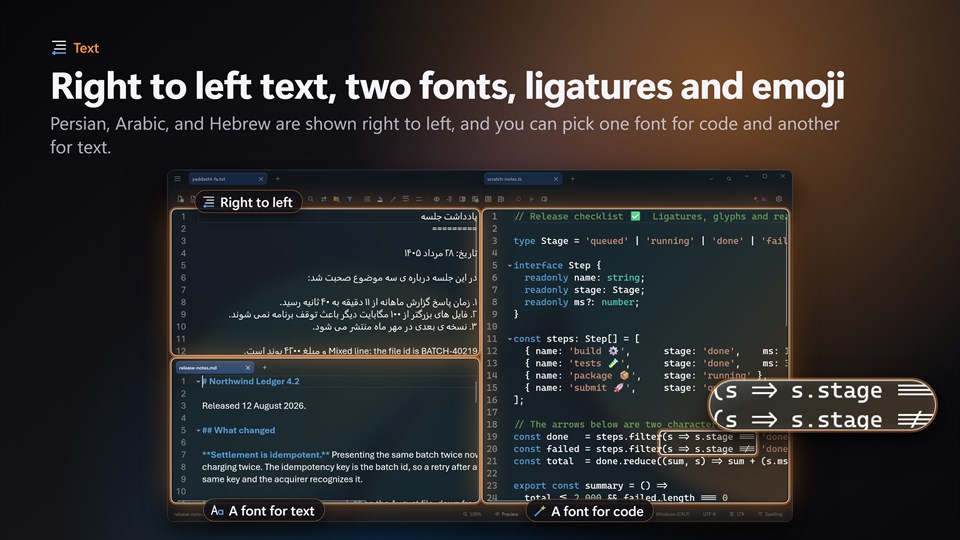
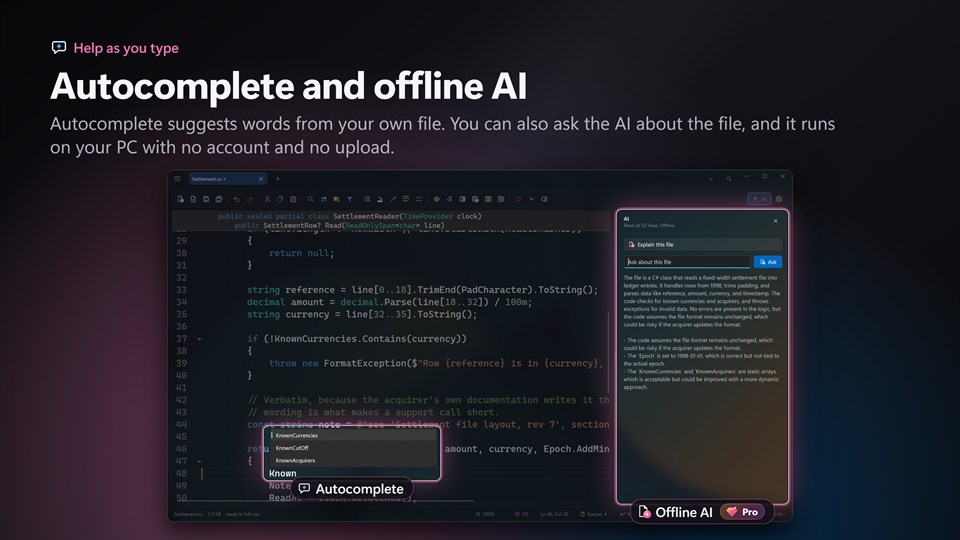
30 languages are syntax highlighted the moment a file opens, and the language is picked from the file itself. Markdown has a live preview beside the text, with tables, code blocks, and even images. Persian, Arabic, and Hebrew are laid out right to left in their real reading order, and the caret goes where you expect it to, even in a line that mixes them with English.
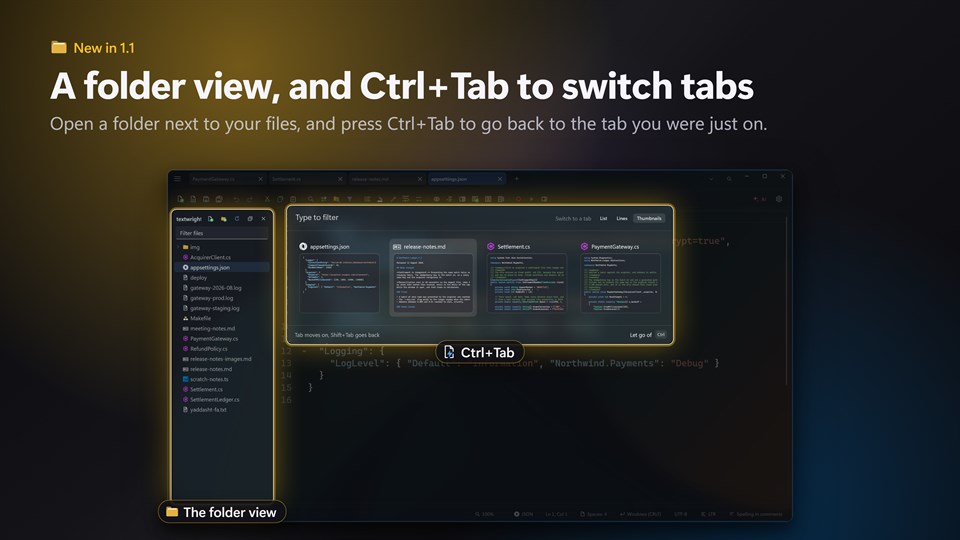
It also has a command palette (Ctrl+Shift+P), a folder view beside your files (Ctrl+B), Ctrl+Tab with a picture of each open tab, a color picker for the colors written in your file, a minimap, split view and docking, bookmarks, multiple carets, line filtering, spell checking, autocomplete for text and code, and UTF-8, UTF-16 and the common Windows code pages. Code and normal text can each have their own font. The macro recorder writes each step out in words, so you can read a macro before you run it. You can also hide a word on screen before you take a screenshot, without changing the file.
ASK ABOUT A FILE
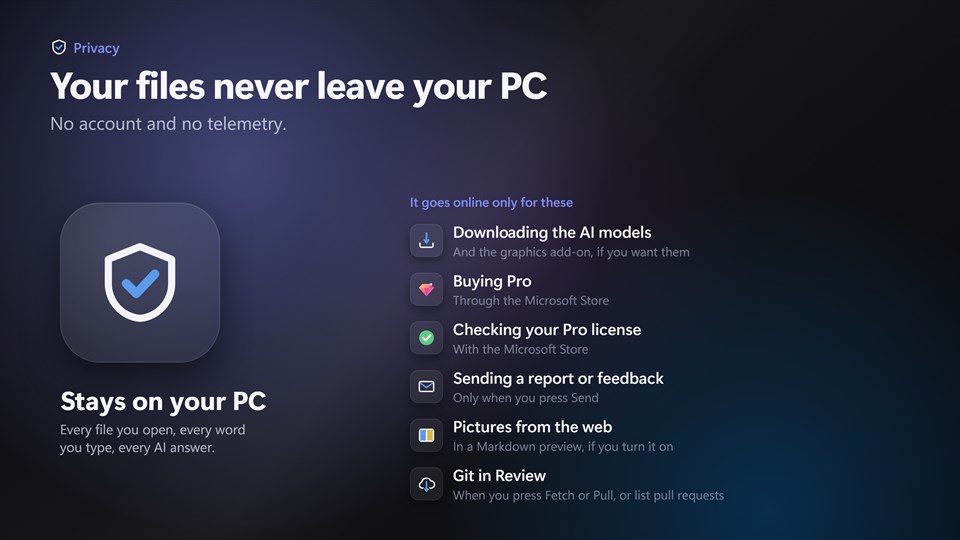
Textwright can explain the file you have open, or answer a question about it, using an AI model that runs on your PC. There is no account, your files are never uploaded, and once the model is downloaded, it works even with the network off. With Pro and an NVIDIA graphics card, a graphics add-on makes the answers about seven times faster, and a second model adds text prediction as you type.
REVIEW YOUR CODING AGENT'S CHANGES
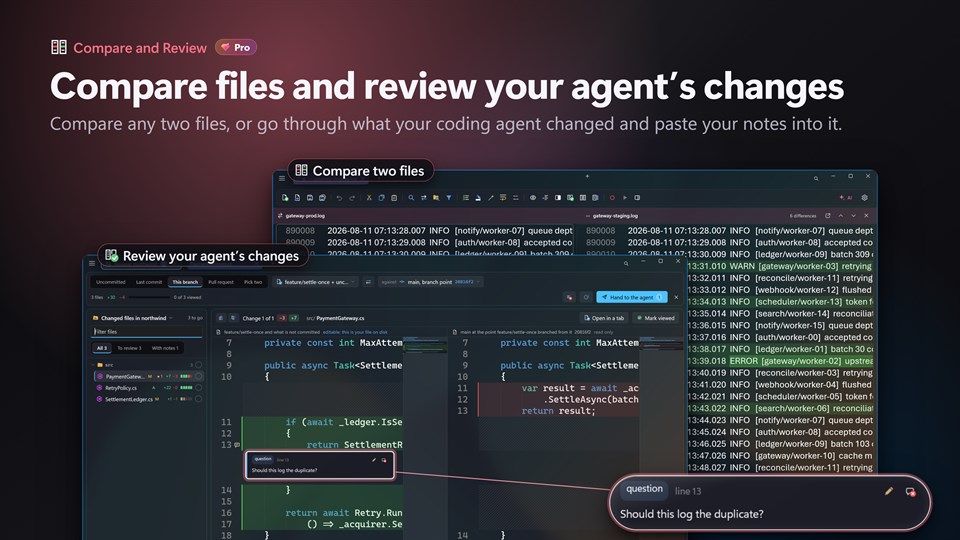
When Claude Code, Codex, or Copilot changes your code, Textwright shows you every change side by side. You can leave a note on any line, then copy every note as one message to paste into the agent, or save them as REVIEW.md. Review is part of Pro.
WHAT IS FREE
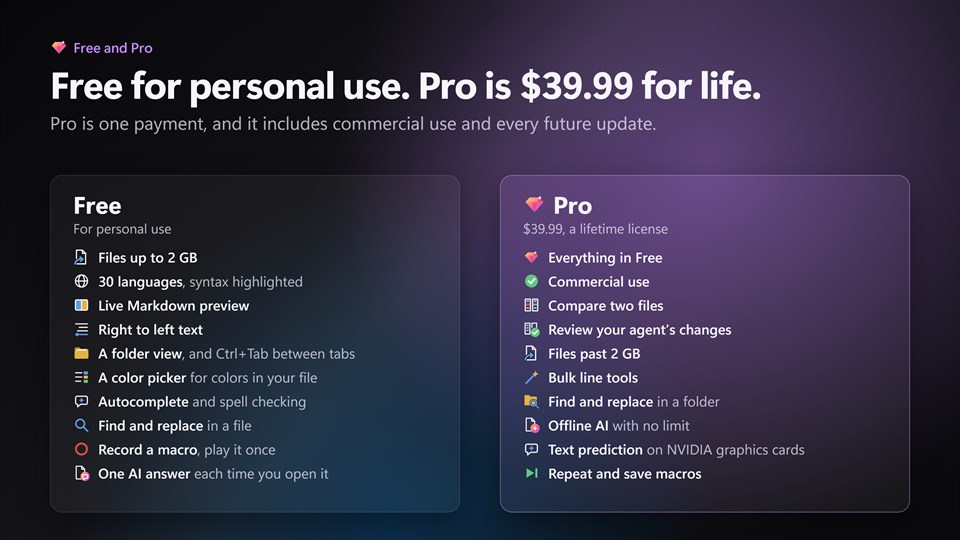
The editor is free for personal use: every language, files up to 2 GB, both splits, the minimap, the folder view, Ctrl+Tab, the color picker, Markdown, right to left text, find and replace in the file you have open, autocomplete, spell checking, printing, and recording a macro and playing it back once.
WHAT PRO ADDS
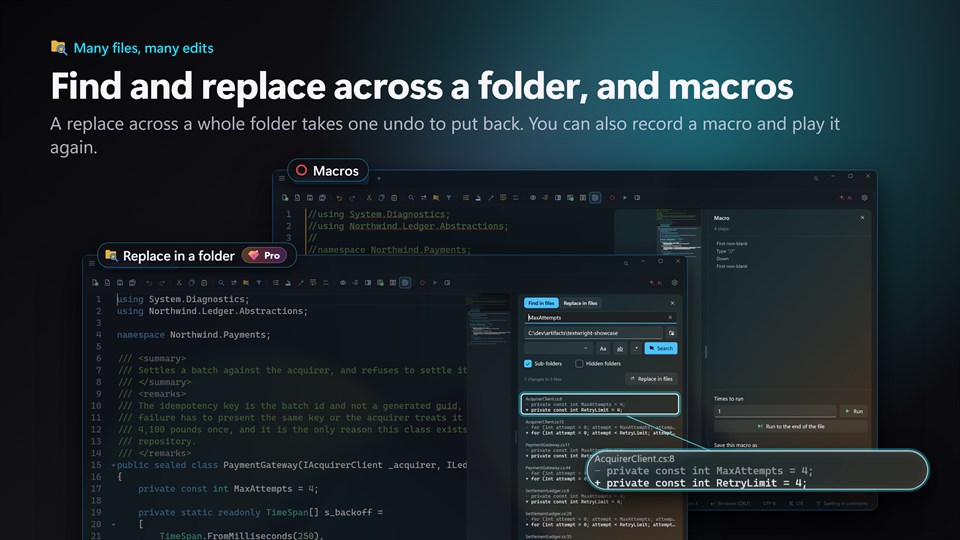
Pro is $39.99, paid only once. It's a lifetime license, so there is no subscription, no Textwright account, and every future update is included. It adds commercial use, comparing two files, reviewing your Git changes and handing the notes to your coding agent, files larger than 2 GB, the line tools that change a file in bulk, find and replace across a whole folder, the offline AI without a limit, text prediction and the graphics card speed-up, and repeating a macro and keeping the ones you name.
WHAT THE FREE VERSION LIMITS
The free version is for personal use. Using Textwright at work, or for paid work, needs Pro.
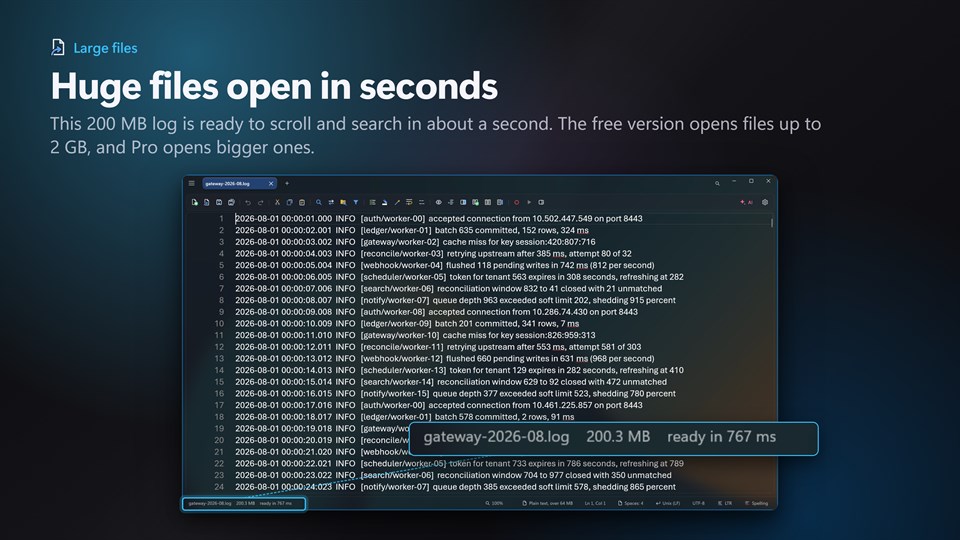
Free opens files up to 2 GB, and everything you need to read them is free too: every language, every split, the minimap, the line filter, following a file as it grows, find and replace inside the file you have open, the common encodings, printing, and recording a macro and playing it back once. The encode, decode, hash, and timestamp tools are free as well.
Pro is for changing things in bulk and for comparing two files: sorting, removing duplicate lines, trimming, joining, and changing the case of lines; find and replace across a folder, with an undo; repeating a macro and keeping the ones you name; files past 2 GB; and comparing two files side by side, even two 500 MB logs in about nine seconds, with F7 to go from one difference to the next.
The AI gives one free answer each time you open the app, with a short wait if you reopen it again and again, so you can see what it does before deciding whether it's worth paying for.
От разработчика
Списки 0
-
 Textwright
Очки 0
-

- +1 Очко

Рейтинги 0
-
- Ваша оценка
Разработчик 4
- Alireza Noori Software
- Подписчики: 0
- Платформы: Windows Приложения (4)
- Скидки: 0
- Списки: 0 0
- Очки: 0
- Рейтинги: 0
- Комментарии: 0
- Видео: 3
- RSS: Подписаться
Что нового
- Версия: PC
- Последнее обновление:
- New in 1.2.2:
- The suggested word no longer sits a few pixels above your text when Aptos, the default text font, isn't installed.
New in 1.2.1:
- Review: pick a note's kind with Alt+F, Alt+Q, or Alt+N, or step through them with Ctrl+Up and Ctrl+Down. Each kind has its own color, and you can also write a note about a whole file or the whole review.
- Review: the notes you hand your agent name the commit you reviewed and say if the branch has moved since. A folder you haven't looked at is listed once instead of file by file.
- textwright:// links also take the form VS Code uses (textwright://file/C:/path/file.cs:12), and can open a review of a repository or compare two files.
- The suggested word sits on the same line as your text at every display scale.
New in 1.2:
- Terminal (Pro): press Ctrl+Shift+` or the New terminal button to open a terminal below your files, in the folder of the file you're working on. Right click the button to pick PowerShell, Command Prompt, WSL, or any other shell you have.
- Go to definition: hold Ctrl over a name in code and click it, or press F12, to open where it's declared in your folder, or in the review you're doing. Alt+Left takes you back and Alt+Right forward again, and so do the mouse's side buttons.
- Press Ctrl+, to open any file in your open folder by typing part of its name.
- The suggested word stays while you type its letters, so Tab still takes it. It also no longer disappears partway along a line or near its end.
- New in 1.1.2:
- Comparing two big files no longer freezes the window while the second file is read.
- Pressing Enter in a big file with word wrap on no longer wraps the whole file again.
- Ctrl+= and Ctrl+- zoom from the main keyboard, not only from the number pad.
- The window title shows the tab you're working in, so the right window is easy to find in the taskbar and Alt+Tab.
- Review: the To review list empties once every file is viewed, and Ctrl+Shift+B brings back the last file you marked as viewed, like Ctrl+Shift+T does for tabs.
- Settings are saved more safely, so a power cut in the middle of a save can't lose them.
- Lots of smaller fixes from a full review of the code, including a few rare ways unsaved work could be lost.
New in 1.1:
- Folder view: press Ctrl+B to open a folder beside your files. You can make, rename, and delete files there without leaving the editor.
- Tab switcher: hold Ctrl and press Tab to see a picture of each open tab, the most recent first.
- Command palette: Ctrl+Shift+P has a new look, and every command shows its shortcut right beside it.
- Color picker: Ctrl+click a color written in your file, like #3A7BD5, to change it with a picker.
- Review has an inline view as well as side by side.
- Find and replace in files is faster, and long jobs can be stopped from the corner of the window. - Textwright now asks once whether you would like to rate it in the Microsoft Store. It waits until you have used it on at least three different days, asks only right after you save and stop typing, and never asks again, whatever you choose.
Pro can now be bought from inside the app. In 1.0.1 the Get Pro button could not find it in the Store, so if you tried and it failed, please try again after this update.
New in 1.1:
- Folder view: press Ctrl+B to open a folder beside your files. You can make, rename, and delete files there without leaving the editor.
- Tab switcher: hold Ctrl and press Tab to see a picture of each open tab, the most recent first.
- Command palette: Ctrl+Shift+P has a new look, and every command shows its shortcut right beside it.
- Color picker: Ctrl+click a color written in your file, like #3A7BD5, to change it with a picker.
- Review has an inline view as well as side by side.
- Find and replace in files is faster, and long jobs (Find in files, Replace in files, downloads, opening a big file) can be stopped from the corner of the window.
- A short "What's new" sheet opens once after an update, so you can see what changed.
Дополнительная информация
- Дата выпуска:
- Категория:
Приложения для Windows›Средства разработчика - Операционные системы:
PC - Размер:
46 Mb - Поддерживаемые языки:
Английский - Возрастные ограничения:
EVERYONE - Windows Store Рейтинг: ¡
0
 https://alirezanoori.ca/textwright
Оценка AppAgg
Примерная оценка AppAgg для
Textwright
Разработчик: Alireza Noori Software
Более высокая оценка обычно означает лучшие результаты по показателям AppAgg.
На основе: популярности · оценок пользователей · актуальности · скидок · данных магазинов · активности сообщества
Пересчитывается ежедневно на основе актуальных данных AppAgg.
Комментарии 0 ¡
Поделиться
Textwright Короткий URL: Скопировано!- Windows Store

