
Záložky
| Vývojář: | Lucky Panda (23) | ||
| Cena: | $9.99 | ||
| Skóre: | 1 060 Stříbro | ||
| Žebříčky: | 0 | ||
| Komentáře: | 0 Přidat komentář | ||
| Seznamy: | 0 0 | ||
| Body: | 0 | ||
| +1 Bod | |||
Shrnutí
W3C Validator Pro je aplikace od vývojáře Lucky Panda z kategorie „Vývojářské nástroje“.
Vyšla , takže je pořád docela čerstvá.
$9.99. Na AppAgg ani jednou ve slevě, opravdu ani jednou. Nastavte si hlídání ceny. My nezapomeneme, i kdyby vám to vypadlo z hlavy.
Microsoft Store je přímo součástí Windows, takže instalace je otázkou pár kliknutí.
Skóre AppAgg je 1 060. „Stříbro“, a to vůbec není špatné.
Věková kategorie „EVERYONE“, takže se hodí i pro děti.
Mluví jen jedním jazykem a čeština to není.
Na AppAgg ji zatím nikdo neohodnotil. Můžete být první, a to hned teď.
Tento vývojář má na AppAgg ještě 2 hry a 20 aplikací. Stojí za to se podívat.
Chcete se o slevách, aktualizacích a nových aplikacích dozvídat jako první? Zapněte hlídání ceny, sledujte vývojáře nebo odebírejte RSS kanál. Push oznámení chodí přes aplikaci AppAgg Alerts pro Android a iOS.
Další platformy 0
Historie cen 0
- Aktuální cena: $9.99
- Minimum: $9.99
- Maximum: $9.99
Vlastní přehled na hlavní stránce
Snímky obrazovky 4
Video 1
Popis

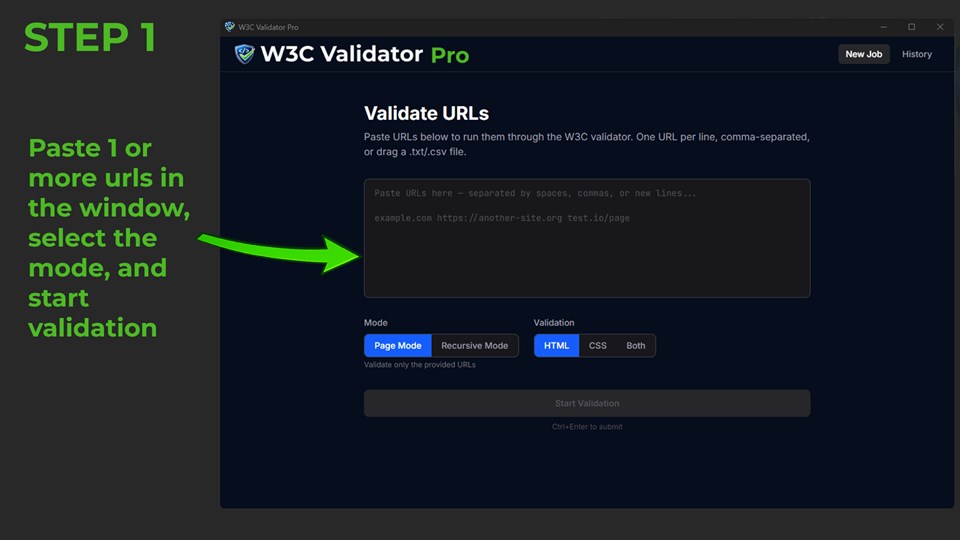
BATCH VALIDATE HUNDREDS OF PAGES IN ONE CLICK
Stop validating one page at a time. W3C Validator Pro lets you paste in as many URLs as you want — separated by spaces, commas, or new lines — and validates them all automatically. Whether you're checking 5 pages or 500, just paste and go.
RECURSIVE SITE CRAWLING + SITEMAP PARSING
Need to validate an entire website? Switch to Recursive Mode and W3C Validator Pro will automatically crawl your site, parse your sitemap.xml (including nested sitemap indexes), and discover every page. No need to manually list every URL — the app finds them for you and validates everything it discovers.
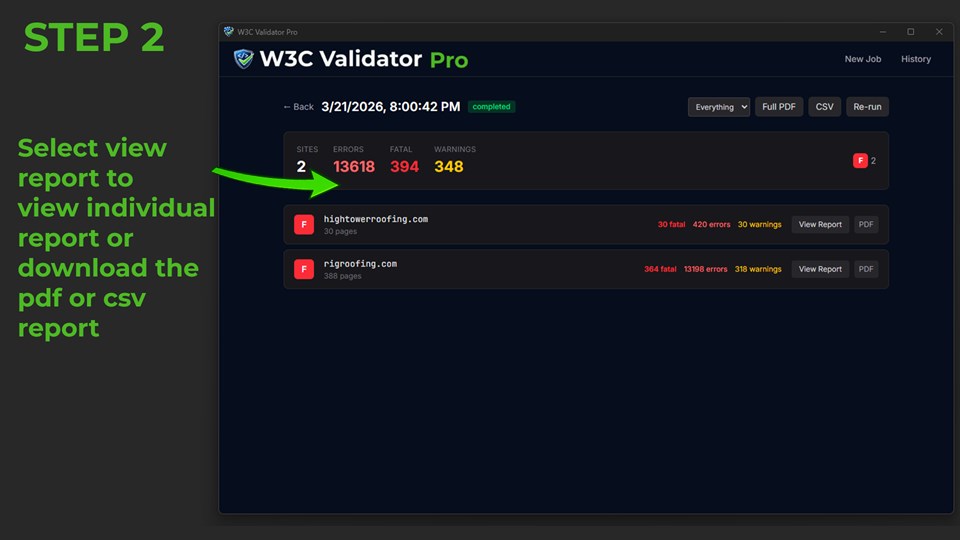
SITE GRADING SYSTEM (A through F)
Every site gets a letter grade based on total error count across all its pages:
- Grade A: 0 errors — your code is clean
- Grade B: 1-10 errors — minor issues
- Grade C: 11-25 errors — needs attention
- Grade D: 26-59 errors — significant problems
- Grade F: 60+ errors or any fatal error — critical issues
Grades are displayed as color-coded badges throughout the app, in your reports, and in your exports. It's the fastest way to see which sites need work and which ones are solid.
HTML AND CSS VALIDATION
Validate HTML, CSS, or both. The app uses the official W3C validation services (validator.w3.org for HTML and jigsaw.w3.org for CSS), so you're getting the same results as the official validators — just batched across all your sites at once. Toggle between HTML only, CSS only, or Both right from the main screen.
DEBUG ERRORS WITH AI — ONE CLICK
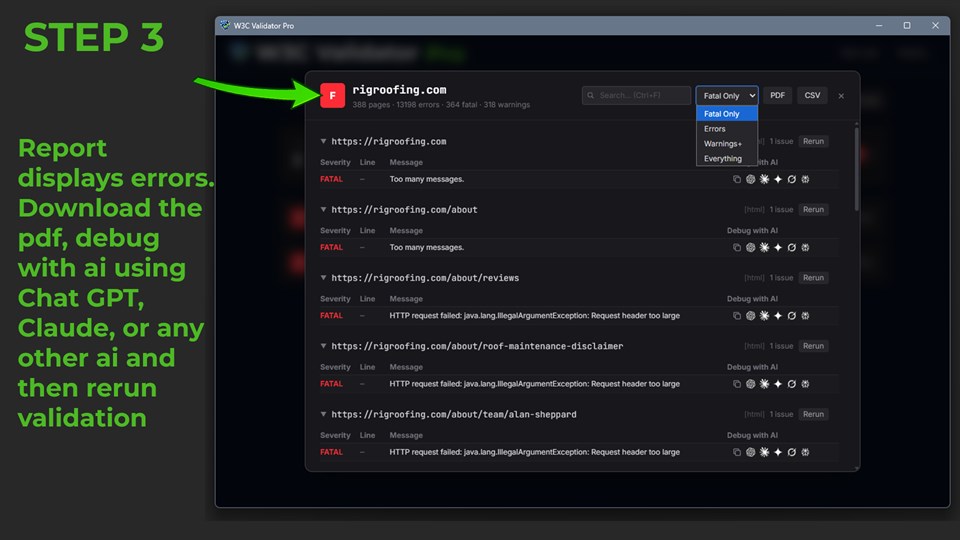
This is where W3C Validator Pro really stands out. Every validation error has built-in AI debugging. Right next to each error, you'll see icons for ChatGPT, Claude, Gemini, Grok, and Perplexity. Click any icon and your browser opens with a pre-written prompt that includes the page URL, error severity, line number, error message, and code extract. Just hit enter and get an instant fix from your favorite AI. No more copying and pasting error messages manually — it's all done for you in one click.
DETAILED REPORTS WITH FILTERING
Click "View Report" on any site to see a full breakdown of every page and every error. The report modal includes:
- Per-page expandable sections showing all validation messages
- Severity labels: FATAL, ERROR, WARN, INFO — color-coded for quick scanning
- Line numbers so you know exactly where the issue is in your code
- Code extracts showing the actual HTML/CSS that triggered the error
- Copy button on every error to quickly grab the details for your clipboard
Filter your results to see only what matters:
- Fatal Only — show only critical errors that break your page
- Errors — show all errors
- Warnings+ — include warnings
- Everything — show all messages including informational ones
- CSS Only — isolate CSS validation results (when running Both mode)
SEARCH WITHIN REPORTS
Use the built-in search bar (or hit Ctrl+F) to find specific pages or errors within a report. Search by URL, error message, or code extract. The results filter in real-time as you type.
PER-PAGE RERUN
Fixed an error and want to check if it's resolved? Every page in the report has a "Rerun" button. Click it and W3C Validator Pro will re-validate just that single page without re-running the entire job. A green progress bar shows the validation in progress, and if all errors are cleaned up, you get a success badge right there in the report. It's the fastest way to verify your fixes one page at a time.
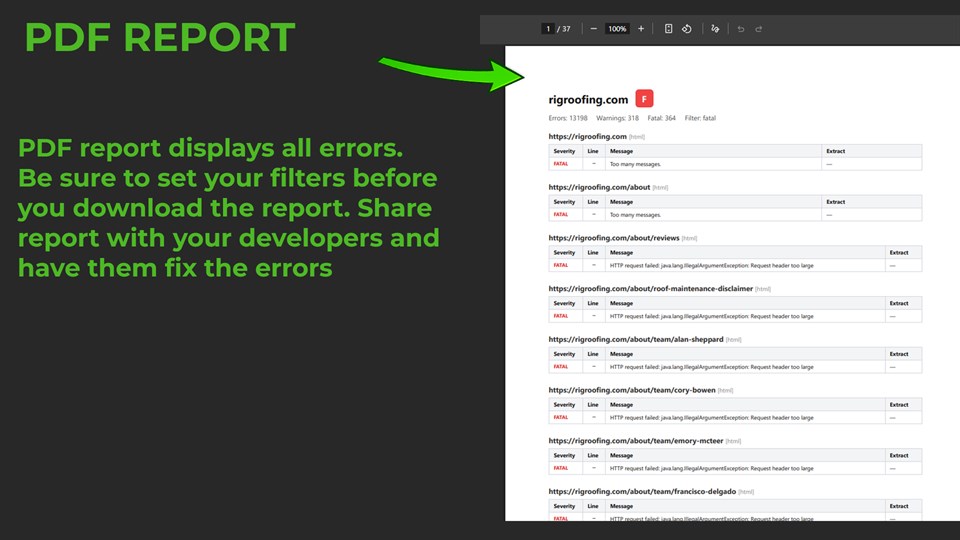
EXPORT AS PDF OR CSV
Generate professional reports to share with clients, team members, or stakeholders:
- Full PDF Report: Includes a cover page with date, mode, and grade summary, a clickable table of contents linking to each site, and per-site sections with grades and per-page error tables. Filter the PDF to include only fatal errors, all errors, or everything.
- Single-Site PDF: Export a report for just one site from the report modal.
- CSV Export: Flat format with columns for site, page URL, grade, validation type, message type, severity, message, line, column, and extract. Opens perfectly in Excel or Google Sheets. Respects your current filter settings.
JOB HISTORY AND RE-RUN
Every validation job is saved automatically. The History page shows all your past jobs with date, mode, validation type, URL count, and grade distribution. From here you can:
- View any past job's full results
- Re-run a job with the same URLs and settings to check for improvements
- Delete individual jobs or clear all history
- History auto-prunes to keep the 50 most recent jobs
TREND TRACKING
When you re-run a job, W3C Validator Pro compares the new results against the previous run. See at a glance which sites improved, which got worse, and which stayed the same — with trend badges showing the direction and error count changes.
DRAG AND DROP URL IMPORT
Have a list of URLs in a .txt or .csv file? Just drag and drop it onto the input area. W3C Validator Pro will parse the file and populate the URL list automatically. Supports comma-separated, newline-separated, and even Google Docs-style pasted lists with bullet characters.
DARK THEME DESIGNED FOR DEVELOPERS
W3C Validator Pro features a professional dark theme built for long coding sessions. The interface uses a deep navy background with syntax-highlight-style severity colors (red for errors, amber for warnings, green for success). URLs and code extracts are displayed in JetBrains Mono for maximum readability. Everything is designed to feel like a developer tool, not a consumer app.
PRIVACY FIRST
All validation results and job history are stored locally on your device in a SQLite database. The only network requests the app makes are to the official W3C validation services and to websites you choose to crawl. No telemetry, no analytics, no tracking. Your data stays on your machine.
BUILT FOR PROFESSIONALS
W3C Validator Pro is built for web developers, QA teams, SEO specialists, and digital agencies who need to validate code across multiple client sites efficiently. Whether you're doing a site audit, preparing for a launch, or maintaining ongoing code quality, W3C Validator Pro gives you the tools to validate at scale and fix issues faster with AI-powered debugging.
Requirements: Windows 10 (version 2004 or later) or Windows 11. Internet connection required for W3C validation and AI debugging features.
Od vývojáře
Seznamy 0
-
 W3C Validator Pro
Body 0
-

- +1 Bod

Žebříčky 0
-
- Vaše hodnocení
Vývojář 23
- Lucky Panda
- Sledující: 0
- Platformy: Windows Aplikace (21) Windows Hry (1) Steam Hry (1)
- Slevy: 0
- Seznamy: 0 1
- Body: 6
- Žebříčky: 0
- Komentáře: 0
- Videa: 21
- RSS: Odebírat
Novinky
- Verze: PC
- Poslední aktualizace:
Další informace
- Datum vydání:
- Kategorie:
Aplikace pro Windows›Vývojářské nástroje - OS:
PC - Velikost:
221 Mb - Podporované jazyky:
Angličtina - Hodnocení obsahu:
EVERYONE - Windows Store Hodnocení: ¡
0
 http://luckypandawebsites.com/support/w3c-validator-pro
Skóre AppAgg
Odhadované skóre AppAgg pro
W3C Validator Pro
Vývojář: Lucky Panda
Vyšší skóre obvykle odráží lepší výsledky v ukazatelích sledovaných na AppAgg.
Na základě: popularity · uživatelských hodnocení · aktuálnosti · slev · dat obchodů · aktivity komunity
Denně se přepočítává z aktuálních dat AppAgg.
Komentáře 0 ¡
Sdílet
W3C Validator Pro Krátká adresa URL: Zkopírováno!- Windows Store

