
Bookmarks
| Developer: | XBuilder (20) | ||
| Price: | Free New | ||
| Score: | 810 Silver | ||
| Rankings: | 0 | ||
| Comments: | 0 Add a comment | ||
| Lists: | 0 0 | ||
| Points: | 0 | ||
| +1 Point | |||
Summary
Meet WP Theme Studio, an app from XBuilder in the Developer tools category.
It came out , so it’s younger than the milk in your fridge.
Free, no ads, no in-app purchases. Just you and the app.
The Microsoft Store is built into Windows, so it installs in a couple of clicks.
Its AppAgg Score is 810. Silver, and that’s not bad at all.
Rated “EVERYONE”, so it’s fine for kids too.
Speaks 2 languages, English included.
Used it? Your review would be the first one here.
The developer has 1 more game and 18 apps on AppAgg. Worth a look.
Want to hear about updates and new apps first? Follow the developer or subscribe to the RSS feed. Push alerts come through the AppAgg Alerts app for Android and iOS.
Other platforms 0
Price History 0
- Current price: Free
- Minimum: Free
- Maximum: Free
Your own feed on the home page
Screenshots 5
Description

Independent Product Notice: WP Theme Studio is an independent tool created by PhotoEasy Studio. It exports standard WordPress 6.2+ Full Site Editing packages and is not affiliated with, sponsored by, or endorsed by the WordPress Foundation or Automattic.
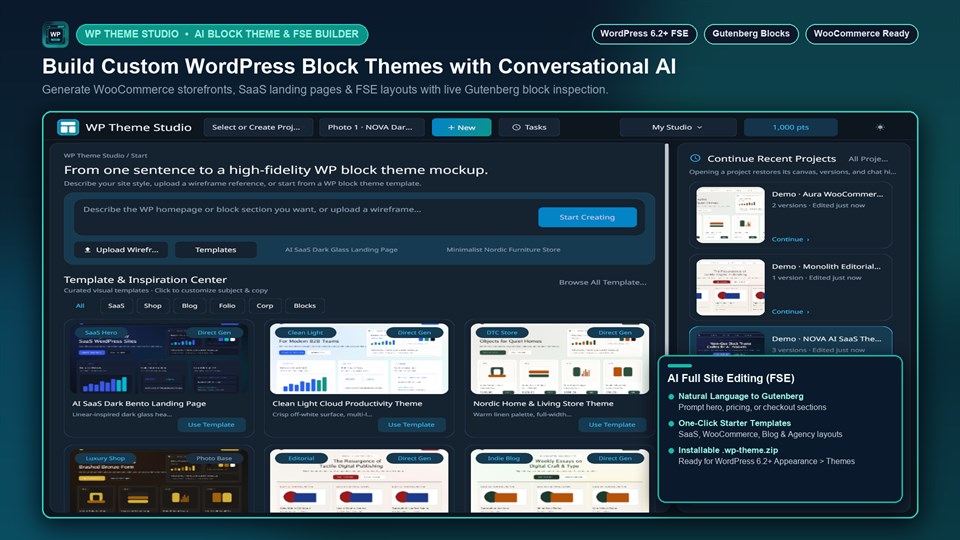
AI-Powered Block Theme Builder & Full Site Editing (FSE) for Windows 10/11
• Conversational AI web design: prompt complete page layouts, hero banners, Bento feature grids, pricing tables, or WooCommerce product showcases using natural language chat.
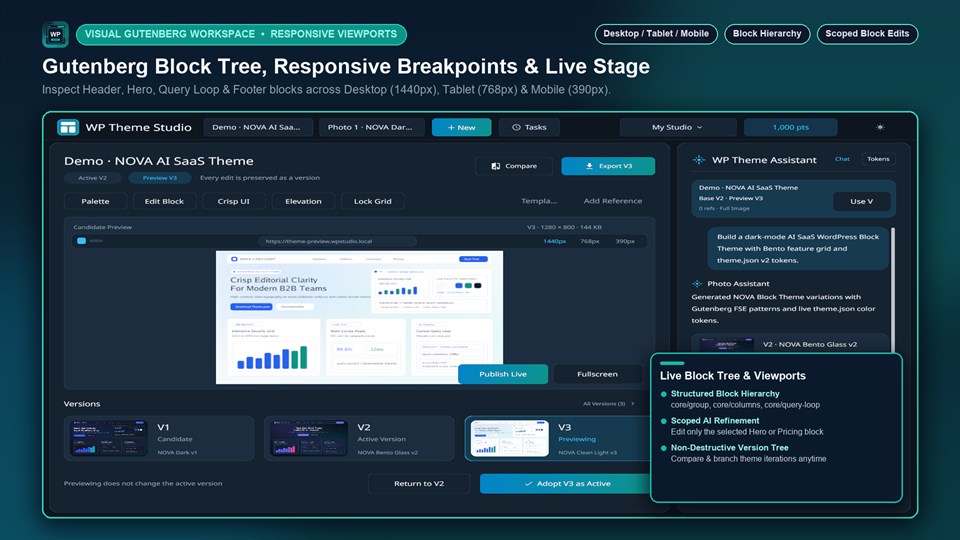
• Scoped regional block editing: refine only your selected Header, Hero, Pricing, or Footer section—or paint a visual mask over a specific area—while keeping the rest of your theme layout intact.
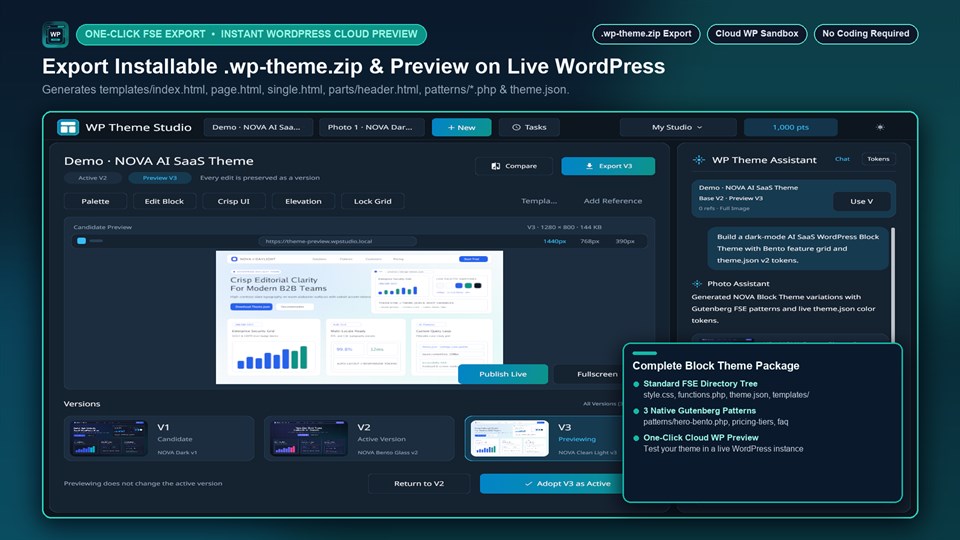
• Non-destructive version history tree: every AI generation and design iteration is saved as an immutable node so you can compare side by side, branch new variations, and restore previous versions anytime.
Visual Gutenberg Block Tree, Pattern Library & Responsive Viewport Switcher
• Structured Gutenberg block hierarchy: inspect how your visual design maps directly to native block primitives including core/group, core/columns, core/cover, core/navigation, and core/query-loop.
• Instant responsive viewport switcher: preview and fine-tune your block theme across Desktop (1440px), Tablet (768px), and Mobile (390px) viewports in real time.
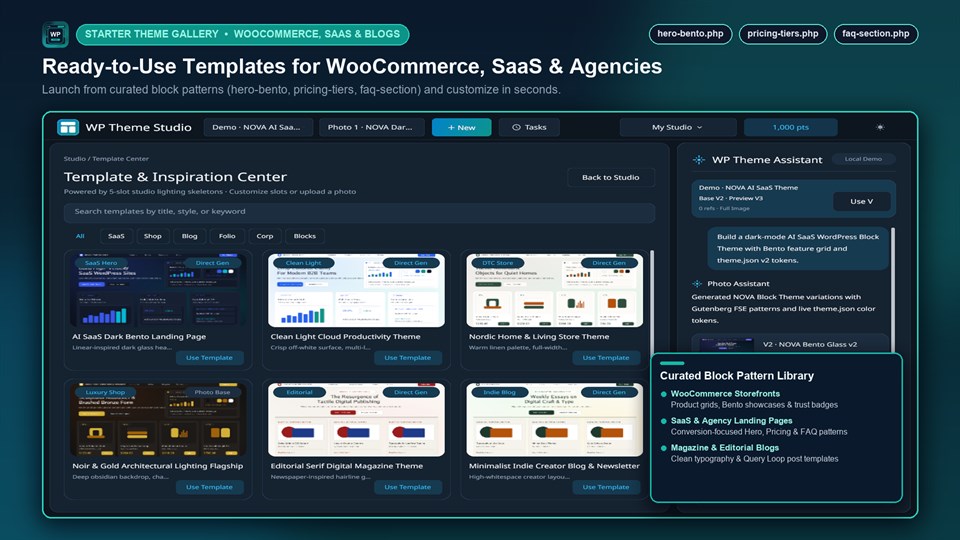
• Pre-built Gutenberg block patterns: insert and customize conversion-ready PHP block patterns including Hero Bento grids (patterns/hero-bento.php), 3-tier SaaS pricing tables (patterns/pricing-tiers.php), and interactive FAQ sections (patterns/faq-section.php).
Ready-to-Use Templates for Online Stores, SaaS Landing Pages, Blogs & Agency Portfolios
• Launch fast with 12+ curated starter theme templates tailored for WooCommerce storefronts, modern SaaS product pages, creative agency portfolios, corporate websites, and editorial blogs.
• One-click starter action cards and quick-tool chips let you restyle color palettes, swap typography pairings, or generate new sections without writing complex prompts.
Automatic theme.json v2 Design Tokens & Installable .wp-theme.zip Export
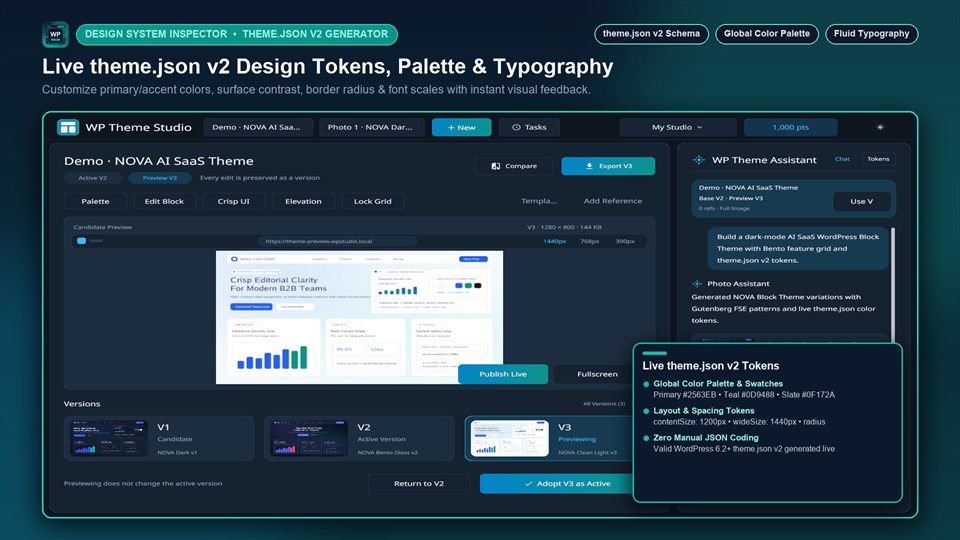
• Live theme.json v2 generator: configure global color palettes, primary and accent swatches, fluid typography scales, layout container widths (contentSize / wideSize), and border radius tokens with zero manual JSON coding.
• Complete .wp-theme.zip package export: export a standards-compliant WordPress 6.2+ Full Site Editing block theme archive containing style.css, functions.php, index.php, theme.json v2, HTML templates (templates/index.html, page.html, single.html), template parts (parts/header.html, parts/footer.html), and registered block patterns—ready to upload under Appearance > Themes > Add New.
One-Click Cloud Sandbox Provisioning & Live Site Preview
• Instant live preview: spin up a temporary cloud sandbox with your generated block theme pre-installed so you can test navigation, Gutenberg editing, and responsive behavior in a real browser before deploying to production.
Free Trial & In-App Purchases
• New installations include 3 complimentary AI trial credits (1 credit per AI theme generation or regional AI edit) with no time limit.
• Template browsing, Gutenberg block tree inspection, theme.json editing, and exporting local .wp-theme.zip packages remain available without charge.
• After your 3 trial credits are used, optional non-expiring AI credit packs are offered via in-app purchase (25 AI Credits Starter Pack $2.99, 100 AI Credits $9.99, and 300 AI Credits Studio Bundle $19.99; local taxes may apply).
From the developer
Lists 0
-
 WP Theme Studio
Points 0
-

- +1 Point

Rankings 0
-
- Your rating
Developer 20
- XBuilder
- Followers: 0
- Platforms: Windows Apps (19) Windows Games (1)
- Deals: 0
- Lists: 0 0
- Points: 0
- Rankings: 0
- Comments: 0
- Videos: 0
- RSS: Subscribe
What's new
- Version: PC
- Last Updated:
- Version 2.0.17 updates the product branding to WP Theme Studio, introduces Windows-native canvas preview chrome, adds a low-credit conversion banner and flexible credit packs support (with additional packs rolling out via Store add-on activation), alongside starter action cards, Enter-to-send prompting, 3 native Gutenberg PHP block patterns, .wp-theme.zip export with live theme.json v2 tokens, and instant cloud preview.
Additional Information
- Release Date:
- Category:
Windows Apps›Developer tools - OS:
PC - Size:
64 Mb - Supported Languages:
English,Chinese - Content Rating:
EVERYONE - Windows Store Rating: ¡
0
AppAgg Score
Estimated AppAgg Score for
WP Theme Studio
Developer: XBuilder
Higher scores usually reflect better results across AppAgg’s indicators.
Based on: popularity · ratings · freshness · deals · store data · community signals
Recalculated daily using fresh AppAgg data.
Comments 0 ¡
Share
WP Theme Studio Short URL: Copied!- Windows Store
You may also like
Recent discussionsMore →
 AppGame4Class Game4Class makes lesson review fun and interactive. I like how easily students can join from their o...
 Mehdi Gateway62
 AppAniMate Waifu - AI Anime Desktop Pet This is the best anime desktop pets I have ever had, The dancing feature is amazing.
 shaw chaney34
 AppSpark Motion Create 26 The graphics are amazing! Now I can design my ball layouts and watch then spin in 3D animation.
 Jim Kirker40
 AppLocalDub – Real-Time Game Dubbing Hello Kırtay Interactive, I am using LocalDub - Real-Time Game Dubbing. I would like to know if Hind...
 rashid game53
 AppNauticPlayer This app is absolute cinema. Honestly, it’s one of the best media players I’ve ever tried, and I’m s...
 Manuel92
 AppScreen Beings - Interactive Accessibility Companion This is my app so I’m a little bias but as someone from the ADHD community that teaches ADHD and neu...
 Tarelle Irwin54
 AppAadi vault good it ia a encrypter and good you my work on office
 Aditya Rai50
 AppTyping 365 | Daily Typing Trainer The best typing app ever. With Typing 365 you don’t have to force yourself for couple minutes traini...
 Ahmad Mozaffar50
 AppZefir Calendar — Calendar in the Taskbar excelente app! Superando todas as espectativas!
 Diógenes Magnus50
 AppBlazin IPTV Player This compact IPTV player is amazing. I threw multiple playlists at it and it handles it with no issu...
 Mike Anderson40

