
Закладки
Выберите название для этой закладки.
Закладка сохранена
| Разработчик: | Yozoneko (1) | ||
| Цена: | * Бесплатно Новинка | ||
| Оценка: | 600 Серебро | ||
| Рейтинги: | 0 | ||
| Комментарии: | 0 Оставьте комментарий | ||
| Списки: | 0 + 0 | ||
| Очки: | 0 + 0 ¡ | ||
| +1 Очки | |||
Скриншоты
Реклама
Описание

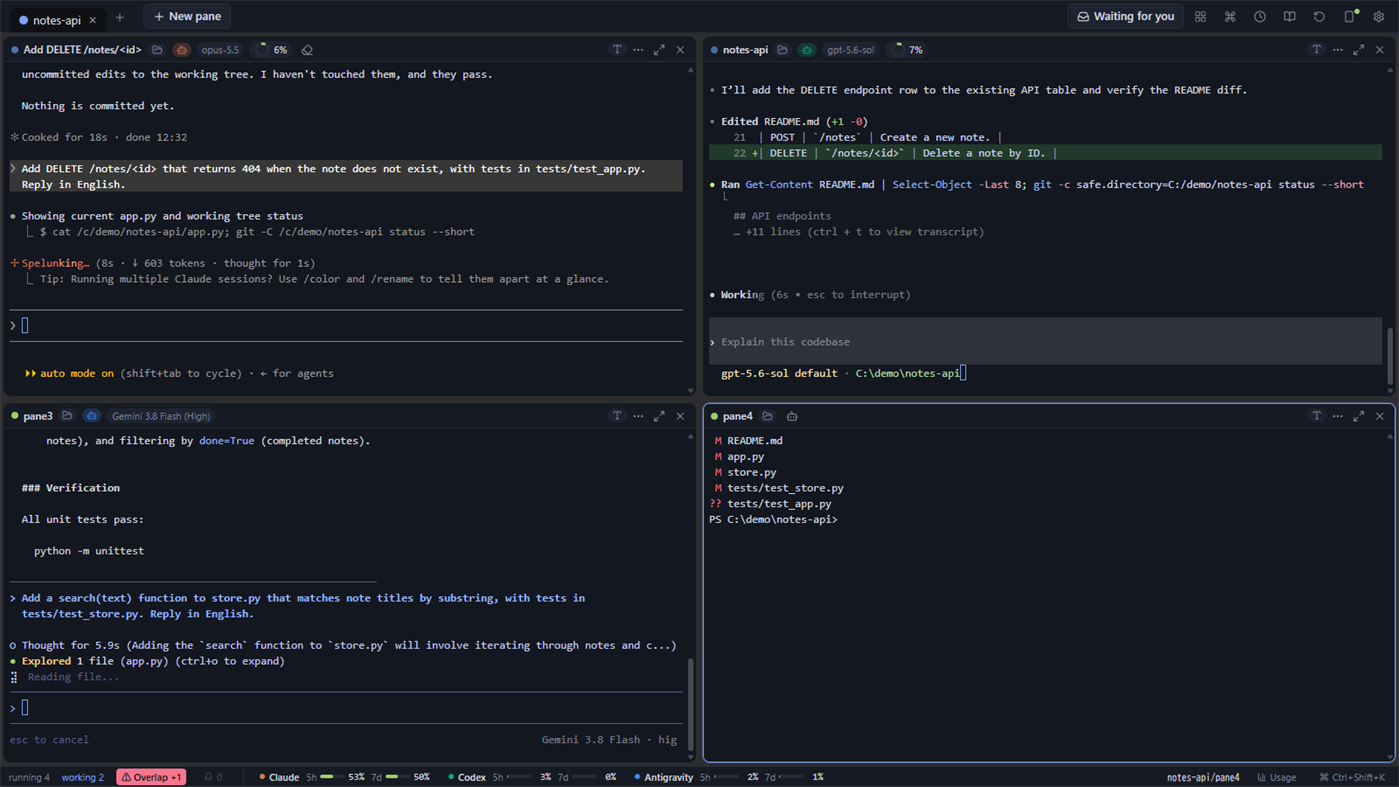
■ Split the window and arrange panes freely
Split one window up, down, left or right, and run a separate shell in each pane. Every pane is an ordinary terminal (PowerShell, cmd or WSL), and agents are started inside it.
- Drag a pane by its header to move it elsewhere or swap it with another pane
- Drag the dividers to resize, or even out every pane with one click
- Zoom one pane to fill the window for a while
- Besides terminals, a pane can also be a file explorer that shows the contents of a folder
■ Keep work apart with groups
Each group holds its own arrangement of panes, and you switch groups with the tabs at the top. Give each project its own group: agents in the groups you are not looking at keep running.
- Name a group and give it a color. Each group can also have its own folder that new panes open in
- Drag tabs to reorder them, and drag a pane onto a tab to move it to that group
- Groups and panes come back the next time you open the app. Claude Code and Codex CLI sessions that were running when you closed it resume their conversation
■ See what every agent is doing
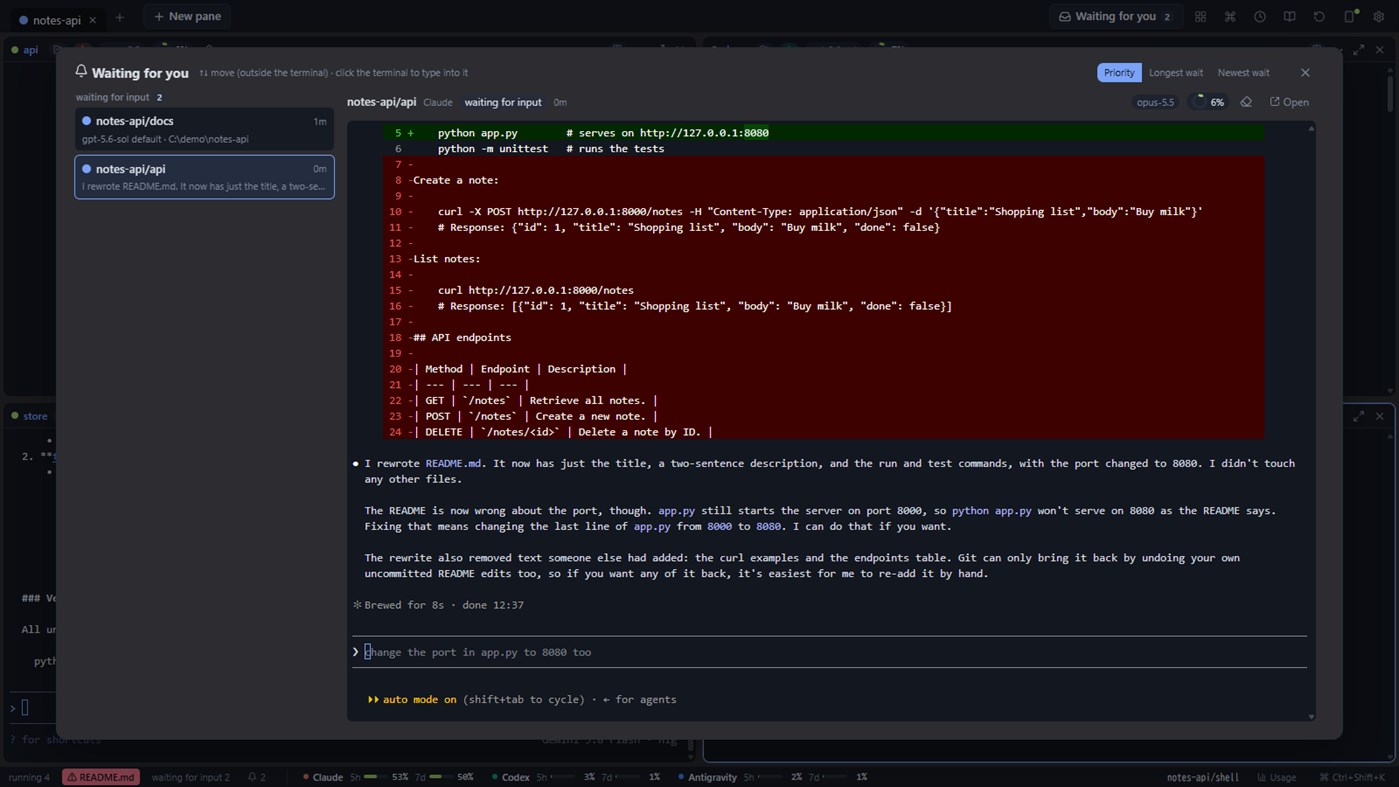
Each pane header shows the agent running there, its model, context usage, and whether it is working, waiting for input, or waiting for your approval. Claude Code, Codex CLI and Antigravity CLI are supported. Remaining usage limits are shown at the bottom of the window.
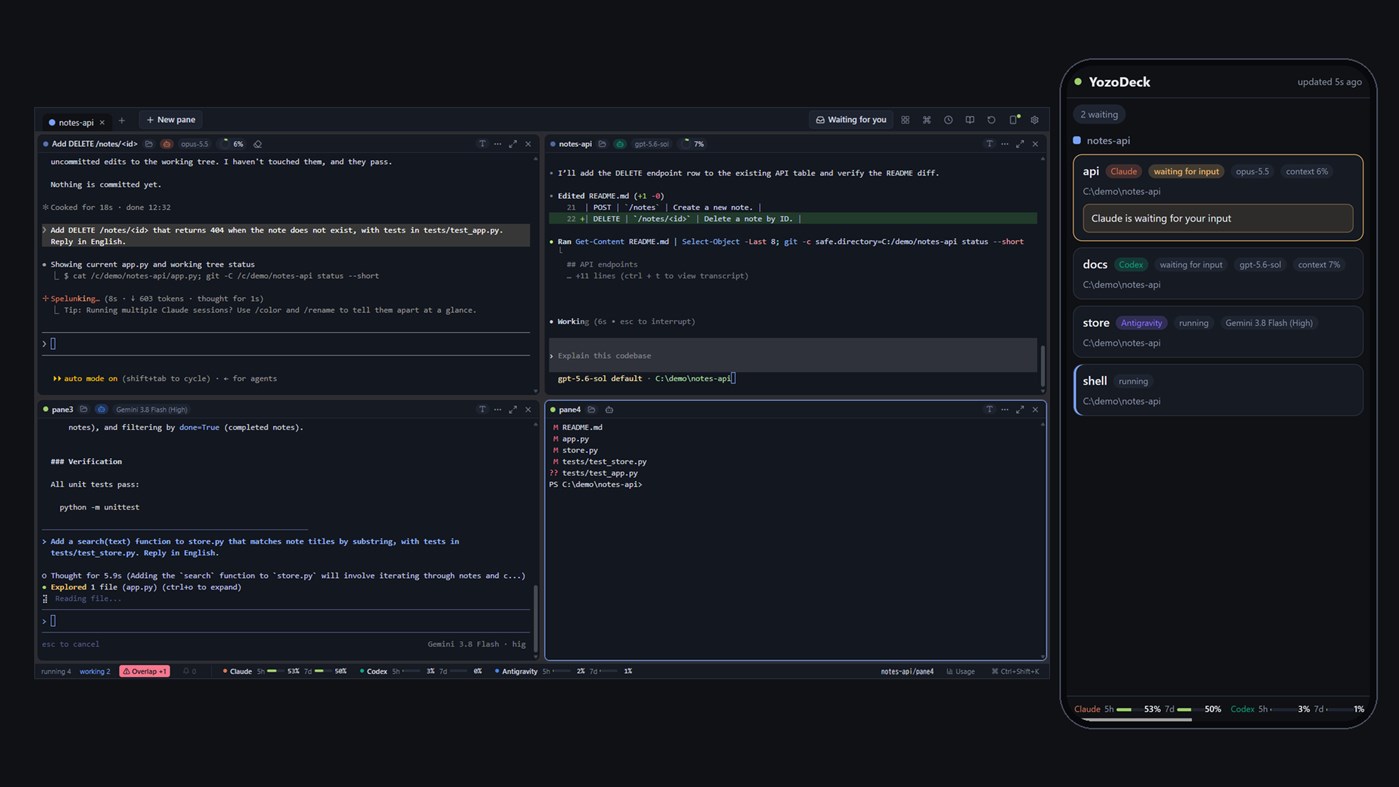
Panes that are waiting for you are gathered in one list, where you can answer them.
The state is read from the log files each CLI already writes. For Claude Code you can also connect its hooks (Claude Code's way of reporting what it is doing), so states such as a permission request show up immediately. This is optional, and the exact text it adds to Claude Code's settings file is shown before anything is written.
■ A safety net for running several agents in one repository
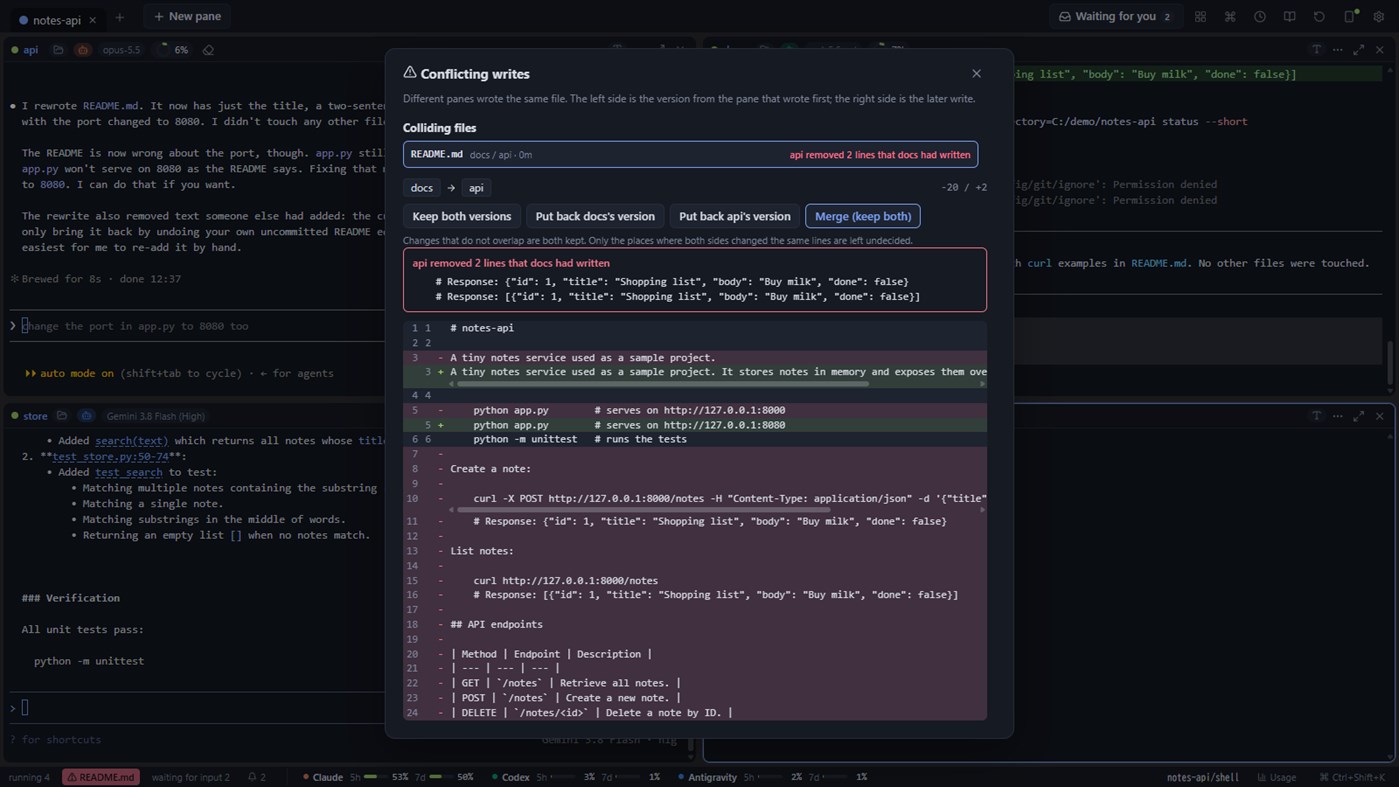
- When two agents write to the same file, YozoDeck tells you. With Pro you can view the difference, restore one side, or merge
- With Pro you can rewind the working folder to just before a Claude Code or Codex CLI turn started, whether the agent changed files with its edit tools or with shell commands
■ Let an agent drive the pane next to it (yzd command)
The bundled yzd command lets an agent in one pane read and operate the screen of the pane beside it, such as an SSH session or a dev server. It is limited to its own group by default, and every action is recorded.
■ Check in from your phone
From the same network, or from your own Tailscale, open a phone view to see the state and screen of each pane. With Pro you can also answer permission requests and send instructions. No outside server is involved.
Traffic inside the same network is not encrypted (plain HTTP): turn the feature on only on a network you trust, such as your home, and use Tailscale anywhere else. It is off by default.
■ Local AI (optional, off by default)
When turned on, a generative AI model running on your own PC (Ollama) writes one-line titles for history entries, summarises a pane, and explains permission requests and diffs. You can also search history by meaning and open a pane to chat with it.
- Everything runs on your PC; nothing is sent to an outside service
- Turning it on downloads the Ollama runtime (about 40 MB) and the model you choose (about 0.6 to 3.2 GB each). The size and the location are shown before anything is downloaded
- AI output can be wrong. YozoDeck uses it only for explanations and search, never to decide an approval or to instruct an agent
■ Free and Pro
The free version is a complete terminal. Pro (a one-time in-app add-on) differs in these five points only:
- Groups: up to 3 in Free / as many as you like in Pro
- Remote from your phone: view only in Free / send instructions, allow or deny, interrupt and more in Pro
- History: the newest 10 entries from the last 3 days in Free / everything that is stored, searchable, in Pro
- Rewind: Pro only
- Write collisions: detection and the list in Free / the diff, restoring one side and merging in Pro
Stored history has a time and size limit, and entries beyond it are deleted in Pro too. The limit is 180 days and 1 GB by default and can be changed in Settings.
■ Also
- Dark (default) and light themes, Japanese and English
- Desktop notifications
- Start with Windows (optional, in Settings)
- Usage totals, a list of skills and memory files, saved prompts
Claude and Claude Code are products or services of Anthropic PBC, Codex of OpenAI OpCo, LLC, and Antigravity and Gemini of Google LLC. YozoDeck is a third-party app not affiliated with these providers, and it does not bundle or redistribute their CLIs.
Другие платформы
| YozoDeckWindows Store600 СереброВы здесьВстроенные покупки | Бесплатно |
Сейчас только в этом магазине.
История цен
- Текущая цена: Бесплатно
- Минимум: Бесплатно
- Максимум: Бесплатно
Отслеживайте цены Добавьте в список, чтобы получать уведомления о скидках по электронной почте или через push
Списки 0
0
- YozoDeck
Очки 0
0
Рейтинги 0
-

- Ваша оценка

Комментарии 0 ¡
Будьте первым, кто оставит комментарий
Разработчик
- Yozoneko
- Подписчики: 0
- Платформы: Windows Приложения (1)
- Скидки: 0
- Списки: 0 + 0
- Очки: 0 + 0 ¡
- Рейтинги: 0
- Комментарии: 0
- Видео: 0
- RSS: Подписаться
Что нового
- Версия: PC
- Последнее обновление:
Дополнительная информация
- Дата выпуска:
- Категория:
Приложения для Windows›Средства разработчика - Операционные системы:
PC - Размер:
6 Mb - Поддерживаемые языки:
English,Japanese - Возрастные ограничения:
EVERYONE - Windows Store Рейтинг: ¡
0 - Сайт:
 https://yozoneko.com/
Оценка AppAgg
600
Примерная оценка AppAgg для
YozoDeck
Разработчик: Yozoneko
600 Серебро
Более высокая оценка обычно означает лучшие результаты по показателям AppAgg.
На основе: популярности · оценок пользователей · актуальности · скидок · данных магазинов · активности сообщества
Пересчитывается ежедневно на основе актуальных данных AppAgg.
Бейдж для сайта:  Скопировано!
Кратко
YozoDeck Короткий URL: Скопировано!- Windows Store
На AppAgg можно следить за приложением «YozoDeck» от Yozoneko. Платформа — Windows, категория — Средства разработчика. Оценка AppAgg: 600 (Серебро). Очки приложения — подтверждённые: 0; косвенные: 0. Публичных списков с приложением: 0. Пользователей, сохранивших его в приватные списки: 0. Пользователи AppAgg пока не оценили приложение. Подтверждённые очки отражают переходы авторизованных пользователей AppAgg в магазин; косвенные очки основаны на данных магазинов. AppAgg учитывает публичные списки с приложением или игрой и пользователей, сохранивших приложение или игру в приватные списки. Приложение впервые выпущено . Последнее обновление приложения: . Сейчас приложение доступно бесплатно. Приложение доступно на следующих языках: English, Japanese. Посмотрите историю цен, добавьте приложение в список или подпишитесь на разработчика. Следите за будущими скидками и обновлениями приложения через RSS-канал. AppAgg не размещает и не распространяет это приложение. Все связанные с приложением товарные знаки, логотипы и снимки экрана принадлежат их владельцам.
Вам также могут понравиться
Обсуждают сейчас
 ПриложениеLocalDub – Real-Time Game Dubbing Hello Kırtay Interactive, I am using LocalDub - Real-Time Game Dubbing. I would like to know if Hind...
  rashid game5
  ПриложениеNauticPlayer This app is absolute cinema. Honestly, it’s one of the best media players I’ve ever tried, and I’m s...
  Manuel16
  ПриложениеScreen Beings - Desktop Pet & Study Companion This is my app so I’m a little bias but as someone from the ADHD community that teaches ADHD and neu...
  Tarelle Irwin6
  ПриложениеAadi vault good it ia a encrypter and good you my work on office
  Aditya Rai5
  ПриложениеTyping 365 | Daily Typing Trainer The best typing app ever. With Typing 365 you don’t have to force yourself for couple minutes traini...
  Ahmad Mozaffar5
  ПриложениеZefir Calendar — Calendar in the Taskbar excelente app! Superando todas as espectativas!
  Diógenes Magnus5
  ПриложениеLockinRa LockinRa 리뷰 LockinRa는 작업 관리, 집중력 도구, AI 코칭을 하나의 데스크톱 앱으로 통합한 무료 Windows 생산성 프로그램입니다. 클라우드 동기화 없이 로컬 ...
  abhilok reddy6
  ПриложениеCN Vault I Love this app CN Vault is a user-friendly app that helps keep your passwords safe and secure. If y...
  Marjuk Amin5
