
Záložky
| Vývojář: | Antony Corbett (2) | ||
| Cena: | Zdarma | ||
| Skóre: | 590 Bronz | ||
| Žebříčky: | 0 | ||
| Komentáře: | 0 Přidat komentář | ||
| Seznamy: | 0 0 | ||
| Body: | 0 | ||
| +1 Bod | |||
Shrnutí
Zoomara je aplikace od vývojáře Antony Corbett z kategorie „Vývojářské nástroje“.
Běží dokonce i na HoloLens: Windows ve smíšené realitě.
Existuje dokonce verze pro Windows Mobile. Zdravíme z minulosti.
Zdarma, žádné reklamy, žádné nákupy v aplikaci. Jen vy a aplikace.
Vyšla , takže je pořád docela čerstvá.
Zvládne i Surface Hub, pro velké zasedačky.
Skóre AppAgg je 590. Zatím „Bronz“, ale je kam růst.
Věková kategorie „EVERYONE“, takže se hodí i pro děti.
Mluví jen jedním jazykem a čeština to není.
Na AppAgg ji zatím nikdo neohodnotil. Můžete být první, a to hned teď.
Tento vývojář má na AppAgg ještě 1 aplikaci. Stojí za to se podívat.
Chcete se o aktualizacích a nových aplikacích dozvídat jako první? Sledujte vývojáře nebo odebírejte RSS kanál. Push oznámení chodí přes aplikaci AppAgg Alerts pro Android a iOS.
Snímky obrazovky 2
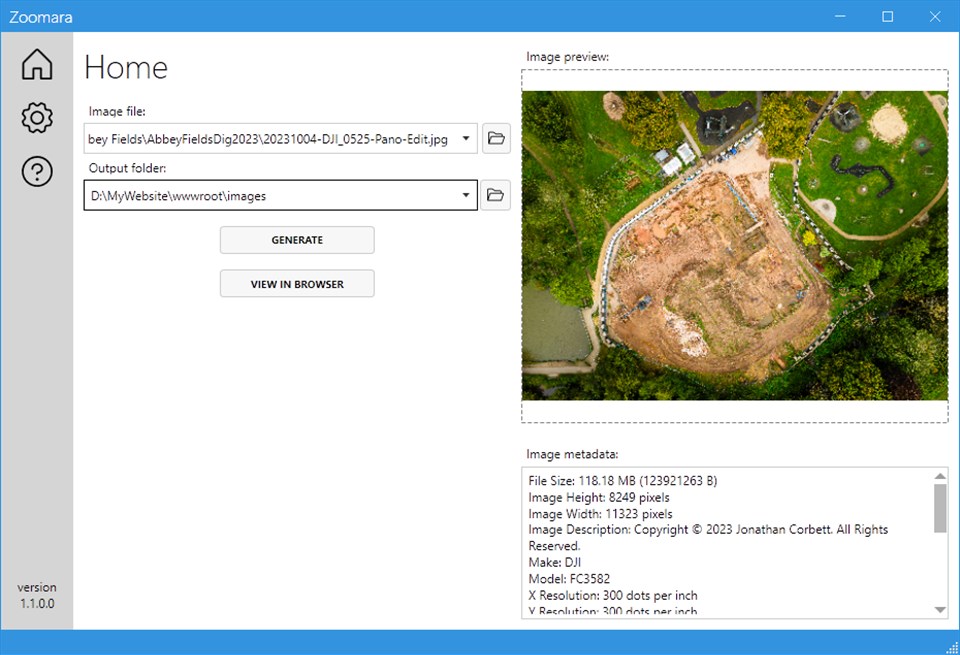
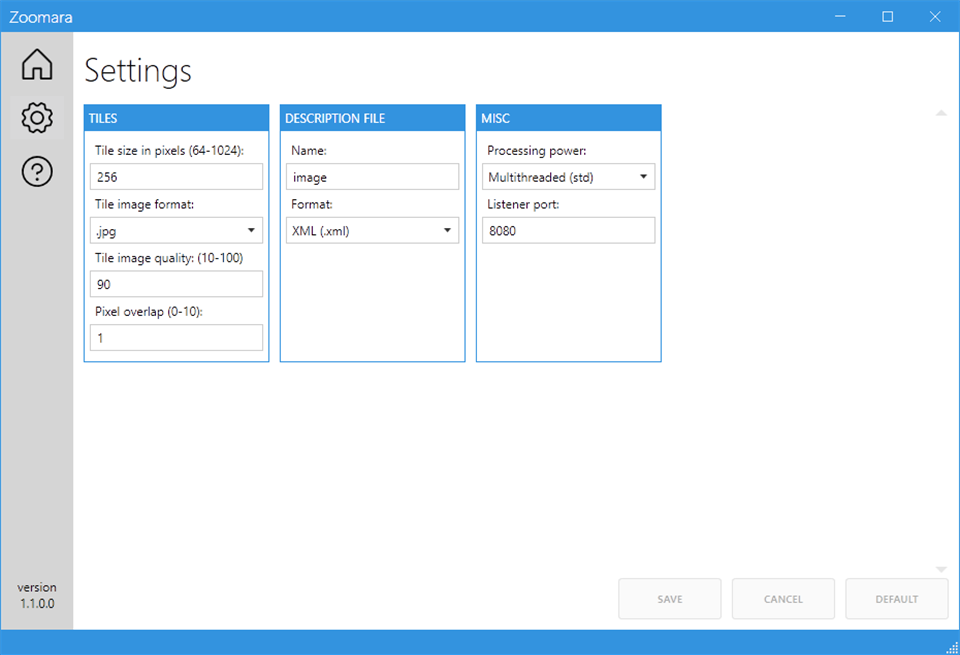
Další platformy 0
Historie cen 0
- Aktuální cena: Zdarma
- Minimum: Zdarma
- Maximum: Zdarma
Vlastní přehled na hlavní stránce
Popis

Zoomara is a modern, high-performance Windows application designed to make Deep Zoom image creation fast, intuitive, and accessible to everyone. Whether you’re a photographer, artist, archivist, educator, or web developer, Zoomara empowers you to convert ultra-high-resolution images into interactive, zoomable experiences suitable for online viewing and sharing.
What is Deep Zoom?
Deep Zoom technology allows users to explore massive images smoothly, without long load times or excessive memory usage. Instead of loading the entire image at once, Deep Zoom splits your image into a pyramid of tiles at multiple resolutions. As viewers pan and zoom, only the necessary tiles are loaded, ensuring a seamless and responsive experience—even on devices with limited resources or slower connections. This approach is ideal for detailed maps, artwork, blueprints, historical documents, and any scenario where clarity at every zoom level is essential.
Why Choose Zoomara?
• User-Friendly Interface: Zoomara’s clean, modern interface makes it easy to load your high-resolution images, preview them, and generate Deep Zoom tiles in just a few clicks.
• Fast Processing: Leveraging multi-threaded processing and efficient algorithms, Zoomara can process even very large images quickly. You can adjust processing power to suit your workflow, from background-friendly single-threaded mode to full-speed multithreaded operation.
• Flexible Output: Choose your preferred tile size, image format (JPG, PNG, WebP, BMP), and quality settings. Zoomara supports the industry-standard DZI (Deep Zoom Image) format, as well as XML, JSON, and JSONP description files for maximum compatibility.
• Instant Preview: Use the built-in “View in Browser” feature to instantly preview your Deep Zoom image in your default web browser, powered by an integrated local web server. No need to upload files to a website just to check your results.
• Comprehensive Settings: Fine-tune tile overlap, output folder structure, and listener port for browser previews. All settings are clearly explained, making it easy to optimize for your specific needs.
• Seamless Deployment: Once your image is processed, simply upload the generated tiles and description file to your website. Zoomara provides clear instructions and sample HTML for integrating with popular viewers like OpenSeadragon.
How It Works:
1. Install Zoomara on your Windows PC from the Microsoft Store.
2. Load your high-resolution image.
3. Select an output folder and click “Generate” to create Deep Zoom tiles.
4. Preview your results in your browser, or upload the output to your website for public viewing.
Ideal For:
• Museums and galleries digitizing artwork or artifacts
• Educators sharing detailed diagrams or maps
• Photographers and artists showcasing high-res portfolios
• Archivists preserving historical documents
• Anyone needing to present large images online with clarity and speed
Support and Documentation:
Zoomara includes built-in help and links to online resources about Deep Zoom technology. For additional support, contact the developer directly via the support email provided in the app.
Trademarks:
Microsoft, Deep Zoom, and Seadragon are trademarks of the Microsoft group of companies.
Od vývojáře
Vývojář
- Antony Corbett
- Sledující: 0
- Platformy: Windows Aplikace (2)
- Slevy: 0
- Seznamy: 0 0
- Body: 0
- Žebříčky: 0
- Komentáře: 0
- Videa: 0
- RSS: Odebírat
Seznamy 0
-
 Zoomara
Body 0
-

- +1 Bod

Žebříčky 0
-
- Vaše hodnocení
Novinky
- Verze: PC
- Poslední aktualizace:
Další informace
- Datum vydání:
- Kategorie:
Aplikace pro Windows›Vývojářské nástroje - OS:
HoloLensMobilePCSurface Hub - Velikost:
243 Mb - Podporované jazyky:
Angličtina - Hodnocení obsahu:
EVERYONE - Windows Store Hodnocení: ¡
0
 https://cv8.org.uk/zoomara
Komentáře 0 ¡
Skóre AppAgg
Odhadované skóre AppAgg pro
Zoomara
Vývojář: Antony Corbett
Vyšší skóre obvykle odráží lepší výsledky v ukazatelích sledovaných na AppAgg.
Na základě: popularity · uživatelských hodnocení · aktuálnosti · slev · dat obchodů · aktivity komunity
Denně se přepočítává z aktuálních dat AppAgg.
Zoomara Krátká adresa URL: Zkopírováno!- Windows Store

