
Segnalibri
| Sviluppatore: | Antony Corbett (2) | ||
| Prezzo: | Gratis | ||
| Punteggio: | 590 Bronzo | ||
| Classifiche: | 0 | ||
| Commenti: | 0 Pubblica commento | ||
| Liste: | 0 0 | ||
| Punti: | 0 | ||
| +1 Punto | |||
In breve
Zoomara è un’app di Antony Corbett della categoria «Strumenti di sviluppo».
Funziona perfino su HoloLens (Windows in realtà mista).
C’è perfino una versione per Windows Mobile. Saluti dal passato.
Gratis: niente pubblicità, niente acquisti in-app. Solo tu e l’app.
Uscita , è ancora bella fresca.
Compatibile perfino con Surface Hub, per le grandi sale riunioni.
Il suo Punteggio AppAgg è 590. Per ora livello Bronzo, con tanto margine per crescere.
Classificazione «EVERYONE»: va bene anche per i bambini.
Parla una sola lingua, e non è l’italiano.
Su AppAgg nessuno l’ha ancora votata. Tocca a te aprire le danze.
Lo sviluppatore ha 1 altra app su AppAgg. Vale la pena dare un’occhiata.
Vuoi sapere prima di tutti di aggiornamenti e nuove app? Segui lo sviluppatore o iscriviti al feed RSS. Le notifiche push arrivano tramite l’app AppAgg Alerts per Android e iOS.
Screenshot 2
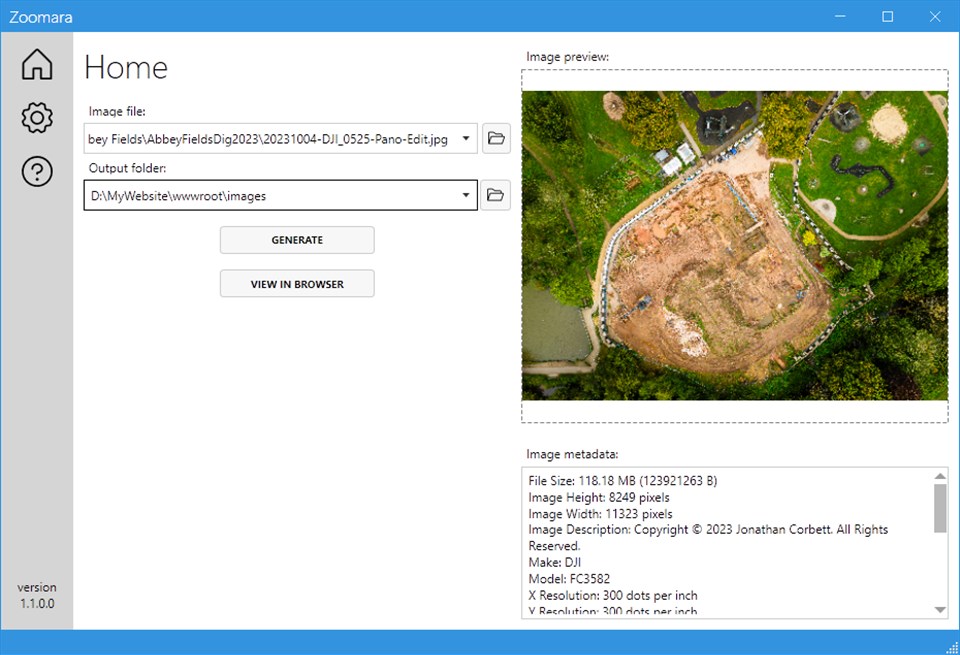
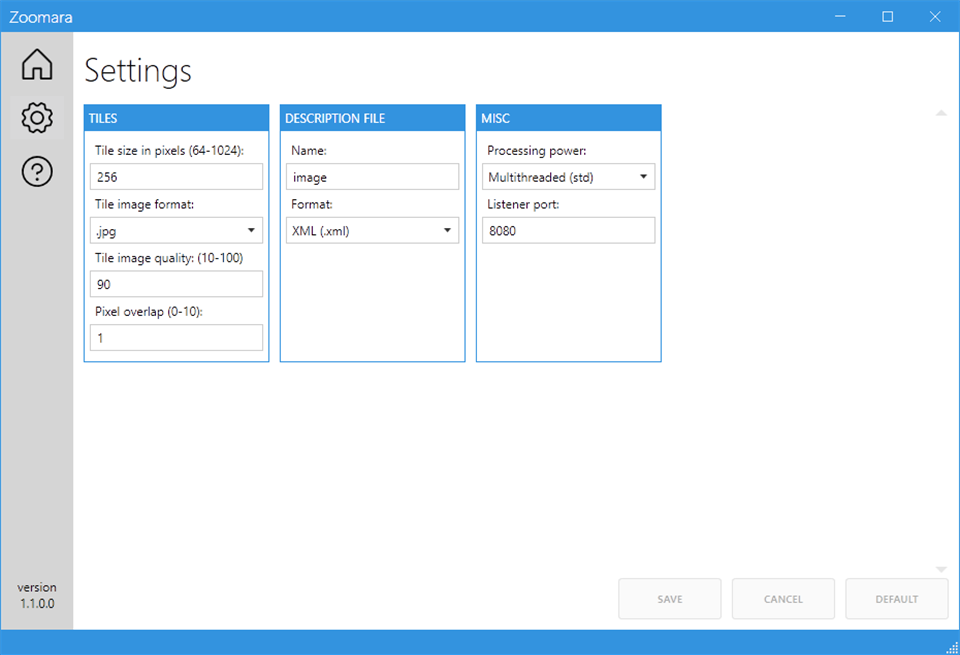
Altre piattaforme 0
Cronologia dei prezzi 0
- Prezzo attuale: Gratis
- Minimo: Gratis
- Massimo: Gratis
Il tuo feed personale nella home
Descrizione

Zoomara is a modern, high-performance Windows application designed to make Deep Zoom image creation fast, intuitive, and accessible to everyone. Whether you’re a photographer, artist, archivist, educator, or web developer, Zoomara empowers you to convert ultra-high-resolution images into interactive, zoomable experiences suitable for online viewing and sharing.
What is Deep Zoom?
Deep Zoom technology allows users to explore massive images smoothly, without long load times or excessive memory usage. Instead of loading the entire image at once, Deep Zoom splits your image into a pyramid of tiles at multiple resolutions. As viewers pan and zoom, only the necessary tiles are loaded, ensuring a seamless and responsive experience—even on devices with limited resources or slower connections. This approach is ideal for detailed maps, artwork, blueprints, historical documents, and any scenario where clarity at every zoom level is essential.
Why Choose Zoomara?
• User-Friendly Interface: Zoomara’s clean, modern interface makes it easy to load your high-resolution images, preview them, and generate Deep Zoom tiles in just a few clicks.
• Fast Processing: Leveraging multi-threaded processing and efficient algorithms, Zoomara can process even very large images quickly. You can adjust processing power to suit your workflow, from background-friendly single-threaded mode to full-speed multithreaded operation.
• Flexible Output: Choose your preferred tile size, image format (JPG, PNG, WebP, BMP), and quality settings. Zoomara supports the industry-standard DZI (Deep Zoom Image) format, as well as XML, JSON, and JSONP description files for maximum compatibility.
• Instant Preview: Use the built-in “View in Browser” feature to instantly preview your Deep Zoom image in your default web browser, powered by an integrated local web server. No need to upload files to a website just to check your results.
• Comprehensive Settings: Fine-tune tile overlap, output folder structure, and listener port for browser previews. All settings are clearly explained, making it easy to optimize for your specific needs.
• Seamless Deployment: Once your image is processed, simply upload the generated tiles and description file to your website. Zoomara provides clear instructions and sample HTML for integrating with popular viewers like OpenSeadragon.
How It Works:
1. Install Zoomara on your Windows PC from the Microsoft Store.
2. Load your high-resolution image.
3. Select an output folder and click “Generate” to create Deep Zoom tiles.
4. Preview your results in your browser, or upload the output to your website for public viewing.
Ideal For:
• Museums and galleries digitizing artwork or artifacts
• Educators sharing detailed diagrams or maps
• Photographers and artists showcasing high-res portfolios
• Archivists preserving historical documents
• Anyone needing to present large images online with clarity and speed
Support and Documentation:
Zoomara includes built-in help and links to online resources about Deep Zoom technology. For additional support, contact the developer directly via the support email provided in the app.
Trademarks:
Microsoft, Deep Zoom, and Seadragon are trademarks of the Microsoft group of companies.
Dallo sviluppatore
Sviluppatore
- Antony Corbett
- Follower: 0
- Piattaforme: Windows App (2)
- Offerte: 0
- Liste: 0 0
- Punti: 0
- Classifiche: 0
- Commenti: 0
- Video: 0
- RSS: Iscriviti
Liste 0
-
 Zoomara
Punti 0
-

- +1 Punto

Classifiche 0
-
- La tua valutazione
Novità
- Versione: PC
- Ultimo aggiornamento:
Informazioni aggiuntive
- Data di uscita:
- Categoria:
App per Windows›Strumenti di sviluppo - Sistemi operativi:
HoloLensMobilePCSurface Hub - Dimensioni:
243 Mb - Lingue supportate:
Inglese - Classificazione contenuti:
EVERYONE - Windows Store Valutazione: ¡
0 - Sito web:
 https://cv8.org.uk/zoomara
Commenti 0 ¡
Punteggio AppAgg
Punteggio AppAgg stimato per
Zoomara
Sviluppatore: Antony Corbett
Un punteggio più alto riflette in genere risultati migliori negli indicatori di AppAgg.
Basato su: popolarità · valutazioni degli utenti · freschezza · offerte · dati degli store · attività della community
Ricalcolato ogni giorno con dati AppAgg aggiornati.
Zoomara URL breve: Copiato!- Windows Store

