
| Developer: | ToolFun (1) | ||
| Price: | * Free | ||
| Rankings: | 0 | ||
| Reviews: | 0 Write a Review | ||
| Lists: | 0 + 0 | ||
| Points: | 0 + 127 (4.6) ¡ | ||
| Windows Store | |||
Description

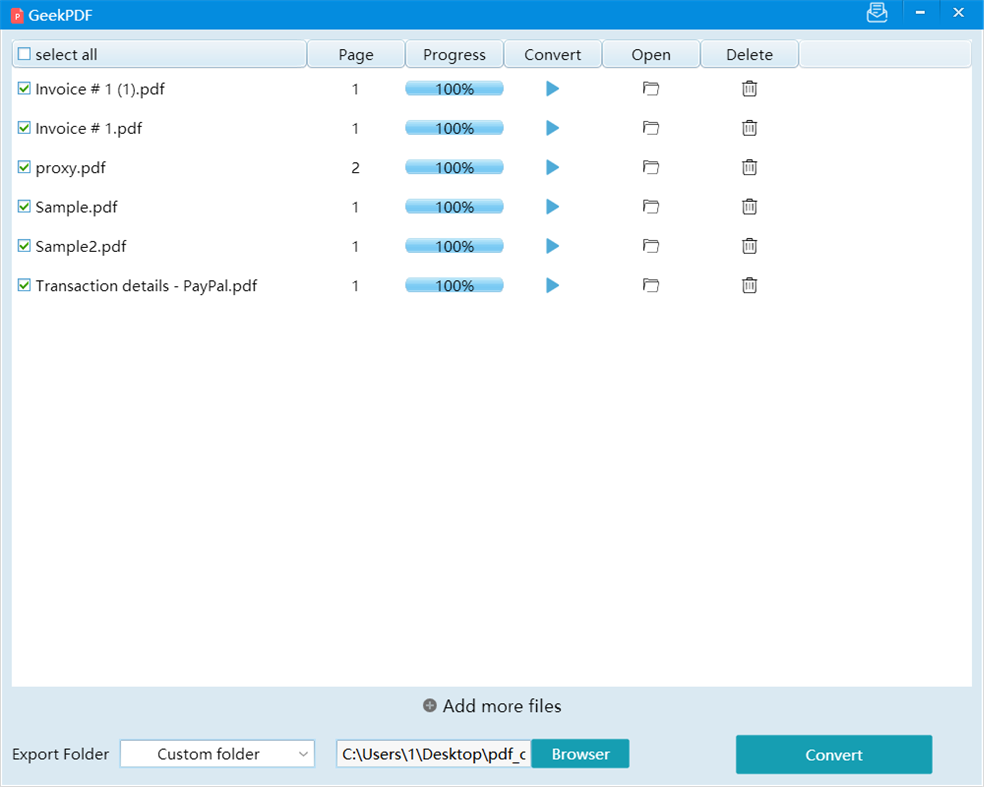
Use offline, no need to network, no need to upload files, protect your privacy, no need to register, effortlessly convert any PDF file to MS Word document, export PDF to Word, you can access this highest level of data at any time Protection and simple user-friendly interface.
The best quality PDF to Word conversion on the market-free and easy to use, no watermark-convert PDF to Word in a few seconds, this free PDF to Word converter allows you to convert PDF documents to Microsoft Word DOC Format, which provides better quality than many other converters.
Convert any PDF to Word document for free. PDF to Word conversion is fast and almost 100% accurate, the best PDF to Word converter to improve your productivity
Screenshots

What's new
- Version: PC
- Updated:
Price History
-
* In-App Purchases - Today: Free
- Minimum: Free
- Maximum: Free
Track prices
Developer
- ToolFun
- Platforms: Windows Apps (1)
- Lists: 0 + 0
- Points: 0 + 127 ¡
- Rankings: 0
- Reviews: 0
- Discounts: 0
- Videos: 0
- RSS: Subscribe
Points
0 ☹️
Rankings
0 ☹️
Lists
0 ☹️
Reviews
Be the first to review 🌟
Additional Information
- Version: PC
- Category:
Windows Apps›Productivity - OS:
PC - Size:
29 Mb - Supported Languages:
English - Content Rating:
EVERYONE - Windows Store Rating:
4.6(127) - Updated:
- Release Date:
Contacts
- Website:
 https://geekpdf.com
«GeekPDF - Convert PDF To Doc» is a Productivity app for Windows, developed by «ToolFun». It was first released on and last updated on . This app is currently free. This app has not yet received any ratings or reviews on AppAgg. On Windows Store, the current store rating is 4.6 based on 127 votes. Available languages: English. AppAgg continuously tracks the price history, ratings, and user feedback for «GeekPDF - Convert PDF To Doc». Subscribe to this app or follow its RSS feed to get notified about future discounts or updates.
GeekPDF - Convert PDF To Doc Short URL: Copied!- 🌟 Share
- Windows Store
You may also like
-
- PDF Doc
- Windows Apps: Productivity By: Ballard App Craftery
- * Free
- Lists: 0 + 1 Rankings: 0 Reviews: 0
- Points: 1 + 1,873 (4.3) Version: PC PDF Doc is a tiny app that lets you open PDF, DOC, and DOCX files, convert documents to PDF, and annotate and sign Adobe PDF files. Sign and edit documents and PDFs with one simple ... ⥯
-
- Convert PDF To PDF/A
- Windows Apps: Productivity By: Ngoc Thanh
- $1.59
- Lists: 0 + 0 Rankings: 0 Reviews: 0
- Points: 0 + 0 Version: PC As digital document management continues to grow in importance, the need for standardized, long-term archivable formats like PDF/A becomes more essential than ever. Whether you re ... ⥯
-
- PDF Converter: PDF File Converter
- Windows Apps: Productivity By: finetuneapps
- $19.99
- Lists: 0 + 1 Rankings: 0 Reviews: 0
- Points: 1 + 124 (4.6) Version: PC PDF Converter is a robust tool that empowers users to effortlessly convert their PDF files into various other formats. It's not just confined to Word, but also extends to HTML, Text, ... ⥯
-
- PDF Convert&Extract Office Document Pro
- Windows Apps: Productivity By: GenuiSoft IT
- * $32.99
- Lists: 0 + 0 Rankings: 0 Reviews: 0
- Points: 0 + 0 Version: PC Convert all your PDF file to many Office format with a perfect conversion in version unlimited without any subscription. Possibility to create a complete DOC/DOCX file, an XLS/XLSX ... ⥯
-
- PDF Extra - PDF Reader, PDF Editor, Fill & Sign
- Windows Apps: Productivity By: MobiSystems
- * Free
- Lists: 0 + 1 Rankings: 0 Reviews: 0
- Points: 1 + 945 (4.6) Version: PC PDF Extra is the only professional PDF editor, reader, and converter you need. Create, edit, OCR, fill, sign, convert, annotate, and organize any PDF. Аdd pages, images, stamps, attach ⥯
-
- PDF Suite PLUS
- Windows Apps: Productivity By: File Format Apps
- Free
- Lists: 0 + 0 Rankings: 0 Reviews: 0
- Points: 0 + 9 (5.0) Version: PC PDF Suite PLUS is a comprehensive PDF reader, editor, convertor and management tool. It enables you to view, create, fill, sign, convert, annotate and organize any PDF file. It also ... ⥯
-
- PDF+ Converter
- Windows Apps: Productivity By: PeroSoftware.com
- * Free
- Lists: 0 + 0 Rankings: 0 Reviews: 0
- Points: 0 + 12 (4.7) Version: PC PDF+ Converter is an easy to use and powerful PDF converter, reader and creator. It supports the conversion of Office documents and PDF files to each other, and can create PDF file. ... ⥯
-
- PDF Reader - View and Edit PDF
- Windows Apps: Productivity By: Kdan Mobile Software Ltd.
- * Free
- Lists: 0 + 0 Rankings: 0 Reviews: 0
- Points: 4 + 22,376 (4.7) Version: PC KDAN PDF, formerly KDAN PDF Reader, is your simple, powerful tool for reading and editing PDFs. Easily read, edit, sign, and share PDFs for sharing and reviewing documents, filling ... ⥯
-
- PDF Assist
- Windows Apps: Productivity By: PC Assist Software
- * $7.19
- Lists: 0 + 0 Rankings: 0 Reviews: 0
- Points: 1 + 0 Version: PC Fully featured PDF manipulation tool Basic Features: The following features are all included in the base price purchase: Redaction: Secure redaction of content from PDF files, ... ⥯
-
- PDF Split
- Windows Apps: Productivity By: XtremeDevelopments.com Ltd
- * $1.99
- Lists: 0 + 0 Rankings: 0 Reviews: 0
- Points: 1 + 33 (4.3) Version: PC Extract PDF pages to a new PDF, separate PDFs or image files with PDF Split. Simply import your PDF, select the page(s) you wish to extract and tap (or click) save to create a new PDF ... ⥯
-
- PDF to Offices - Docx, xlsx
- Windows Apps: Productivity By: File converter
- $4.99
- Lists: 0 + 0 Rankings: 0 Reviews: 0
- Points: 0 + 0 Version: PC This is a lightweight app to convert PDF file into Word (docx), Excel (xlsx), images, and even a html web. The converting process is really quick along with a good quality of result. ... ⥯
-
- PDF to TEXT Scanner
- Windows Apps: Productivity By: DADEM
- $5.49
- Lists: 0 + 0 Rankings: 0 Reviews: 0
- Points: 0 + 1 (1.0) Version: PC There is an easy way to convert PDF documents to text with the help of OCR (Optical Character Recognition). You wondered how to extract text from a PDF. ⥯
-
- PDF Converter +
- Windows Apps: Productivity By: Xiaoya Lab
- * Free
- Lists: 0 + 1 Rankings: 0 Reviews: 0
- Points: 0 + 804 (4.6) Version: PC PDF Converter + is a free PDF maker software that can convert almost all common documents to PDF. Not only it does the conversion, it also enables you to view the converted PDF ... ⥯
-
- PDF To Extract
- Windows Apps: Productivity By: Danilo da Silva Cruz
- * Free
- Lists: 0 + 0 Rankings: 0 Reviews: 0
- Points: 0 + 0 Version: PC PDF file reader with the functionality to extract pages. Have you ever had the frustration of having to deal with PDF documents for a long time when all you needed was to extract a few ⥯