
| Sviluppatore: | indeepsoft (4) | ||
| Prezzo: | $10.49 | ||
| Classificazioni: | 0 | ||
| Recensioni: | 0 Scrivi una recensione | ||
| Commenti: | 0 Pubblica commento | ||
| Listes: | 0 + 0 | ||
| Punti: | 0 + 0 ¡ | ||
| Windows Store | |||
Descrizione

To change the system time, your user needs to be an administrator or it needs to have the rights to change system time.
App can also change file creation date for files selected in File Explorer window, after pressing the assigned hotkey if the feature is enabled. Read details below.
Using the app directly:
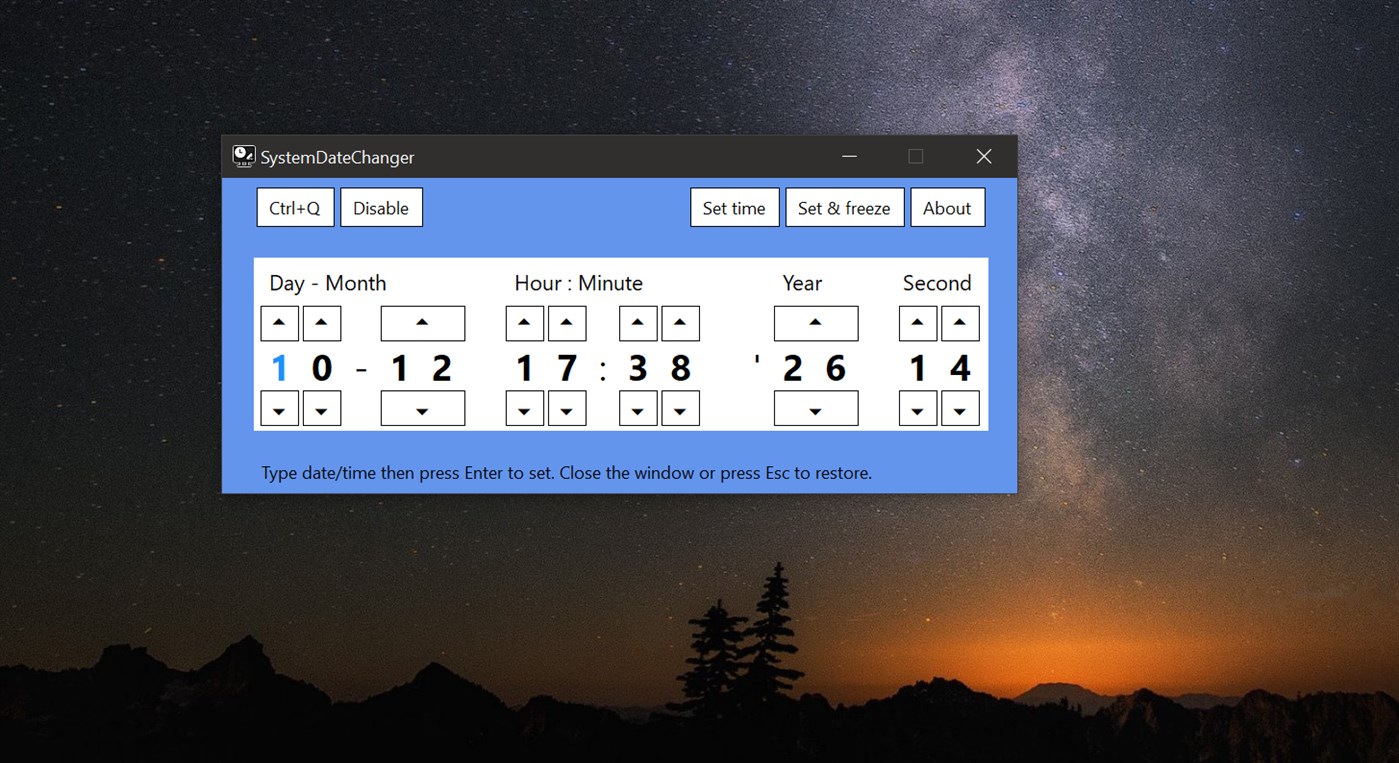
- Run the app. With the app's window in front, type the date and time.
- Use the arrow keys to go back and forth when needed, or to change values.
- Press Enter key to set the new values or the "Set time and lock it" button.
- App window will then minimize.
- Closing the app's window will restore the current date and time.
- You can also press the Escape key to close the window.
- App can run like this from a NTFS formatted removable drive.
To set a hotkey:
- Press the Set hotkey button, then press the key combination you want.
- If the button text color turns to red the hotkey is not available.
- In this case press the Set hotkey button again and try to set another one.
- App will run in the background if you do not disable it under the Windows Task Manager startup tab. Keep the app startup enabled when using the app with a hotkey.
Using the app with a hotkey:
- Press the hotkey. With the app's window in front, type the date and time.
- Use the arrow keys to go back and forth when needed, or to change values.
- Press Enter key to set the new values or the "Set time and lock it" button.
- App window will then minimize.
- You can press the hotkey again to bring the window back in view.
- Closing the app's window will restore the current date and time.
- You can also press the Escape key to close the window.
Options:
- You can click a value and use the scroll wheel to increase or decrease it.
- To swap Day-Month order create a SwapDate.txt file in app's Data\Settings subfolder.
You can find app's Data folder if you press F1 in app and at the bottom you press the Open data folder button.
- To initialize with an hour different than the current time, create a DefaultHour.txt file in app's Data\Settings subfolder, put the numeric value in (0 to 23) and save the file in UTF8 format.
- You can set the date and time right away if found in a PDF's file name
(eg. "MyPDF_YYYY.MM.DD-HH.MM.pdf", "Report YYYY.MM.DD-HH.MM.SS.pdf").
To enable this feature create a file named "SetDateFromPdfName.txt" in app's Settings folder.
Open a folder in Windows File Explorer, select a PDF file and press the hotkey.
If date is found the PDF opens in the default app, unless SDC runs with admin rights.
When seconds are present in PDF name, time will lock until set different or restored.
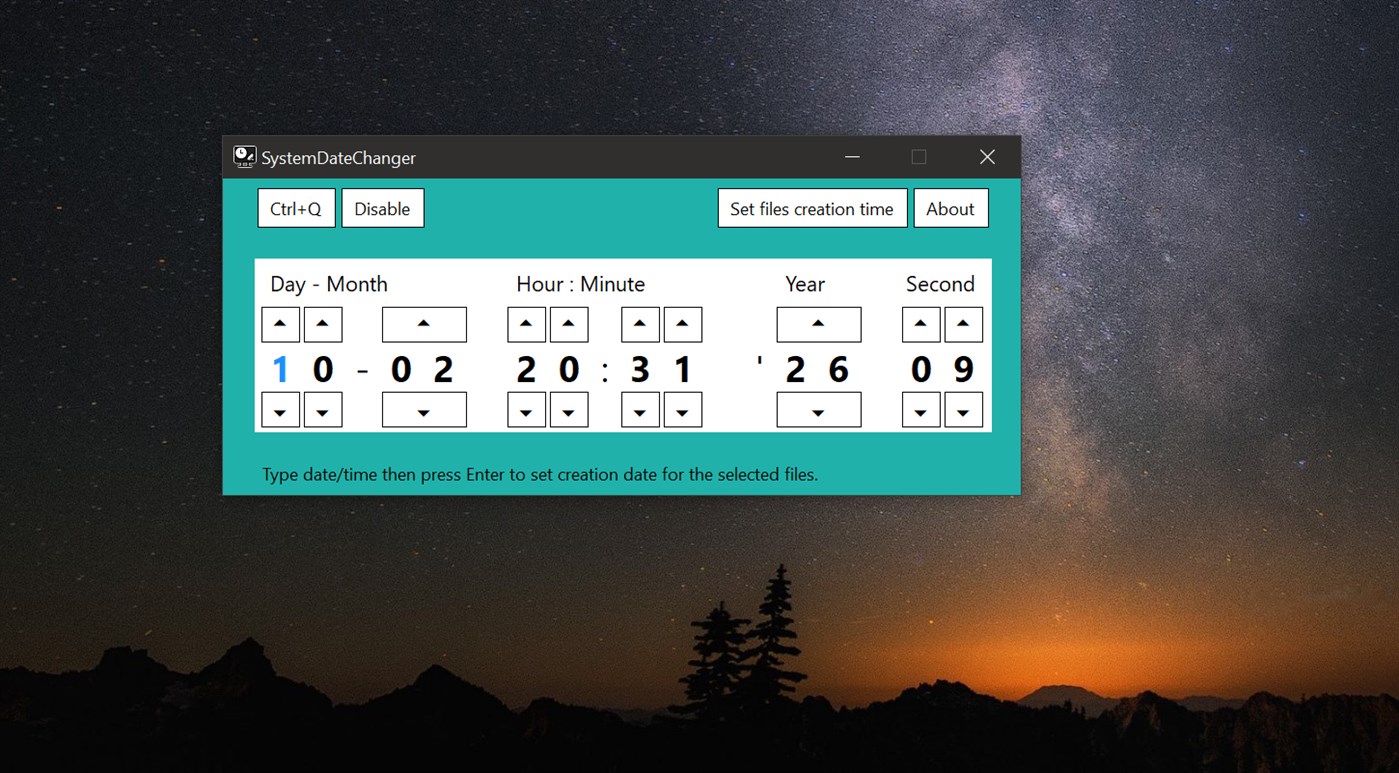
- You can set the creation date for files selected in a Windows File Explorer window.
To enable this feature create a file named "SetFileCreationDate.txt" in app's Settings folder.
Open a folder in Windows File Explorer, select files and press the hotkey.
With the app window in view, press the Enter key to change creation date for the selected files.
Ad
Screenshot
Novità
- Versione: PC
- Aggiornata:
Cronologia dei prezzi
- Oggi: $10.49
- Minimo: $2.99
- Massimo: $10.49
Monitora prezzi
Ad
Sviluppatore
- indeepsoft
- Piattaforme: Windows App (4)
- Listes: 0 + 0
- Punti: 0 + 0 ¡
- Classificazioni: 0
- Recensioni: 0
- Commenti: 0
- Sconti: 1
- Video: 0
- RSS: Sottoscrivi
Punti (0)
0 ☹️
Classificazioni (0)
0 ☹️
Listes (0)
0 ☹️
- SystemDateChanger
Recensioni (0)
Scrivi tu la prima recensione 🌟
Commenti (0)
Sii il primo a commentare 🌟
Informazioni aggiuntive
- Versione: PC
- Categoria:
Windows App›Utilità e strumenti - Sistemi operativi:
HoloLens,Mobile,PC,Surface Hub,Xbox - Dimensioni:
1 Mb - Lingue supportate:
English - Classificazione contenuti:
EVERYONE - Windows Store Voto:
0 - Aggiornata:
- Data di uscita:
Contatti
- Sito web:
 https://indeepsoft.ly.ro
«SystemDateChanger». Piattaforma: Windows. Categoria: Utilità e strumenti. Sviluppatore: «indeepsoft». Prima uscita: . Ultimo aggiornamento: . Prezzo attuale: $10.49. Prezzo più basso registrato: $2.99 (). Prezzo più alto registrato: $10.49 (). Questo titolo non ha ancora ricevuto valutazioni o recensioni su AppAgg. Lingue disponibili: English. AppAgg tiene traccia della cronologia dei prezzi, delle valutazioni e del feedback degli utenti per «SystemDateChanger». Segui futuri sconti e aggiornamenti tramite RSS. AppAgg non ospita applicazioni né distribuisce software. Tutti i marchi, loghi e screenshot appartengono ai rispettivi proprietari.
SystemDateChanger URL breve: Copiato!- 🌟 Condividi
- Windows Store
Ti potrebbero piacere anche
-
- System Speech
- Windows App: Utilità e strumenti di: Melvin Dev
- * Gratis
- Listes: 0 + 1 Classificazioni: 0 Recensioni: 0
- Punti: 2 + 37 (3.6) Commenti: 0 Versione: PC System Speech, speak text using installed voice system, use it wherever you go, on your school, home or street, for example when you can't speak you can write a text and system speech ... ⥯
-
- System Timed Shutdown
- Windows App: Utilità e strumenti di: Franz Fischer
- Gratis
- Listes: 0 + 0 Classificazioni: 0 Recensioni: 0
- Punti: 0 + 0 Commenti: 0 Versione: PC System Timed Shutdown ermöglicht es Ihnen, den Computer zeitgesteuert in den Stand-by-Modus oder Ruhezustand zu versetzen, den Benutzer abzumelden, den Computer herunterzufahren oder ... ⥯
-
- System Internals (exploring & studying)
- Windows App: Utilità e strumenti di: Million
- Gratis
- Listes: 4 + 1 Classificazioni: 0 Recensioni: 0
- Punti: 7 + 6 (4.3) Commenti: 0 Versione: PC A program developed to explore and study the internals of a computer system. Run as administrator. Some features may still be blocked by Windows permissions. Type 'lua help' in the ... ⥯
-
- System Essentials Tools for Windows 10
- Windows App: Utilità e strumenti di: LLC "SKYSPARK CORP"
- * Gratis
- Listes: 0 + 1 Classificazioni: 0 Recensioni: 0
- Punti: 2 + 2,953 (4.3) Commenti: 0 Versione: PC Integrated system solution for home and Office. Get comprehensive information about the Tablet, an ultrabook, notebook and desktop PCs: hardware, operating system, network and ... ⥯
-
- System Health Widget
- Windows App: Utilità e strumenti di: EvlarSoft LLC
- $3.99
- Listes: 1 + 0 Classificazioni: 0 Recensioni: 0
- Punti: 0 + 5 (3.0) Commenti: 0 Versione: PC Keep your system performance in check with System Health Widget, the ultimate desktop widget that provides real-time stats at a glance. Designed for power users and casual users alike, ⥯
-
- System Color Picker
- Windows App: Utilità e strumenti di: Starry Apps
- $0.99
- Listes: 0 + 0 Classificazioni: 0 Recensioni: 0
- Punti: 0 + 9 (4.4) Commenti: 0 Versione: PC This app is a screen color picker. Drag your mouse from the preview area to the point from where you want to pick color, and the preview area will show the pixels around that point ... ⥯
-
- Experience Index System Assessment Tool
- Windows App: Utilità e strumenti di: barbez.eu
- Gratis
- Listes: 1 + 1 Classificazioni: 0 Recensioni: 0
- Punti: 3 + 75 (4.3) Commenti: 0 Versione: PC About the app This app uses the WinSAT component that still exist under the hood in Windows. This Experience Index System Assessment Tool is a replacement for the graphical user ... ⥯
-
- Time Stamp Changer
- Windows App: Utilità e strumenti di: AQSOFT.JP
- Gratis
- Listes: 0 + 0 Classificazioni: 0 Recensioni: 0
- Punti: 0 + 1 (5.0) Commenti: 0 Versione: PC This application can change "Last Write Date/Time" and "Creation Date/Time" of files and folders at once. ⥯
-
- XFast: System Optimizer, RAM Booster
- Windows App: Utilità e strumenti di: AQI
- * Gratis
- Listes: 0 + 0 Classificazioni: 0 Recensioni: 0
- Punti: 1 + 5 (4.6) Commenti: 0 Versione: PC **Transform Your PC into a High-Performance Machine** Is your computer slowing down? Games lagging and stuttering? XFast is a system optimization utility designed for gamers, content ... ⥯
-
- FW System Performance Optimiser
- Windows App: Utilità e strumenti di: Fullyworked
- $0.99
- Listes: 0 + 0 Classificazioni: 0 Recensioni: 0
- Punti: 0 + 0 Commenti: 0 Versione: PC This application must be ran as ADMINISTRATOR or if will fail to function. FW System Performance Optimiser is a comprehensive set of tools designed to enhance your Windows computer's ... ⥯
-
- Batch Modify Date and Time of Files in Folders
- Windows App: Utilità e strumenti di: King Shareware
- $9.99
- Listes: 0 + 0 Classificazioni: 0 Recensioni: 0
- Punti: 0 + 0 Commenti: 0 Versione: PC This handy tool is used to batch modify date and time of files in folders recursively. Both date and time can be modified. You can just modify the date and time for selected file, or ... ⥯
-
- Total PC Disk Cleanup - Storage System Scan Optimize
- Windows App: Utilità e strumenti di: Everyday Tools LLC
- * Gratis
- Listes: 0 + 0 Classificazioni: 0 Recensioni: 0
- Punti: 1 + 42 (3.3) Commenti: 0 Versione: PC MyCleaner is a powerful tool for scanning and optimizing your computer. Easy to use, it ll become your first aid in sorting files and cleaning disk space routine. Get rid of everything ⥯
-
- HP System Information
- Windows App: Utilità e strumenti di: HP Inc.
- Gratis
- Listes: 3 + 1 Classificazioni: 0 Recensioni: 0
- Punti: 22 + 198 (3.6) Commenti: 0 Versione: PC The HP HotKey Support (HPHKS) software provides the support for handling the Hotkeys (fixed notebook buttons that provide quick access to a particular function when pressed) for HP's ... ⥯
-
- Easy Lock Screen Changer
- Windows App: Utilità e strumenti di: dummysoftware
- Gratis
- Listes: 0 + 0 Classificazioni: 0 Recensioni: 0
- Punti: 0 + 10 (4.1) Commenti: 0 Versione: PC Automatically change the lock screen background and user profile image every day! Simply choose a folder of images on your computer and select how often to update. The lock screen and ... ⥯