
| Concepteur: | Apple (165) | ||
| Prix: | $9.99 | ||
| Classements: | 0 | ||
| Avis: | 0 Rédiger un avis | ||
| Listes: | 21 + 19 | ||
| Points: | 7 + 1,134 (4.5) ¡ | ||
| App Store | |||
Description

Designed exclusively for iOS and iPadOS, Pixelmator takes full advantage of the latest iOS and iPadOS 17 features and technologies, giving you innovative, fast, and powerful tools.
Create Eye-Catching Designs
- Combine words, shapes, and images to create breathtaking artwork right on your iPhone and iPad
- Apply non-destructive layer styles like shadows, outlines, gradient fills, and more
- Insert, group, and blend layers of an image
- Easily add, combine, and customize shapes
- Blend layers, shapes, and text using any of the blending modes
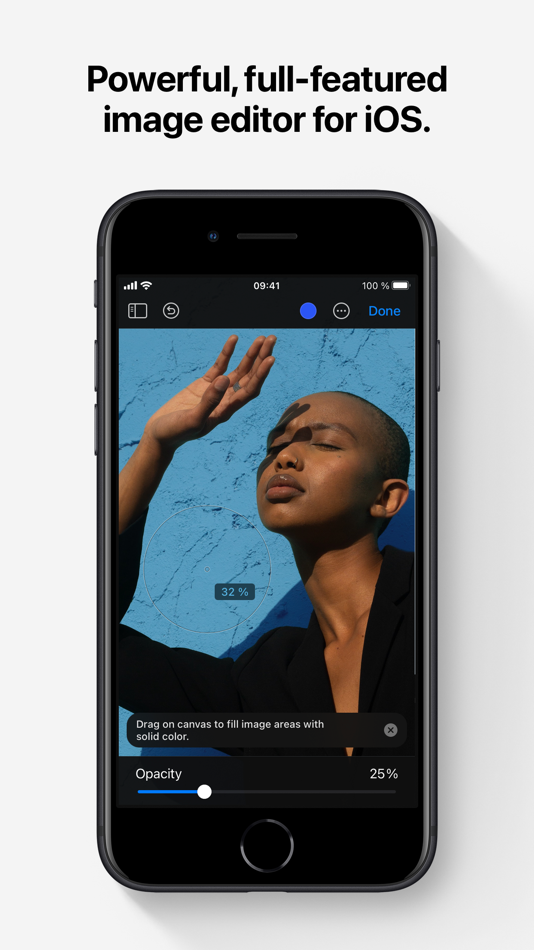
- Use precise selection tools to edit areas of an image
- Automatically select subjects in images with the machine learning-powered Select Subject
- Crop, arrange, and rotate objects and layers with pixel-perfect precision
- Easily remove the background of images or cut and paste objects from one image to another
Add Shapes and Text
- Create flyers, logos, and other compositions using vector shapes and their styling options
- Customize Smart Shapes with easy-to-use controls
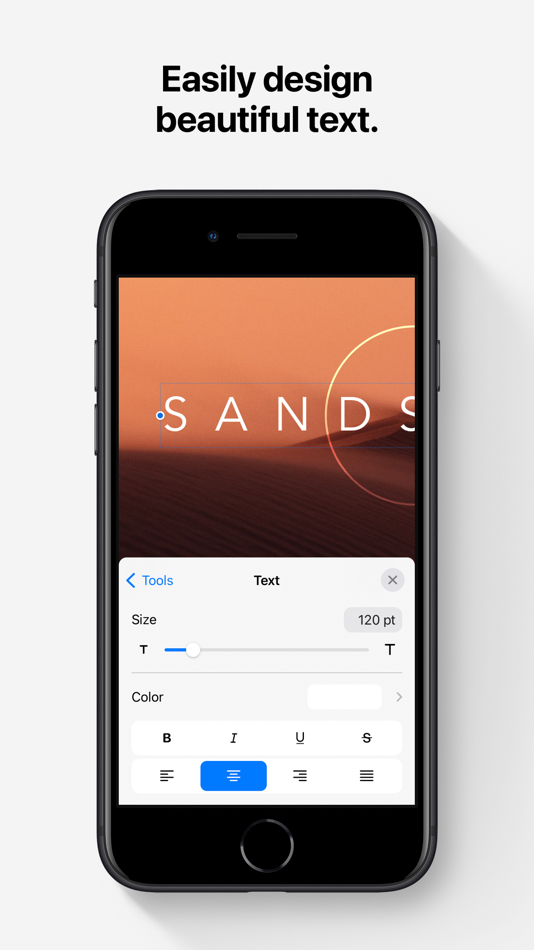
- Add text and make it look gorgeous with 24 pre-designed text styles
- Change the font, size, alignment, line spacing, use custom fonts, and more
Paint and Sketch
- Paint stunning images right on your iPhone and iPad
- Choose from over artist-designed brushes and numerous painting techniques
- Paint with near-natural wetness effect of watercolor and crayon brushes
- Create stunning pixel art images with the custom-designed Pixel brush
- Paint with incredible detail thanks to the double texture brush technology
- Vary the speed of your stroke to change the thickness of some of the brushes
- Easily select and fine-tune colors with a full-featured color picker
- Instantly choose colors right from your image with the Eyedropper
- Paint more naturally than ever with the Apple Pencil, featuring palm rejection, pressure, tilt, and acceleration sensitivity
Edit and Enhance Photos
- Get started with dozens of beautifully designed templates
- Instantly improve your photos with single-tap color presets
- Take full control over the tonal range of your image with levels and curves
- Easily remove color casts and set the right white balance
- Wipe away image imperfections, skin blemishes, and unwanted objects with the Repair tool
- Duplicate areas of your image with the easy-to-use Clone tool
- Pinch, bump, twirl, or warp areas of an image with powerful, Metal-based Distort tools
- Blur, sharpen, lighten, or darken areas of an image
- Choose from dozens of breathtaking effects to subtly improve or completely change the look of an image
- Open and edit images of up to 256 megapixels
Export and Share Images
- Optimize images for the web using quality, color depth, and size settings
- Export images to Files, iCloud, or open in other apps using a file format of your choice
- Using the integrated share extension, easily share your artwork with friends and family using Mail, AirDrop, or post it to social platforms like Instagram, Twitter, or Facebook
Compatibility
- Open and save images using HEIF, JPEG, PNG, and TIFF formats
- Work with multilayered Pixelmator Pro and Adobe Photoshop documents
- Save your edited images directly to Photos
- Create, edit, and keep all your images up to date on all your devices thanks to iCloud support
- External keyboard support with over 70 keyboard shortcuts
Built for iPhone and iPad
- Pixelmator is meticulously thought through and created from the ground up for iPhone and iPad devices
- Designed to take full advantage of powerful iOS and iPadOS features and technologies — iCloud Drive, Photos extension, Split View, and more
- Thanks to Apple silicon, Metal, Core Image, and Core Animation, Pixelmator delivers state-of-the-art performance and real-time responsiveness
Captures d'écran



Prix
- Aujourd’hui: $9.99
- Minimum: $4.99
- Maximum: $9.99
Suivre l'évolution des prix
Concepteur
- Apple
- Plateformes: Android Applications (7) iOS Applications (119) iOS Jeux (1) macOS Applications (38)
- Listes: 157 + 84
- Points: 345 + 40,147,629 ¡
- Classements: 4.6 (13)
- Avis: 0
- Remises: 0
- Vidéos: 1
- RSS: S'abonner


Classements
0 ☹️


Avis
Soyez le premier à donner votre avis 🌟
Informations supplémentaires
- Version: 3.1.16
- Catégorie:
iOS Applications›Photo et vidéo - Systèmes d'exploitation:
iPad,iPhone,iOS 15.0 ou version ultérieure - Taille:
410 Mb - Langues prises en charge:
Chinese,English,French,German,Italian,Japanese,Korean,Portuguese,Russian,Spanish - Classification du contenu:
4+ - App Store Note:
4.5(1,134) - Mis à jour:
- Date de sortie:
Contacts
- Site Web:
 https://www.pixelmator.com/ios/
Pixelmator URL courte: Copié!- 🌟 Partager
- App Store
Découvrez également
-
- Kino - Pro Video Camera
- iOS Applications: Photo et vidéo De: Lux Optics Incorporated
- $9.99
- Listes: 1 + 5 Classements: 0 Avis: 0
- Points: 1 + 1,726 (4.7) Version: 1.3.2 Make great video easy! Kino lets you just press record and create cinematic video with color presets created by expert filmmakers no edit required. Plus, with AutoMotion, the app ... ⥯
-
- Mobile Mouse - iPad Edition
- iOS Applications: Utilitaires De: R.P.A. Tech
- $2.99
- Listes: 1 + 5 Classements: 0 Avis: 0
- Points: 2 + 5 (2.2) Version: 3.6.1 Mobile Mouse instantly transforms your iPad into a wireless remote and trackpad for your computer! Sit back and use this remote to surf the web, browse your photo library or control ... ⥯
-
- Crystalzoa
- iOS Applications: Graphisme et design De: Michael McKenna
- $0.29
- Listes: 0 + 0 Classements: 0 Avis: 0
- Points: 3 + 5 (5.0) Version: 1.0.1 (2) Crystalzoa Create is a cosmic synthesizer of graphics in motion - an interactive, simulated visual experience for iPhone, iPad, Mac (Apple Silicon), and Vision Pro. Crystalzoa responds ⥯
-
- GAMMA 35mm
- iOS Applications: Photo et vidéo De: Benjamin Lambinet
- Gratuit
- Listes: 1 + 0 Classements: 0 Avis: 0
- Points: 0 + 22 (4.4) Version: 2.1 Use the hashtag #gamma35mm on Instagram :-) GAMMA 35mm gives a cinematic look to your photos with 20 analog styles inspired on real color film prints. When you apply a filter to your ... ⥯