
| ผู้พัฒนา: | 秀英 朱 (13) | ||
| ราคา: | * $8.99 | ||
| การจัดอันดับ: | 0 | ||
| ความเห็น: | 0 เขียนความเห็น | ||
| รายการ: | 1 + 2 | ||
| แต้มแล: | 9 + 0 ¡ | ||
| Mac App Store | |||
คำอธิบาย

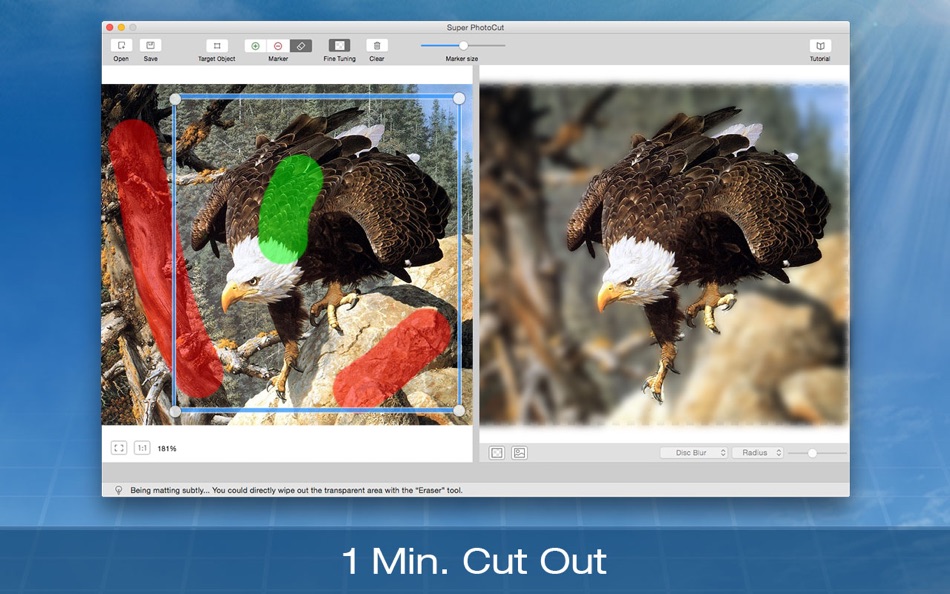
Super PhotoCut interactive cutout tool isolates and separates a detailed foreground object from photos. With our proprietary best-in-class algorithm masking tool, you can instantly remove complex image backgrounds and make them transparent with just a few clicks. Get the dramatic stand-out images done in seconds-to-minutes instead of minutes-to-hours.
Unlike those image processing software in the market, Super PhotoCut doesn't require any special technical skills. You just need mark the object with a rectangle to obtain the desired result. Super PhotoCut will automatically cut objects out for you.
Super PhotoCut speeds up your design process, enhance your design time and improves the quality of your photos! It will save you hours that you usually spent on cutting out an object using Photoshop. It is time to say goodbye to the PhotoShop lasso and magic wand tool.
Key Features:
1 Instantly and Accurately remove complex background from images.
2 Smart Algorithm: Cuts object out with critical precision. It enables extremely fast operation with great results on any image, minimizing the amount of work you need to put in.
3 Supports almost all image formats: JPG,BMP,PNG,GIF,Raw...
4 Separate foreground from background easily. Live preview the final effect.
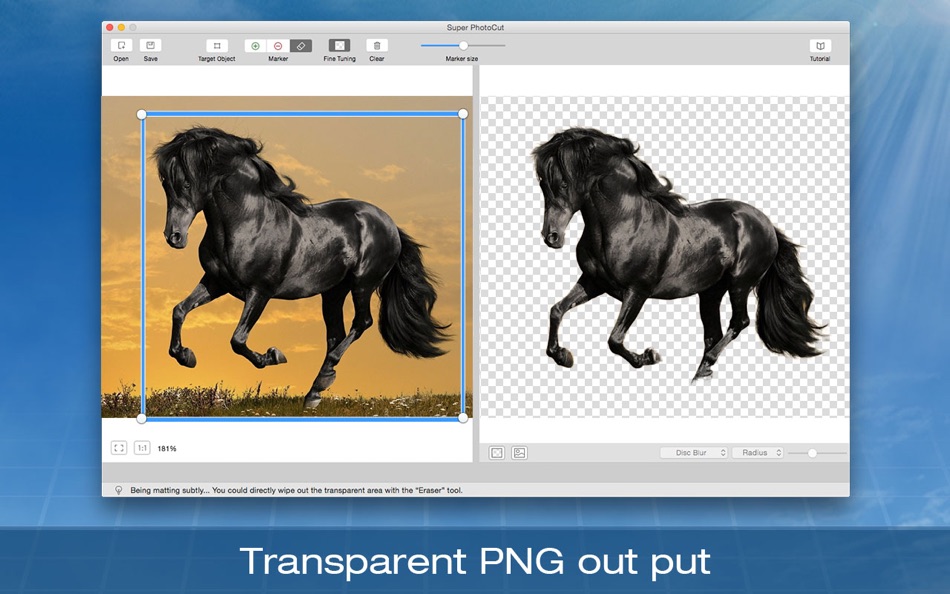
5 Transparency Processing Supported. Export to Transparent PNG images.
6 20 kinds of background transition effects are for your choices:
Disc Blur, Gaussian Blur, Box Blur, Motion Blur, Zoom Blur, Color Controls, Exposure Adjust, Gamma Adjust, Hue Adjust, Vibrance, Color Invert, Color Posterize, Chrome, Fade, Instant, Mono, Process, Transfer, Sepia Tone, Vignette, Vignette Effect.
7 Zoom to any level necessary allows you to inspect details while quickly navigating your image.
8 Create isolated images with colored or transparent backgrounds. Or import your favorite picture as the background image.
9 Undo / Redo: never fear that a mistake will ruin your work.
10 Configurable Auto-Brush-Size: The mark size adapts dynamically to your zoom level so that you can easily zoom in to make detailed edits.
Increase conversion rates with stunning product photos that conform to eBay and Amazon requirements at a little cost. People all over the world are more productive with Super PhotoCut. Try it out today!
Feedback:
Any suggestion will be highly appreciated. Support email: market@effectmatrix.com
ภาพหน้าจอ



ราคา
-
* การซื้อภายในแอพ - วันนี้: $8.99
- ต่ำสุด: ฟรี
- มากที่สุด: $19.99
ติดตามราคา
ผู้พัฒนา
แต้มแล



การจัดอันดับ
0 ☹️
รายการ
- Super PhotoCut

ความเห็น
แสดงรีวิวเป็นคนแรกเลย 🌟
ข้อมูลเพิ่มเติม
- เวอร์ชัน: 2.8.8
- หมวดหมู่:
macOS แอป›การถ่ายภาพ - ระบบปฏิบัติการ:
macOS,macOS 10.7 และสูงกว่า - ขนาด:
23 Mb - ภาษาที่สนับสนุน:
Chinese,English - การจัดประเภทเนื้อหา:
4+ - Mac App Store คะแนนโดย:
0 - อัปเดต:
- วันที่วางจำหน่าย:
รายชื่อติดต่อ
 http://www.effectmatrix.com/mac-appstore/free-remove-background-from-image-for-mac.htmSuper PhotoCut URL แบบสั้น: คัดลอกแล้ว!
- 🌟 แชร์
- Mac App Store
คุณอาจชอบ
-
- Super PhotoCut Pro
- macOS แอป: การถ่ายภาพ โดย: 秀英 朱
- $17.99
- รายการ: 0 + 0 การจัดอันดับ: 0 ความเห็น: 0
- แต้มแล: 1 + 0 เวอร์ชัน: 2.8.8 On sale. Original USD $49.99 Pioneering in the world, Super PhotoCut Pro is an unprecedented tool designed to AUTO cut out transparent objects and wedding dresses. Removing image ... ⥯
-
- Super Transcoder
- macOS แอป: การถ่ายภาพ โดย: Super Jump Pty Ltd
- $23.99
- รายการ: 0 + 0 การจัดอันดับ: 0 ความเห็น: 0
- แต้มแล: 0 + 0 เวอร์ชัน: 1.2 Super Transcoder is a simple video transcoding tool that is surprisingly fast. It supports the transcoding of MP4 and MOV files encoded using Apple ProRes 422, 444 and H.264 codecs. We ⥯
-
- Super Video Enhancer
- macOS แอป: การถ่ายภาพ โดย: AnyMP4 Studio
- $24.99
- รายการ: 0 + 1 การจัดอันดับ: 0 ความเห็น: 0
- แต้มแล: 9 + 0 เวอร์ชัน: 1.1.15 Super Video Enhancer is the best and easiest video editor software, which enables you to enhance your video quality greatly. It not only enhances the video resolution from 480p to ... ⥯
-
- Super Borders
- macOS แอป: การถ่ายภาพ โดย: Wolfgang Ante
- ฟรี
- รายการ: 0 + 0 การจัดอันดับ: 0 ความเห็น: 0
- แต้มแล: 0 + 0 เวอร์ชัน: 1.0.2 Super Borders is a Photo Extension that lets you add beautiful borders to your photos, all from inside Apple s Photos app. Super Borders has high resolution borders in three sets, ... ⥯
- ใหม่
- Super Picture Viewer
- macOS แอป: การถ่ายภาพ โดย: 亚兰 郑
- $4.99
- รายการ: 0 + 0 การจัดอันดับ: 0 ความเห็น: 0
- แต้มแล: 0 + 0 เวอร์ชัน: 1.0 Super Picture Viewer A Modern, Fast, and Elegant Image Viewer for macOS Overview Super Picture Viewer is a native macOS application designed to provide a seamless and efficient image ... ⥯
- ใหม่
- Super Live Wallpaper
- macOS แอป: การถ่ายภาพ โดย: Kemal Buhur
- $1.99
- รายการ: 0 + 0 การจัดอันดับ: 0 ความเห็น: 0
- แต้มแล: 0 + 0 เวอร์ชัน: 1.0 Bring your Mac desktop to life with your own videos. Super Live Wallpaper lets you import local MP4/MOV files, trim the exact moment you want, save clips, and apply them as live ... ⥯
-
- Super Image Viewer
- macOS แอป: การถ่ายภาพ โดย: NP Associates
- * ฟรี
- รายการ: 0 + 0 การจัดอันดับ: 0 ความเห็น: 0
- แต้มแล: 1 + 0 เวอร์ชัน: 2.5.1 Super Image Viewer takes a simple image viewer several steps further. Fast. Always expands the image to the full size of your display. Great for making presentations. Supports the more ⥯
-
- Super Player
- macOS แอป: การถ่ายภาพ โดย: 育平 姚
- $4.99
- รายการ: 0 + 0 การจัดอันดับ: 0 ความเห็น: 0
- แต้มแล: 0 + 0 เวอร์ชัน: 2.7 Super Player is a media player app. The supported formats include mpg, mpeg, mpeg 2, vob, dat, mp4, m4v, ts, rm, rmvb, wmv, asf, mkv, avi, 3gp, 3g2, flv, mov, h264/x264 1080p/720p HD ... ⥯
-
- Super Any Video Converter
- macOS แอป: การถ่ายภาพ โดย: Alessandro Gimenes Ferri
- $1.99
- รายการ: 0 + 1 การจัดอันดับ: 0 ความเห็น: 0
- แต้มแล: 3 + 0 เวอร์ชัน: 4.54 Convert your videos like a pro with Super Any Video Converter, the ultimate high-performance tool for fast, efficient, and high-quality video conversion. Whether you're a content ... ⥯
-
- Super Resolution - AI Upscale
- macOS แอป: การถ่ายภาพ โดย: Neuralful Ai ltd
- * ฟรี
- รายการ: 0 + 0 การจัดอันดับ: 0 ความเห็น: 0
- แต้มแล: 0 + 0 เวอร์ชัน: 1.0 Unlock the true potential of your photos with Superresolution the revolutionary AI-powered image editor that works entirely OFFLINE! Transform your low-resolution, noisy, or poorly lit ⥯
-
- ImageViewer: Video Player and Photo Image Viewer
- macOS แอป: การถ่ายภาพ โดย: 志强 吴
- $4.99
- รายการ: 1 + 2 การจัดอันดับ: 0 ความเห็น: 0
- แต้มแล: 37 + 0 เวอร์ชัน: 1.71 On sale. Original $14.99. Download it Now. Don't forget to download "Super PhotoCut" - A great photo background eraser. 50% OFF! ImageViewer is a powerful photo viewer and video player ⥯
-
- Photo Eraser
- macOS แอป: การถ่ายภาพ โดย: effectmatrix
- $1.99
- รายการ: 0 + 1 การจัดอันดับ: 0 ความเห็น: 0
- แต้มแล: 18 + 0 เวอร์ชัน: 1.3.0 * Get the upgraded version "Super Eraser Pro" with better photo eraser result. 70% OFF! ** Don't forget to download "Super PhotoCut" - A great photo background eraser. 50% OFF! Get it ... ⥯
-
- Video Subtitler
- macOS แอป: การถ่ายภาพ โดย: Anand
- ฟรี
- รายการ: 0 + 1 การจัดอันดับ: 0 ความเห็น: 0
- แต้มแล: 10 + 0 เวอร์ชัน: 3.0 Super simple to use. Just 3 steps: 1. Drag & Drop any video. 2. Add Subtitle(s). 3. Save Video. That s it! Two Modes. Switch between them just with a click of a button. Hard Subtitle ... ⥯
-
- Photomator – Photo Editor
- macOS แอป: การถ่ายภาพ โดย: Apple
- ฟรี
- รายการ: 15 + 16 การจัดอันดับ: 0 ความเห็น: 0
- แต้มแล: 31 + 3,467 (4.5) เวอร์ชัน: 3.4.13 Photomator is the most powerful photo editing app ever designed for a mobile device. It includes an extensive collection of cutting-edge color adjustments, automatic selections powered ⥯