
Saved
Choose the name that will be shown in your Saved menu.
Done!
| Developer: | Mineko IMANISHI (4) | ||
| Price: | * Free | ||
| Score: | 10,020 Legend | ||
| Rankings: | 0 | ||
| Comments: | 0 Add a comment | ||
| Lists: | 3 + 4 | ||
| Points: | 8 + 0 ¡ | ||
| +1 Points | |||
Description

Made for Mac
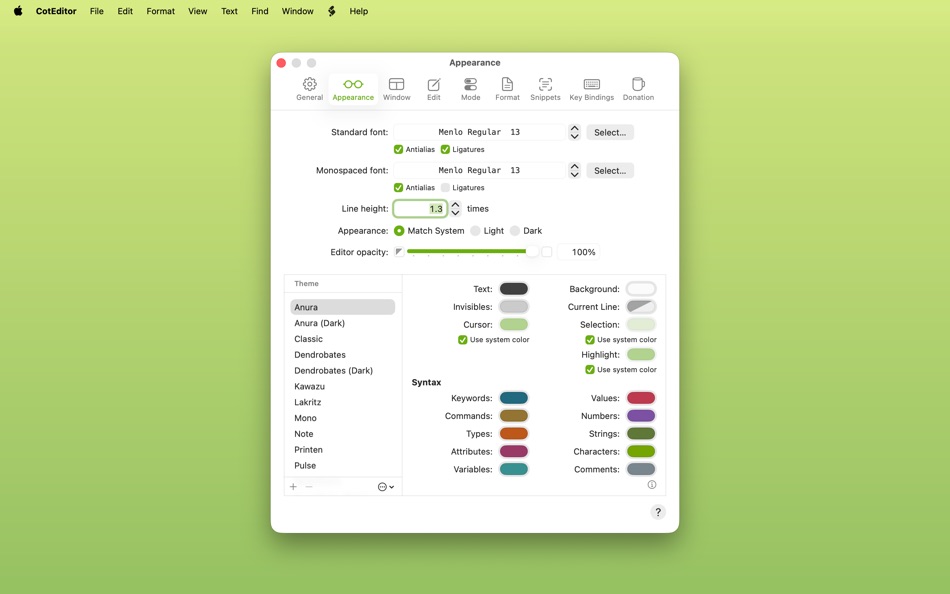
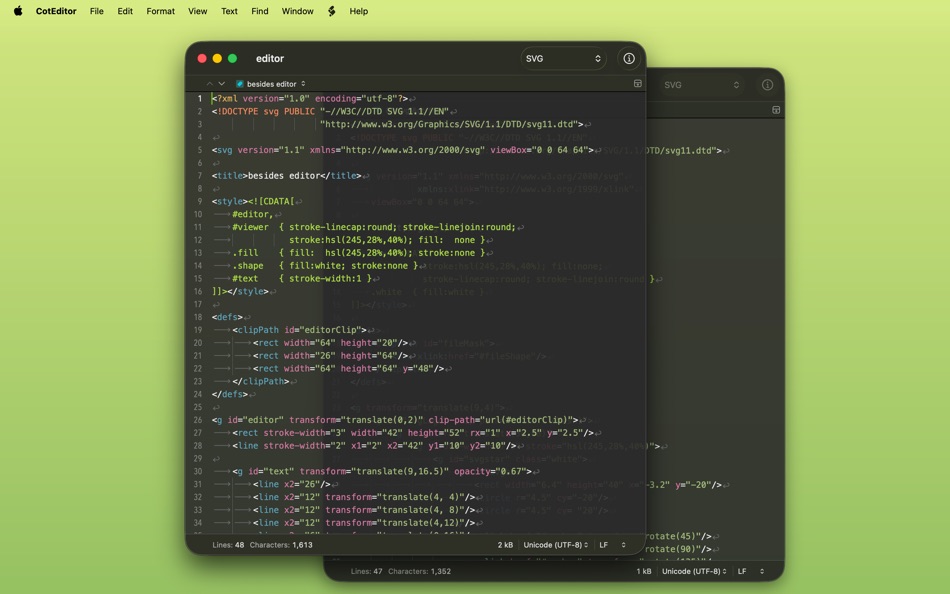
CotEditor is built exclusively for macOS and designed to feel at home from the start. It follows familiar system conventions, integrates seamlessly with features such as Dark Mode, Versions, iCloud, and VoiceOver, and keeps settings in a standard settings window, right where Mac users expect them.
Fast, Focused, and Ready for Real Work
CotEditor launches quickly, and its simple, well-organized interface helps you stay focused on your work. Built-in syntax highlighting for many popular languages and an outline menu based on syntax help you grasp the structure of your documents at a glance. When your work calls for more, CotEditor is ready with powerful find and replace, precise tools for editing text, scripting support, and the flexibility to tailor the details to your workflow.
Thoughtful About Text
CotEditor pays attention to the details that make plain-text editing reliable, from text encodings and line endings to Unicode normalization and diverse writing systems. It helps you see what’s really in your document by revealing invisible characters, warning about mixed line endings or characters that cannot be saved in the chosen encoding, and offering detailed character inspection. It also makes CotEditor comfortable across different writing systems and text conventions.
Key Features
• Syntax highlighting for more than 70 preset languages
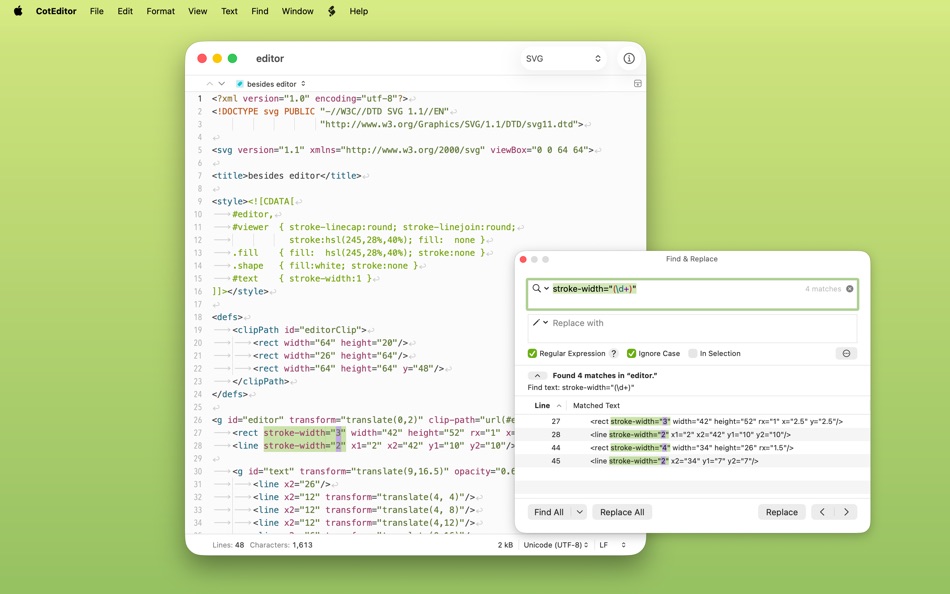
• Powerful find and replace with regular expressions
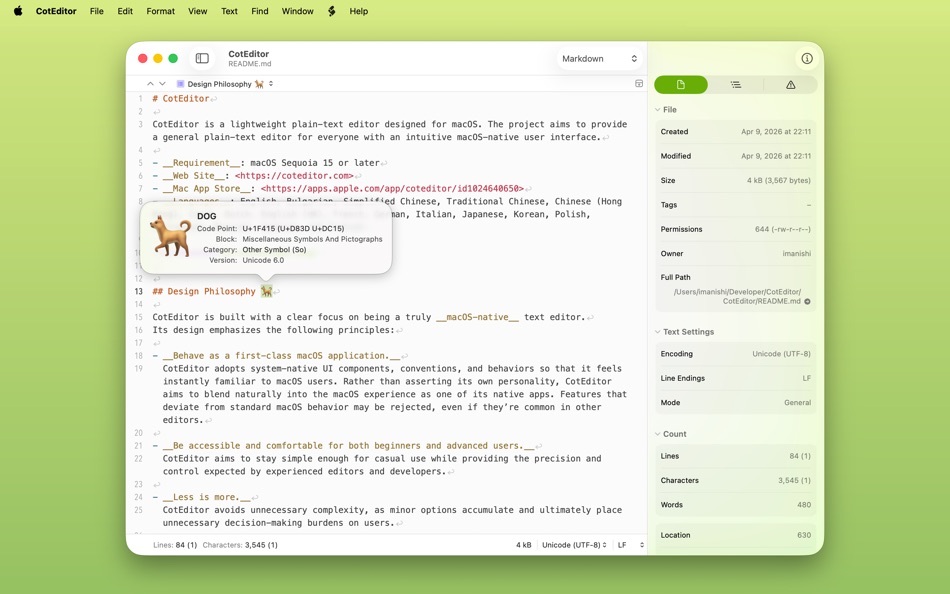
• Live character, word, and line counts
• Auto Save with an option to avoid overwriting the original file
• Careful handling of text encodings and line endings
• Outline menu based on syntax
• Multi-cursor editing
• Sidebar folder navigation
• Character inspector with enlarged glyph and Unicode information
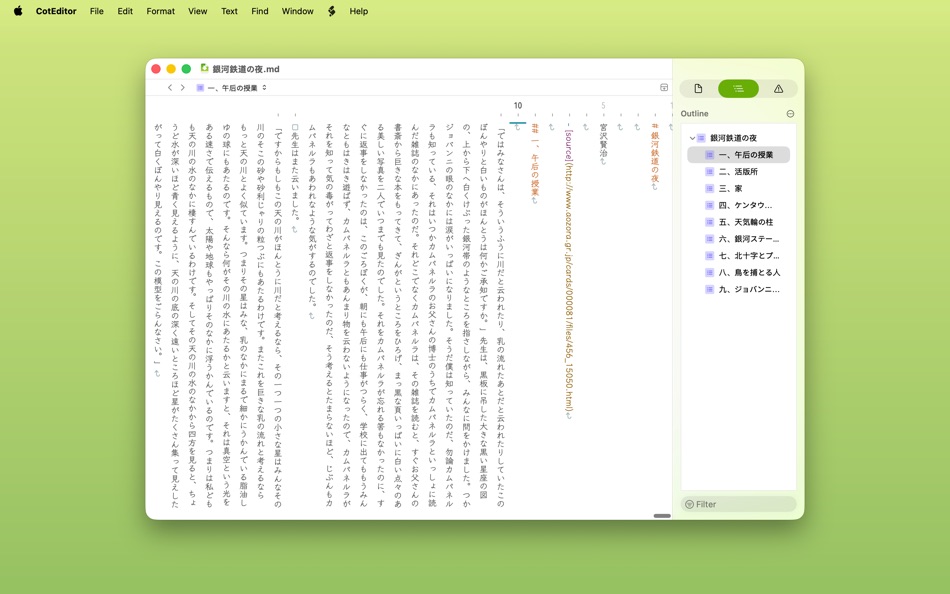
• Support for diverse writing styles, including CJK text, vertical text layout, and right-to-left text
• Various Unicode normalizations
• Command-line tool
• Scriptable in your favorite language
All features in CotEditor are available for free. In-app purchases are optional and support the project.
Terms of Service: https://www.apple.com/legal/internet-services/itunes/dev/stdeula/
Privacy Policy: https://coteditor.com/privacy
Screenshots
Ad
Price History
-
* In-App Purchases - Current price: Free
- Minimum: Free
- Maximum: Free
Track prices
AppAgg Score
10,020
Estimated AppAgg Score for
CotEditor
10,020 Legend
Higher scores usually mean stronger signals on AppAgg.
Based on: popularity · ratings · freshness · deals · store data · community signals
Recalculated daily using fresh AppAgg data.
Short URL: Copied!
What's new
- Version: 7.0.3
- Last Updated:
- New Features
- Add the Ada syntax.
Improvements
- Add CSS HWB and 4-digit hexadecimal alpha formats to the Edit Color Code command, and allow it to read modern space-separated CSS RGB/HSL color codes.
- Support spaces between menu path components in Quick Actions search.
- Support shebangs with options for syntax detection.
- Improve line sorting commands to better preserve existing mixed line endings.
- Limit tree-sitter-based syntax highlighting to 100,000,000 characters to avoid unexpected crashes.
- Update the Markdown syntax to fix highlighting block quotes.
- Update the Unicode block name list for the character inspector from Unicode 16.0.0 to Unicode 17.0.0.
- Update tree-sitter-c to 0.24.2.
- Update tree-sitter-swift to 0.7.2.
- Improve overall stability and performance.
Fixes
- Fix an issue where customized built-in syntaxes could be ignored when their file mappings conflicted with other built-in syntaxes.
- Fix an issue where text near the end of a very large document could fail to appear when hanging indentation was enabled.
- Fix an issue where text following an emoji tag sequence could be rendered as missing glyphs.
- Fix an issue where deleting by word or to the beginning of a line could delete text outside the selection.
- Fix an issue where selecting a word could select an incorrect range.
- Fix an issue where Sort by Pattern could reorder lines that do not contain the specified sort key.
- Fix an issue where dropping text clippings or File Drop snippets could insert extra text when their line endings differed from the document’s.
- Fix an issue where File Drop snippets could omit the domain from dropped web URLs.
- Fix an issue where the Restore Defaults button in File Drop settings could remain disabled even when the current settings differed from the defaults.
- Fix an issue where opening multiple documents at once could open them in separate windows even when window tabbing was set to Automatically.
- Fix an issue where opening multiple documents while an empty untitled document was open could show some documents before replacing the empty document.
- Fix an issue where canceling or failing to open a document could leave an empty untitled document behind.
- Fix an issue where text encoding and read-only options in the Open dialog could be unavailable when selecting files together with folders.
- Fix an issue where syntax-specific snippets and scripts could remain scoped to the previous document after switching documents in the file browser.
- Fix an issue where the Document inspector could keep showing the previous document path after closing a document in the file browser.
- Fix an issue where opening the original folder of an alias from the file browser could fail after requesting file access permission.
- Fix an issue where opening a UTF-16 or UTF-32 document with a BOM using a byte-order-specific encoding could leave the BOM in the document text.
- Fix an issue where converting a document to a non-UTF-8 encoding with AppleScript’s BOM option could add an invalid UTF-8 BOM.
- Fix an issue where encoding detection could prioritize a later encoding declaration over the first one found in the document.
- Fix an issue where custom syntax highlighting could crash when a begin/end regular expression matched zero-length text at the end of the document.
- Fix an issue where an unterminated begin/end string pattern could prevent later custom syntax highlighting from being applied.
- Fix an issue where a malformed custom syntax definition with empty delimiters or empty highlight patterns could make syntax highlighting hang.
- Fix an issue where tree-sitter-based syntax highlighting could become misaligned after editing around consecutive empty lines or a trailing line ending.
- Fix an issue where importing settings could incorrectly show an error for a custom theme included in the same settings archive.
- Fix other minor issues.
Additional Information
- Release Date:
- Category:
macOS Apps›Productivity - OS:
macOS,macOS 15.0 and up - Size:
18 Mb - Supported Languages:
Bulgarian,Chinese,Czech,Dutch,English,French,German,Italian,Japanese,Korean,Polish,Portuguese,Russian,Spanish,Turkish - Content Rating:
4+ - Mac App Store Rating:
0 - Website:
 https://coteditor.com
Developer
- Mineko IMANISHI
- Platforms: macOS Apps (4)
- Lists: 3 + 4
- Points: 21 + 0 ¡
- Rankings: 0
- Comments: 0
- Deals: 0
- Videos: 0
- RSS: Subscribe
Lists (3)
- CotEditor



Points (8)
-

- 102 윤대남
- +1
-
- 472 QenTox
- +1
-
- 60 FUKASHI NOBE
- +1
-
- 1 Dr MHQ
- +1
-
- 65 Kai Lee
- +1
-
- 3 Steven Liou
- +1




Rankings (0)
0
Comments (0)
Be the first to comment
Summary
CotEditor Short URL: Copied!- Share
- Mac App Store
«CotEditor» is a Productivity app for macOS, developed by «Mineko IMANISHI». It was first released on and last updated on . This app is currently free. This app has not yet received any ratings on AppAgg. It has been added to 3 public lists and 4 private lists created by users. AppAgg has tracked 8 confirmed points plus 0 indirect points for this app. Available languages: Bulgarian, Chinese, Czech, Dutch, English, French, German, Italian, Japanese, Korean, Polish, Portuguese, Russian, Spanish, Turkish. AppAgg continuously tracks the price history, ratings, and user feedback for «CotEditor». AppAgg does not host applications or distribute software. All trademarks, logos and screenshots belong to their respective owners. Subscribe to this app or follow its RSS feed to get notified about future deals or updates.
Similar
-
- Foxit PDF Editor: Convert&Sign
- macOS Apps: Productivity By: FOXIT SOFTWARE INCORPORATED
- * Free
- Lists: 0 + 1 0 0
- Points: 0 + 0 1K Version: 2026.1.1 Foxit PDF Editor is an AI-integrated PDF solution that innovates your way to work intelligently with PDF files. This easy-to-use PDF editor allows you to view and annotate PDFs for ... ⥯
-
- Textbundle Editor
- macOS Apps: Productivity By: Xelaton Software
- $1.99
- Lists: 0 0 0
- Points: 0 + 0 690 Version: 1.2.2 With "Textbundle Editor" you can quickly and easily open, edit and create new Textbundle- and Textpack-files. # Customize your Editor It is completely up to you what the text editor ... ⥯
-
- PDF Editor : esign Documents
- macOS Apps: Productivity By: ZEN TECH
- * Free
- Lists: 0 0 0
- Points: 0 + 0 1K Version: 1.0 PDF Editor Edit, Sign, Convert & Manage PDFs Easily Take full control of your documents with PDF Editor, an all-in-one PDF solution for macOS. Edit, sign, convert, merge, compress, and ⥯
-
- Word Document Editor |
- macOS Apps: Productivity By: Asfand Ali Ghafoor
- * Free
- Lists: 0 0 0
- Points: 0 + 0 720 Version: 1.2 A Docs Editor is a powerful tool designed to help users create, edit, and manage written documents efficiently in a digital environment. It provides a clean and organized workspace ... ⥯
- New
- Markdown to PDF - Pro Editor
- macOS Apps: Productivity By: Zain Aaban
- $9.99
- Lists: 0 0 0
- Points: 0 + 0 580 Version: 2.3 Turn your Markdown files into polished, print-ready PDFs, all without your files leaving your desktop. This is app provides a powerful markdown editor with live-rendered preview, and ... ⥯
-
- SingAccord Song Editor
- macOS Apps: Productivity By: Sing Accord LLC
- Free
- Lists: 0 0 0
- Points: 1 + 0 970 Version: 1.2.0 While worship leaders use the SingAccord app, it has no ability to edit MusicXML files once they import a song, other than basic section re-ordering. So composers, publishers and ... ⥯
-
- tibok markdown editor
- macOS Apps: Productivity By: Kristina Quinones
- Free
- Lists: 0 0 0
- Points: 0 + 0 600 Version: 1.0 Tibok is a markdown editor designed for developers, writers, and anyone who values simplicity and power in their writing tools. Why Tibok? Workspace Organization - Manage entire ... ⥯
-
- PDF Editor : Converter & Sign
- macOS Apps: Productivity By: Muhammad Farooq
- * Free
- Lists: 0 0 0
- Points: 0 + 0 600 Version: 1.2 Ultimate PDF Toolkit Convert, Edit, Merge & Conversions Turn your files into professional PDFs in seconds! Ultimate PDF Toolkit is your all-in-one PDF solution, offering fast file ... ⥯
-
- LFF JSON Editor
- macOS Apps: Productivity By: 斌 虞
- Free
- Lists: 1 + 1 0 0
- Points: 8 + 0 6K Version: 1.2.25 The ultra small JSON and Plist editor. There's a JSON editor embedded in Lifofinn code editor years, that allows user fast and visually edit JSON file or text block with tree ... ⥯
- -100%
- AI Slide Editor
- macOS Apps: Productivity By: 新宇 刘
- ▼ Free
$3.99-100% - Lists: 0 + 1 0 0
- Points: 6 + 0 6K Version: 1.0.1 AI Slide Editor (formerly SlideRev) is a professional tool designed for academics, researchers, and office professionals who need to reverse-engineer exported PDF presentations. Using ... ⥯
-
- Notepad - Text Editor
- macOS Apps: Productivity By: 长江 吴
- * Free
- Lists: 0 + 1 0 0
- Points: 9 + 0 6K Version: 2.3 This is a basic text editor. No formatting, styles, graphics, or unnecessary frills. Get it now and avoid all those text formatting headaches! Also, do you need to remember something ... ⥯
-
- Plain Text Editor Pro
- macOS Apps: Productivity By: 远腾 李
- $4.99
- Lists: 0 + 1 0 0
- Points: 9 + 0 6K Version: 6.6.6 Plain Text Editor Pro is a minimalist text editor designed for speed, clarity, and distraction-free writing. Whether you re jotting down notes, editing code, or cleaning up copied ... ⥯
-
- CDR Editor Pro: for CorelDRAW
- macOS Apps: Productivity By: 士通 陈
- * Free
- Lists: 0 0 0
- Points: 0 + 0 1K Version: 3.1.1 View, edit, print, convert CorelDRAW(.cdr/.cmx) files to PDF, JPG, PNG, WEBP, HEIC(iPhone Image), APNG/WEBP(Animation), MS Office Word, PowerPoint and Publisher. CDR Editor - view, ... ⥯
-
- Docx Editor - Word Processor
- macOS Apps: Productivity By: 洪 陈
- * Free
- Lists: 0 + 1 0 0
- Points: 7 + 0 8K Version: 3.1.0 Docx Editor is a cute, quick, fully functional and easy-to-use Word Processor for your daily work and personal needs. As a full-featured word processor, Docx Editor lets you create ... ⥯