
Saved
Choose the name that will be shown in your Saved menu.
Done!
| Developer: | 兰桂 吴 (72) | ||
| Price: | Free | ||
| Score: | 1,730 Gold | ||
| Rankings: | 0 | ||
| Comments: | 0 Add a comment | ||
| Lists: | 1 + 0 | ||
| Points: | 2 + 0 ¡ | ||
| +1 Points | |||
Description

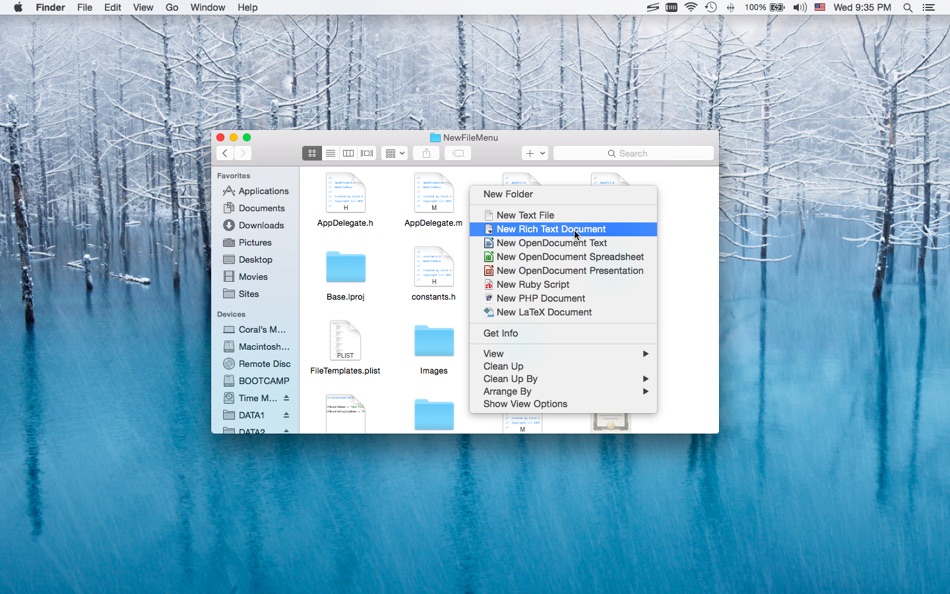
New File Menu is simply the coolest way to create a new file on the macOS platform, you can right click in any Finder window to create a new file! You can even right click on the desktop to create your files!
Important: New File Menu Lite is implemented as a Finder extension, you need to enable "New File Menu Lite Extension" in "System Preferences » Extensions" to make the context menu appear.
* Features
• Right click in any Finder window to create a new file
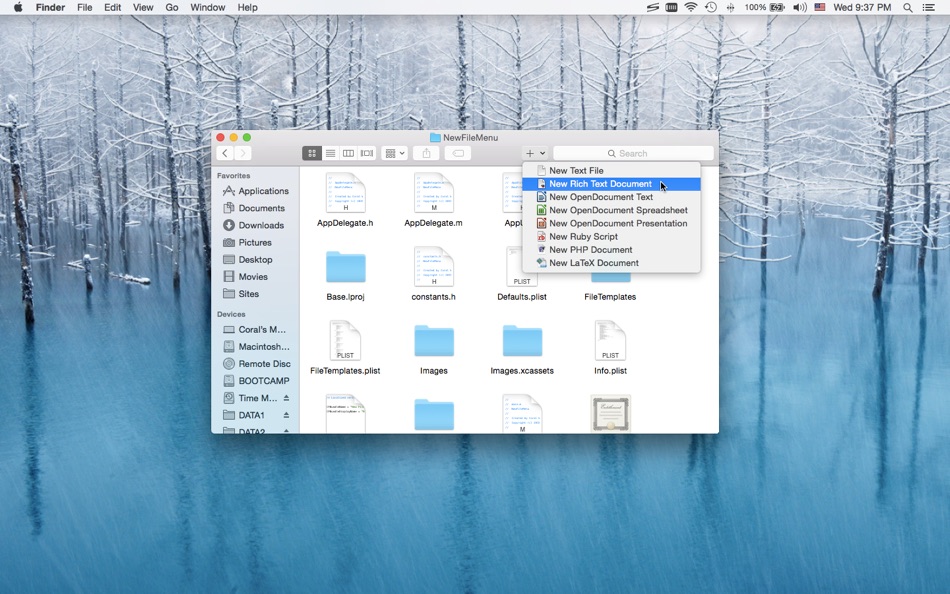
• Create new files via the "New File Menu" Finder toolbar button
• Create new files via the "New File Menu" share menu
• Create new files via drag and drop
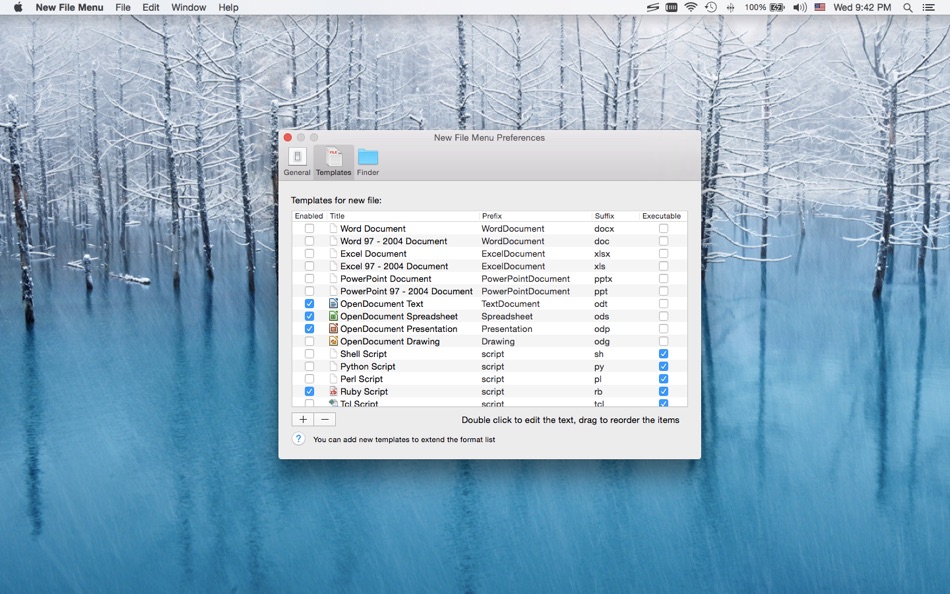
• Over 30 built-in file templates (please enable the templates you need in the New File Menu Preferences)
• Custom templates are supported, New File Menu is able to create virtually any kind of document
• Various options to configure the app behavior
• Create new files via quick actions in cloud storage folders
* Built-in File Types
• Plain text document
• Rich text document
• MS Office documents (Word, Excel, PowerPoint)
• iWork documents (Pages, Numbers, Keynote)
• OpenOffice / LibreOffice documents (Text, Spreadsheet, Presentation, Drawing)
• Scripts (Shell, Python, Perl, Ruby, etc.)
• Many other kinds of documents
* New File Menu Lite supports up to 3 templates, you can purchase the New File Menu full version to support more templates.
* FAQ
Q: I can't find the context menu to create a new file?
A: Please make sure that you've enabled "New File Menu Lite Extension" in "System Preferences » Extensions", and make sure that you've added the specific location to New File Menu preferences.
If the problem persists, please disable "New File Menu Lite Extension" in "System Preferences » Extensions" and then re-enable it. The last resort is to relaunch Finder or restart your computer.
Q: There is no file templates available, what can I do?
A: Please remove the "~/Library/Group Containers/85P8ZUTQL8.net.langui.NewFileMenuFree/Templates" folder and relaunch New File Menu, then the folder should be recreated. (Do remember to backup any important data in the folder before removing it.)
Q: Is it possible to add the context menu to mounted volumes?
A: Yes. You need to add the volumes to New File Menu preferences first.
Q: How to hide New File Menu from the Dock?
A: Please simply quit New File Menu, the context menu extension will continue to work.
Q: Is it possible to make the save panel appear faster?
A: Please enable the "Keep the helper app running in the background" option in the New File Menu preferences, so that the app launching process is skipped.
If you have any further questions, please visit https://langui.net/new-file-menu/ and leave a message.
Screenshots
Ad
Price History
- Current price: Free
- Minimum: Free
- Maximum: Free
Track prices
AppAgg Score
1,730
Estimated AppAgg Score for
New File Menu Lite
1,730 Gold
Higher scores usually mean stronger signals on AppAgg.
Based on: popularity · ratings · freshness · deals · store data · community signals
Recalculated daily using fresh AppAgg data.
Short URL: Copied!
What's new
- Version: 1.8.7
- Last Updated:
- • Fixed a bug affecting the Finder sidebar drive icon display.
Additional Information
- Release Date:
- Category:
macOS Apps›Productivity - OS:
macOS,macOS 10.10 and up - Size:
6 Mb - Supported Languages:
Chinese,English - Content Rating:
4+ - Mac App Store Rating:
0
Developer
Lists (1)
- New File Menu Lite


Rankings (0)
0
Comments (0)
Be the first to comment
Summary
New File Menu Lite Short URL: Copied!- Share
- Mac App Store
«New File Menu Lite» is a Productivity app for macOS, developed by «兰桂 吴». It was first released on and last updated on . This app is currently free. This app has not yet received any ratings on AppAgg. It has been added to 1 public lists and 0 private lists created by users. AppAgg has tracked 2 confirmed points plus 0 indirect points for this app. Available languages: Chinese, English. AppAgg continuously tracks the price history, ratings, and user feedback for «New File Menu Lite». AppAgg does not host applications or distribute software. All trademarks, logos and screenshots belong to their respective owners. Subscribe to this app or follow its RSS feed to get notified about future deals or updates.
Similar
-
- Easy New File Menu
- macOS Apps: Productivity By: 少泽 梁
- $1.99
- Lists: 0 0 0
- Points: 0 + 0 570 Version: 1.2.0 Easy New File Menu is a lightweight and practical extension designed exclusively for Mac Finder, aiming to solve the trouble of cumbersome operations in daily file management. It ... ⥯
-
- File Manager Master
- macOS Apps: Productivity By: Mehmet Sami Aslangil
- $2.99
- Lists: 0 0 0
- Points: 0 + 0 1K Version: 1.0 File Manager Master - Professional File Management for macOS Transform your Mac file management with File Manager for mac, the comprehensive file manager designed for macOS. Perfect ... ⥯
-
- Menu AI: Ask AI in menu bar.
- macOS Apps: Productivity By: INII Co., Ltd.
- * Free
- Lists: 0 0 0
- Points: 1 + 0 600 Version: 1.2.0 Menu AI - Ask AI in menu bar. Menu AI is a powerful AI chat assistant that lives in your menu bar, providing instant access to both GPT and Claude AI capabilities. With its sleek and ... ⥯
-
- Menu Bar Quick Calc
- macOS Apps: Productivity By: Mark Huber
- $0.99
- Lists: 0 0 0
- Points: 0 + 0 560 Version: 1.0 Menu Bar Calculator is a lightweight, always-accessible calculator that lives in your Mac's menu bar. Perfect for quick calculations without interrupting your workflow. Features: ... ⥯
-
- Menu Bar Calendar
- macOS Apps: Productivity By: Sindre Sorhus
- Free
- Lists: 1 + 1 0 0
- Points: 4 + 0 5K Version: 1.7.0 Quickly access a monthly calendar from your menu bar. You can click a date in the calendar to reveal it in the Calendar app or Google Calendar. The calendar displays dates and days in ... ⥯
-
- File Workflow Widget
- macOS Apps: Productivity By: Keen Widget
- * Free
- Lists: 0 0 0
- Points: 0 + 0 590 Version: 1.06 Transform your file management workflow with File Workflow Widget the ultimate menu bar tool for organizing, renaming, and managing files at lightning speed. KEY FEATURES: Smart File ... ⥯
-
- Menu Quotes
- macOS Apps: Productivity By: Tyler Durette
- Free
- Lists: 0 0 0
- Points: 1 + 0 740 Version: 1.0.1 A lightweight, simple app built natively for macOS Tahoe. Keeps and rotates through your favorite quotes in your menu bar throughout the day. Open source on GitHub: ... ⥯
- -30%
- File Organizer - File Sortify
- macOS Apps: Productivity By: 波 黄
- ▼ $6.99
$9.99-30% - Lists: 0 0 0
- Points: 0 + 0 580 Version: 1.0.5 FILE SORTIFY - YOUR AUTOMATIC FILE ORGANIZER Keep any folder clean and organized with automatic file sorting, real-time monitoring, and custom rules tailored to the way you work. KEY ... ⥯
-
- File Encryptor Pro
- macOS Apps: Productivity By: 斌 虞
- Free
- Lists: 0 + 1 0 0
- Points: 7 + 0 1K Version: 1.2 File Encryptor Pro is a small general purpose cryptography tool that can be used to encrypt and decrypt archives. The app was based on a customised stable and reliable cryptography ... ⥯
-
- File Deduper Pro
- macOS Apps: Productivity By: Christian Ahrweiler
- $9.99
- Lists: 0 0 0
- Points: 0 + 0 560 Version: 1.0.3 File Deduper Pro finds byte-identical duplicate files on your Mac: it groups files by size, then verifies matches with SHA-256 so you only see true duplicates not files that merely ... ⥯
-
- File Deliver
- macOS Apps: Productivity By: 锦文 游
- Free
- Lists: 0 + 1 0 0
- Points: 1 + 0 1K Version: 1.0 File Deliver ensure both devices(Mac&iPhone&iPod&iPad) transfer files mutually, No file type restrictions. WI-FI must be enabled on Mac OS. specifically as follows: Bluetooth Action ** ⥯
-
- Menu Bar Timer
- macOS Apps: Productivity By: Efe Ertugrul
- $0.99
- Lists: 0 0 0
- Points: 1 + 0 1K Version: 2.4.5 Menu Bar Timer adds a Stopwatch or a Timer to your menu bar so you can keep track of time whatever you've been working on without an extra app icon on your dock. You can choose ... ⥯
-
- Menu QuickNote
- macOS Apps: Productivity By: Oyvind Snekkestad
- * Free
- Lists: 0 0 0
- Points: 0 + 0 580 Version: 1.1.2 Menu QuickNote - Quick Notes for Your Mac Menu Bar Transform your note-taking experience with Menu QuickNote, the elegant and lightweight app that puts beautiful, colorful notes right ... ⥯