
| Vývojář: | 兰桂 吴 (72) | ||
| Cena: | $14.99 | ||
| Hodnocení: | 0 | ||
| Recenze: | 0 Napsat recenzi | ||
| Komentáře: | 0 Přidat komentář | ||
| Seznamy: | 2 + 0 | ||
| Body: | 0 + 0 ¡ | ||
| Mac App Store | |||
Popis

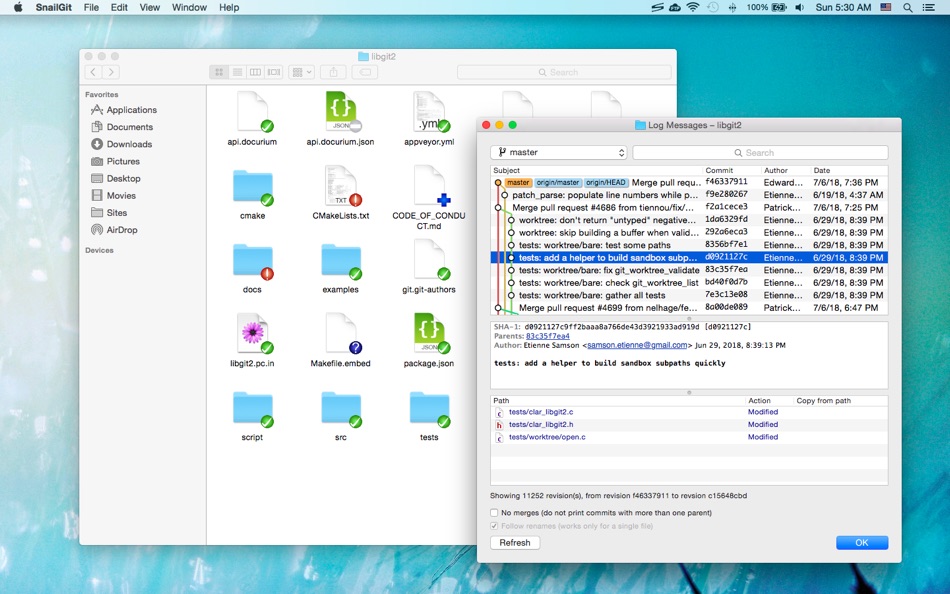
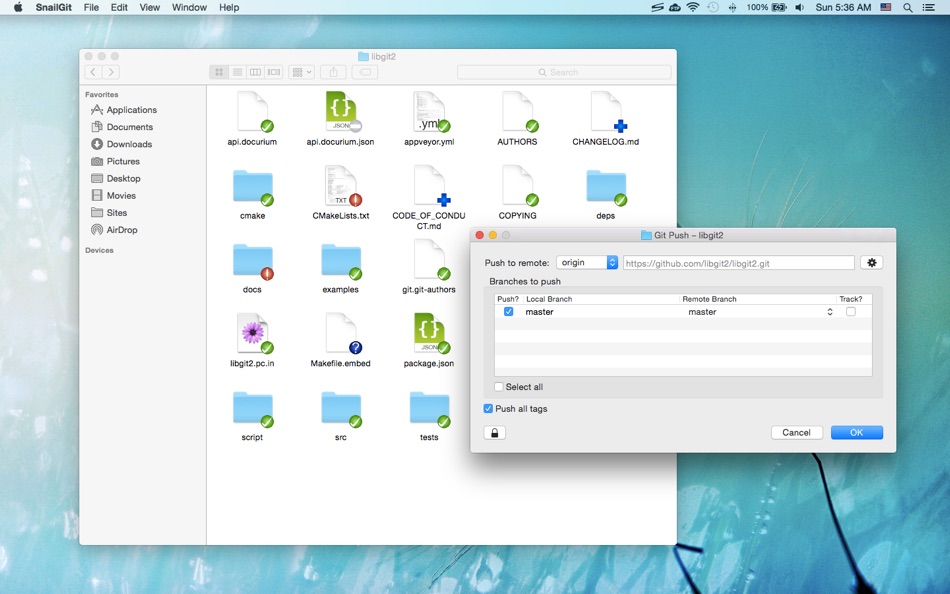
SnailGit allows you to access the most frequently used Git features from the Finder context menu.
SnailGit also adds icon overlays to your Git repositories in Finder. It tracks your Git repositories and updates the icon overlays automatically, providing visual feedback of the current state of the repositories.
In a few steps, you can start using SnailGit easily:
1. Enable "SnailGit Extension" in "System Preferences » Extensions".
2. Clone a Git repository with SnailGit (File » Git Clone...) or add an existing Git repository to SnailGit.
3. Navigate to your repository in Finder and right click to access SnailGit functionalities.
* FAQ
Q: There is no icon overlays / context menu for the files?
A: Please make sure that you've enabled "SnailGit Extension" in "System Preferences » Extensions", and also make sure that you've added the repository to SnailGit Preferences.
If your Git repository is monitored by multiple Finder extensions, please make sure that SnailGit Extension comes first in "System Preferences » Extensions » Finder", you can drag and drop the extensions to adjust the order.
If the problem persists, please disable "SnailGit Extension" in "System Preferences » Extensions" and then enable it again. The last resort is to relaunch Finder or restart your computer.
Q: What kind of URL schemes does SnailGit support?
A: SnailGit supports the following URL schemes:
• http://
• https://
• git://
• ssh://
Q: Does SnailGit work well with other Git clients?
A: In theory, SnailGit works with any kinds of Git clients that is compatible with Git 2.6, from the command line client to the GUI apps.
Q: SnailGit command-line interface?
A: The SnailGit command-line interface is located at "/Applications/SnailGit.app/Contents/Resources/snailgit.sh".
Q: Does SnailGit work for file managers other than Finder?
A: SnailGit is primarily a Finder extension, so it is likely that it will not work for other file managers.
Ad
Snímky obrazovky



Historie cen
- Dnes: $14.99
- Minimální: $9.99
- Maximální: $14.99
Sledovat ceny
Novinky
- Verze: 1.11.6
- Aktualizováno:
- • Improved diff tool detection
• Supports copying paths with Command-C
Vývojář
- 兰桂 吴
- Platformy: iOS Aplikace (6) macOS Aplikace (66)
- Seznamy: 7 + 6
- Body: 47 + 151 ¡
- Hodnocení: 0
- Recenze: 0
- Komentáře: 0
- Slevy: 0
- Videa: 0
- RSS: Odebírat
Body (0)
0 ☹️
Hodnocení (0)
0 ☹️
Seznamy (2)
- SnailGit – Git for Finder


Recenze (0)
Buďte první, kdo bude hodnotit 🌟
Další informace
- Verze: 1.11.6
- Kategorie:
macOS Aplikace›Nástroje - OS:
macOS,macOS 10.10 a vyšší - Velikost:
19 Mb - Podporovaný jazyk:
Chinese,English - Hodnocení obsahu:
4+ - Mac App Store Hodnocení:
0 - Aktualizováno:
- Datum vydání:
«SnailGit – Git for Finder». Platforma: macOS. Kategorie: Nástroje. Vývojář: «兰桂 吴». První vydání: . Poslední aktualizace: . Aktuální cena: $14.99. Nejnižší zaznamenaná cena: $9.99 (). Nejvyšší zaznamenaná cena: $14.99 (). Tento titul zatím na AppAgg nezískal hodnocení ani recenze. Seznamy: veřejné 2, soukromé 0. Dostupné jazyky: Chinese, English. AppAgg sleduje historii cen, hodnocení a zpětnou vazbu od uživatelů «SnailGit – Git for Finder». Sledujte budoucí slevy a aktualizace prostřednictvím RSS. AppAgg nehostuje aplikace ani nedistribuuje software. Všechny ochranné známky, loga a snímky obrazovky patří jejich příslušným vlastníkům.
Komentáře (0)
Buďte první, kdo okomentuje 🌟
SnailGit – Git for Finder Krátká adresa URL: Zkopírováno!- 🌟 Sdílet
- Mac App Store
Ad
Podobné
-
- Git Ignore Generator
- macOS Aplikace: Nástroje Podle: Konstantin Adamov
- Zdarma
- Seznamy: 0 + 0 Hodnocení: 0 Recenze: 0
- Body: 0 + 0 0 Verze: 1.0.12 Git ignore generator is an app that helps you create .gitignore files for your projects. You can choose from over 500 templates based on the programming languages, operating systems ... ⥯
-
- Git Mounter
- macOS Aplikace: Nástroje Podle: 兰桂 吴
- $4.99
- Seznamy: 0 + 1 Hodnocení: 0 Recenze: 0
- Body: 1 + 0 0 Verze: 1.2 Git Mounter allows you to mount gitweb/cgit/GitHub/Gitea/Gitee repositories as drives. You can preview/open files in the Git repositories as if they are local. * Features Mount ... ⥯
-
- Git Streaks for GitHub
- macOS Aplikace: Nástroje Podle: Honghao Zhang
- Zdarma
- Seznamy: 0 + 3 Hodnocení: 0 Recenze: 0
- Body: 3 + 0 0 Verze: 1.2.6 Git Streaks: A sleek Mac menu bar app for GitHub enthusiasts Stay motivated and on top of your GitHub contributions with Git Streaks, a minimalist app designed to seamlessly integrate ... ⥯
-
- Git Reaper
- macOS Aplikace: Nástroje Podle: Daniel Allsopp
- $2.99
- Seznamy: 0 + 0 Hodnocení: 0 Recenze: 0
- Body: 0 + 0 0 Verze: 1.0 Git Reaper helps you quickly identify local branches that no longer have a matching remote branch, making it simple to spot and safely delete orphaned branches with a single click. In ... ⥯
-
- Gitonium Git Client
- macOS Aplikace: Nástroje Podle: Allsidium AS
- $39.99
- Seznamy: 0 + 2 Hodnocení: 0 Recenze: 0
- Body: 2 + 0 0 Verze: 2026.3.1 The staging first macOS Git client, for developers who care about clean commits. Build atomic commits with surgical precision. Stop shipping drive by changes. Earn a reputation for ... ⥯
-
- DiffStudio – File Git History
- macOS Aplikace: Nástroje Podle: Krishna Varshney
- Zdarma
- Seznamy: 0 + 0 Hodnocení: 0 Recenze: 0
- Body: 0 + 0 0 Verze: 1.0.0 DiffStudio is a Git history viewer for macOS that allows developers to explore file changes in Git repositories. The app displays commit history, file differences, and repository ... ⥯
-
- Tracks for Git
- macOS Aplikace: Nástroje Podle: The Del Mar Code Company LLC
- $4.99
- Seznamy: 0 + 0 Hodnocení: 0 Recenze: 0
- Body: 0 + 0 0 Verze: 1.0 Tracks is a clean, focused Git graph viewer for macOS. See your branch history at a glance with commits, tags, and branch labels displayed inline alongside a visual graph. ## FEATURES ... ⥯
-
- TaoGit
- macOS Aplikace: Nástroje Podle: Sergiy Vynnychenko
- * Zdarma
- Seznamy: 0 + 0 Hodnocení: 0 Recenze: 0
- Body: 3 + 0 0 Verze: 1.6.128 Git user experience as it should be: Clean yet informative UI helps decrease cognitive complexity and makes your git experience as effortless as possible. It aims to narrow your ... ⥯
-
- Gitfox
- macOS Aplikace: Nástroje Podle: Erik Aigner
- * Zdarma
- Seznamy: 0 + 3 Hodnocení: 0 Recenze: 0
- Body: 6 + 0 0 Verze: 4.1.2 REPOSITORY MANAGER Quickly see all your repositories at a glance and if they have uncommitted changes. If your repository has a Markdown README, it is automatically rendered. Have your ⥯
-
- Right Click Booster for Mac OS X
- macOS Aplikace: Nástroje Podle: Hobbyist Software Limited
- Zdarma
- Seznamy: 0 + 1 Hodnocení: 0 Recenze: 0
- Body: 1 + 0 0 Verze: 1.3 Add useful commands on right click (or ctrl-click). Totally scriptable to let you add the commands you need. Includes actions useful for all power-users, and additional actions for ... ⥯
-
- EasyGit
- macOS Aplikace: Nástroje Podle: Georgios Verigakis
- Zdarma
- Seznamy: 0 + 1 Hodnocení: 0 Recenze: 0
- Body: 7 + 0 0 Verze: 1.9 EasyGit is your personal Git server on iCloud. Use your favorite git client to pull and push as usual and everything will be stored safely on iCloud, available on all your computers. ... ⥯
-
- Peek — A Quick Look Extension
- macOS Aplikace: Nástroje Podle: Big Z Labs LLC
- $7.99
- Seznamy: 4 + 3 Hodnocení: 0 Recenze: 0
- Body: 4 + 0 0 Verze: 2.6.4 Accelerate your workflow with the Quick Look conveniences that only Peek can deliver: searching, jumping, scroll restoring, syntax highlighting, & more. -- Due to system limitations, ... ⥯
-
- Go2Shell
- macOS Aplikace: Nástroje Podle: Alice Dev Team
- Zdarma
- Seznamy: 1 + 2 Hodnocení: 0 Recenze: 0
- Body: 6 + 0 0 Verze: 1.2.2 Go2Shell opens a terminal window to the current directory in Finder. The best way to use Go2Shell is to add it to the Finder toolbar, to do this just drag and drop the app onto the ... ⥯
-
- Shellcut - Open in Terminal
- macOS Aplikace: Nástroje Podle: Leon Boettger
- Zdarma
- Seznamy: 0 + 1 Hodnocení: 0 Recenze: 0
- Body: 8 + 0 0 Verze: 1.5 Shellcut lets you open a new Terminal window directly from Finder, with the working directory set to the folder currently displayed in the Finder window. Shellcut supports Apple's ... ⥯