
Saved
Choose the name that will be shown in your Saved menu.
Done!
| Developer: | 兰桂 吴 (72) | ||
| Price: | $14.99 | ||
| Rankings: | 0 | ||
| Comments: | 0 Add a comment | ||
| Score: | $7,110 | ||
| Lists: | 2 + 0 | ||
| Points: | 0 + 0 ¡ | ||
| +1 Points | |||
Description

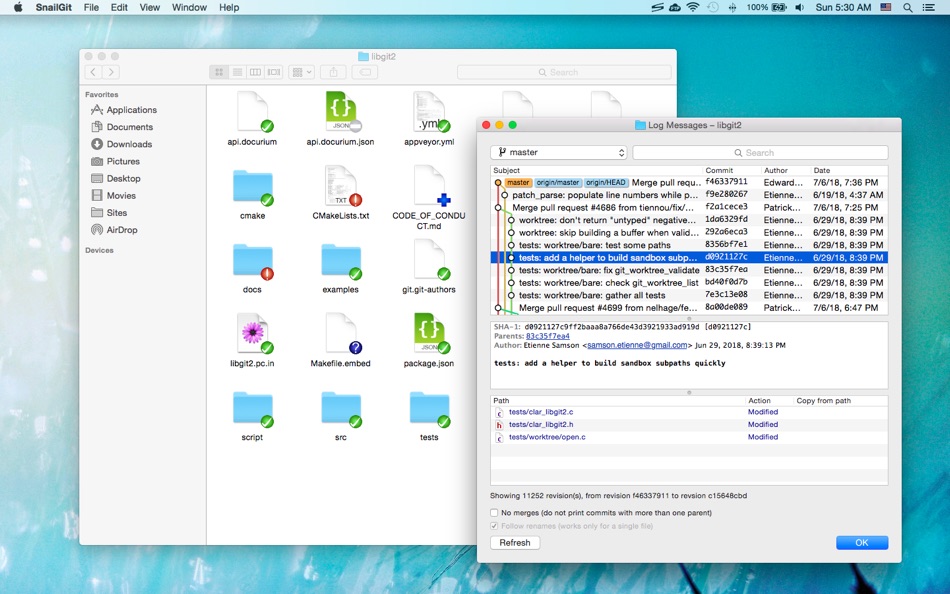
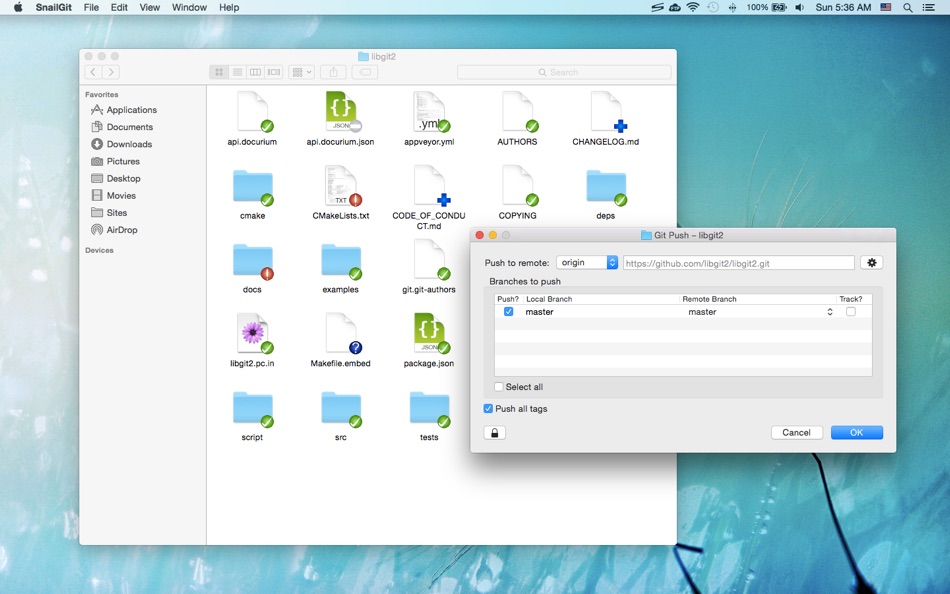
SnailGit allows you to access the most frequently used Git features from the Finder context menu.
SnailGit also adds icon overlays to your Git repositories in Finder. It tracks your Git repositories and updates the icon overlays automatically, providing visual feedback of the current state of the repositories.
In a few steps, you can start using SnailGit easily:
1. Enable "SnailGit Extension" in "System Preferences » Extensions".
2. Clone a Git repository with SnailGit (File » Git Clone...) or add an existing Git repository to SnailGit.
3. Navigate to your repository in Finder and right click to access SnailGit functionalities.
* FAQ
Q: There is no icon overlays / context menu for the files?
A: Please make sure that you've enabled "SnailGit Extension" in "System Preferences » Extensions", and also make sure that you've added the repository to SnailGit Preferences.
If your Git repository is monitored by multiple Finder extensions, please make sure that SnailGit Extension comes first in "System Preferences » Extensions » Finder", you can drag and drop the extensions to adjust the order.
If the problem persists, please disable "SnailGit Extension" in "System Preferences » Extensions" and then enable it again. The last resort is to relaunch Finder or restart your computer.
Q: What kind of URL schemes does SnailGit support?
A: SnailGit supports the following URL schemes:
• http://
• https://
• git://
• ssh://
Q: Does SnailGit work well with other Git clients?
A: In theory, SnailGit works with any kinds of Git clients that is compatible with Git 2.6, from the command line client to the GUI apps.
Q: SnailGit command-line interface?
A: The SnailGit command-line interface is located at "/Applications/SnailGit.app/Contents/Resources/snailgit.sh".
Q: Does SnailGit work for file managers other than Finder?
A: SnailGit is primarily a Finder extension, so it is likely that it will not work for other file managers.
Screenshots



Price History
- Current price: $14.99
- Minimum: $9.99
- Maximum: $14.99
Track prices
AppAgg Score
Estimated score for this app
$7,110
Higher scores usually mean stronger signals on AppAgg.
Based on: 🔥 popularity · ⭐ ratings · 🕒 freshness · 🏷️ deals · 🏬 store data · 👥 community
This score is for informational purposes only. It is not a real price, an offer to sell, or a market valuation.
Short URL: Copied!
Ad
What's new
- Version: 1.11.6
- Last Updated:
- • Improved diff tool detection
• Supports copying paths with Command-C
Additional Information
- Release Date:
- Category:
macOS Apps›Developer Tools - OS:
macOS,macOS 10.10 and up - Size:
19 Mb - Supported Languages:
Chinese,English - Content Rating:
4+ - Mac App Store Rating:
0
Developer
Lists (2)
- SnailGit – Git for Finder


Points (0)
0 ☹️
Rankings (0)
0 ☹️
Comments (0)
Be the first to comment 🌟
«SnailGit – Git for Finder» is a Developer Tools app for macOS, developed by «兰桂 吴». It was first released on and last updated on . The lowest historical price was $9.99 on , and the highest was $14.99 on . This app has not yet received any ratings on AppAgg. It has been added to 2 public lists and 0 private lists created by users. Available languages: Chinese, English. AppAgg continuously tracks the price history, ratings, and user feedback for «SnailGit – Git for Finder». Subscribe to this app or follow its RSS feed to get notified about future deals or updates. AppAgg does not host applications or distribute software. All trademarks, logos and screenshots belong to their respective owners.
SnailGit – Git for Finder Short URL: Copied!- 🌟 Share
- Mac App Store
Similar
-
- Git Ignore Generator
- macOS Apps: Developer Tools By: Konstantin Adamov
- Free
- Lists: 0 0 0
- Points: 0 + 0 Score: $540 Version: 1.0.12 Git ignore generator is an app that helps you create .gitignore files for your projects. You can choose from over 500 templates based on the programming languages, operating systems ... ⥯
-
- Git Mounter
- macOS Apps: Developer Tools By: 兰桂 吴
- $4.99
- Lists: 0 + 1 0 0
- Points: 1 + 0 Score: $3k Version: 1.2 Git Mounter allows you to mount gitweb/cgit/GitHub/Gitea/Gitee repositories as drives. You can preview/open files in the Git repositories as if they are local. * Features Mount ... ⥯
-
- Git Streaks for GitHub
- macOS Apps: Developer Tools By: Honghao Zhang
- Free
- Lists: 0 + 3 0 0
- Points: 3 + 0 Score: $1k Version: 1.2.6 Git Streaks: A sleek Mac menu bar app for GitHub enthusiasts Stay motivated and on top of your GitHub contributions with Git Streaks, a minimalist app designed to seamlessly integrate ... ⥯
-
- Git Reaper
- macOS Apps: Developer Tools By: Daniel Allsopp
- $2.99
- Lists: 0 0 0
- Points: 0 + 0 Score: $3k Version: 1.0 Git Reaper helps you quickly identify local branches that no longer have a matching remote branch, making it simple to spot and safely delete orphaned branches with a single click. In ... ⥯
- New
- Git Meter App
- macOS Apps: Developer Tools By: Quartet Labo LLC.
- Free
- Lists: 0 0 0
- Points: 0 + 0 Score: $590 Version: 0.1 GitMeter は、GitHub のコントリビューション状況を macOS で素早く確認できる開発者向けアプリです。GitHub アカウントでサインインすると、その日の contribution をメニューバーからすぐに確認できます。日々の開発活動を見える化したいユーザーに適しています。 ⥯
- New
- Git Glance: Menu Bar Git PRs
- macOS Apps: Developer Tools By: sovio
- Free
- Lists: 0 0 0
- Points: 0 + 0 Score: $780 Version: 1.1.1 A simple macOS menu bar app which shows GitHub PRs and GitLab MRs. View: - items awaiting your review - items you created There is the option to show green / orange / red based on how ... ⥯
-
- Gitonium Git Client
- macOS Apps: Developer Tools By: Allsidium AS
- $39.99
- Lists: 0 + 2 0 0
- Points: 2 + 0 Score: $6k Version: 2026.4.1 The staging first macOS Git client, for developers who care about clean commits. Build atomic commits with surgical precision. Stop shipping drive by changes. Earn a reputation for ... ⥯
-
- DiffStudio – File Git History
- macOS Apps: Developer Tools By: Krishna Varshney
- Free
- Lists: 0 0 0
- Points: 0 + 0 Score: $750 Version: 1.0.0 DiffStudio is a Git history viewer for macOS that allows developers to explore file changes in Git repositories. The app displays commit history, file differences, and repository ... ⥯
-
- Tracks for Git
- macOS Apps: Developer Tools By: The Del Mar Code Company LLC
- $4.99
- Lists: 0 0 0
- Points: 0 + 0 Score: $2k Version: 1.0 Tracks is a clean, focused Git graph viewer for macOS. See your branch history at a glance with commits, tags, and branch labels displayed inline alongside a visual graph. ## FEATURES ... ⥯
-
- TaoGit
- macOS Apps: Developer Tools By: Sergiy Vynnychenko
- * Free
- Lists: 0 0 0
- Points: 3 + 0 Score: $6k Version: 1.6.129 Git user experience as it should be: Clean yet informative UI helps decrease cognitive complexity and makes your git experience as effortless as possible. It aims to narrow your ... ⥯
-
- Gitfox
- macOS Apps: Developer Tools By: Erik Aigner
- * Free
- Lists: 0 + 3 0 0
- Points: 6 + 0 Score: $7k Version: 4.1.3 REPOSITORY MANAGER Quickly see all your repositories at a glance and if they have uncommitted changes. If your repository has a Markdown README, it is automatically rendered. Have your ⥯
-
- RibbonDiff
- macOS Apps: Developer Tools By: Rei Kitajima
- * Free
- Lists: 0 + 1 0 0
- Points: 7 + 0 Score: $6k Version: 4.1.1 Compare two versions of text instantly - ideal for code, config files, logs, and document edits. RibbonDiff for macOS gives you a Mac-native, side-by-side diff view with fully editable ⥯
-
- Right Click Booster for Mac OS X
- macOS Apps: Developer Tools By: Hobbyist Software Limited
- Free
- Lists: 0 + 1 0 0
- Points: 1 + 0 Score: $740 Version: 1.3 Add useful commands on right click (or ctrl-click). Totally scriptable to let you add the commands you need. Includes actions useful for all power-users, and additional actions for ... ⥯
-
- RocketSim for Xcode Simulator
- macOS Apps: Developer Tools By: SwiftLee
- * Free
- Lists: 1 + 3 0 0
- Points: 9 + 0 Score: $10k Version: 15.1.0 RocketSim enhances the Xcode Simulator for iOS and iPadOS development: boost productivity and streamline your workflow with capture, networking, build insights, and quick actions ... ⥯
You may also like
Recently viewed
Last Updated:
Search operators you can use with AppAgg