
Saved
Choose the name that will be shown in your Saved menu.
Done!
| Developer: | Eugene Krupnov (1) | ||
| Price: | $19.99 | ||
| Rankings: | 0 | ||
| Comments: | 0 Add a comment | ||
| Lists: | 4 + 2 | ||
| Points: | 5 + 0 ¡ | ||
| Mac App Store | |||
Description

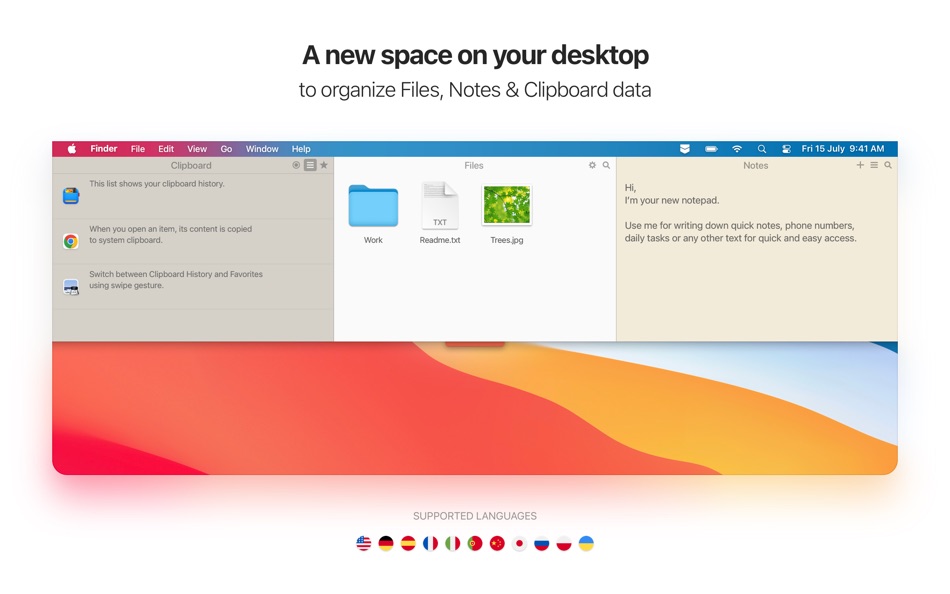
It’s a smart and super handy place on your desktop for storing notes, files and pasteboard clips.
Being just one easy gesture away, Unclutter becomes a surprisingly helpful and convenient tool. In fact 3 tools:
*** Clipboard History ***
Track everything you copy into your Mac’s clipboard. You can browse the list of recent clips & recall any of them.
*** Quick Notes ***
Jot down casual notes without launching a text editor. You can find any note with a keyword, using the full-text search.
*** Files Hub ***
Now you have a place to drop casual files to, without cluttering your Desktop or wasting time on searching for them.
HOW IT WORKS:
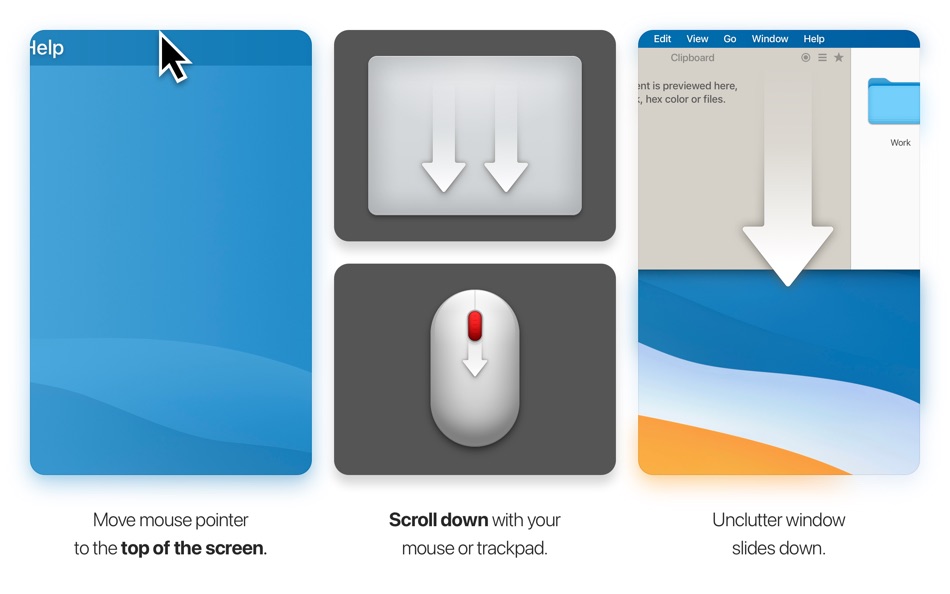
- Unclutter stays hidden above your Desktop and opens instantly when you need it. All your data is always with you, nicely stored and neatly organized.
- To open, simply move the pointer to the very top of screen and scroll down. That easy!
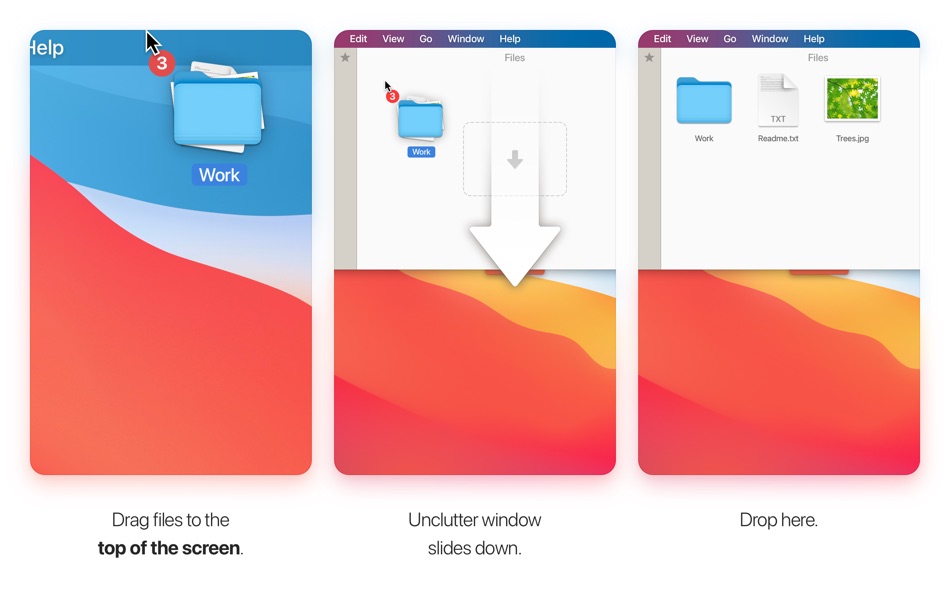
- Drag items from Desktop or other applications to the top of screen to store them in Unclutter.
MAIN FEATURES:
- Instant access to your data on every screen and space of your Mac, even in full screen mode.
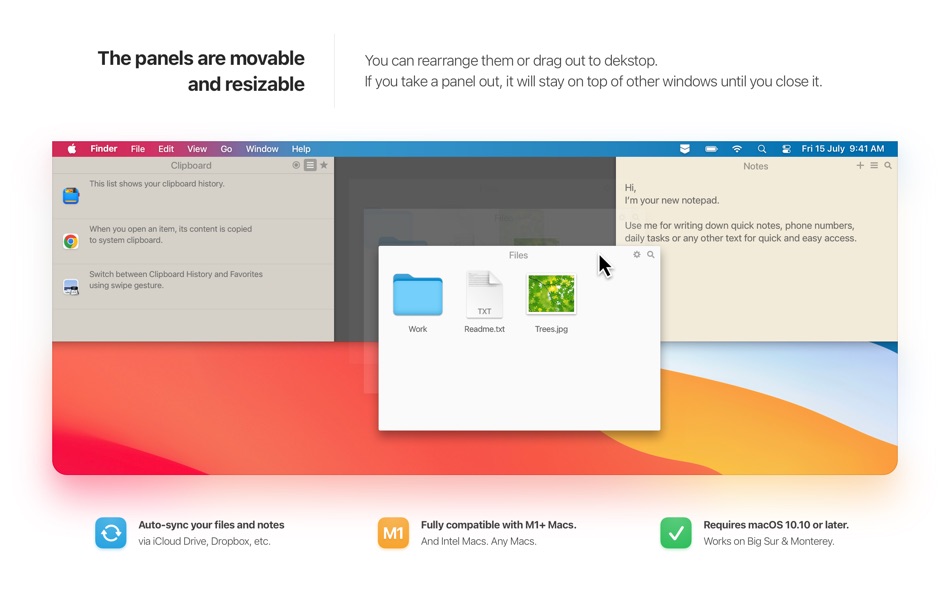
- Draggable panels that can stick on top of other windows
- Files and notes can auto-sync across all your Macs via iCloud Drive or Dropbox
- Full retina & multi-display support
- Universal Clipboard support
- Light/Dark theme to match system appearance.
WE LOVE TO HEAR FROM YOU
Have a question? Want to request a feature or share your idea?
Please contact us at support@unclutterapp.com
Twitter - https://twitter.com/Unclutterapp
Facebook - https://www.facebook.com/Unclutter
Ad
Screenshots

Price History
- Current price: $19.99
- Minimum: $9.99
- Maximum: $19.99
Track prices
What's new
- Version: 2.2.16
- Updated:
- - Fixed: Unclutter Files freezing on launch and during use when your storage folder is in iCloud Drive (or another cloud drive). Previously, Unclutter waited for these files to fully download to disk — this is no longer required.
- Fixed: On macOS 26 Tahoe, the text editor (Notes/Clipboard) should no longer leave a trace of the last line when deleting lines.
- Improved: Unclutter window positioning to better adapt to menu bar settings and the notch on MacBook.
- Improved: Deleting an empty note no longer requires confirmation.
- Minor polish and improvements across the app for smoother operation.
Additional Information
- Release Date:
- Category:
macOS Apps›Productivity - OS:
macOS,macOS 10.13 and up - Size:
9 Mb - Supported Languages:
Chinese,English,French,German,Italian,Japanese,Polish,Portuguese,Russian,Spanish,Ukrainian - Content Rating:
4+ - Mac App Store Rating:
0 - X: Unclutterapp
- Facebook: Unclutter
- Website:
 https://unclutterapp.com
Developer
- Eugene Krupnov
- Platforms: macOS Apps (1)
- Lists: 4 + 2
- Points: 5 + 0 ¡
- Rankings: 0
- Comments: 0
- Deals: 0
- Videos: 0
- RSS: Subscribe
Lists (4)
- Unclutter


Points (5)
-

- 237 Attila Szucs
- +1
-
- 319 pantype
- +1
-
- 534 MichaelTheGeek
- +1
-
- 779 Rocky4812
- +1
-
- 15 Tomas
- +1




Rankings (0)
0 ☹️
Comments (0)
Be the first to comment 🌟
«Unclutter» is a Productivity app for macOS, developed by «Eugene Krupnov». It was first released on and last updated on . The lowest historical price was $9.99 on , and the highest was $19.99 on . This app has not yet received any ratings on AppAgg. It has been added to 4 public lists and 2 private lists created by users. AppAgg has tracked 5 confirmed points plus 0 indirect points for this app. Available languages: Chinese, English, French, German, Italian, Japanese, Polish, Portuguese, Russian, Spanish, Ukrainian. AppAgg continuously tracks the price history, ratings, and user feedback for «Unclutter». Subscribe to this app or follow its RSS feed to get notified about future deals or updates. AppAgg does not host applications or distribute software. All trademarks, logos and screenshots belong to their respective owners.
Unclutter Short URL: Copied!- 🌟 Share
- Mac App Store
Similar
-
- VMTek
- macOS Apps: Productivity By: Cyaneous, Inc.
- * Free
- Lists: 1 + 2 0 0
- Points: 23 Version: 3.1.0 VMTek is the Mac virtualization platform you've been waiting for. Run multiple instances and versions of macOS*, Linux and other operating systems side-by-side on your Mac with ease. ... ⥯
-
- NotchBox - Easier Drag & Drop
- macOS Apps: Productivity By: 裕涛 兰
- * Free
- Lists: 2 + 1 0 0
- Points: 21 Version: 1.1.68 NotchBox Turn Your Mac s Notch into a Dynamic Hub NotchBox transforms your Mac s notch into a lively, interactive space just like the iPhone s Dynamic Island. From music playback to ... ⥯
-
- Mountain Duck
- macOS Apps: Productivity By: David Kocher
- * Free
- Lists: 2 + 6 0 0
- Points: 19 Version: 5.2.1 Mountain Duck lets you mount server and cloud storage as a disk on your desktop. With Smart Synchronization, files are synchronized to the local disk when opened to allow offline usage ⥯
-
- Soonie - Meeting Reminder
- macOS Apps: Productivity By: Unit Numberfive oHG
- Free
- Lists: 0 + 2 0 0
- Points: 17 Version: 3.1 You know how it goes: suddenly your meeting is here, and you were deep into something else. Soonie quietly lives in your Mac s menu bar and gently pops up to show you how much time you ⥯
- -100%
- ClipBoardy: Copy & Paste Tool
- macOS Apps: Productivity By: Tristan Jarrett
- ▼ Free
$0.99-100% - Lists: 0 + 1 0 0
- Points: 15 Version: 1.2.0 ClipBoardy is a lightweight, beautifully simple clipboard manager for macOS that keeps everything you copy exactly where you need it, ready instantly without breaking your focus. ... ⥯
-
- Bridges Link Formatting
- macOS Apps: Productivity By: Jonathan Ruiz
- Free
- Lists: 1 + 1 0 0
- Points: 14 Version: 2.1 Bridges is the best way to collect custom formatted links. Saving a link for your podcast, newsletter, or blog post has never been easier. If you ve ever had the task to collect links ... ⥯
-
- SoundPaste
- macOS Apps: Productivity By: Maxim Kuzmenko
- * Free
- Lists: 0 + 3 0 0
- Points: 14 Version: 1.6.0 Introducing SoundPaste the simple, revolutionary app that lets you copy and paste sound. Tired of saving and dragging sound files around? With SoundPaste, just record and paste. It s ... ⥯
-
- Awesome Copy Clipboard History
- macOS Apps: Productivity By: Evan Jones
- * Free
- Lists: 0 + 1 0 0
- Points: 14 Version: 5.18 AwesomeCopy is a full-featured clipboard history manager built for Apple users who value speed, design, and privacy. It keeps track of everything you copy - text, images, links, files, ⥯
-
- LaunchPalette – App Switcher
- macOS Apps: Productivity By: Seungwoo Choe
- * Free
- Lists: 0 + 3 0 0
- Points: 13 Version: 1.14 Switch between apps and projects in milliseconds, without breaking your flow. LaunchPalette brings keyboard-first navigation to macOS, letting you instantly jump to any app, project, ... ⥯
-
- Applight – Smart App Switcher
- macOS Apps: Productivity By: Seungwoo Choe
- * Free
- Lists: 0 + 3 0 0
- Points: 13 Version: 1.1 A smarter, faster way to switch apps. Instead of endless Command-Tabs or Spotlight searches, Applight learns your workflow and predicts what you ll need next so you can jump to the ... ⥯
-
- Clipboard Manager - CopyQ
- macOS Apps: Productivity By: Umut Acerbatimur
- * Free
- Lists: 0 + 1 0 0
- Points: 13 Version: 1.5.2 Seeing your clipboard has never been easier. Press Option Command V and boom! your entire history appears. CopyQ stores everything you copy or cut, text, images, links, files and ... ⥯
-
- Unified Calendar Sync
- macOS Apps: Productivity By: Paulo Soares
- * Free
- Lists: 0 + 1 0 0
- Points: 13 Version: 1.3.1 Unified Calendar Sync is a lightweight macOS menu bar app that creates and maintains a dedicated unified calendar acting as your single source of truth. The app syncs events from ... ⥯
-
- Grila • calendar for typers
- macOS Apps: Productivity By: THE LOW-TECH GUYS SRL
- Free
- Lists: 0 + 1 0 0
- Points: 13 Version: 2.0.4 Grila is a keyboard-driven instantly available calendar. The calendar can be shown instantly using ⌥ Right Option + \ (backslash), which is configurable to any other hotkey. Navigating ⥯
-
- Canary Mail App
- macOS Apps: Productivity By: Cartasec Pte. Ltd.
- * Free
- Lists: 3 + 3 0 0
- Points: 13 Version: 5.19.1 The Best Email Client for Mac. Your AI Email Assistant. Canary can be as simple or as powerful as you want it to be: FOREVER FREE: Best for students & personal use Includes: **Unified ... ⥯