
| 개발자: | Suborbital Softworks Ltd. (6) | ||
| 가격: | $49.99 | ||
| 순위: | 0 | ||
| 리뷰: | 0 리뷰 작성 | ||
| 댓글: | 0 댓글 게시 | ||
| 목록: | 1 + 1 | ||
| 포인트: | 1 + 0 ¡ | ||
| Mac App Store | |||
기술

Power Prompter is not only incredibly easy to use, but it's also packed with powerful features that make it a must-have for anyone creating videos or giving presentations. With its automatic font size adjustment to fit your screen's resolution, you'll never have to manually fiddle with font sizes again. Plus, with the free iPhone remote control app, you can easily control Power Prompter over Bluetooth or WiFi, giving you the freedom to move around while you deliver your lines.
But that's not all. Power Prompter also supports USB controllers, pedals, and game pads, making it easy to control the teleprompter with the tools you already have. And because it's designed to run even on low-powered Macs, you won't have to worry about compatibility issues.
With Power Prompter, you'll be able to create professional-quality videos and presentations with ease. Its intuitive interface makes it a great choice for beginners, while its advanced features will satisfy even the most experienced pros. And best of all, Power Prompter will save you time and reduce the chances of errors, making your video creation process smoother and more efficient.
Don't settle for outdated teleprompter applications that are difficult to use and don't provide the results you need. Download Power Prompter today and see the difference for yourself. With its powerful features and user-friendly interface, it's the only teleprompter you'll ever need.
▸ FEATURES
▸ Native M1 and Intel Mac App. Not a poor Windows or Catalyst port!
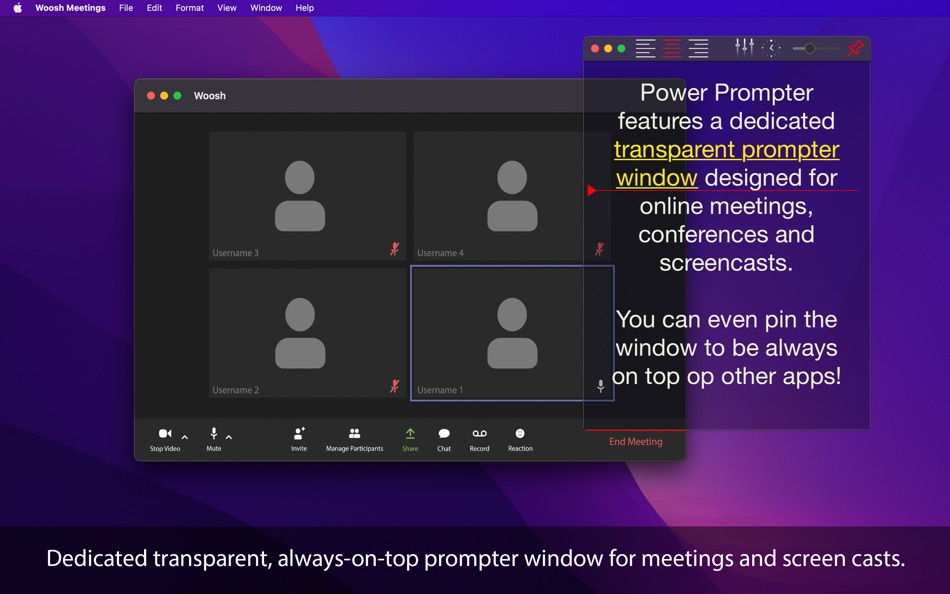
▸ Compatible with Zoom, MS Teams and all other online meeting apps.
• FREE Bluetooth/WiFi Remote Control app for your iPhone/iPad.
• WYSIWYG: The script will look exactly the same on every screen. No need to fiddle around with screen resolutions, line brakes and text sizes anymore. Just set it up in the editor and Power Prompter will do the rest!
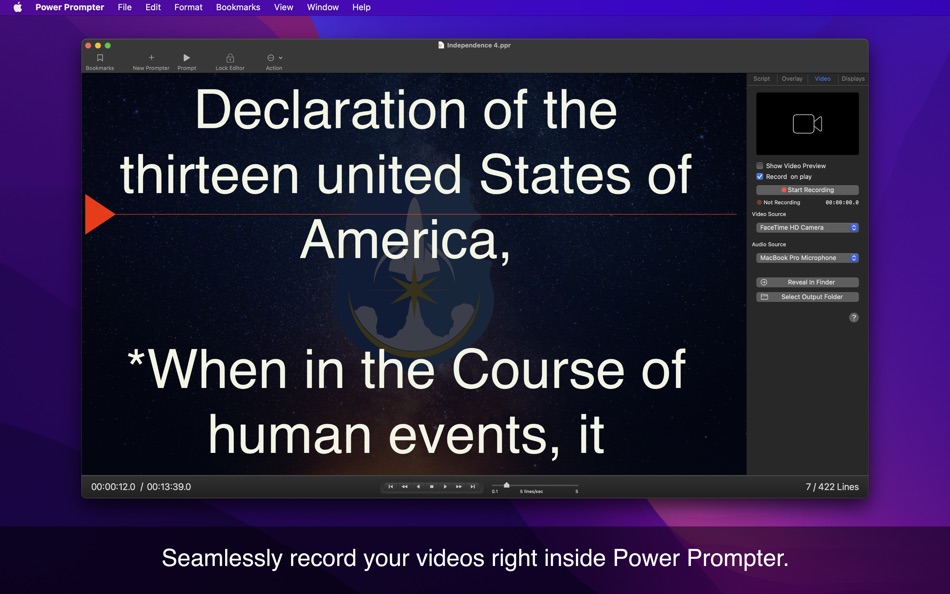
• Built-In video recording. Simply create videos within Power Prompter - no need for external recording software.
• Individual script alignment settings. You can choose to align the script to the left, right or center - independently for each screen.
• Support for TTL/Beamsplitter hoods. Power Prompter can flip & mirror the text along both the X and Y axis so you can use professional TTL teleprompter hoods with it.
• Auto timing: You need a script to scroll through in exactly 7 minutes and 32 seconds? No problem. Power Prompter will automatically adjust the scroll speed to meet the time requirements you set.
• Multiple overlay and indicator options which help the talent to focus on the script. You can reposition the indicator freely along the Y Axis.
• Open as many teleprompter windows as you need. Power Prompter supports dozens of synced teleprompter windows at the same time.
• Assign teleprompter windows to specific displays or spawn free floating teleprompter windows you can position anywhere you want. There's no limits to the arrangements you can create this way. You can even make teleprompter windows transparent to see what's behind the teleprompter window!
Ad
스크린샷




가격 내역
- 오늘: $49.99
- 최소: $24.99
- 최대: $69.99
가격 추적
새로운 기능
- 버전: 2025.5
- 업데이트:
- • Added a new Countdown overlay feature. You can now display a countdown (1 to 9 seconds) before script playback begins.
• Introduced a Linear Scroll Wheel setting that disables inertial scrolling on trackpads and mice—ideal for certain USB controllers.
• Increased the maximum script margin width—now up to twice as wide as before.
• Fixed an issue where negative scroll speeds could be set when using the Contour ShuttleXpress controller.
• Fixed a crash that could occur when opening a transparent teleprompter window
개발자
포인트 (1)
-

- 2 Kalid Abdule
- +1

순위 (0)
0 ☹️
목록 (1)
- Power Prompter - Teleprompter
리뷰 (0)
첫 번째 리뷰를 남겨보세요 🌟
추가 정보
주소록
 https://suborbital.io/powerprompter/
 «Power Prompter - Teleprompter». 플랫폼: macOS. 카테고리: 사진 및 비디오. 개발자: «Suborbital Softworks Ltd.». 첫 번째 릴리스: . 마지막 업데이트: . 현재 가격: $49.99. 최저 기록 가격: $24.99 (). 최고 기록 가격: $69.99 (). 이 타이틀은 아직 AppAgg에서 평가나 리뷰를 받지 못했습니다. 목록: 공개: 1, 비공개: 1. 추적된 포인트: 확인됨: 1, 간접: 0. 사용 가능한 언어: English. AppAgg는 «Power Prompter - Teleprompter»의 가격 기록, 평점 및 사용자 피드백을 추적합니다. 향후 할인 및 업데이트 받기: RSS에서 확인할 수 있습니다. AppAgg는 애플리케이션을 호스팅하거나 소프트웨어를 배포하지 않습니다. 모든 상표, 로고 및 스크린샷은 해당 소유자의 자산입니다.
댓글 (0)
가장 먼저 댓글을 남겨주세요 🌟
Power Prompter - Teleprompter 단축 URL: 복사됨!- 🌟 공유하기
- Mac App Store
Ad
유사 항목
-
- Power Prompter Express
- macOS 앱: 사진 및 비디오 게시자: Suborbital Softworks Ltd.
- 무료
- 목록: 0 + 1 순위: 0 리뷰: 0
- 포인트: 3 + 0 0 버전: 2025.5 Are you tired of fumbling with clunky, outdated teleprompters that are difficult to use and don't provide the professional results you need? Look no further than Power Prompter, the ... ⥯
-
- Teleprompter
- macOS 앱: 사진 및 비디오 게시자: Pavonine Software
- 무료
- 목록: 0 + 0 순위: 0 리뷰: 0
- 포인트: 1 + 0 0 버전: 3.1.1 Teleprompter is an easy-to-use yet powerful prompting application. Using Teleprompter is as easy a typing in your script and clicking play, but don t be fooled by Teleprompter s ... ⥯
-
- Teleprompter Recorder
- macOS 앱: 사진 및 비디오 게시자: Makayama.com
- $14.99
- 목록: 0 + 0 순위: 0 리뷰: 0
- 포인트: 0 + 0 0 버전: 1.0.1 Record speeches, vlogs and presentations on your Mac. Use your built-in camera to record as you read your script. Look more confident and natural on camera by recording your videos ... ⥯
-
- Power Guides for Final Cut Pro
- macOS 앱: 사진 및 비디오 게시자: PopTop Production, LLC
- $10.00
- 목록: 0 + 0 순위: 0 리뷰: 0
- 포인트: 0 + 0 0 버전: 2.0 BretFX Power Guides for Final Cut Pro is everything you ll ever need in a guides, letterbox and grid plugin! Align and visualize your content with custom guides, rulers, film zones, ... ⥯
-
- Power DVD Burner - Create DVD
- macOS 앱: 사진 및 비디오 게시자: 4Videosoft Studio
- 무료
- 목록: 0 + 1 순위: 0 리뷰: 0
- 포인트: 1 + 0 0 버전: 5.1.9 Totally FREE video to DVD burner to use! Power DVD Burner is an easy-to-use video to DVD creating program, which can help you convert any popular SD video format like MOV, MP4, MTS, ... ⥯
-
- Presentation Prompter
- macOS 앱: 사진 및 비디오 게시자: Ripeware, LLC
- $99.99
- 목록: 0 + 0 순위: 0 리뷰: 0
- 포인트: 0 + 0 0 버전: 5.13.3 Presentation Prompter is a teleprompter and helps you deliver successful presentations. It is built for live performers, newscasters, actors, public speakers, narrators, and anyone who ⥯
-
- RAW Power
- macOS 앱: 사진 및 비디오 게시자: Gentlemen Coders
- $39.99
- 목록: 2 + 2 순위: 0 리뷰: 0
- 포인트: 2 + 0 0 버전: 3.5.5 RAW Power® has the best Finder, Photos and iCloud integration of any non-Apple photo app, plus advanced RAW editing, ratings and more. RAW Power is three tools in one: 1) A fast, ... ⥯
-
- Videq - Teleprompter
- macOS 앱: 사진 및 비디오 게시자: Sergiy Vynnychenko
- 무료
- 목록: 0 + 0 순위: 0 리뷰: 0
- 포인트: 1 + 0 0 버전: 1.14 Features: * Font color & size change * Margins/Paddings change( macOS > 13 ) * AutoScroll speed * Window opacity * EasyRead mode * Window frontMost mode * Window opacity ⥯
-
- Loopcam
- macOS 앱: 사진 및 비디오 게시자: Power Light and Sound Company, Inc.
- 무료
- 목록: 0 + 0 순위: 0 리뷰: 0
- 포인트: 0 + 0 0 버전: 1.0 Loopcam enables you to replace your webcam output with a loop that you record. It's fun, easy to use, and works with most webcams and video apps. ⥯
-
- CullEdit
- macOS 앱: 사진 및 비디오 게시자: Confidential Power
- * 무료
- 목록: 0 + 1 순위: 0 리뷰: 0
- 포인트: 8 + 0 0 버전: 1.24 CullEdit Professional Image Culling and Editing CullEdit requires a CullEdit Pro subscription to access all features. CullEdit is a lightning-fast macOS application designed for ... ⥯
-
- SRecorder-Screen Recorder
- macOS 앱: 사진 및 비디오 게시자: Wuhan Net Power Technology Co., Ltd
- 무료
- 목록: 0 + 0 순위: 0 리뷰: 0
- 포인트: 0 + 0 0 버전: 1.6.0 Still looking for a professional screen recording tool? SRecorder is a screen recording tool specially designed for Mac operating system. The software can record computer desktop ... ⥯
-
- TouchRetouch: Object Removal
- macOS 앱: 사진 및 비디오 게시자: ADVA Soft GmbH
- $14.99
- 목록: 5 + 4 순위: 0 리뷰: 0
- 포인트: 3 + 0 0 버전: 2.3.8 TouchRetouch allows clearing your photos from undesired objects in an instant. It also comes in handy when dealing with color correction and composition problems. In a few simple ... ⥯
-
- DaVinci Resolve Studio
- macOS 앱: 사진 및 비디오 게시자: Blackmagic Design Inc
- $299.99
- 목록: 3 + 2 순위: 0 리뷰: 0
- 포인트: 9 + 0 0 버전: 20.3.2 DaVinci Resolve Studio 20 Hollywood s most powerful tools for professional editing, color correction, audio post and visual effects! DaVinci Resolve Studio is the world s only solution ⥯
-
- Compressor
- macOS 앱: 사진 및 비디오 게시자: Apple
- $49.99
- 목록: 5 + 5 순위: 0 리뷰: 0
- 포인트: 0 + 0 0 버전: 5.0 Compressor integrates tightly with Final Cut Pro and Motion to add power and flexibility to your video conversions. Quickly customize output settings, enhance images, and package your ... ⥯