
已保存
选择将在你的已保存菜单中显示的名称。
完成!
| 开发人员: | FIPLAB Ltd (29) | ||
| 价格: | $8.99 | ||
| 排名: | 0 | ||
| 评论: | 0 发表评论 | ||
| 列表: | 2 + 3 | ||
| 积分: | 0 + 0 ¡ | ||
| +1 积分 | |||
说明

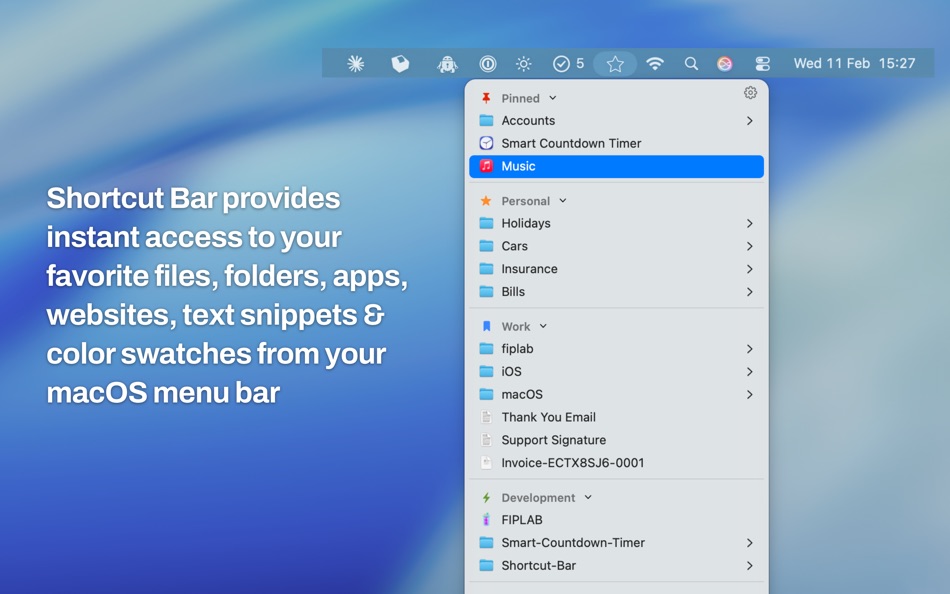
The app lives in your menubar and allows you to add in an unlimited number of shortcuts. Whenever you require access to these important shortcuts, simply click on the menubar icon and select the item from the dropdown list.
We believe that within just a few days of use, you'll be totally hooked and wonder how you ever lived without Shortcut Bar. The app will save you time and speed up your workflow.
FEATURES:
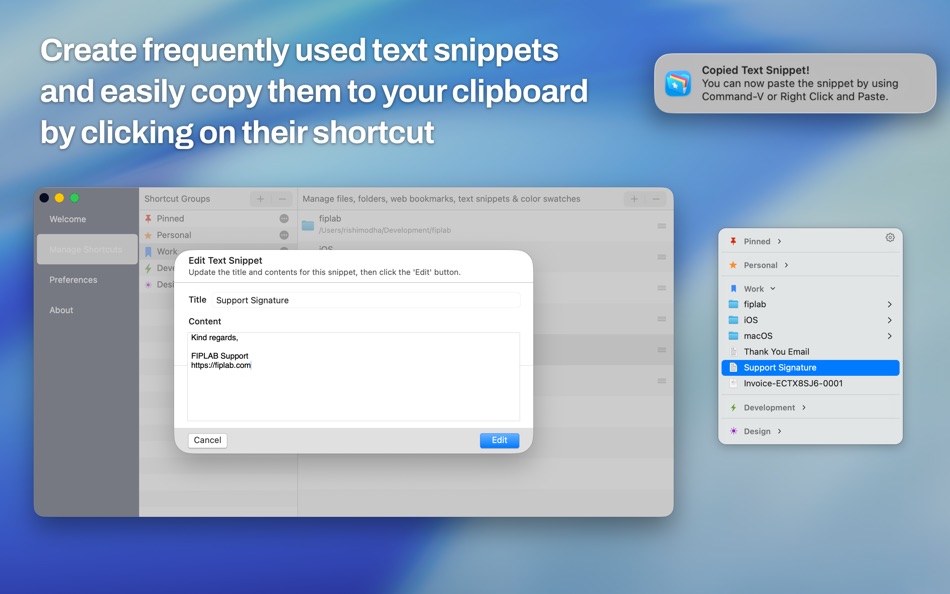
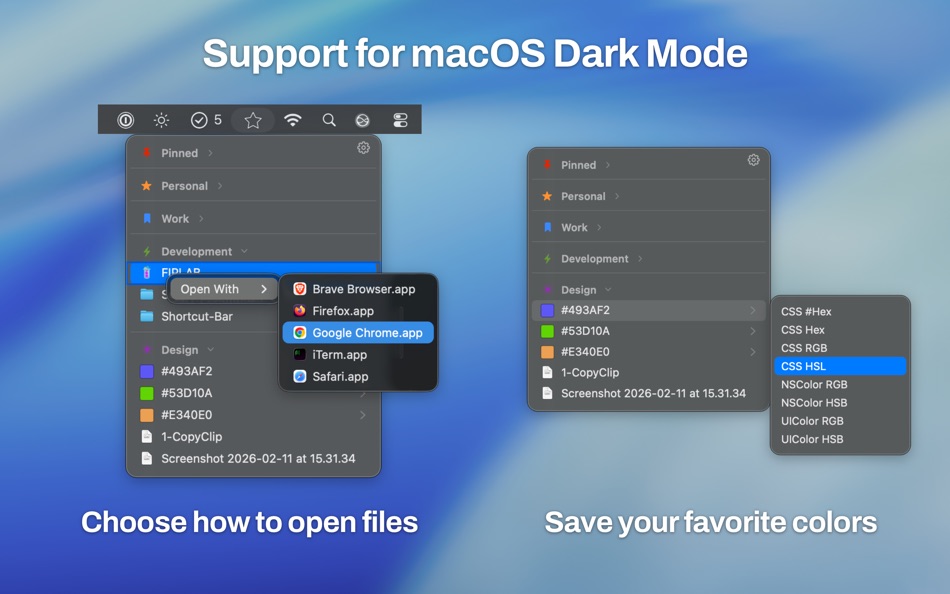
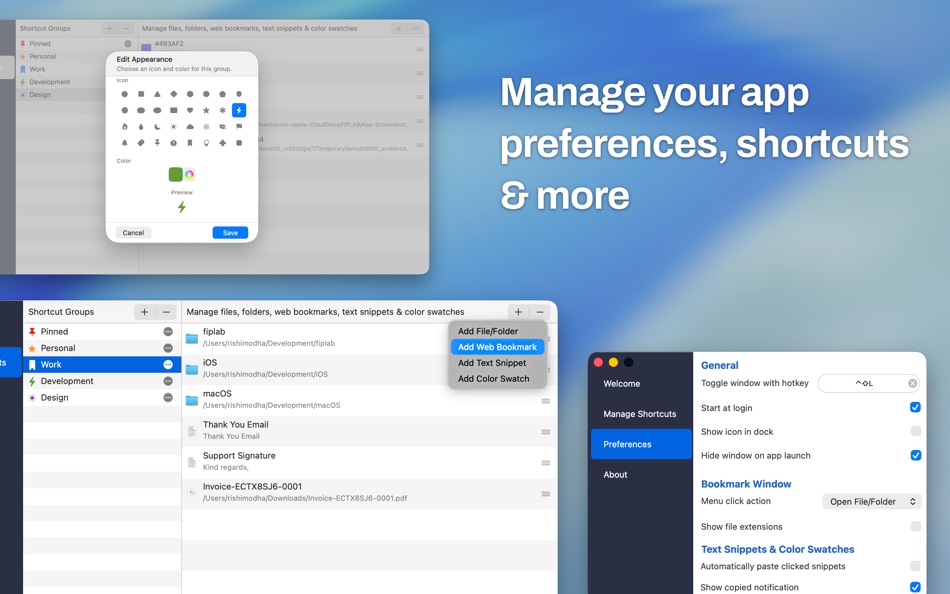
- Add as many files, folders, web links, apps, text snippets and color swatches that you would like instant access to
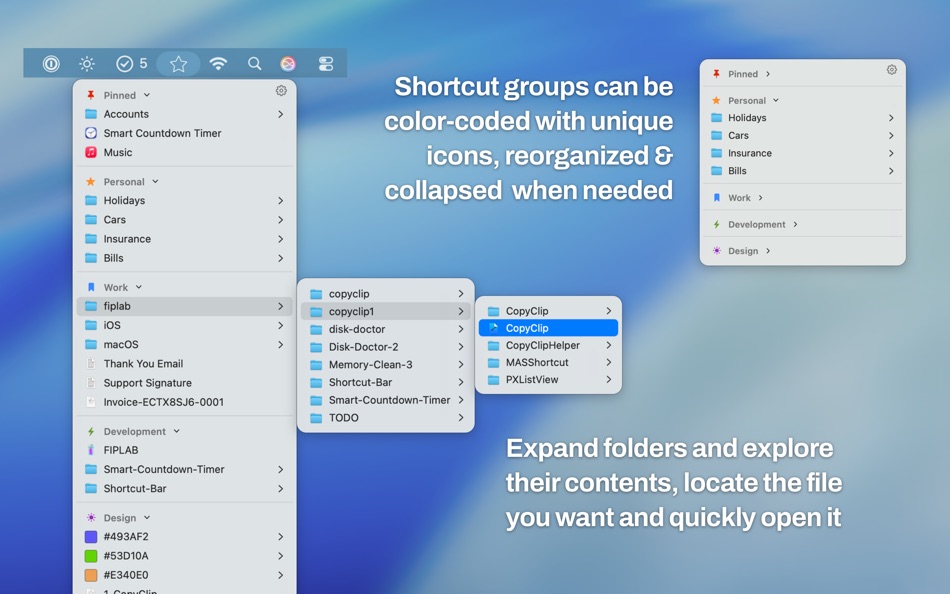
- Sort files and folders into Groups with headings, making it easier to find the shortcut you’re looking for
- Expand and collapse Groups to keep your shortcuts organized and tidy
- Folders and files are presented with their respective icon
- Choose whether clicking on a shortcut opens it in Finder or opens the item itself
- Expand and navigate within folders
- Choose whether the app starts at login or not
- Supports macOS Dark Mode
BENEFITS:
- Ultra quick access to any file/folder/website/app/color swatch/text snippet that you desire
- No more shuffling through directories on Finder to locate exactly what you’re looking for and use regularly
- Save time and improve productivity
We've worked hard to make Shortcut Bar an amazing experience for our users. We would love to hear your thoughts via email and make any improvements to future versions of this app. We intend to have an active development cycle powered by your feedback and support!
Ad
屏幕截图
价格历史
- 目前价格: $8.99
- 最小值: $8.99
- 最大值: $8.99
可选
其他信息
 https://fiplab.com
新版变化
- 版本: 2.9.72
- 已更新:
- - Sort by Date: New option in Preferences to sort folder contents by date modified (newest first) when hovering over folders
- Indent Items: New option to visually indent files and folders under their group headers for a clearer hierarchy
- Browser Picker: Hover over a web link to see all available browsers and open it in your preferred one, no right-click needed
- More Icons: Added 8 new group icons including house, office, briefcase, globe, folder, gear, music, and game controller
- Bug fixes and UI improvements


积分 (0)
0 ☹️
排名 (0)
0 ☹️
评论 (0)
成为第一个发表评论的人 🌟
«Shortcut Bar - Instant Access». 平台: macOS. 类别: 效率. 开发商: «FIPLAB Ltd». 首次发布: . 最后更新: . 目前价格: $8.99. 最低记录价格: $8.99. 最高记录价格: $8.99. 该条目尚未在 AppAgg 上获得评分或评论。 列表: 公开: 2, 私密: 3. 可用语言: English. AppAgg 会跟踪 «Shortcut Bar - Instant Access»的价格历史、评分和用户反馈。 关注未来折扣和更新: RSS. AppAgg 不托管应用程序或分发软件。 所有商标、徽标和屏幕截图均属于其各自所有者。
Shortcut Bar - Instant Access 短网址: 已复制!- 🌟 分享
- Mac App Store
类似
-
- Instant Translate for Safari
- macOS 应用: 效率 来自: 晨 陈
- $0.99
- 列表: 0 0 0
- 积分: 0 版本: 1.2 Instant Translate is a lightweight Safari extension that helps you understand English words instantly while browsing the web. FEATURES: Double-click any English word to see its Chinese ⥯
-
- Shortcut for Google Apps
- macOS 应用: 效率 来自: 翔 何
- 免费
- 列表: 0 0 0
- 积分: 1 版本: 1.8 Massive & Useful Google shortcuts are integrated into this app. Since then, opening your Google app, websites and services has become so simple. - You can quickly search your Google ... ⥯
-
- Instant Fax Cover
- macOS 应用: 效率 来自: Charles Haspel
- $4.99
- 列表: 0 0 0
- 积分: 0 版本: 3.0.1 Instant Fax Cover A simple, easy to use program to quickly print fax cover sheets. You need to send a fax and you need a cover page. What do you do? Launch a word processor, type in ... ⥯
-
- InstaCal - Menu Bar Calendar
- macOS 应用: 效率 来自: Higher Bar, LLC
- $4.99
- 列表: 1 + 2 0 0
- 积分: 2 版本: 1.9.8 InstaCal is the missing menu bar calendar macOS deserves. InstaCal is an affordable, yet powerful calendar app that puts all your events right at your fingertips, always available in ... ⥯
-
- Bar Wand: Hotkey Shortcuts
- macOS 应用: 效率 来自: Swiftful Dynamics
- $5.99
- 列表: 0 0 0
- 积分: 1 版本: 1.5 Stop the copy-paste dance. Bar Wand integrates powerful AI into your natural workflow with customisable, system-wide hotkeys. Simply select text (or dictate), press your shortcut, and ... ⥯
-
- Instant Tone Changer
- macOS 应用: 效率 来自: Zhaonian Luan
- 免费
- 列表: 0 0 0
- 积分: 0 版本: 25.609.1116 Instantly change the tone of your text and correct grammar with one single keystroke in any app on macOS. Ctrl + X, and instantly transform it to be more professional, casual, ... ⥯
-
- Prism - Instant Multi LLM
- macOS 应用: 效率 来自: Bytesurge Labs
- * 免费
- 列表: 1 0 0
- 积分: 2 版本: 1.2.0 Prism brings all major AI chat interfaces into one powerful Mac app with a global keyboard shortcut for instant access. KEY FEATURES: Multi-LLM Side-by-Side View ChatGPT, Claude, and ... ⥯
-
- Menu Bar Quick Calc
- macOS 应用: 效率 来自: Mark Huber
- $0.99
- 列表: 0 0 0
- 积分: 0 版本: 1.0 Menu Bar Calculator is a lightweight, always-accessible calculator that lives in your Mac's menu bar. Perfect for quick calculations without interrupting your workflow. Features: ... ⥯
-
- Lingr: Menu Bar List for ADHD
- macOS 应用: 效率 来自: Wojciech Olszewski
- * 免费
- 列表: 0 0 0
- 积分: 1 版本: 1.0 Lingr is a minimalist macOS menubar app that keeps your oldest unresolved thought always visible. It is not a task manager. It is externalized working memory. Lingr gives unfinished ... ⥯
-
- Favvy: Quick Access Shortcuts
- macOS 应用: 效率 来自: Jyotikaben Patel
- 免费
- 列表: 0 0 0
- 积分: 0 版本: 1.0 Favvy gives you quick access shortcuts to everything you need files, folders, apps, and websites all organised beautifully in your menu bar. Stop wasting time searching through Finder, ⥯
-
- Qued: Fast Menu Bar Notes
- macOS 应用: 效率 来自: Salam Business Club
- 免费
- 列表: 0 0 0
- 积分: 0 版本: 1.0 Meet Qued, your new favorite menu bar companion. Whether you're in the middle of a meeting, deep into coding, or just browsing the web, Qued is always a click (or a global shortcut) ... ⥯
-
- PreForget: Menu Bar To-Do App
- macOS 应用: 效率 来自: Anson Goo
- 免费
- 列表: 0 + 1 0 0
- 积分: 3 版本: 2.1 Stay organized and motivated with PreForget! The innovative menu bar app is designed to enhance your productivity. Encouraging and interactive messages will keep away the boredom. The ... ⥯
-
- Mini Calendar - Menu Bar
- macOS 应用: 效率 来自: Kalavathi Ekambaram
- $0.99
- 列表: 0 0 0
- 积分: 0 版本: 2.0 MiniCalendar brings your calendar right to your Mac's menu bar for instant access to your schedule. Never miss a meeting again. MiniCalendar sits quietly in your menu bar, giving you ... ⥯
-
- Menu Bar Hub: work.bench
- macOS 应用: 效率 来自: Dimitri Giani
- * 免费
- 列表: 0 0 0
- 积分: 1 版本: 1.2 work.bench is the ultimate menu bar utility for macOS that revolutionizes your workflow. Designed exclusively for Mac with a beautiful notch-inspired interface, work.bench brings ... ⥯