
Saved
Choose the name that will be shown in your Saved menu.
Done!
| Developer: | 禄海 区 (3) | ||
| Price: | * Free | ||
| Rankings: | 0 | ||
| Comments: | 0 Add a comment | ||
| Score: | $40,500 | ||
| Lists: | 1 + 1 | ||
| Points: | 3 + 148 (4.5) ¡ | ||
| +1 Points | |||
Description

MWeb is composed of a complete and stable editor, a Folders mode for managing documents, a Library mode specifically for notes, and a document publishing and sharing function set, with a total of four modules. The feature of MWeb's software is that it chooses platform-native technology for each platform. It is built using AppKit on macOS and UIKit on iOS/iPadOS. The following is a brief introduction to these four modules. If you are interested, you can continue reading.
## Editor features
Here are some of the key features of an editor:
* Base on CommonMark syntax and GitHub Flavored Markdown (GFM) extended syntax, supporting TOC, tables, code blocks, math formulas, task lists, footnotes, etc.
* Display the text of the Markdown document completely without any deletion.
* Images can be displayed directly in the Editor, supporting jpg, png, gif, webP, HEIC and etc.
* Math formulas, mermaid and Echarts drawings can be previewed in the editor.
* You can set your favorite font or multiple fonts for writing.
* You can choose from 11 light themes and 21 dark themes, and also support custom themes.
* There is a menu to facilitate the input of Markdown syntax, and a special Markdown syntax keyboard is also provided in iOS.
* Convenient tools for generating and formatting Markdown table syntax.
* You can view the outline and word count of Markdown documents.
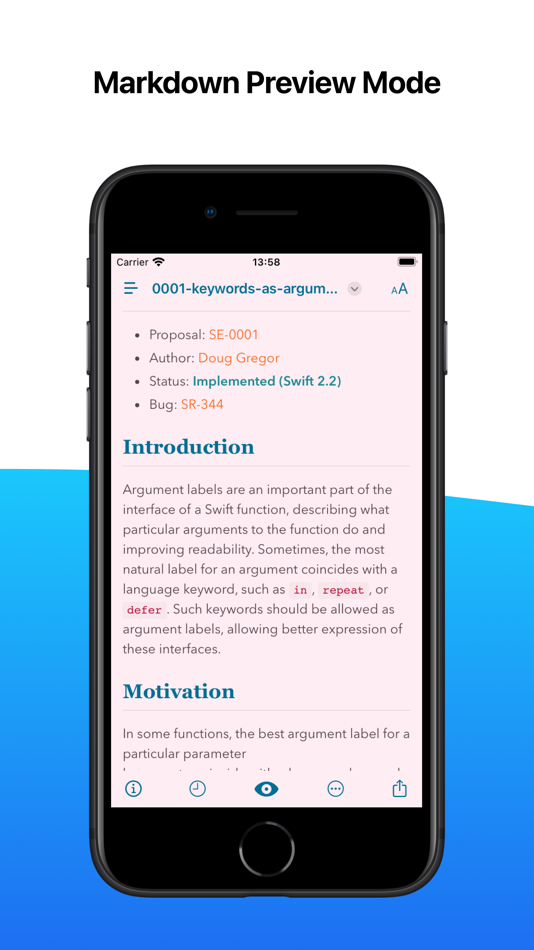
* Markdown documents can be previewed and support Editor & Preview mode.
## Folders mode
The first requirement of Markdown is to create and edit Markdown documents, and MWeb's Folders mode does this. It supports the following features:
* Create Markdown, Textbundle documents, or simply open them for editing.
* Introduce a folder with Markdown documents into the Folders mode of MWeb. MWeb will provide practical functions such as management of Markdown documents, full-text search, copy and paste to insert images, and unified storage of referenced images.
* iPadOS/iOS version supports Dropbox folders.
## Library mode
Markdown is so easy to use, so taking notes is also in great demand. Of course, you can use Folders mode and introduce a folder to take notes, which is also very nice and easy to share. So why do we still create a separate Library mode? Mainly, the Library mode has the following features:
* There is no need to consider the file name, title and storage location, Just create note and writing.
* Use category trees and tags to manage notes. A single note can be classified into multiple categories, making it easier to set categories for notes.
* Organizing notes is more convenient. When moving categories and notes, renaming categories will not affect each other. You don't need to worry about incorrect associations between notes, incorrect reference location of images and attachments in notes, etc.
* Complete cross-device synchronization using iCloud CloudKit technology.
* The Library follows the "local first" principle and is stored in a folder, very easy for backup. Even if you use iCloud sync, your Library can be completely backed up locally.
* Export the entire category of notes to PDF or Epub e-book.
* The macOS version of MWeb Pro also supports generating static blogs from categories. The generated blog fully supports math formulas, mermaid, echarts etc. Allows you to create your own blog in a very simple way.
## More features...
* Publish documents or notes to Wordpress, Metaweblog API, Evernote, Blogger, Tumblr, Yuque, sspai Matrix, Ghost and Medium.
* Upload images in documents or notes to imgur, Qiniu, SM.MS, Tencent COS, Youpai, Alibaba OSS, custom API, etc.
* Export documents or notes to PDF (with Table of Contents in macOS version).
* Export documents or notes to Epub or image.
Privacy Policy: https://www.mweb.im/policy.html
Terms of Use: https://www.mweb.im/terms.html
Hope you enjoy MWeb!
Screenshots




Price History
-
* In-App Purchases - Current price: Free
- Minimum: Free
- Maximum: Free
Track prices
AppAgg Score
Estimated score for this app
$40,500
Higher scores usually mean stronger signals on AppAgg.
Based on: 🔥 popularity · ⭐ ratings · 🕒 freshness · 🏷️ deals · 🏬 store data · 👥 community
This score is for informational purposes only. It is not a real price, an offer to sell, or a market valuation.
Short URL: Copied!
Ad
What's new
- Version: 4.8.2
- Last Updated:
- * Improvement: Opening Markdown documents with hundreds of images is now very fast.
* Improvement: The style for exporting to PDF can now be selected from the custom themes. If you have a custom light theme, you can select it as the PDF style in the "Styles" button in the export to PDF interface.
* Improvement: The image upload service sm.ms has been updated to the new s.ee.
* Improvement: When publishing to WordPress, you can now optionally fill in a summary.
* Improvement: The mermaid library has been upgraded to version 11.14.0.
* Improvement: Added an "Export as Markdown" option to the publish button's menu.
* Other bug fixes and improvements.
Additional Information
Developer
Lists (1)
- MWeb - Markdown Writing, Notes


Rankings (0)
0 ☹️
Comments (0)
Be the first to comment 🌟
«MWeb - Markdown Writing, Notes» is a Productivity app for iOS, developed by «禄海 区». It was first released on and last updated on . This app is currently free. This app has not yet received any ratings on AppAgg. It has been added to 1 public lists and 1 private lists created by users. AppAgg has tracked 3 confirmed points plus 148 indirect points for this app. On App Store, the current store rating is 4.5 based on 148 votes. Available languages: Chinese, English. AppAgg continuously tracks the price history, ratings, and user feedback for «MWeb - Markdown Writing, Notes». Subscribe to this app or follow its RSS feed to get notified about future deals or updates. AppAgg does not host applications or distribute software. All trademarks, logos and screenshots belong to their respective owners.
MWeb - Markdown Writing, Notes Short URL: Copied!- 🌟 Share
- App Store
Similar
-
- Markdown.md - Notes & Preview
- iOS Apps: Productivity By: VGD TECHNOLOGIES PRIVATE LIMITED
- Free
- Lists: 0 0 0
- Points: 1 + 0 Score: $5k Version: 1.0.3 Markdown.md is a clean and focused Markdown workspace built for people who write and manage Markdown files every day. Whether you are a developer writing documentation, a writer ... ⥯
-
- Writing Room
- iOS Apps: Productivity By: A WRITING ROOM INC
- * Free
- Lists: 0 0 0
- Points: 2 + 129 (4.7) Score: $41k Version: 8.264.167 Write daily, hone your craft, meet new collaborators, learn from the best teachers in the world, and become the writer you ve always dreamed of in a thriving creative community you can ⥯
-
- Notever - Writing Notes
- iOS Apps: Productivity By: Fatma Zehra ASLANTAS
- Free
- Lists: 0 0 0
- Points: 0 + 0 Score: $4k Version: 1.02 Notever - The Modern Not-Receiving Experience Organize your ideas, plans, and important information in one place! Notever is the smart receiving app that makes your daily life easier. ... ⥯
-
- Markdown Notes App
- iOS Apps: Productivity By: Constellation Ltd
- Free
- Lists: 0 0 0
- Points: 2 + 3 (3.7) Score: $12k Version: 1.0.7 Markdown Editor Plus is the perfect app for anyone looking for a simple yet powerful tool to write and edit text in Markdown format. Designed with a clean and easy-to-use interface, ... ⥯
-
- Notes Expert
- iOS Apps: Productivity By: Montana AI Solutions, LLC
- * Free
- Lists: 0 0 0
- Points: 1 + 2 (5.0) Score: $26k Version: 1.0.79 Notes Expert transforms how you capture and organize ideas. Record your thoughts, let AI enhance your notes, and keep everything synced securely across all your devices. VOICE ... ⥯
-
- Markdown to PDF: Pro Editor
- iOS Apps: Productivity By: Zain Aaban
- * Free
- Lists: 0 0 0
- Points: 0 + 3 (4.7) Score: $22k Version: 2.11 Markdown to PDF converts any markdown file into a clean, shareable PDF right on your iPhone or iPad. Write or paste your Markdown, see a live preview as you type, and export a polished ⥯
-
- Markdown to Image
- iOS Apps: Productivity By: 军 沈
- Free
- Lists: 0 0 0
- Points: 1 + 0 Score: $4k Version: 1.0 Markdown to Image is a focused tool designed to convert your Markdown text into beautiful, shareable images. Whether for technical blogs, study notes, or daily thoughts, it helps you ... ⥯
-
- Markdown - View Edit
- iOS Apps: Productivity By: OKAN KAYCI
- * Free
- Lists: 0 0 0
- Points: 0 + 0 Score: $4k Version: 1.1.2 Markdown Editor is a modern and powerful text editing app. Perfect for writers, developers, and anyone who loves taking notes. KEY FEATURES - Live Preview: See your writing instantly - ⥯
-
- Notes - AI Note Taker
- iOS Apps: Productivity By: Shanghai Zongchong Information Technology Co., Ltd
- * Free
- Lists: 0 0 0
- Points: 0 + 3 (5.0) Score: $30k Version: 1.0.8 Notes - AI Note Taker makes note-taking effortless whether you're in class, at a meeting, interviewing, or brainstorming. Capture voice, text, images or documents, then let powerful AI ⥯
-
- Notes+ - Inkpad Notepad
- iOS Apps: Productivity By: Brijesh Kanani
- Free
- Lists: 0 0 0
- Points: 0 + 4 (3.8) Score: $16k Version: 2.0 Notes+ - Inkpad Notepad is your ultimate all-in-one tool for note-taking, planning, organizing, and capturing inspiration whenever and wherever it strikes. Whether you're a student, a ... ⥯
-
- Notes Buddy Kit
- iOS Apps: Productivity By: Ally Msuo
- Free
- Lists: 0 0 0
- Points: 1 + 0 Score: $3k Version: 1.1 Notes Buddy is a notes app that brings useful tools directly into your documents. Every element, text or widget is an independent block so you can build notes that do more than record ... ⥯
-
- Notes - Site Supervision
- iOS Apps: Productivity By: Script&Go
- Free
- Lists: 0 0 0
- Points: 0 + 0 Score: $3k Version: 1.7.1 Notes offers you a solution to create your notes with photos during your site visits, organize them in your concerned sites, linked to Site Supervision. Thanks to tags, find them more ... ⥯
-
- Markdown Reader - Ream
- iOS Apps: Productivity By: Rakko Inc.
- $3.99
- Lists: 0 0 0
- Points: 0 + 1 (5.0) Score: $27k Version: 1.3.1 With AI tools generating more Markdown files than ever READMEs, technical docs, meeting notes, reports we spend more time reading Markdown than writing it. You don't need a ... ⥯
You may also like
Recently viewed
Last Updated:
Search operators you can use with AppAgg