
已保存
选择将在你的已保存菜单中显示的名称。
完成!
| 开发人员: | Erik Wegener (28) | ||
| 价格: | $2.99 | ||
| 排名: | 0 | ||
| 评论: | 0 发表评论 | ||
| 列表: | 1 + 0 | ||
| 积分: | 3 + 0 ¡ | ||
| Mac App Store | |||
说明

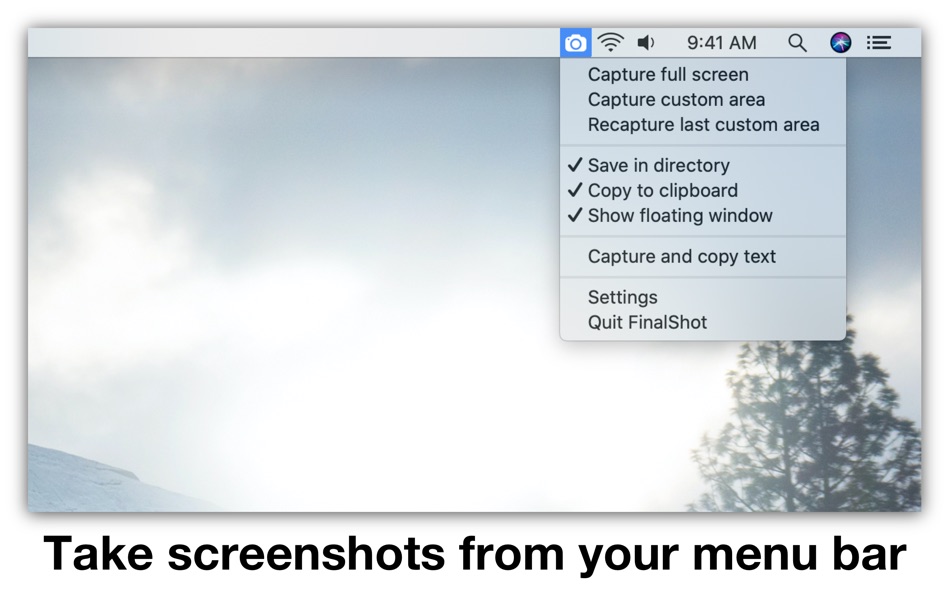
You can customize what happens after you take a screenshot. There are four available output options, and multiple can be active at the same time:
• Save in directory (customizable in FinalShot settings)
• Copy to clipboard (paste screenshots into other apps)
• Open in Preview (makes it easy to annotate screenshots using the Preview app)
• Show floating window (keep screenshots visible after capture)
You can screenshot your full screen or a specific area. To screenshot a specific area, simply select the top left corner and drag your cursor to the bottom right corner to outline the area to be captured. You can also recapture the last custom area you selected.
Floating windows help you keep information visible across different apps! They come in handy when compiling information or when comparing data from different sources. You can use the slider to adjust the transparency of the floating window.
FinalShot stores your screenshots as PNG or JPEG files and you can lower the quality if you require a lower file size. You can also choose between retina and non-retina resolution.
FinalShot can also copy un-selectable text and text from images using OCR (optical character recognition)!
Please read:
FinalShot features four output options: "Save in directory", "Copy to clipboard", "Open in Preview" and "Show floating window". Multiple output options can be active at the same time. Click on an option in the FinalShot menu to enable or disable it. At least one option must be active.
Tip: If you want to quickly enable only one output option while disabling all others, hold the option-key and select the output option you want to enable exclusively.
FinalShot needs permission to record your screen. Please follow the instructions in the app to enable this permission.
Ad
屏幕截图


价格历史
- 目前价格: $2.99
- 最小值: 免费
- 最大值: $5.99
可选
新版变化
- 版本: 2.6.4
- 已更新:
- • FinalShot has been rebuilt with the latest macOS technology for better speed, stability, and performance.
其他信息
 http://wegenerlabs.com
开发人员
列表 (1)
- FinalShot Screenshot Capture

积分 (3)
-

- 767 Erin
- +1
-
- 661 IMO FUCASHI
- +1
-
- 2,979 바람처어럼
- +1



排名 (0)
0 ☹️
评论 (0)
成为第一个发表评论的人 🌟
«FinalShot Screenshot Capture». 平台: macOS. 类别: 效率. 开发商: «Erik Wegener». 首次发布: . 最后更新: . 目前价格: $2.99. 最低记录价格: $0.00 (). 最高记录价格: $5.99 (). 该条目尚未在 AppAgg 上获得评分或评论。 列表: 公开: 1, 私密: 0. 追踪点: 已确认: 3, 间接: 0. 可用语言: English. AppAgg 会跟踪 «FinalShot Screenshot Capture»的价格历史、评分和用户反馈。 关注未来折扣和更新: RSS. AppAgg 不托管应用程序或分发软件。 所有商标、徽标和屏幕截图均属于其各自所有者。
FinalShot Screenshot Capture 短网址: 已复制!- 🌟 分享
- Mac App Store
类似
-
- Capture Note - Note On Screen
- macOS 应用: 效率 来自: Jaeil Roh
- 免费
- 列表: 0 0 0
- 积分: 2 版本: 0.1.15 "Capture Note" provides fastest and easiest way to make notes over the screenshot. You can easily take screenshots and writes notes on them. You can easily save it image file or copy ... ⥯
-
- Screenshot for Street View
- macOS 应用: 效率 来自: Bilaal Rashid
- $0.99
- 列表: 0 + 1 0 0
- 积分: 6 版本: 1.1 Capture breathtaking views from Google Street View with ease. Frame your desired location in Street View, and with a click of a button, preserve stunning snapshots of real-world ... ⥯
-
- Screenshot Text Extractor
- macOS 应用: 效率 来自: thomas pentzek
- $9.99
- 列表: 0 0 0
- 积分: 0 版本: 1.0 Screenshot Text Extractor Turn screenshots into editable text fast. Screenshots are great for saving information, but copying the text inside them is usually slow and frustrating. ... ⥯
- 新
- Screenshot Inventory
- macOS 应用: 效率 来自: Marcelo Mafra
- * 免费
- 列表: 0 0 0
- 积分: 0 版本: 1.0 Screenshot Inventory is a macOS menu bar app that keeps your screenshots always within reach. Capture the full screen or select an area, then access everything from a fast, organized ... ⥯
-
- Screenshot One
- macOS 应用: 效率 来自: Ruizheng Liu
- $4.99
- 列表: 0 0 0
- 积分: 1 版本: 5.0 Screenshot One adds icon to Mac status bar, so you can take screenshot easily anytime! With Screenshot One, you can take screenshot for: - Selected window - Selected window without ... ⥯
-
- Screenshot App: Snipping Tool
- macOS 应用: 效率 来自: Moon Technolabs Pvt Ltd
- 免费
- 列表: 0 0 0
- 积分: 2 版本: 1.7.0 The Ultimate Screenshot & Annotation Tool for Mac & Windows Say hello to your new favorite screen capture tool built for speed, flexibility, and total control. Whether you re snapping ... ⥯
-
- Screenshot Editor
- macOS 应用: 效率 来自: 科 姚
- $4.99
- 列表: 0 0 0
- 积分: 0 版本: 2.3 Screenshot Editor helps you to easily take screenshot and annotate the screenshot with a set of useful markup tools. Quickly take a screenshot with useful capturing modes: - Capture ... ⥯
-
- Shot Assistant SE
- macOS 应用: 效率 来自: Sunset Magicwerks, LLC
- 免费
- 列表: 0 0 0
- 积分: 4 版本: 1.0.1 Shot Assistant provides functionality needed by Media and Entertainment professionals that is not provided elsewhere. -Create and remove multiple Projects as desired. -Import ALEs into ⥯
-
- Final Draft 13
- macOS 应用: 效率 来自: Cast & Crew Production Software, LLC
- $199.99
- 列表: 0 + 1 0 0
- 积分: 0 版本: 13.3.0 Write your screenplay with Final Draft 13, the best-selling screenwriting software in the world. Final Draft 13 is used by production companies, studios, and filmmakers worldwide ... ⥯
-
- Screenshot Text Recognition
- macOS 应用: 效率 来自: chan hong wing
- 免费
- 列表: 0 0 0
- 积分: 2 版本: 1.4 Text recognition by screenshot, no need Internet Support different languages Fast and accurate recognition using native engine Free, no restrictions and hidden charges ⥯
-
- Capture&Paste − Offline OCR
- macOS 应用: 效率 来自: Doyoung Gwak
- 免费
- 列表: 0 0 0
- 积分: 2 版本: 1.1 Open the "Capture&Paste" app and then just press "shift + command + 2" and drag to copy the text on the screen. - When you want to extract letters on the screen while watching a ... ⥯
-
- RICH Shot
- macOS 应用: 效率 来自: Wise Tech Labs Private Limited
- $9.99
- 列表: 1 + 1 0 0
- 积分: 14 版本: 2.0 RICH Shot is the fastest tool to Swiftly capture your Mac s screen. Get powerful screen capture and recording with RICH Shot. Swiftly capture Mac s screen without desktop icons, ... ⥯
-
- Precise Screenshot 2
- macOS 应用: 效率 来自: Roberto Panetta
- $7.99
- 列表: 0 0 0
- 积分: 1 版本: 2.4.1 Precise Screenshot is a powerful and user-friendly tool for capturing screenshots on your Mac. With its small size, fast performance, and full range of features, you can take ... ⥯
-
- TrarrenShot - Screenshot
- macOS 应用: 效率 来自: Ko Jui Lin
- 免费
- 列表: 0 0 0
- 积分: 1 版本: 1.1.1 TrarrenShot is a high efficiency screenshot and annotation tool built specifically for macOS, allowing you to capture, annotate, and share all in one seamless flow. Whether you need to ⥯