
Saved
Choose the name that will be shown in your Saved menu.
Done!
| Developer: | Microsoft Corporation (766) | ||
| Price: | * Free | ||
| Rankings: | 5 (1) | ||
| Comments: | 0 Add a comment | ||
| Lists: | 2 + 3 | ||
| Points: | 3 + 0 ¡ | ||
| +1 Points | |||
Description

Capture Anything
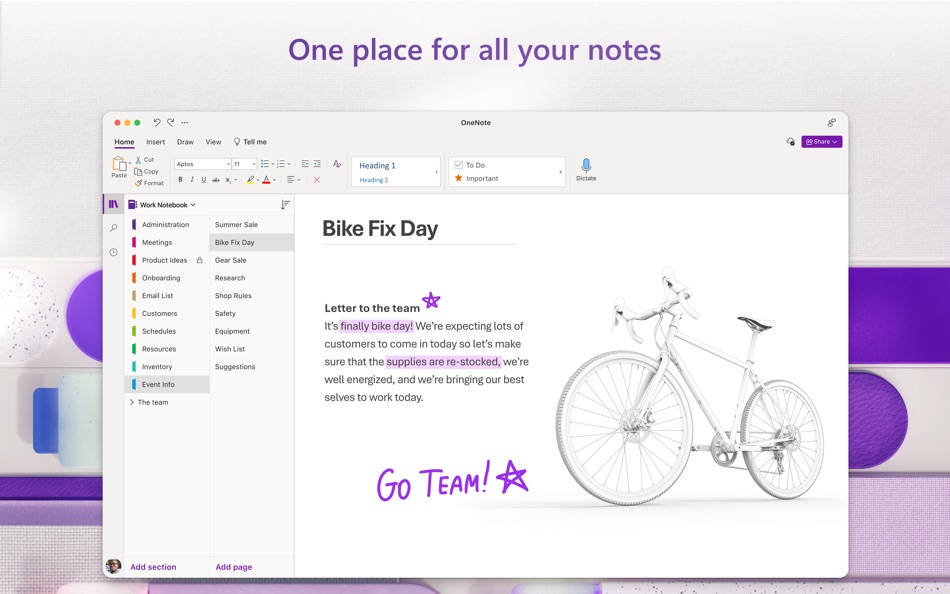
• Write memos, make a digital sketchbook, or jot down notes.
• Save pictures of whiteboards, photos or printed documents in your notes. Take a picture, crop, and insert right into OneNote.
• Highlight can’t-miss notes with Important and To Do tags.
• Use a variety of digital pen colors and settings to create handwritten notes and drawings.
• Draw with confidence with tools like “Convert to Shapes” which automatically converts hand drawn shapes into crisp, perfectly regular polygons and circles.
Organize, Search and Secure
• Organize your notes in a way that works for you using tabs, labels, and color coding to keep track of all your projects.
• Create, rename, search, sort, and copy pages, sections, and entire notebooks.
• Find your most recent notes quickly and pin the pages you most use to the top.
• Secure your notes with a password and control permissions when sharing with others.
• Track daily to-dos, flag questions to raise after a meeting, or mark important points.
Collaborate and Share
• Share ideas and your notes with friends and colleagues.
• Collaborate in real time using a shared notepad.
• Sync your notes to the cloud (OneDrive, OneDrive for Business*, and SharePoint), making it easy to access your notes anywhere.
*For you to sign in to OneDrive for Business, your organization needs to have a qualifying SharePoint Online or Office 365 business subscription plan. You cannot sign in with an account from an on-premises directory.
Learn more about Microsoft 365
Microsoft 365 is a cloud-based subscription service that brings together premium versions of Word, Excel, PowerPoint, Outlook and OneDrive, with the best tools for the way people work today. Please visit: http://go.microsoft.com/fwlink/?linkid=2015120 for information on Licensing Terms.
Unlock the full Microsoft Office experience with a qualifying Microsoft 365 subscription for your phone, tablet, PC, and Mac.
Microsoft 365 annual subscriptions purchased from the app will be charged to your App Store account and will automatically renew within 24 hours prior to the end of the current subscription period unless auto-renewal is disabled beforehand. You can manage your subscriptions in your App Store account settings.
This app is provided by either Microsoft or a third-party app publisher and is subject to a separate privacy statement and terms and conditions. Data provided through the use of this store and this app may be accessible to Microsoft or the third-party app publisher, as applicable, and transferred to, stored, and processed in the United States or any other country where Microsoft or the app publisher and their affiliates or service providers maintain facilities.
Ad
Screenshots



Price History
-
* In-App Purchases - Current price: Free
- Minimum: Free
- Maximum: Free
Track prices
Additional Information
- Release Date:
- Category:
macOS Apps›Productivity - OS:
macOS,macOS 14.0 and up - Size:
428 Mb - Supported Languages:
Arabic,Chinese,Czech,Danish,Dutch,English,Finnish,French,German,Greek,Hebrew,Hungarian,Indonesian,Italian,Japanese,Korean,Norwegian,Polish,Portuguese,Russian,Slovak,Spanish,Swedish,Thai,Turkish - Content Rating:
4+ - Mac App Store Rating:
0 - Website:
 http://www.onenote.com
What's new
- Version: 16.108.1
- Updated:
- This month’s update is bug fixes only.
Thanks for using OneNote! We listened to your feedback and updated the application with optimizations to help improve your note taking experience.
Having trouble? Send feedback in the app by clicking on the smiley face in the top-right of the app.
Have an idea? Add to our feature suggestion box at https://aka.ms/onenotefeedback
Developer
- Microsoft Corporation
- Platforms: Android Apps (66) Android Games (5) iOS Apps (57) iOS Games (5) macOS Apps (15) Windows Apps (573) Windows Games (2) Steam Games (1) PlayStation Games (41) Xbox Games (1)
- Lists: 244 + 46
- Points: 1,084 + 110,551,522 ¡
- Rankings: 4.8 (26)
- Comments: 0
- Deals: 15
- Videos: 45
- RSS: Subscribe
Lists (2)
- Microsoft OneNote

Points (3)
-

- 463 upto
- +1
-
- 11,363 Simon Chan
- +1
-
- 1 ra
- +1


Rankings (1)
-
- 119,140 AppAgg
- 5

Comments (0)
Be the first to comment 🌟
«Microsoft OneNote» is a Productivity app for macOS, developed by «Microsoft Corporation». It was first released on and last updated on . This app is currently free. AppAgg users rated this app 5 out of 5, based on 1 votes. It has been added to 2 public lists and 3 private lists created by users. AppAgg has tracked 3 confirmed points plus 0 indirect points for this app. Available languages: Arabic, Chinese, Czech, Danish, Dutch, English, Finnish, French, German, Greek, Hebrew, Hungarian, Indonesian, Italian, Japanese, Korean, Norwegian, Polish, Portuguese, Russian, Slovak, Spanish, Swedish, Thai, Turkish. AppAgg continuously tracks the price history, ratings, and user feedback for «Microsoft OneNote». Subscribe to this app or follow its RSS feed to get notified about future deals or updates. AppAgg does not host applications or distribute software. All trademarks, logos and screenshots belong to their respective owners.
Microsoft OneNote Short URL: Copied!- 🌟 Share
- Mac App Store
Similar
-
- Microsoft Copilot
- macOS Apps: Productivity By: Microsoft Corporation
- * Free
- Lists: 0 + 1 0 0
- Points: 4 Version: 25.6.440416001 Microsoft Copilot is your daily AI companion. Talking with Copilot is an easy way to learn, grow and gain confidence, all with the help of the latest OpenAI and Microsoft AI models. ... ⥯
-
- App for Microsoft ®
- macOS Apps: Productivity By: EdgeAI Minds LLC
- * Free
- Lists: 1 0 0
- Points: 0 Version: 2.0.6 App for Microsoft and Microsoft 365: Empower Your macOS Experience with Seamless Microsoft Apps Integration This application is an independent tool developed by EdgeAI Minds LLC. It is ⥯
-
- App for Microsoft Apps ゜
- macOS Apps: Productivity By: Rai Bilawal
- * Free
- Lists: 2 + 1 0 0
- Points: 0 Version: 2.0.3 App for Microsoft Apps: Your All in One Microsoft Hub for Mac! App for Microsoft gives Mac users fast, unified access to all their key Microsoft apps, services, and cloud storage. ... ⥯
-
- Templates - for Microsoft Word
- macOS Apps: Productivity By: 顺华 吕
- * Free
- Lists: 1 0 0
- Points: 2 Version: 4.6 Templates - for Microsoft Word contains 160 high quality Microsoft Word template, colorful background with appropriate text layout. All of the templates have been well-designed so they ⥯
-
- OfficeDocs - Templates for Microsoft Office for Mac OS X
- macOS Apps: Productivity By: Pocket Bits LLC
- $39.99
- Lists: 1 0 0
- Points: 0 Version: 1.3 The ultimate Bundle of MS Office templates. Suite for MS Office includes hundreds of templates for MS Word, MS Excel, and MS PowerPoint. This bundle of templates is not affiliated and ... ⥯
-
- iA Writer
- macOS Apps: Productivity By: Information Architects AG
- $49.99
- Lists: 11 + 12 0 0
- Points: 5 Version: 7.3.4 Leaving life s mess for an ideal realm of words. The New Yorker iA Writer is just beautiful. To me, it s the gold standard for Markdown syntax styling... an elegant champagne flute. ... ⥯
-
- Fantastical - Calendar
- macOS Apps: Productivity By: Flexibits Inc.
- * Free
- Lists: 5 + 7 0 0
- Points: 9 Version: 4.1.12 Fantastical is the multiple award-winning calendar app with powerful features including intuitive natural language text parsing, a full calendar window with day, week, month, quarter ... ⥯
-
- Cursor Pro
- macOS Apps: Productivity By: App ahead GmbH
- $14.99
- Lists: 4 + 7 0 0
- Points: 7 Version: 2.15 Cursor Pro makes finding your mouse pointer and inspecting pixels on your screen easier than ever. It draws a shape around your cursor, so you and your viewers can recognize it more ... ⥯
-
- Dato
- macOS Apps: Productivity By: Sindre Sorhus
- $18.00
- Lists: 3 + 3 0 0
- Points: 10 Version: 5.7.2 Dato gives you a local clock, date, multiple world clocks, and upcoming events in the menu bar. When you click Dato in the menu bar, you get a menu with a calendar, calendar events, ... ⥯
-
- Cyberduck
- macOS Apps: Productivity By: David Kocher
- $23.99
- Lists: 5 + 4 0 0
- Points: 3 Version: 9.4.1 Cyberduck is an FTP, SFTP, WebDAV, Amazon S3, OpenStack Swift, Backblaze B2, Microsoft Azure & OneDrive, Google Drive and Dropbox browser to transfer files to your web hosting service ... ⥯
-
- Tampermonkey Classic
- macOS Apps: Productivity By: Jan Biniok
- $1.99
- Lists: 2 + 5 0 0
- Points: 2 Version: 5.3.6218 Tampermonkey is the most popular userscript manager, with over 10 million users. It's available for Safari, Chrome, Microsoft Edge, Opera Next and Firefox. Tampermonkey makes it very ... ⥯
-
- Project Plan 365
- macOS Apps: Productivity By: Housatonic.com
- * Free
- Lists: 0 0 0
- Points: 0 Version: 25.61 Project Plan 365 is a MacOS companion for MS Project. Consider our app an extension of MS Project designed specifically for the Mac platform. It provides an intuitive approach to ... ⥯
-
- MeetingMenu
- macOS Apps: Productivity By: Up Hail, Inc.
- $9.99
- Lists: 0 + 2 0 0
- Points: 5 Version: 1.6.21 This all-in-one tool simplifies your meetings, placing every essential feature in your menu bar: meeting countdown timers, quick meeting launches, live camera previews, private ... ⥯